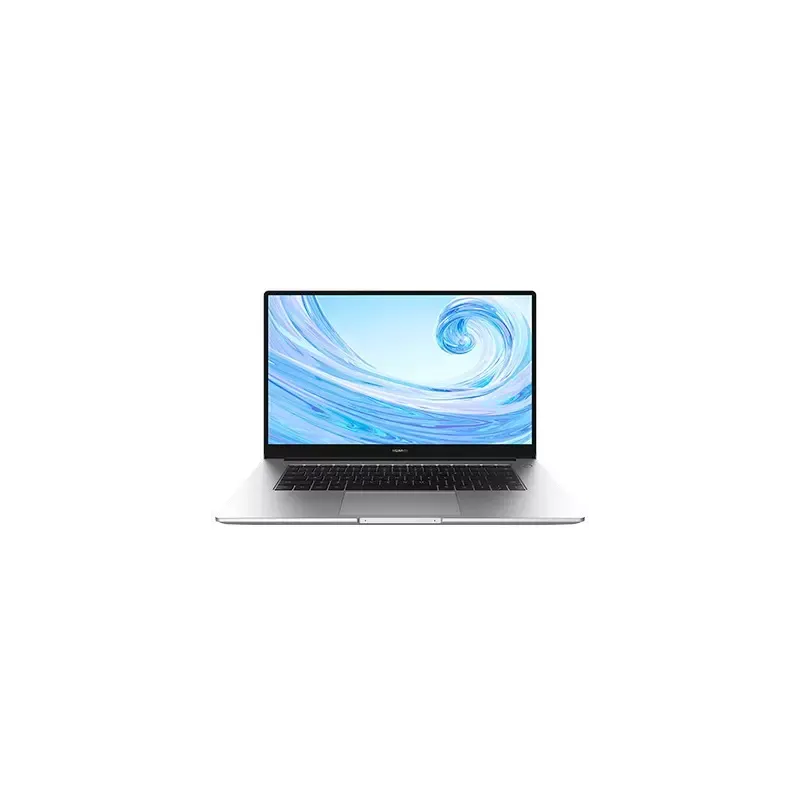

Manual of product MateBook D 15
Editorial note
The Huawei MateBook D 15 presents itself as a laptop with a sleek and modern design, ideal for both home and professional use. Its reputation is based on quality and innovation, offering a smooth user experience thanks to optimal performance suited for daily tasks and multitasking. However, although this model is efficient, it has some drawbacks. The battery life may seem limited, especially during intensive use, which could require frequent recharges. Additionally, the cooling system can become noisy, which may be disruptive in a quiet environment. Furthermore, some users might be disappointed by the lack of high-end features, such as a touchscreen or a Thunderbolt port. In terms of value for money, the MateBook D 15 remains competitive, but the absence of certain advanced specifications may deter users looking for superior performance. Overall, this laptop is a solid choice for those seeking a reliable and aesthetically pleasing device, while being aware of its limitations.Score details
User experience
The user experience is positive thanks to an elegant design and an available user manual, making it easy to get started.
Performance
Performance is optimal for multitasking and daily tasks, although the cooling system can be noisy during intensive use.
Battery life
Battery life is insufficient for prolonged use, especially during demanding tasks.
Design
The design is modern and fits well in different environments, but it may lack originality compared to the competition.
Value for money
The product offers good value for money considering the brand's reputation, although some high-end features are missing.
Features
The absence of certain advanced features, such as a touchscreen or a Thunderbolt port, may disappoint some users.
Advantages
Elegant and modern design suitable for everyone.
Optimal performance for smooth multitasking.
Reliable and innovative brand recognized.
User manual for easy handling.
Large screen for immersive viewing.
Disadvantages
Unoriginal design compared to the competition
Insufficient battery life for prolonged use
Noisy cooling system under heavy use
Lack of touchscreen and Thunderbolt port
Limited availability for components and updates
Technical Specifications MateBook D 15
General Information
-
ModelMATEBOOK D 15
-
Brand
-
Category
-
Type
-
SKU1328064
-
MPN1328064
Frequently Asked Questions
What influences the download speed on the Internet?
What are the dimensions of my laptop screen?
What does the acronym HDMI mean?
What is the best method to clean my laptop?
How can I clean my keyboard?
What is Bluetooth?
Why won't my laptop turn on?
How do I connect my laptop to a Wi-Fi network?
Why is my laptop running slowly?
How do I adjust the brightness of my Huawei MateBook D 15 screen?
Can I connect an external monitor to my Huawei MateBook D 15?
Is the manual for the Huawei MateBook D 15 available in French?
Similar products


More product categories from brand Huawei
More product types from brand Huawei





Presentation of product MateBook D 15 specifications from brand Huawei
General Information
The Huawei MateBook D 15 is a sleek and modern laptop designed by the brand Huawei, known for its commitment to quality and technological innovation. This model, identified by the reference MateBook D 15 | 53012BFG, offers optimal performance thanks to carefully selected components, ensuring a smooth user experience for both everyday tasks and multitasking.
Advantages
Among the strengths of this laptop, we note:
- Contemporary design that easily adapts to various environments, whether for home or professional use.
- Solid performance thanks to quality components, allowing for efficient use even during intensive tasks.
- Brand reputation that ensures reliability and durability for long-term use.
- User manual included, facilitating learning and handling for new users.
- Large screen that enhances viewing and offers increased immersion in multimedia content.
Disadvantages
However, some aspects may be considered limitations:
- A design that, while functional, may lack originality compared to some competitors in the market.
- The battery life may prove insufficient for extended sessions, especially during intensive use.
- The cooling system may emit noise during demanding tasks, which could be distracting in quiet environments.
- The absence of high-end features, such as a touchscreen or a Thunderbolt port, may disappoint those looking for advanced specifications.
- The limited availability of certain components or updates may pose challenges for users wishing to customize or upgrade their device.


