

Manual of product 250ci
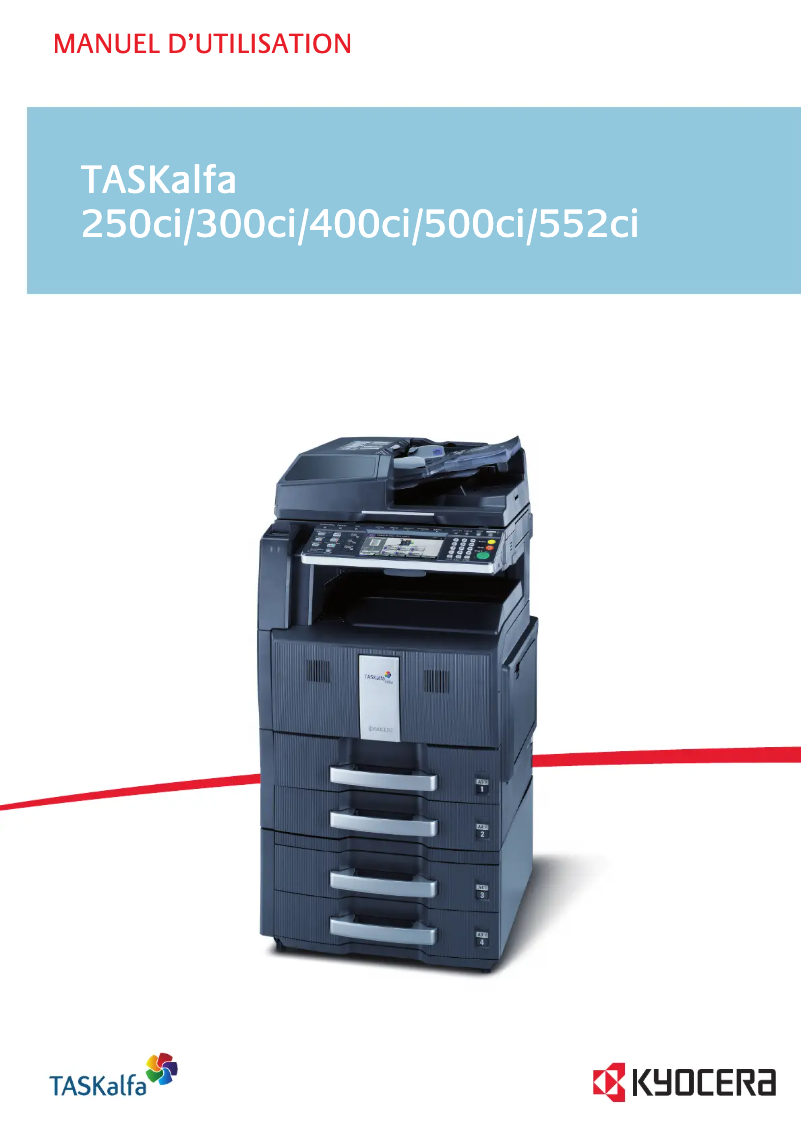
Editorial note
The Kyocera 250ci is a multifunction printer that stands out for its exceptional print quality, achieving a maximum resolution of 9600 x 600 DPI, ensuring clear and precise results. With a print speed of 25 pages per minute in both black and color, it effectively meets the demands of dynamic work environments. Additionally, its all-in-one features, including copying, scanning, and faxing, as well as built-in duplex printing, offer great versatility for professional users. However, some drawbacks must be taken into account. The weight of 106 kg can complicate its installation and movement, which may be an obstacle for some businesses. Furthermore, the limited compatibility with certain operating systems, particularly the lack of support for Mac systems, may restrict its use in diverse work environments. The cost of the print cartridges, although of high quality, can also be high in the long run, which could deter some companies from adopting it. Finally, the 30-second warm-up time can be a disadvantage for users seeking instant printing. In terms of scoring, the user experience is generally satisfactory with a good score of 80, although the limited compatibility may pose issues. Performance is rated good with a score of 75, but the warm-up time is an area for improvement. The design, while professional, receives a score of 70 due to its weight. The value for money is rated at 65, indicating that the cost of cartridges could be a hindrance. Features, with a score of 85, show great versatility, while support is rated at 70 due to the limitation with Mac systems. Finally, the documentation is excellent, with a score of 90, highlighting the richness of the user manual. Overall, the Kyocera 250ci is a solid choice for professionals looking for a reliable printer, but it is important to consider its drawbacks before making a decision.Score details
User experience
The user experience is generally satisfactory due to the exceptional print quality of 9600 x 600 DPI, although limited compatibility with certain operating systems may pose issues.
Performance
Performance is good with a print speed of 25 ppm in black and color, but the 30-second warm-up time can be a drawback for those seeking instant printing.
Design
The design is suitable for professional needs, but the weight of 106 kg can complicate its installation and movement.
Value for money
The cost of ink cartridges can be high in the long run, which may deter some businesses from adopting this model.
Features
The all-in-one features, including copying, scanning, and faxing, as well as the built-in duplex printing, offer great versatility for office needs.
Support
Support is acceptable, but the lack of compatibility with Mac systems may limit accessibility for some users.
Documentation
The user manual is comprehensive with 453 pages, providing detailed information on the features and use of the device.
Advantages
High-resolution printing up to 9600 x 600 DPI
Print speed of 25 pages per minute
Built-in duplex printing for paper savings
Input capacity of 4100 sheets
All-in-one functions: copy, scan, fax
Disadvantages
Relatively heavy, difficult to move
Limited compatibility with certain operating systems
High cost of ink cartridges
Preheating time of 30 seconds
Fax memory of only 12 MB
Technical Specifications 250ci
General Information
-
Model250CI
-
Brand
-
Category
-
Type
-
SKU140758
-
MPN140758
Print speed
-
Maximum resolution9600 x 600 DPI
-
Print speed (color, normal quality, A4/US Letter)25 ppm
-
Print speed (color, normal quality, A4/US Letter)25 ppm
-
Copy time for the first page (color, normal)8.1 s
-
Copy time for the first page (Black, normal)6.2 s
-
Preheating time30 s
-
Printing technologyLaser
-
Print speed (color, normal quality, A3)13 ppm
-
Print speed (color, normal quality, A3)13 ppm
-
PrintingColor printing
-
Double-sided printingYes
Features
-
Number of print cartridges4
-
Digital senderNo
Digitization
-
Gray levels256
-
Supported image formatsTIF
-
DigitizationColor scanning
Copier
-
Max. resolution of copies600 x 600 DPI
-
Copy speed (normal quality, color, A4)25 cpm
-
Copy speed (normal quality, color, A4)25 cpm
-
Free PC copyYes
-
Maximum number of copies999 copies
-
CopyColor copy
Fax
-
Modem speed33.6 Kbit/s
-
Automatic discountYes
-
Automatic discountYes
-
Fax Memory12 MB
-
Fax coding methodsJBIG, MH, MMR (Fax coding method), MR
-
Fax speed (A4)2 sec/page
-
FaxColor fax
Input and output capacity
-
Total output capacity250 sheets
-
Maximum input capacity4100 sheets
-
Total power capacity500 sheets
-
Input capacity of multi-purpose trays100 sheets
-
Multifunctional trayYes
Other features
-
Standard input paper trays2
-
Compatible operating systemsWindows, Mac OS X 10.2+, UNIX, LINUX
-
Network features10-Base-T/100Base-TX
-
Ready-to-use networkYes
-
Dimensions (LxWxH)605 x 680 x 745 mm
-
EmulationsPCL 6, Postscript 3 (KPDL3), XPS Direct print, PDF Direct print
-
Power requirementsAC 220 V – 240 V, 50/60 Hz
-
All-in-one functionsCopy, Fax, Scan
-
All-in-one color functionscopy, fax, print, scan
Representation / realization
-
Processor model750FL
-
Processor frequency600 MHz
-
Internal memory2048 MB
-
Integrated into the processorYes
-
Integrated into the processorYes
-
Sound pressure level (impression)65.5 dB
-
Sound power level (standby)56.9 dB
-
Internal storage capacity80 GB
-
Integrated into the processorYes
-
Processor familyPowerPC
Paper management
-
Maximum print format297 x 420 mm
-
Weight/Grammage of the support, bin 160–163 g/m²
-
Weight of the multifunctional tray support60–220 g/m²
-
Maximum ISO A series paper sizeA3
Network
-
Ethernet/LANYes
Connectivity
-
Standard interfacesUSB 2.0
-
Quantity of USB 2.0 Ports1
-
USB portYes
Weight and dimensions
-
Weight106000 g
Power
-
Energy consumption (eco mode)19 W
-
Energy consumption (standby mode)160 W
-
Electricity consumption (average operation)860 W
Certificate
-
CertificationGS
-
TÜV
-
CE
Design
-
Market positionProfessional
Frequently Asked Questions
What is the weight of the Kyocera 250ci printer?
What is the best method to remove a jammed paper from the printer?
Why is my printer not recognizing the original cartridges?
What could be the causes of poor print quality?
How does a laser printer differ from an inkjet printer?
Why does my inkjet printer leave black streaks on prints?
What does the acronym DPI mean?
What certifications does the Kyocera 250ci have?
How many cartridges can be installed in the Kyocera 250ci?
What is the storage capacity of the Kyocera 250ci printer?
Is the manual for the Kyocera 250ci available in French?
Similar products


More product categories from brand Kyocera
Phones Kyocera
Other Kyocera
More product types from brand Kyocera


Presentation of product 250ci specifications from brand Kyocera
General Information
The Kyocera 250ci model is a multifunction device from the Kyocera brand, known for its innovation and quality in the office equipment sector. This model, referenced under the code 1102JZ3NL0, is designed to deliver high performance and a satisfactory user experience. The associated EAN code is 632983012543, allowing for unique identification in the distribution network.
Print Speed
With a maximum resolution of 9600 x 600 DPI, the Kyocera 250ci produces prints of remarkable clarity, suitable for both professional and personal applications. Its print speed reaches 25 pages per minute in both black and color, ensuring increased productivity. The first print times are 6.2 seconds for black and 8.1 seconds for color, while warm-up takes 30 seconds. Additionally, it offers automatic duplex printing, helping to reduce paper consumption.
Features
The Kyocera 250ci uses 4 cartridges for printing, optimizing quality while providing effective color management. It does not have a digital sender, which may limit certain document sending functionalities.
Scanning
For scanning, this device offers 256 levels of gray and supports the TIF image format, ensuring faithful and detailed reproductions. The color scanning function allows for vibrant images.
Copier
The integrated copier delivers a maximum resolution of 600 x 600 DPI, providing high-quality copies. Its copy speed is 25 copies per minute in both black and color, with a maximum of 999 copies possible. It also allows for direct printing from a PC without complex setup.
Fax
The modem of the Kyocera 250ci operates at a speed of 33.6 Kbit/s, facilitating fast communications. It includes features such as automatic redial and automatic document reduction. Its fax memory of 12 MB allows for a limited number of documents to be stored.
Input and Output Capacity
This model has an output capacity of 250 sheets and can hold up to 4100 sheets in input, making it suitable for high-volume printing. Its multifunction tray can hold 100 sheets, offering flexibility in use.
Other Features
The Kyocera 250ci is compatible with several operating systems, including Windows XP, Vista, and 7. It is equipped with 10-Base-T/100Base-TX ports for reliable network connection and has dimensions of 605 x 680 x 745 mm, allowing for easy integration into various office environments.
Representation / Performance
The 750FL processor operates at a frequency of 600 MHz and is supported by an internal memory of 2048 MB, ensuring efficient task management. Although it is not compatible with Mac systems, it features an integrated memory card reader for convenient use.
Paper Management
The maximum print format is 297 x 420 mm, and it supports media from 60 to 163 g/m². This ensures optimal print quality for various types of documents.
Connectivity
The Kyocera 250ci is equipped with a USB 2.0 port for easy and fast connection with other devices, as well as Ethernet/LAN connectivity for seamless network access.
Weight and Dimensions
Weighing 106 kg, this device is relatively heavy, which may complicate its installation.
Power
In economy mode, the power consumption is 19 W, while it reaches 160 W in standby. In normal operation, the consumption is around 860 W.
Certification
The Kyocera 250ci meets safety and performance standards with certifications such as GS, TÜV, and CE.
Design
Designed primarily for professional use, the Kyocera 250ci is suitable for office environments requiring quality printing, copying, and scanning solutions.


