

Manual of product Ecosys FS-1061DN
Editorial note
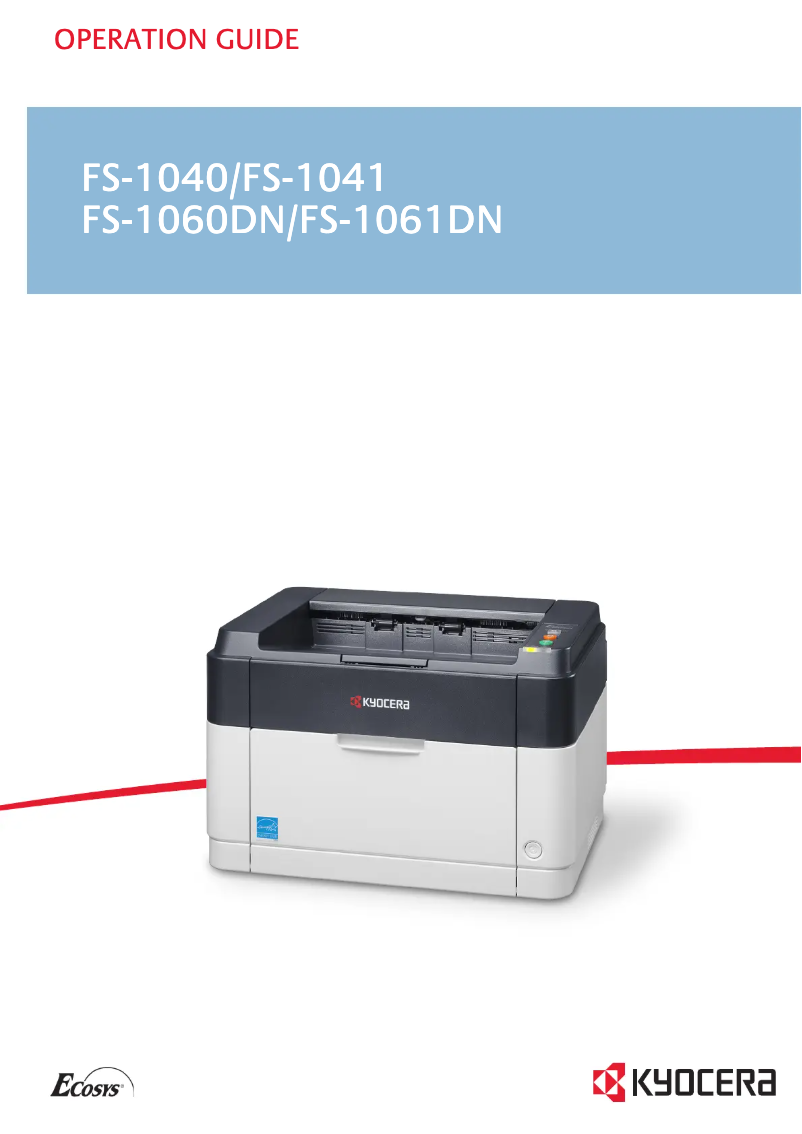
The Kyocera Ecosys FS-1061DN printer stands out with its printing speed of 25 pages per minute, ideal for work environments requiring fast and efficient printing. Its laser printing technology ensures exceptional quality with a maximum resolution of 1800 x 600 DPI. Additionally, the manual duplex printing feature helps save paper, contributing to reducing environmental impact while optimizing resources. However, several drawbacks should be considered. The lack of Wi-Fi connectivity limits wireless printing options, which may be a hindrance for users seeking more flexibility. Although the printing speed is satisfactory, it may prove insufficient for high-volume offices. Furthermore, the manual duplex printing mode requires user intervention, which can slow down the process, especially for long documents. The internal memory of 32 MB may also pose limitations when printing large files, and the 250-sheet input capacity may not be sufficient in a very busy environment. In terms of user experience, the Kyocera Ecosys FS-1061DN offers an intuitive interface that makes it easy to use, although the lack of Wi-Fi is a notable drawback. In terms of design, the printer has a modern look that fits well in an office. The value for money is reasonable, although it is important to keep in mind the limitations regarding memory and input capacity for more demanding printing tasks. In summary, the Kyocera Ecosys FS-1061DN is a solid printer for home or light professional use, but it may not be suitable for very busy work environments.Score details
User experience
The user experience is generally satisfactory thanks to laser printing technology and an intuitive interface, although the lack of Wi-Fi limits flexibility.
Performance
The printing speed of 25 ppm is adequate for standard tasks, but may be insufficient for high-volume printing environments.
Features
The manual duplex printing feature is a plus for saving paper, but requires user intervention which can slow down the process.
Design
The design is modern and fits well in an office environment, although the 250-sheet paper capacity may not be sufficient for very busy offices.
Value for money
The value for money is reasonable considering the print quality and features, but the 32 MB internal memory may limit efficiency for complex files.
Advantages
Fast printing of 25 pages per minute
Manual duplex printing
Laser quality 1800 x 600 DPI
Network connectivity with Ethernet port
250-sheet paper capacity
Disadvantages
No Wi-Fi connectivity
Insufficient print speed
Manual duplex printing
Internal memory limited to 32 MB
Paper capacity of 250 sheets too low
Technical Specifications Ecosys FS-1061DN
General Information
-
ModelECOSYS FS-1061DN
-
Brand
-
Category
-
Type
-
SKU162555
-
MPN162555
Print speed
-
ColorNo
-
Maximum resolution1800 x 600 DPI
-
Double-sided printingYes
-
Printing technologyLaser
-
Print speed (black, normal quality, A4/US Letter)25 ppm
-
Preheating time16 s
-
Copy time for the first page (Black, normal)7.5 s
-
Duplex printing modeAuto
Network
-
Ethernet/LANYes
-
Ethernet/LANYes
-
WifiNo
-
Mobile printing technologiesNot supported
Features
-
Service cycle (Maximum)15000 pages per month
-
Number of print cartridges1
-
Printing colorsBlack
-
Languages of the page descriptionGDI
-
Replacement cartridgesTK-1125
Representation / realization
-
Internal memory32 MB
-
Processor frequency390 MHz
-
Sound pressure level (impression)51.2 dB
-
Processor modelARM
-
Sound pressure level (silent mode)49.6 dB
-
Integrated into the processorYes
Input and output capacity
-
Maximum input capacity250 sheets
-
Maximum output capacity150 sheets
-
Maximum input capacity250 sheets
-
Maximum output capacity150 sheets
-
Input capacity of multi-purpose trays1 sheet
-
Maximum number of feed bins1
-
Maximum number of feed bins1
-
Paper feed typeCassette, Paper tray
-
Multifunctional trayYes
Paper management
-
Maximum print format216 x 356 mm
-
Type of paper tray supportOrdinary paper
-
ISO, Format Series A (A0...A9)A4, A5
-
ISO, Formats Series-B (B0...B9)B5
-
Weight of the multifunctional tray support60 - 220 g/m²
-
Support weight supported in duplex mode50 - 120 g/m²
-
Support width customization70 - 216 mm
-
Customization of support length148 - 356 mm
-
Non-ISO print support sizesLetter
-
Maximum ISO A series paper sizeA4
-
Weight of the multifunctional tray support60 - 220 g/m²
Connectivity
-
Standard interfacesEthernet, USB 2.0
-
USB portYes
-
USB portYes
Minimum system requirements
-
Support for the Windows operating systemYes
-
Support for the Mac operating systemMac OS X 10.5 Leopard
-
Mac OS X 10.6 Snow Leopard
-
Mac OS X 10.7 Lion
-
Mac OS X 10.8 Mountain Lion
-
Mac OS X 10.9 Mavericks
Power
-
Average power consumption in Print mode346 W
-
Energy consumption (standby mode)6 W
-
AC input voltage220 - 240 V
-
AC input frequency50 - 60 Hz
-
Energy consumption (eco mode)3 W
Weight and dimensions
-
Weight6700 g
-
Width358 mm
-
Depth276 mm
-
Height241 mm
Sustainability
-
Sustainability certificatesENERGY STAR
Design
-
CertificationTUV-GS, CE
-
Product colorBlack, White
-
Built-in screenNo
-
Market positionDomestic and professional
Packaging contents
-
Cartridge(s) includedYes
-
Cartridge(s) includedYes
-
Cables includedSector
Frequently Asked Questions
What is the weight of the Kyocera Ecosys FS-1061DN printer?
What is the recommended method for removing jammed paper from the printer?
Why is my printer not recognizing the original cartridges?
Why is the quality of my prints poor?
What is the difference between a laser printer and an inkjet printer?
Why does my inkjet printer leave black streaks on my prints?
What does the term DPI mean?
What are the certifications of the Kyocera Ecosys FS-1061DN model?
How many cartridges are compatible with the Kyocera Ecosys FS-1061DN?
What is the height of the Kyocera Ecosys FS-1061DN?
What is the width of the Kyocera Ecosys FS-1061DN?
What is the depth of the Kyocera Ecosys FS-1061DN?
Is the manual for the Kyocera Ecosys FS-1061DN available in French?
Similar products


More product categories from brand Kyocera
Phones Kyocera
Other Kyocera
More product types from brand Kyocera


Presentation of product Ecosys FS-1061DN specifications from brand Kyocera
General Information
The model Kyocera Ecosys FS-1061DN is a product of the Kyocera brand, known for its reliability and innovation in the field of printing equipment. This model, identified by the code 870B61102M33NL0, is designed to deliver high performance and an optimized user experience. The EAN code 0632983932391 allows for unique identification in distribution systems.
Print Speed
This printer is monochrome, which is ideal for users looking to harmonize their work environment. With a maximum resolution of 1800 x 600 DPI, it ensures sharp and quality prints, perfect for professional or personal needs. The duplex printing feature is available, allowing for paper savings while reducing environmental impact. The Laser printing technology guarantees precise results. Its print speed reaches 25 pages per minute for black and white documents, and the warm-up time is 16 seconds. Additionally, the first page print time is 7.5 seconds, making the printer efficient even in demanding work environments.
Network
The Kyocera Ecosys FS-1061DN is ready for network connection, facilitating its integration into various office environments thanks to its Ethernet/LAN port. However, it does not have Wi-Fi connectivity, which limits wireless printing options. The printer supports several mobile printing technologies, allowing for flexible use with mobile devices.
Features
Designed for a maximum service cycle of 15,000 pages per month, this model meets the needs of heavy users. It uses a single black toner cartridge, ensuring satisfactory print quality. The compatible replacement cartridges are TK-1125.
Performance / Achievement
Equipped with an internal memory of 32 MB and a 390 MHz processor, the printer ensures smooth operation. Its sound pressure level in print mode is 51.2 dB, making it suitable for quiet work environments. In silent mode, the noise level is reduced to 49.6 dB.
Input and Output Capacity
The printer's input capacity is 250 sheets, while the output capacity is 150 sheets. For various printing needs, it is equipped with a multifunction tray. The type of feed is a cassette, facilitating paper management.
Paper Management
The maximum print size is 216 x 356 mm, and it is compatible with standard paper sizes such as A4, A5, and B5. The supported paper weight ranges from 60 to 220 g/m², allowing for varied use according to needs.
Connectivity
This printer is equipped with standard interfaces, providing effective connectivity with various devices. It also has a USB port for quick and direct connections.
Minimum System Requirements
The Kyocera Ecosys FS-1061DN is compatible with several operating systems, including different versions of Windows and Mac OS, ensuring smooth integration into various computing environments.
Power
Its power consumption in print mode is 346 W, while in standby mode, it consumes 6 W. In energy-saving mode, the consumption is reduced to 3 W, thus contributing to energy efficiency.
Weight and Dimensions
With a weight of 6700 g, the printer is designed for easy handling. Its dimensions are 358 mm in width, 276 mm in depth, and 241 mm in height, allowing for easy integration into various workspaces.
Durability
The Kyocera Ecosys FS-1061DN is certified ENERGY STAR, ensuring that it meets high standards for energy efficiency and environmental sustainability.
Design
Certified TUV-GS and CE, it complies with safety and performance standards. Its modern design, available in black and white, is suitable for both home and professional use.
Package Contents
The printer comes with included drivers for quick and easy installation, as well as cartridges for immediate use. The necessary power cable for its operation is also provided.


