

Manuals of product Ecosys M3040dn



Editorial note
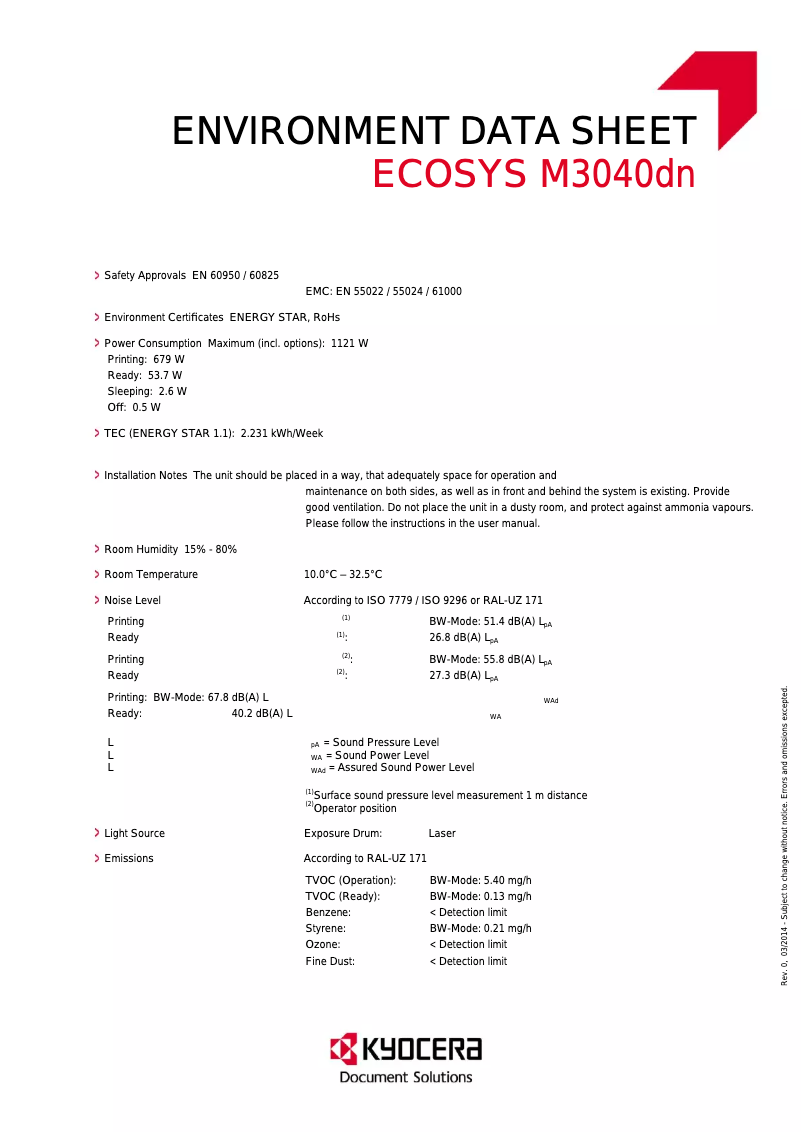
The Kyocera Ecosys M3040dn printer stands out for its exceptional print quality, offering a high resolution that ensures clear and professional documents. Its versatility as an all-in-one printer also allows for printing, copying, and scanning, thus meeting many office needs. Additionally, its energy-efficient design helps reduce operating costs and carbon footprint, making it a wise choice for companies concerned about their environmental impact. However, it is important to note that the initial purchase cost can be high, which may be a barrier for small businesses or individual users. Furthermore, its large size may not be suitable for cramped workspaces. Although the print quality is generally good, some users have reported issues with specific media, such as photo paper. Finally, the warm-up time before the first print and the operating noise can be drawbacks in certain work environments. Overall, the Kyocera Ecosys M3040dn proves to be a robust and reliable option, with remarkable durability and a user-friendly interface that makes it easy to use. Accompanying documents, such as the user manual and FAQ, provide valuable support for users. Despite some limitations, its performance and versatility make it an interesting choice for offices seeking a comprehensive printing solution.Score details
User experience
The user experience is enhanced by a user-friendly interface and comprehensive supporting documents, making it easier to get started with the product.
Performance
The printing performance is exceptional, although some users have reported quality issues on specific media.
Battery life
Energy efficiency is a plus, reducing operating costs, but the warm-up time can slow down productivity.
Design
The design is functional, but the size of the printer can be cumbersome in tight workspaces.
Value for money
The initial purchase cost can be high, which may pose a barrier for small businesses or individual users.
Robustness
The durability and reliability of the product are remarkable, making it a wise choice for long-term use.
Usability
The versatility of features, including printing, copying, and scanning, meets the varied needs of users well.
Support
The available documents, such as the user manual and FAQ, provide a good level of support for users.
Advantages
High-quality printing
All-in-one features
Significant energy savings
Recognized durability and reliability
Intuitive user interface
Disadvantages
High purchase cost for small businesses
Bulky size for restricted spaces
Quality issues on certain media
Annoying operating noise in silence
Long preheating time before printing
Technical Specifications Ecosys M3040dn
General Information
-
ModelECOSYS M3040DN
-
Brand
-
Category
-
Type
-
SKU208285
-
MPN208285
Frequently Asked Questions
What is the recommended method for removing jammed paper from the printer?
Why is my printer not recognizing the original cartridges?
What could be the causes of poor print quality?
What is the difference between a laser printer and an inkjet printer?
Why is my inkjet printer producing black marks on prints?
What does the acronym DPI mean?
Is the manual for the Kyocera Ecosys M3040dn available in French?
Similar products


More product categories from brand Kyocera
Phones Kyocera
Other Kyocera
More product types from brand Kyocera


Presentation of product Ecosys M3040dn specifications from brand Kyocera
General Information
The Kyocera Ecosys M3040dn is a multifunction device recognized for its print quality and efficiency. Manufactured by the brand Kyocera, which stands out for its commitment to innovation and sustainability in the field of office equipment, this model is designed to meet the demands of modern businesses. The EAN code, 632983031865 and 6329830318654, allows for precise product identification in the distribution system.
Technical Specifications
The Kyocera Ecosys M3040dn is equipped with advanced features that include printing, copying, and scanning. Its high print resolution ensures documents of exceptional clarity, ideal for professional use. Furthermore, this printer is designed to be energy-efficient, thus contributing to reduced operating costs and a minimal carbon footprint.
Advantages
- Superior print quality: Produces sharp and professional prints.
- Versatility: All-in-one printer that meets various office needs.
- Energy efficiency: Contributes to significant savings on electricity costs.
- Durability: Designed for increased longevity and reduced maintenance.
- User-friendly interface: Easy to use, even for novice users.
Disadvantages
- Initial cost: May be perceived as high for small businesses or individual users.
- Bulkiness: Its size may be a drawback for limited workspace.
- Quality issues: Some users have reported printing problems on certain specific media.
- Noise level: May be louder than some competing models, disturbing in quiet environments.
- Warm-up time: A delay before the first print that can affect productivity in very active offices.


