

Manuals of product ECOSYS MA4500x
Editorial note
The Kyocera ECOSYS MA4500x is a multifunction printer that stands out for its printing speed, reaching up to 45 pages per minute. This model is ideal for demanding work environments, offering exceptional laser print quality with a maximum resolution of 1200 x 1200 DPI. Its 600-sheet paper capacity allows for handling a large volume of documents without interruption, and its various features, such as color scanning and copying, add to its versatility. However, some drawbacks should be noted. The lack of fax function may disappoint users who need it, as well as the absence of duplex scanning, limiting efficiency when scanning multi-page documents. Additionally, the duplex printing mode being manual can slow down the printing process. The weight of 22.8 kg may also pose mobility issues, and the sound pressure level during printing, while reasonable, can be disruptive in quiet workspaces. Overall, the user experience is positive thanks to an intuitive interface and various features, although improvements could be considered. With a score of 85 for performance and 90 for robustness, the Kyocera ECOSYS MA4500x positions itself as a solid choice for professionals seeking a reliable and efficient printing solution. The provided documentation is clear and helpful, making it easy to get started with the product.Score details
User experience
The user experience is positive due to an intuitive interface and varied features, although the lack of fax and duplex scanning may disappoint some users.
Performance
Performance is excellent with a printing speed of up to 45 pages per minute, ideal for demanding work environments.
Design
The design is modern and suitable for a professional environment, although its weight of 22.8 kg may pose mobility issues.
Value for money
The value for money is good, with varied features, but the operating cost could be a factor to consider.
Robustness
The product is robust and meets sustainability standards, thus reducing environmental impact.
Features
The features are varied, with manual duplex printing and a 600-sheet paper capacity, but the lack of duplex scanning may limit its effectiveness.
Support
The support is adequate, but the absence of advanced functions like fax may disappoint some users.
Documentation
The provided documentation, including a manual and safety instructions, is clear and helpful for quick onboarding.
Advantages
Fast printing up to 45 pages per minute
Laser resolution 1200 x 1200 DPI
Manual duplex printing
Copying, scanning, and printing functions
600-sheet paper capacity
Environmental compliance and sustainability
Disadvantages
No fax function available
No duplex scanning
Manual duplex printing
Weight of 22.8 kg difficult to move
High noise level (54 dB)
Technical Specifications ECOSYS MA4500x
General Information
-
ModelECOSYS MA4500X
-
Brand
-
Category
-
Type
-
SKU1769120
-
MPN1769120
Print speed
-
Printing technologyLaser
-
PrintingMonochrome printing
-
Poster printing functionYes
-
Duplex printing modeAuto
-
Maximum resolution1200 x 1200 DPI
-
Print speed (black, normal quality, A4/US Letter)45 ppm
-
Duplex printing speed (Black, normal quality, A4/US Letter)22.5 ppm
-
Preheating time16 s
-
Copy time for the first page (Black, normal)5.3 s
-
Poster printing functionYes
-
Layout option2, 4, 6, 8, 9, 16, 25
-
Poster printing functionYes
-
Poster printing functionYes
-
Poster printing functionYes
-
Poster printing functionYes
-
Poster printing functionYes
Copier
-
CopySimple copy
-
Background adjustment functionYes
-
Duplex copy modeAuto
-
Max. resolution of copies600 x 600 DPI
-
Maximum copy sizeA4
-
Copy speed (normal quality, black, A4)45 cpm
-
Release time of the first print (black, normal)6 s
-
Maximum number of copies999 copies
-
Resizing copy25 - 400 %
-
Background adjustment functionYes
-
All-in-one function (N=)2, 4
-
Background adjustment functionYes
-
Background adjustment functionYes
-
Background adjustment functionYes
Digitization
-
DigitizationColor scanning
-
Double-sided scanningYes
-
Duplex scanning modeAuto
-
Maximum scanning resolution600 x 600 DPI
-
Optical analysis resolution (black)600 x 600 pixels per inch
-
Optical analysis resolution (color)300 x 300 pixels per inch
-
Maximum scanning resolution600 x 600 DPI
-
Maximum scanning resolution600 x 600 DPI
-
Maximum scan area210 x 297 mm
-
Type of scannerFlatbed and ADF scanner
-
Scanning technologyCIS/CCD
-
Scan toE-mail, FTP, Fax, File, Image, Memory Card, PC, SMB, TWAIN, USB, WIA
-
Scanning speed (color)40 ppm
-
Scanner speed (black)60 ppm
-
Duplex scanning speed (color)17 ppm
-
Duplex scanning speed (black)26 ppm
-
Supported image formatsJPEG, TIFF
-
Support for text formatsPDF, XPS
-
Gray levels256
-
Scan driversTWAIN, WIA
Fax
-
FaxNo
Features
-
Service cycle (Maximum)150000 pages per month
-
Double-sided functionsCopy, Print, Scan
-
Service cycle (recommended)3000 - 15000 pages per month
-
Number of print cartridges1
-
Printing colorsBlack
-
Languages of the page descriptionPCL 5e, PCL 6, PCL XL, PDF 1.4
-
Printer fontsBarcode, Bitmap, PCL
-
Digital senderYes
-
Country of originVietnam
-
Replacement cartridgesTK-3400
-
Digital senderYes
Input and output capacity
-
Total number of power supply units2
-
Total power capacity600 sheets
-
Maximum output capacity250 sheets
-
Input capacity of the paper tray 1500 sheets
-
Automatic Document Feeder (ADF)Yes
-
Input capacity of multi-purpose trays100 sheets
-
Automatic Document Feeder (ADF)Yes
-
Automatic document feeder capacity75 sheets
-
Maximum number of feed bins6
-
Maximum input capacity2600 sheets
-
Maximum output capacity250 sheets
Paper management
-
Maximum ISO A series paper sizeA4
-
Maximum print format216 x 356 mm
-
Type of paper tray supportBanner, Letterhead, Plain paper, Pre-Printed, Thicker paper
-
ISO, Format Series A (A0...A9)A4, A5, A6
-
ISO, Formats Series-B (B0...B9)B5, B6
-
Non-ISO print support sizesFolio (media size), Legal (media size), Letter (media size)
-
Support width customization140 - 216 mm
-
Customization of support length210 - 356 mm
-
Weight of paper tray support60 - 120 g/m²
-
Weight of the multifunctional tray support60 - 220 g/m²
Connectivity
-
USB portYes
-
USB portYes
-
Quantity of USB 2.0 Ports1
-
Optional connectivityEthernet, Wireless LAN
Network
-
WifiNo
-
Ethernet/LANYes
-
Wiring technology10/100/1000Base-T(X)
-
LAN Ethernet: data transfer rate10,100,1000 Mbit/s
-
Mobile printing technologiesApple AirPrint, Kyocera Mobile Print, Mopria Print Service
Representation / realization
-
Internal memory1000 MB
-
Maximum internal memory3000 MB
-
Memory locations1
-
Built-in memory card readerNo
-
Compatible memory cardsSD
-
Integrated into the processorYes
-
Processor familyARM Cortex-A5
-
Processor frequency1400 MHz
-
Number of processor cores2
-
Launch year2023
-
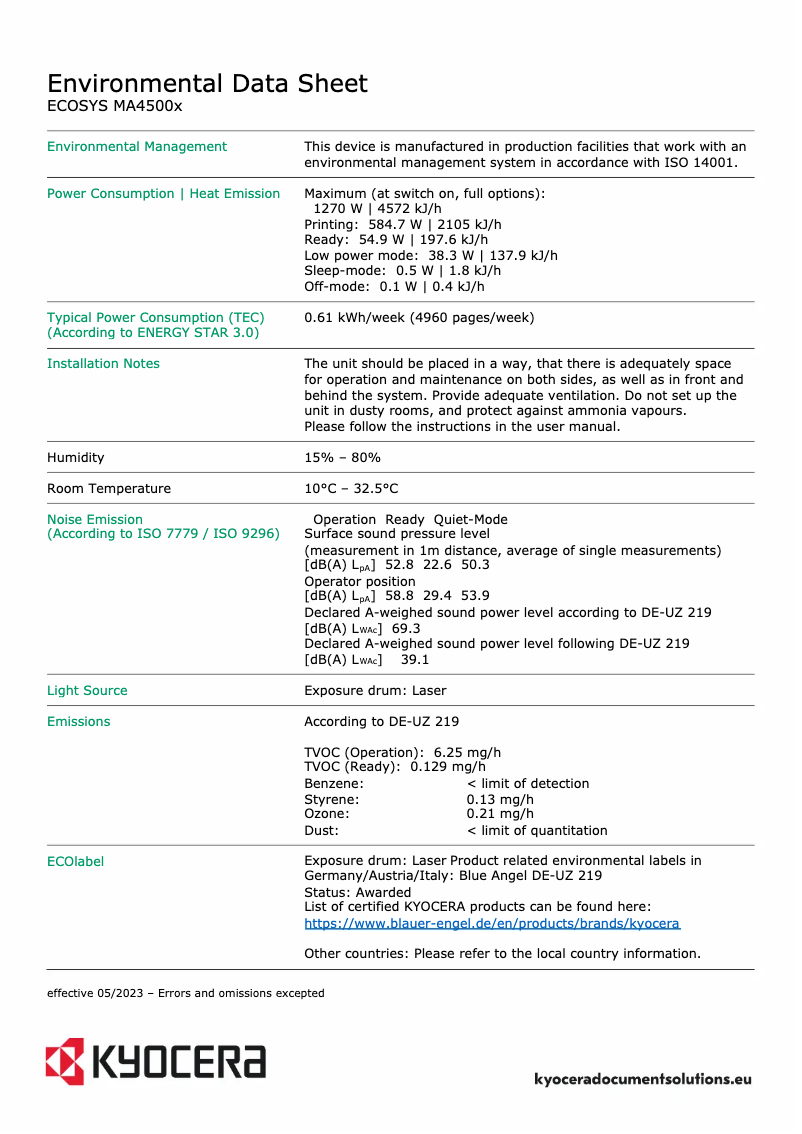
Sound pressure level (copy)54 dB
-
Sound pressure level (copy)54 dB
-
Sound pressure level (standby)30 dB
Design
-
Product colorBlack, White
-
Market positionProfessional
-
Built-in screenYes
-
ScreenLCD
-
Color displayNo
-
Order typeButtons
Power
-
Consumption (max)Blablabla W
-
Average power consumption in Print mode602 W
-
Average power consumption in Copy mode585 W
-
Energy consumption (loan)55 W
-
Energy consumption (standby mode)38 W
-
Electricity consumption (stop)0.1 W
-
Energy consumption (in standby mode)0.5 W
-
Energy Star, typical electrical consumption (TEC)0.62 kWh/week
-
AC input voltage220 - 240 V
-
AC input frequency50 - 60 Hz
Minimum system requirements
-
Support for the Linux operating systemYes
-
Support for the Mac operating systemMac OS X 10.9 Mavericks, Mac OS X 11.0 Big Sur, Mac OS X 12.0 Monterey, Mac OS X 13.0 Ventura
-
Support for the Linux operating systemYes
Weight and dimensions
-
Width475 mm
-
Depth476 mm
-
Height575 mm
-
Weight22800 g
Packaging information
-
Package width607 mm
-
Package depth570 mm
-
Package height695 mm
-
Package weight30000 g
Packaging contents
-
Imaging unit includedYes
-
Included cartridge capacity (black)6000 pages
-
Imaging unit includedYes
-
Cables includedSector
Environmental conditions
-
Operating relative humidity (H-H)15 - 80 %
-
Temperature out of operation-20 - 40 °C
-
Operating temperature10 - 32.5 °C
-
Relative humidity rate (storage)10 - 90 %
-
Operating altitude0 - 3500 m
Sustainability
-
Compliance with sustainabilityYes
-
Sustainability certificatesREACH, RoHS, Turkish Environment Label
Frequently Asked Questions
What is the weight of the Kyocera ECOSYS MA4500x?
What is the best method to remove paper jammed in the printer?
Why is my printer rejecting original cartridges?
Why is the quality of my prints poor?
What is the difference between a laser printer and an inkjet printer?
Why is my inkjet printer producing black streaks?
What does the acronym DPI mean?
How many cartridges can be installed in the Kyocera ECOSYS MA4500x?
What is the height of the Kyocera ECOSYS MA4500x?
What is the width of the Kyocera ECOSYS MA4500x?
What is the depth of the Kyocera ECOSYS MA4500x?
Is the manual for the Kyocera ECOSYS MA4500x available in French?
Similar products


More product categories from brand Kyocera
Phones Kyocera
Other Kyocera
More product types from brand Kyocera


Presentation of product ECOSYS MA4500x specifications from brand Kyocera
General Information
The Kyocera ECOSYS MA4500x is a multifunction printer from the Kyocera brand, known for its commitment to quality and innovation. This model, referenced as ECOSYS MA4500x | 110C133NL0, is designed to deliver exceptional performance and an enhanced user experience. Its EAN code 0632983080160 allows for precise identification in distribution systems.
Print Speed
Equipped with laser printing technology, the Kyocera ECOSYS MA4500x ensures high-quality print results. It supports color printing, allowing for vibrant documents and images. The print speed reaches up to 45 pages per minute in black and 22.5 ppm in duplex mode, making it ideal for professional use. Its maximum resolution of 1200 x 1200 DPI ensures exceptional clarity.
Printing Features
The duplex printing function is manual, requiring user intervention, but helps reduce paper waste. Additionally, it includes options such as watermark printing, secure printing, and custom covers. The economical printing capability allows for cost control while maintaining a high level of quality.
Copier
As a copier, the Kyocera ECOSYS MA4500x offers color copying with a resolution of 600 x 600 DPI. Although it does not have an automatic duplex copying function, it allows flexibility with resizing options ranging from 25% to 400%. Its copying speed is 45 copies per minute, ensuring efficiency for daily tasks.
Scanning
Color scanning is also supported, with an optical resolution of 600 x 600 DPI. However, duplex scanning is not available. The scanning mode allows for sending documents to various protocols such as E-mail, FTP, and USB, providing great flexibility.
Technical Specifications
The maximum service cycle of the printer is 150,000 pages per month, while the recommended cycle is 3,000 to 15,000 pages per month. It uses a single print cartridge, ensuring quality printing with optimized operating costs. The main print color is black, suitable for a wide range of applications.
Input and Output Capacity
The total feed capacity of the Kyocera ECOSYS MA4500x is 600 sheets, spread across two feed trays. The multifunction tray can hold up to 100 sheets, allowing for efficient print management. The output capacity is 250 sheets.
Paper Management
This printer supports various paper sizes, including A4 and A5, and allows printing on a variety of media types. Custom paper dimensions are possible, with widths ranging from 140 to 216 mm and lengths from 210 to 356 mm.
Connectivity
The Kyocera ECOSYS MA4500x offers connectivity via a USB port and Ethernet options for network integration. Although it does not include Wi-Fi connectivity, it supports mobile printing technologies for flexible use.
Energy Consumption
Power consumption varies depending on the mode of use, with a consumption of 602 W in print mode and 38 W in standby. These features contribute to an appreciable overall energy efficiency.
Dimensions and Weight
With dimensions of 475 mm wide, 476 mm deep, and 575 mm high, the weight of the device is 22.8 kg, which may make it less mobile in certain office environments.
Durability
The Kyocera ECOSYS MA4500x complies with environmental standards, benefiting from certifications such as REACH and RoHS, demonstrating its commitment to sustainability and reducing ecological impact.


