

Manuals of product ECOSYS P2040dw
Editorial note
The Kyocera ECOSYS P2040dw printer stands out with its impressive printing speed of 40 pages per minute, making it an ideal choice for demanding work environments. Its laser printing technology ensures exceptional print quality with a maximum resolution of 1200 x 1200 DPI. Additionally, the manual duplex printing feature helps save paper, a beneficial characteristic for environmentally conscious users. However, this model has some drawbacks. The lack of color printing limits its use for documents requiring colored graphic elements. Furthermore, the manual duplex printing feature may prove inconvenient for those looking to quickly print documents on both sides. While the printing speed is competitive, the 15-second warm-up time could delay the start of prints in a dynamic setting. The maximum input capacity of 850 sheets may also be insufficient for users with very high printing needs. In terms of design, the printer has a modern and energy-efficient look, supported by certifications such as Blue Angel and ENERGY STAR, reflecting a commitment to responsible resource use. Connectivity is versatile with Ethernet, Wi-Fi, and mobile printing options, facilitating integration into various office environments. The user experience is generally positive thanks to an intuitive interface and comprehensive documentation, but the sound pressure level of 48.8 dB, while considered quiet, may be perceived as bothersome in particularly quiet environments. Finally, the product offers good value for money, especially with efficient replacement cartridges, but the lack of color printing may deter some users. In summary, the Kyocera ECOSYS P2040dw is a solid choice for those seeking a fast and efficient printer for monochrome prints, although it is important to consider its limitations before purchase.Score details
User experience
The user experience is generally positive, with versatile connectivity and an intuitive interface. However, the manual duplex printing feature can be inconvenient.
Performance
The printing speed of 40 pages per minute is impressive for a demanding work environment, although the 15-second warm-up time may slow down the startup.
Design
The energy-efficient design and certifications like Blue Angel and ENERGY STAR reflect a commitment to the environment. The printer has a modern look.
Value for money
With a high printing capacity and efficient replacement cartridges, the product offers good value for money, although the lack of color printing may be a drawback for some users.
Usability
Usability is enhanced by adequate internal memory and connectivity options. However, the noise level could be bothersome in quiet environments.
Features
Features like duplex printing and laser printing technology are advantages, but the lack of color printing limits capabilities.
Support
The product comes with several useful documents, such as the user manual and FAQ, facilitating support and assistance.
Documentation
The provided documentation is comprehensive and well-structured, offering good help for setting up and using the printer.
Advantages
Fast printing up to 40 pages per minute
Laser print quality 1200 x 1200 DPI
Manual duplex printing for savings
Ethernet connectivity, Wi-Fi, and mobile printing
Energy-efficient design with environmental certifications
Disadvantages
No color printing
Manual double-sided printing
Preheating time of 15 seconds
Input capacity limited to 850 sheets
Noise level of 48.8 dB
Technical Specifications ECOSYS P2040dw
General Information
-
ModelECOSYS P2040DW
-
Brand
-
Category
-
Type
-
SKU786624
-
MPN786624
Representation / realization
-
Maximum internal memory256 MB
-
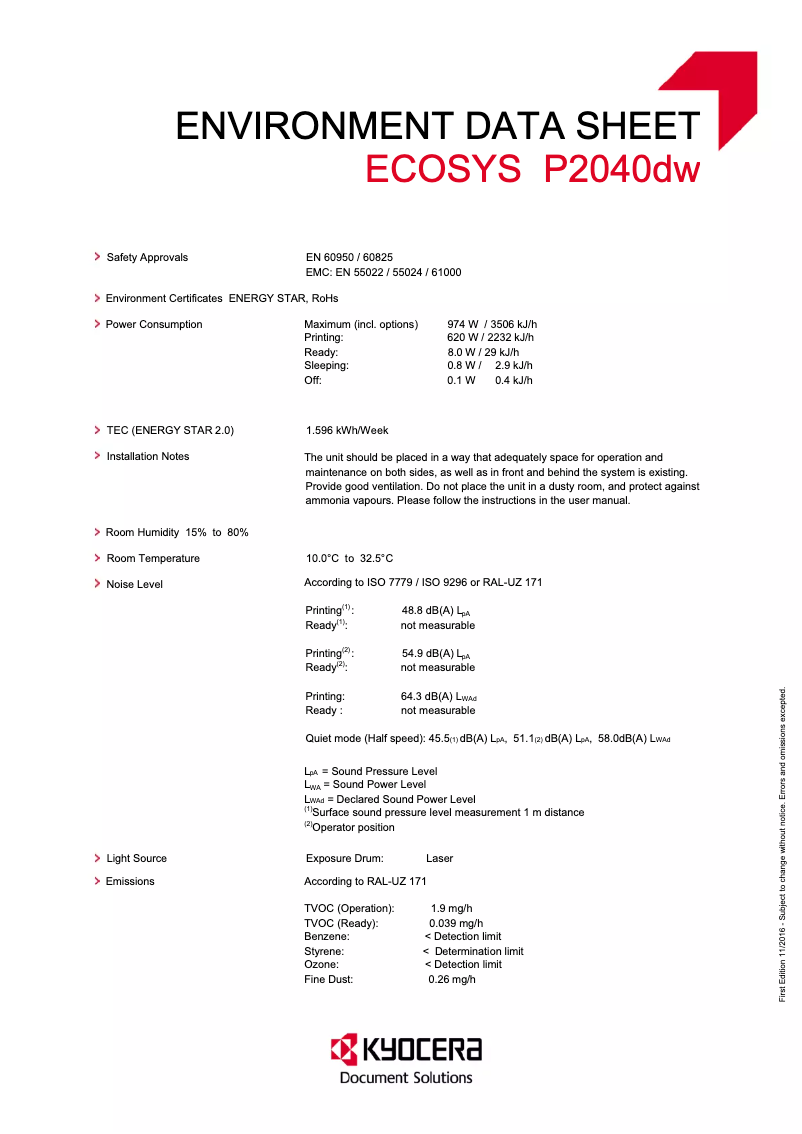
Sound pressure level (impression)48.8 dB
-
Sound pressure level (silent mode)45.5 dB
-
Built-in memory card readerYes
-
Processor familyARM Cortex
-
Processor frequency800 MHz
-
Maximum internal memory256 MB
-
Built-in memory card readerYes
-
Compatible memory cardsSD, SDHC
Print speed
-
ColorNo
-
Black print resolution1200 x 1200 DPI
-
Double-sided printingYes
-
Printing technologyLaser
-
Print speed (black, normal quality, A4/US Letter)40 ppm
-
Preheating time15 s
-
Copy time for the first page (Black, normal)6.4 s
-
Duplex printing modeAuto
-
Duplex printing speed (Black, normal quality, A4/US Letter)20 ppm
-
Black print resolution1200 x 1200 DPI
Features
-
Service cycle (Maximum)50000 pages per month
-
Number of print cartridges1
-
Languages of the page descriptionEpson LQ, IBM ProPrinter, PCL 5e, PCL 6, PCL XL, PDF 1.7, PostScript 3, XPS
-
Service cycle (recommended)2000 - 3000 pages per month
-
Printing colorsBlack
-
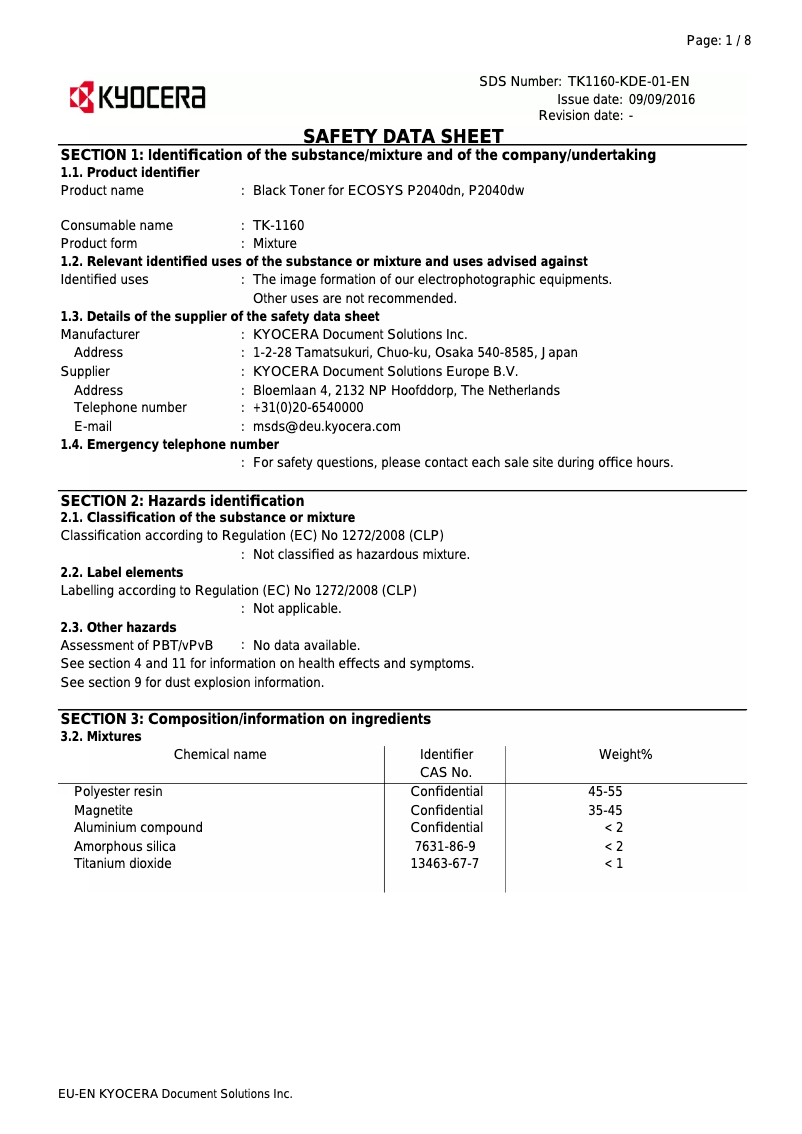
Replacement cartridgesTK-1160 (7,200 pages)
Design
-
Number of lines displayed2 lines
-
CertificationTÜV-GS, CE
-
Product colorBlack, White
-
Built-in screenYes
-
ScreenLCD
-
Market positionDomestic and professional
-
Color displayNo
Power
-
AC input voltage220 - 240 V
-
AC input frequency50 Hz
-
Average power consumption in Print mode620 W
-
Energy consumption (loan)8 W
-
Energy consumption (eco mode)0.8 W
-
Energy Star, typical electrical consumption (TEC)1.6 kWh/week
Input and output capacity
-
Maximum output capacity250 sheets
-
Maximum input capacity850 sheets
-
Input capacity of multi-purpose trays100 sheets
-
Maximum output capacity250 sheets
-
Multifunctional trayYes
-
Total number of power supply units1
-
Maximum output capacity250 sheets
-
Maximum number of feed bins3
-
Maximum output capacity250 sheets
Paper management
-
Maximum ISO A series paper sizeA4
-
Type of paper tray supportOrdinary paper
-
ISO, Format Series A (A0...A9)A4, A5, A6
-
ISO, Formats Series-B (B0...B9)B5, B6
-
Non-ISO print support sizesLegal (media size), Letter (media size)
-
Support weight supported in duplex mode60 - 163 g/m²
-
Weight of the multifunctional tray support60 - 220 g/m²
-
Support weight supported in duplex mode60 - 163 g/m²
-
Maximum print format216 x 356 mm
-
Support width customization70 - 216 mm
-
Customization of support length148 - 356 mm
Weight and dimensions
-
Width375 mm
-
Depth393 mm
-
Height272 mm
-
Weight14000 g
Network
-
Wi-Fi DirectYes
-
Wi-Fi DirectYes
-
Wi-Fi DirectYes
-
Wi-Fi DirectYes
-
Wifi standards802.11b, 802.11g, Wi-Fi 4 (802.11n)
-
Security-supported algorithm802.1x RADIUS, HTTPS, IPPS, IPSEC, SNMP
-
Mobile printing technologiesApple AirPrint, Google Cloud Print, Kyocera Mobile Print, Mopria Print Service
-
Wiring technology10/100/1000Base-T(X)
-
LAN Ethernet: data transfer rate10,100,1000 Mbit/s
-
BluetoothNo
-
BluetoothNo
Connectivity
-
Standard interfacesEthernet
-
USB portUSB 2.0
-
USB portWireless LAN
-
Quantity of USB 2.0 PortsYes
-
Yes
-
1
Sustainability
-
Sustainability certificatesBlue Angel
-
ENERGY STAR
Minimum system requirements
-
Support for the Linux operating systemYes
-
Support for the Linux operating systemYes
-
Support for the Linux operating systemYes
Packaging information
-
Package width500 mm
-
Package depth516 mm
-
Package height400 mm
-
Package weight18000 g
Packaging contents
-
Cartridge(s) includedYes
-
Included cartridge capacity (black)3600 pages
-
Cables includedSector
Logistics data
-
Harmonized System Code84433210
Frequently Asked Questions
What is the weight of the Kyocera ECOSYS P2040dw printer?
What is the recommended method for removing paper jammed in the printer?
Why is my printer refusing to accept original cartridges?
What are the reasons if my prints are of poor quality?
How does a laser printer differ from an inkjet printer?
Why is my inkjet printer producing black streaks on prints?
What does the acronym DPI mean?
What certifications does the Kyocera ECOSYS P2040dw have?
How many cartridges can be installed in the Kyocera ECOSYS P2040dw?
What is the height of the Kyocera ECOSYS P2040dw printer?
What is the width of the Kyocera ECOSYS P2040dw printer?
What is the depth of the Kyocera ECOSYS P2040dw printer?
Is the user manual for the Kyocera ECOSYS P2040dw available in French?
Similar products


More product categories from brand Kyocera
Phones Kyocera
Other Kyocera
More product types from brand Kyocera


Presentation of product ECOSYS P2040dw specifications from brand Kyocera
General Information
The Kyocera ECOSYS P2040dw printer is a model from the Kyocera brand, known for its commitment to quality and innovation in the office equipment sector. This model, identified by the number ECOSYS P2040dw | 1102RY3NL0, offers optimal performance to meet the demands of professional users. The associated EAN code, 0632983040256, 4058154141885, 5057454659150, 6329830402568, allows for precise product identification in commerce.
Representation / Implementation
Equipped with a 256 MB internal memory, the Kyocera ECOSYS P2040dw ensures smooth management of data and printing tasks. Its sound pressure level in printing mode is 48.8 dB, guaranteeing relatively quiet operation, while the silent mode reaches 45.5 dB, ideal for noise-sensitive environments. This model integrates an ARM Cortex processor operating at a frequency of 800 MHz, optimizing the overall performance of the device. Additionally, it includes a memory card reader compatible with SD and SDHC formats, facilitating data transfer.
Print Speed
The Kyocera ECOSYS P2040dw is a monochrome printer, not supporting color printing. Its maximum resolution of 1200 x 1200 DPI ensures remarkably clear prints. It offers manual duplex printing, allowing for reduced paper consumption. The print speed reaches 40 pages per minute in black mode, with a warm-up time of 15 seconds and a delay for the first page of 6.4 seconds. In duplex mode, the speed is 20 pages per minute, ensuring efficiency in frequent printing.
Features
The maximum service cycle of the printer is 50000 pages per month, suitable for heavy users. The product uses a single print cartridge, providing consistent quality. The recommended service cycle is 2000 to 3000 pages per month, thus optimizing the longevity of the device. The available replacement cartridges are TK-1160, capable of printing up to 7200 pages.
Design
With a 2-line display, the Kyocera ECOSYS P2040dw facilitates the visualization of essential information. It is certified TÜV-GS and CE, ensuring compliance with safety standards. Its sleek black and white design easily integrates into any office environment. The printer is designed for both home and professional use, although it does not have a color display.
Power
The product operates with an input voltage of 220 - 240 V and a frequency of 50 Hz, ensuring compatibility with standard electrical networks. In printing mode, it consumes an average of 620 W, while in standby mode, consumption is reduced to 8 W, and to 0.8 W in energy-saving mode. Its typical electricity consumption is 1.6 kWh/week, making it an energy-efficient choice.
Input and Output Capacity
The total feed capacity of the Kyocera ECOSYS P2040dw is 250 sheets, with a maximum input capacity of 850 sheets, allowing for efficient management of large document volumes. It features a multifunction tray and an input capacity in the multipurpose trays of 100 sheets.
Paper Management
This printer supports ISO A series paper sizes up to A4 and is compatible with various types of paper, including plain paper. The paper weight can vary from 60 to 163 g/m², offering flexibility in media choices. The maximum print size is 216 x 356 mm.
Weight and Dimensions
With dimensions of 375 mm width, 393 mm depth, and 272 mm height, the Kyocera ECOSYS P2040dw is designed to fit easily into various workspaces. Its weight of 14 kg ensures easy handling during installation.
Network
The printer features Ethernet/LAN connectivity and supports Wi-Fi, allowing for fast and reliable wireless connection. It is ready to use upon setup and supports Wi-Fi Direct for easy printing from mobile devices. Security standards include protocols such as HTTPS and IPSEC.
Connectivity
The Kyocera ECOSYS P2040dw is equipped with several standard interfaces, including a USB 2.0 port, facilitating connection to various devices for direct printing.
Durability
This printer is certified Blue Angel and ENERGY STAR, attesting to its compliance with energy efficiency standards and reduced environmental impact.
Minimum System Requirements
Compatible with Windows, Mac, and Linux operating systems, the Kyocera ECOSYS P2040dw easily adapts to the needs of various users.
Packaging Information
The printer's package dimensions are 500 mm width, 516 mm depth, and 400 mm height, with a total weight of 18 kg, ensuring adequate protection during transport.
Package Contents
The Kyocera ECOSYS P2040dw comes with a print cartridge, allowing for immediate startup. The included cartridge has a print capacity of 3600 pages and a power cable for proper electrical connection.
Logistics Data
The harmonized system code for the Kyocera ECOSYS P2040dw is 84433210, facilitating its identification in international trade.


