

Manuals of product ECOSYS P3260dn
Editorial note
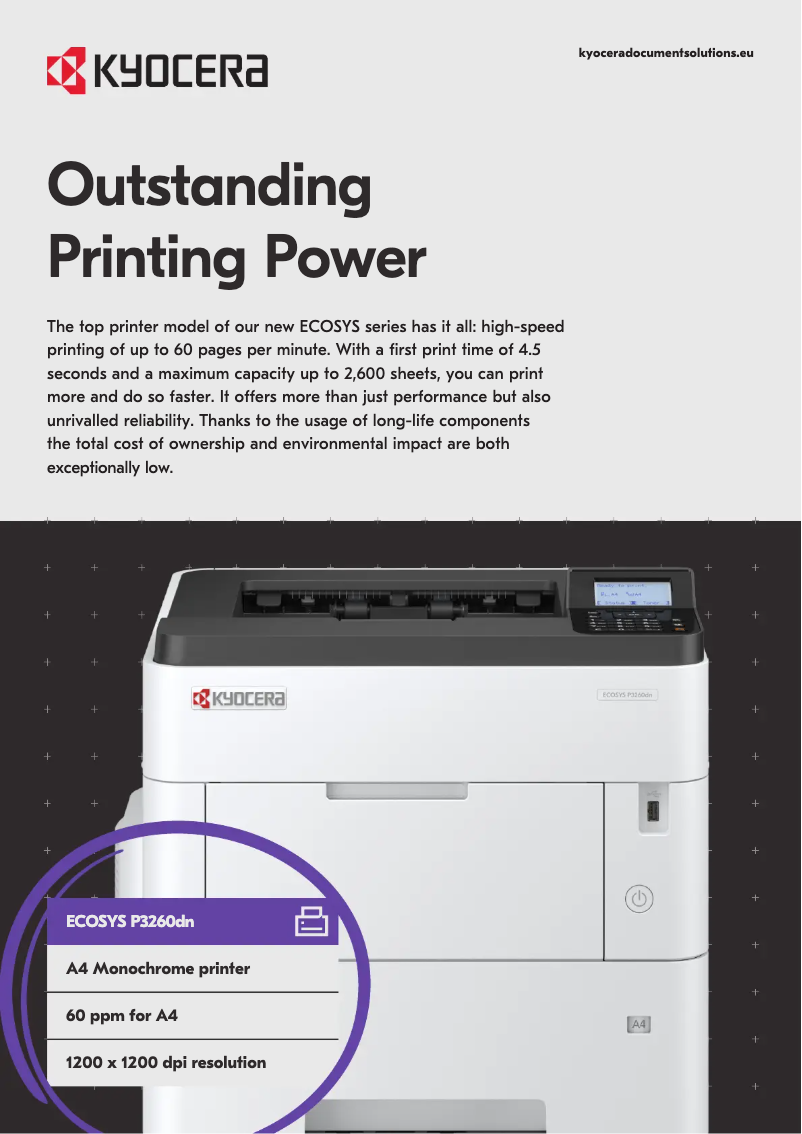
The Kyocera ECOSYS P3260dn printer stands out with its impressive printing speed of 60 pages per minute, ideal for demanding work environments. With a maximum resolution of 1200 x 1200 DPI, it ensures sharp and high-quality prints. Its maximum input capacity of 2600 sheets allows for efficient management of a large volume of documents, which is an undeniable asset for professional users. However, this printer has some limitations. The lack of color printing functionality may restrict its use for documents requiring an attractive visual presentation. Additionally, manual duplex printing can slow down the workflow for those who frequently print double-sided documents. Its relatively high weight of 15.9 kg could complicate its installation and movement, especially in an office where mobility is necessary. Finally, the absence of Wi-Fi connectivity limits usage flexibility by forcing users to connect via Ethernet. In terms of user experience, the interface is simple and the features are tailored for professionals, although the lack of color printing is a drawback. The design is both professional and robust, but the weight may pose practical issues. Regarding value for money, the features offered justify the price, providing excellent value. The provided documentation is comprehensive and facilitates the setup and use of the device, thus meeting user needs. In summary, the Kyocera ECOSYS P3260dn is a high-performing printer, well-suited for office environments, but it may not be suitable for all users due to its limitations in color and connectivity.Score details
User experience
The user experience is satisfactory due to a simple interface and features suited for professionals, although the lack of color printing limits some uses.
Performance
The printing speed of 60 pages per minute is impressive and ideal for handling large volumes, but the manual duplex function can slow down the workflow.
Design
The design is professional and sturdy, although its weight of 15.9 kg may make moving and installation less convenient.
Value for money
The features, such as a maximum print resolution of 1200 x 1200 DPI and an input capacity of 2600 sheets, justify the price, contributing to excellent value for money.
Features
The offered features are solid, but the lack of Wi-Fi connectivity and the limitation to monochrome printing may restrict use in certain environments.
Support
The availability of documents such as the user manual and technical sheet is a plus, facilitating the handling and use of the device.
Documentation
The provided documentation is comprehensive, with 305 pages, allowing users to fully understand the features and use of the printer.
Advantages
Fast printing at 60 pages per minute
Manual duplex printing to save paper
Maximum resolution of 1200 x 1200 DPI
Input capacity of up to 2600 sheets
Ethernet connectivity for business networks
ENERGY STAR certification for energy efficiency
Disadvantages
No color printing available
Slow manual duplex printing
Weight of 15.9 kg difficult to move
No Wi-Fi connectivity
Limited input capacity of 2600 sheets
Technical Specifications ECOSYS P3260dn
General Information
-
ModelECOSYS P3260DN
-
Brand
-
Category
-
Type
-
SKU1133161
-
MPN1133161
Print speed
-
ColorNo
-
Black print resolution1200 x 1200 DPI
-
Black print resolution1200 x 1200 DPI
-
Double-sided printingYes
-
Printing technologyLaser
-
Print speed (black, draft quality, A4/US Letter)60 ppm
-
Preheating time25 s
-
Copy time for the first page (Black, normal)4.5 s
-
Duplex printing modeAuto
-
Print speed (black, draft quality, A4/US Letter)60 ppm
-
Duplex printing speed (Black, normal quality, A4/US Letter)43 ppm
-
Print margins (top, bottom, right, left)4 mm
Design
-
Product colorBlack
-
CertificationWhite
-
Market positionTUV-GS
-
Built-in screenCE
-
Touch screenProfessional
-
ScreenYes
-
Touch screenNo
-
Number of lines displayedLCD
-
Order typeNo
-
5 lines
-
Buttons
Features
-
Printing colorsBlack
-
Number of print cartridges1
-
Languages of the page descriptionEpson LQ, PCL 5e, PCL 6, PCL XL, PDF 1.7, PostScript 3, TIFF, XPS
-
Service cycle (Maximum)300000 pages per month
-
Number of printer fonts93
-
Service cycle (recommended)15000 - 25000 pages per month
-
Average yield of the cartridge (black)40000 pages
-
Replacement cartridgesTK-3160 (toner, 12,500 prints 5% coverage)
-
TK-3170 (toner, 15,500 prints 5% coverage)
-
TK-3190 (toner, 25,000 prints 5% coverage)
-
TK-3200 (toner, 40,000 prints 5% coverage)
Input and output capacity
-
Maximum input capacity2600 sheets
-
Input capacity of multi-purpose trays100 sheets
-
Input capacity of the paper tray 1500 sheets
-
Input capacity of the paper tray 1500 sheets
-
Paper feed typePaper bin
-
Input capacity of the paper tray 1500 sheets
-
Total number of power supply units1
-
Maximum number of feed bins5
-
Multifunctional trayYes
-
Input capacity of the paper tray 1500 sheets
Paper management
-
Maximum ISO A series paper sizeA4
-
Maximum print format216 x 356 mm
-
Type of paper tray supportOrdinary paper
-
Types of multi-purpose binsBanner
-
ISO, Format Series A (A0...A9)A4, A5, A6
-
Support width customization105 - 216 mm
-
Customization of support length148 - 356 mm
-
Support weight supported in duplex mode60 - 120 g/m²
-
Weight of the multifunctional tray support60 - 220 g/m²
-
Support weight supported in duplex mode60 - 120 g/m²
-
Max. length of the support915 mm
-
ISO, Formats Series-B (B0...B9)B5
-
Non-ISO print support sizesLegal (media size), Letter (media size)
Network
-
Ready-to-use networkYes
-
WifiNo
-
Ready-to-use networkYes
-
Wiring technology10/100/1000Base-T(X)
-
Mobile printing technologiesApple AirPrint, Google Cloud Print, Kyocera Mobile Print, Mopria Print Service
-
Management protocolsIPsec, HTTPS, IPPS, POP over SSL, SMTP over SSL
-
LAN Ethernet: data transfer rate10,100,1000 Mbit/s
-
Security-supported algorithmHTTPS, IPPS, IPSEC, IPSec, SNMPv3
Connectivity
-
Direct printingYes
-
Optional connectivityEthernet, Parallel, Wireless LAN
-
Number of expansion slots1
-
Direct printingYes
Representation / realization
-
Internal memory512 MB
-
Maximum internal memory2500 MB
-
Built-in memory card readerYes
-
Processor familyARM Cortex
-
Processor modelA9
-
Processor frequency1200 MHz
-
Memory locations2
-
Sound pressure level (impression)56 dB
-
Sound pressure level (silent mode)50.4 dB
-
Memory locations2
-
Type of memoryDDR3
-
Built-in memory card readerYes
-
Compatible memory cardsSD, SDHC
Power
-
Average power consumption in Print mode721 W
-
Energy consumption (loan)11 W
-
Electricity consumption (stop)0.07 W
-
AC input voltage220 - 240 V
-
AC input frequency50 Hz
-
Consumption (max)1242 W
-
Energy consumption (eco mode)0.7 W
-
Energy Star, typical electrical consumption (TEC)2.99 kWh/week
Weight and dimensions
-
Width410 mm
-
Depth416 mm
-
Height363 mm
-
Weight15900 g
Minimum system requirements
-
Support for the Linux operating systemYes
-
Support for the Mac operating systemMac OS X 10.10 Yosemite, Mac OS X 10.11 El Capitan, Mac OS X 10.12 Sierra, Mac OS X 10.14 Mojave, Mac OS X 10.9 Mavericks
-
Support for the Linux operating systemYes
Packaging contents
-
Drivers includedYes
-
Included cartridge capacity (black)11000 pages
-
Drivers includedYes
-
Drivers includedYes
-
Cables includedSector
Packaging information
-
Package width549 mm
-
Package depth517 mm
-
Package height455 mm
-
Package weight20000 g
Sustainability
-
Sustainability certificatesBlue Angel
-
CE
-
REACH
-
RoHS
-
EPEAT Silver
-
ENERGY STAR
Environmental conditions
-
Operating temperature10 - 32.5 °C
-
Temperature out of operation-20 - 40 °C
-
Operating relative humidity (H-H)15 - 80 %
-
Relative humidity rate (storage)10 - 90 %
-
Operating altitude0 - 3500 m
-
Non-operating altitude0.6 - 15000 m
Certificate
-
Compliant with the standard (WEEE, Waste Electrical and Electronic Equipment)Yes
Logistics data
-
Harmonized System Code84433210
Frequently Asked Questions
What is the weight of the Kyocera ECOSYS P3260dn?
What is the recommended method for removing jammed paper from the printer?
Why does my printer not recognize the original cartridges?
What could be the reasons for poor print quality?
How does a laser printer differ from an inkjet printer?
Why does my inkjet printer leave black streaks on prints?
What does the acronym DPI mean?
What are the certifications of the Kyocera ECOSYS P3260dn?
How many cartridges can be inserted into the Kyocera ECOSYS P3260dn?
What is the height of the Kyocera ECOSYS P3260dn?
What is the width of the Kyocera ECOSYS P3260dn?
What is the depth of the Kyocera ECOSYS P3260dn?
Is the manual for the Kyocera ECOSYS P3260dn available in French?
Similar products


More product categories from brand Kyocera
Phones Kyocera
Other Kyocera
More product types from brand Kyocera


Presentation of product ECOSYS P3260dn specifications from brand Kyocera
General Information
The model Kyocera ECOSYS P3260dn, designed by the renowned brand Kyocera, stands out for its commitment to innovation and quality. This device, referenced under the number 1102WD3NL0, ensures optimal performance and a smooth user experience. The EAN code 0632983059043 allows for precise identification of the printer in the distribution network.
Print Speed
The Kyocera ECOSYS P3260dn is a monochrome printer, lacking color functionality, but it compensates with a maximum print resolution of 1200 x 1200 DPI, ensuring clear and professional documents. Its print speed reaches 60 pages per minute (ppm) in normal mode, which is ideal for the quick processing of large volumes of documents. The warm-up time is 25 seconds, and the first page print delay is only 4.5 seconds. Additionally, it offers a manual duplex printing feature, allowing for paper savings.
Design and Ergonomics
With its sleek design in black and white, the Kyocera ECOSYS P3260dn integrates seamlessly into various professional environments. It features an LCD screen that facilitates navigation and management of print tasks. Although it is not equipped with a color display or a touchscreen, its button interface remains intuitive. This model is designed for professional use, meeting the demands of discerning users.
Technical Specifications
The Kyocera ECOSYS P3260dn supports a maximum monthly duty cycle of 300,000 pages and a recommended service cycle of 15,000 to 25,000 pages per month. With a single cartridge, it offers a yield of 40,000 pages in black. It is compatible with several page description languages, including PCL 5e, PCL 6, PostScript 3, and others.
Input and Output Capacity
This model has a maximum input capacity of 2600 sheets, ensuring efficient document management. The multifunction tray can hold 100 sheets, and the output capacity is 500 sheets. The paper tray design optimizes feeding, contributing to uninterrupted printing.
Connectivity
The Kyocera ECOSYS P3260dn offers connectivity via Ethernet/LAN, facilitating integration into corporate networks. However, it does not offer Wi-Fi connectivity, which may limit flexibility for some users. It is also equipped with a USB port for direct connection.
Energy Consumption
In terms of energy efficiency, the Kyocera ECOSYS P3260dn consumes an average of 721 W in print mode and only 11 W in standby mode. Its power consumption at rest is incredibly low at 0.07 W, contributing to its ENERGY STAR certification.
Dimensions and Weight
The dimensions of the Kyocera ECOSYS P3260dn are 410 mm wide, 416 mm deep, and 363 mm high, weighing 15.9 kg. These physical characteristics make it a robust device, but it may be less easy to move in a dynamic office environment.
Operating Conditions
The product is designed to operate within a temperature range of 10 to 32.5 °C and can withstand relative humidity levels of 15 to 80 %. It is also capable of operating at altitudes of up to 3500 m, making it a reliable option for various environments.
Durability and Certifications
The Kyocera ECOSYS P3260dn complies with several durability standards, such as Blue Angel, CE, RoHS, and REACH. These certifications attest to its reduced environmental impact and energy efficiency.
Conclusion
The Kyocera ECOSYS P3260dn positions itself as an efficient and professional printing solution, well-suited for work environments requiring fast and high-quality printing while adhering to environmental standards.


