

Manuals of product ECOSYS P8060cdn


Editorial note
The Kyocera ECOSYS P8060cdn printer stands out for its remarkable printing speed, reaching up to 60 pages per minute in black and 55 pages in color. This performance makes it particularly suitable for demanding work environments where speed is essential. Additionally, its maximum resolution of 4800 x 1200 DPI ensures prints of exceptional clarity, ideal for professional documents. One of the strengths of this printer is its feeding capacity, with a maximum input of 7150 sheets, allowing it to handle large print volumes without frequent interruptions. Reliable network connectivity via Ethernet/LAN and multiple USB ports also facilitate its integration into a professional environment. However, the weight of 89 kg can pose challenges during relocation and installation, especially in tight spaces. The lack of Wi-Fi connectivity limits usage flexibility for users who prefer wireless connections. Furthermore, the manual duplex printing mode may seem less convenient for those seeking an automatic feature. Finally, the cost of replacement cartridges can be a drawback, increasing long-term operating costs. In terms of ratings, the user experience is generally satisfactory with a score of 75. Performance receives a high score of 85, highlighting the printer's efficiency. The design is deemed functional but heavy, with a score of 70. For value, the score of 65 indicates that the cost of cartridges could be a deterrent. Features, well-rated at 80, are interesting despite some practical limitations. Documentation and support receive a score of 75, and usability is rated at 72, although the warm-up time of 17 seconds may disappoint some users. In summary, the Kyocera ECOSYS P8060cdn is a high-performing printer suitable for intensive printing needs, but certain aspects such as its weight and lack of Wi-Fi should be considered when evaluating its purchase.Score details
User experience
The user experience is generally satisfactory, with a user-friendly interface, although the lack of Wi-Fi limits flexibility of use.
Performance
The printing speed is impressive, reaching 60 ppm in black and 55 ppm in color, which perfectly meets the needs of demanding environments.
Design
The design is functional, but the weight of 89 kg can make moving and installing it difficult in tight spaces.
Value for money
The cost of replacement cartridges can be high, thus increasing the long-term operating cost.
Features
It has interesting features such as manual duplex printing and excellent feed capacity, although the duplex mode is less convenient.
Support
Comprehensive documentation with a manual, FAQs, and safety instructions available, making it easy to get started.
Usability
The use is intuitive, but the 17-second warm-up time can be a drawback for those looking for instant printing.
Advantages
Print speed up to 60 pages per minute
High-quality prints up to 4800 x 1200 DPI
Double-sided printing for paper savings
Input capacity up to 7150 sheets
Ethernet/LAN connectivity for easy sharing
Disadvantages
Heavy weight, difficult to move
No Wi-Fi connectivity
Preheating time of 17 seconds
Manual double-sided printing
High cost of replacement cartridges
Technical Specifications ECOSYS P8060cdn
General Information
-
ModelECOSYS P8060CDN
-
Brand
-
Category
-
Type
-
SKU1148571
-
MPN1148571
Print speed
-
Secure printingYes
-
Maximum resolution4800 x 1200 DPI
-
Secure printingYes
-
Preheating time17 s
-
Printing technologyLaser
-
Copy time for the first page (color, normal)5.1 s
-
Copy time for the first page (Black, normal)3.8 s
-
Print speed (black, normal quality, A4/US Letter)60 ppm
-
Print speed (color, normal quality, A4/US Letter)55 ppm
-
Print speed (black, normal quality, A3)30 ppm
-
Print speed (color, normal quality, A3)27 ppm
-
Black print resolution1200 x 1200 DPI
-
Secure printingYes
-
Duplex printing modeAuto
-
Black print resolution1200 x 1200 DPI
Features
-
Service cycle (Maximum)250000 pages per month
-
Number of print cartridges4
-
Languages of the page descriptionPCL 5c, PCL 6, PCL XL, PDF 1.6, PDF 1.7
-
Printing colorsBlack, Cyan, Magenta, Yellow
-
Service cycle (recommended)20000 - 30000 pages per month
-
Average yield of the cartridge (black)30000 pages
-
Average cartridge yield (CMY)20000 pages
-
Replacement cartridgesTK-8800K, TK-8800C, TK-8800M, TK-8800Y
Representation / realization
-
Integrated into the processorYes
-
Processor frequency1200 MHz
-
Number of processor cores2
-
Maximum internal memory4096 MB
-
Maximum internal memory4096 MB
-
Flash memory8 MB
-
Internal storage capacity328 GB
-
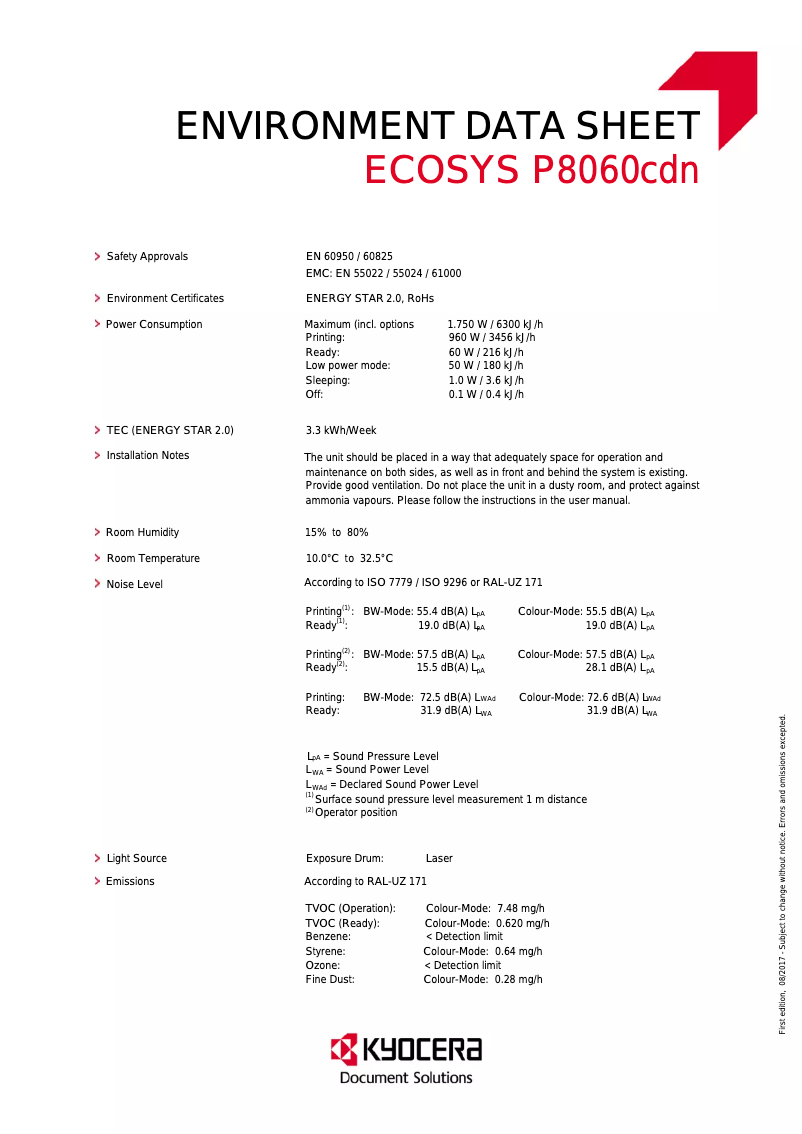
Sound level (ready)19 dB
-
Sound pressure level (impression)55.5 dB
-
Storage mediaHDD
Design
-
Screen size9 "
-
Touch screen
-
Product colorYes
-
Touch screenBlack
-
Touch screenYes
-
Order typeYes
-
Market positionTouch
-
ScreenProfessional
-
CertificationLCD
-
TÜV-GS, CE
Input and output capacity
-
Total power capacity1150 sheets
-
Maximum input capacity7150 sheets
-
Total number of power supply units2
-
Maximum number of feed bins5
-
Total output capacity500 sheets
-
Maximum output capacity4000 sheets
-
Input capacity of multi-purpose trays150 sheets
-
Paper feed typeCassette
-
Multifunctional trayYes
Power
-
Average power consumption in Print mode960 W
-
Energy consumption (standby mode)60 W
-
AC input voltage220 - 240 V
-
AC input frequency50 - 60 Hz
-
Electricity consumption (stop)1 W
-
Energy Star, typical electrical consumption (TEC)3.28 kWh/week
Paper management
-
Maximum ISO A series paper sizeA3+
-
Type of paper tray supportBond paper
-
ISO, Format Series A (A0...A9)Card stock
-
Types of multi-purpose binsEnvelopes
-
Weight of the multifunctional tray supportLabels
-
Weight of the multifunctional tray supportPlain paper
-
Recycled paper
-
Transparencies
-
A3
-
A3+
-
A4
-
A5
-
A6
-
Banner
-
Glossy paper
-
Hole punched paper
-
Labels
-
Letterhead
-
Plain paper
-
Recycled paper
-
Thick paper
-
Thicker paper
-
Transparencies
-
52 - 300 g/m²
-
52 - 300 g/m²
Network
-
Ready-to-use networkYes
-
WifiNo
-
Ready-to-use networkYes
-
Wiring technology10/100/1000Base-T(X)
-
Mobile printing technologiesApple AirPrint, Google Cloud Print, Kyocera Mobile Print, Mopria Print Service
-
LAN Ethernet: data transfer rate10,100,1000 Mbit/s
-
Security-supported algorithm802.1x RADIUS, HTTPS, IPSEC, SNMPv3
Connectivity
-
Standard interfacesRJ-45, USB 2.0
-
Quantity of USB 2.0 Ports5
-
USB portYes
-
Optional connectivityWireless LAN
-
USB portYes
Minimum system requirements
-
Support for the Linux operating systemYes
-
Support for the Mac operating systemMac OS X 10.8 Mountain Lion, Mac OS X 10.9 Mavericks
-
Support for the Linux operating systemYes
Weight and dimensions
-
Width602 mm
-
Depth665 mm
-
Height790 mm
-
Weight89000 g
Other features
-
Standby LEDYes
-
Standby LEDYes
Sustainability
-
Sustainability certificatesBlue Angel
-
ENERGY STAR
Packaging contents
-
Cartridge(s) includedYes
-
Cables includedSector
Logistics data
-
Harmonized System Code84433210
Frequently Asked Questions
What is the weight of the Kyocera ECOSYS P8060cdn printer?
What is the recommended method for removing paper jammed in the printer?
Why does my printer not recognize the original cartridges?
What can cause poor print quality?
What is the difference between a laser printer and an inkjet printer?
Why is my inkjet printer printing black streaks?
What does the acronym DPI mean?
What certifications does the Kyocera ECOSYS P8060cdn have?
How many cartridges can be installed in the Kyocera ECOSYS P8060cdn?
What is the size of the screen on the Kyocera ECOSYS P8060cdn?
What is the height of the Kyocera ECOSYS P8060cdn printer?
What is the width of the Kyocera ECOSYS P8060cdn printer?
What is the depth of the Kyocera ECOSYS P8060cdn printer?
What is the storage capacity of the Kyocera ECOSYS P8060cdn?
Is the manual for the Kyocera ECOSYS P8060cdn available in French?
Similar products


More product categories from brand Kyocera
Phones Kyocera
Other Kyocera
More product types from brand Kyocera


Presentation of product ECOSYS P8060cdn specifications from brand Kyocera
General Information
The model Kyocera ECOSYS P8060cdn is a printer designed by the brand Kyocera, known for its innovation and reliability in the field of printing devices. With the model number ECOSYS P8060cdn | 1102RR3NL0, this device promises exceptional performance tailored to various printing needs. The associated EAN codes, such as 0632983934326, 0632983046227, and 4058154241165, ensure accurate identification in the distribution system.
Print Speed
This printer is capable of producing color prints, with a maximum resolution of 4800 x 1200 DPI, ensuring remarkable clarity, whether for professional or personal documents. It also features a manual duplex printing function, allowing for reduced paper consumption. With a warm-up time of 17 seconds, it operates using laser printing technology that ensures precise results. The print speed reaches up to 60 pages per minute in black and 55 pages per minute in color, making this device ideal for high-volume work environments.
Technical Specifications
The maximum service cycle is 250,000 pages per month, making it suitable for heavy users. The printer is equipped with four cartridges for high-quality printing, with a yield of 30,000 pages for the black cartridge and 20,000 pages for each color cartridge (CMY). Compatible with page description languages such as PCL 5c, PCL 6, and PDF 1.7, this device allows flexibility in print formats.
Representation and Performance
The Kyocera ECOSYS P8060cdn is integrated with a processor running at 1200 MHz and has 2 cores, ensuring efficient task management. With 4096 Mo of internal memory, it can handle multiple processes simultaneously. The noise level in standby mode is 19 dB, while in printing it reaches 55.5 dB, ensuring a pleasant working environment.
Design and Interface
Equipped with a 9-inch color display, the printer features a touch control for intuitive use. Its black color gives it a modern appearance. This model is primarily designed for professional use, thus meeting the printing requirements of businesses.
Input and Output Capacity
The total feed capacity is 1150 sheets, with a maximum input capacity of 7150 sheets, allowing for efficient management of large print volumes. It includes several feed trays, optimizing usability for various types of documents.
Connectivity and Network
The Kyocera ECOSYS P8060cdn is equipped with Ethernet/LAN connectivity, facilitating integration into an office network. Although it does not have Wi-Fi, it allows for mobile printing through various printing technologies. The data transfer rate is 10/100/1000 Mbit/s, ensuring a fast and efficient connection.
Consumption and Durability
In terms of energy efficiency, the power consumption in print mode is 960 W, while in standby mode it reduces to 60 W. The product is certified Blue Angel and ENERGY STAR, attesting to its environmental respect.
Packaging Contents
The Kyocera ECOSYS P8060cdn comes with included cartridges and a power cable, allowing for immediate setup.
Logistics Data
The harmonized system code for this device is 84433210, ensuring appropriate identification in international trade.


