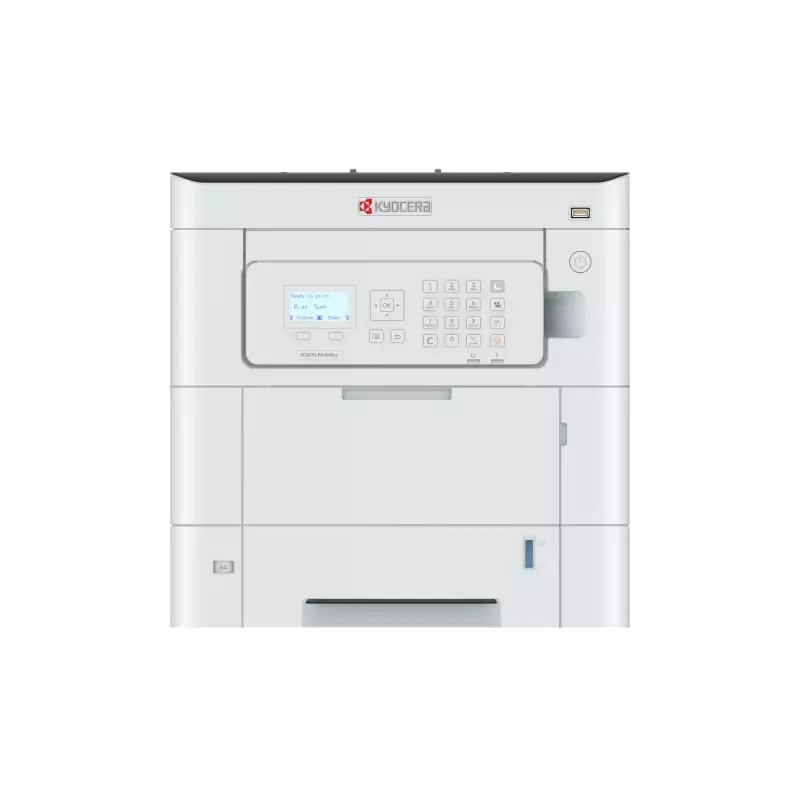

Manuals of product ECOSYS PA3500cx
Editorial note
The Kyocera ECOSYS PA3500cx printer stands out with its impressive printing speed of 35 pages per minute, both in color and black, making it an ideal choice for users with frequent printing needs. Its maximum resolution of 1200 x 1200 DPI ensures prints of exceptional clarity, perfect for professional documents. Additionally, with a total paper capacity of 650 sheets, it can handle a large volume of documents without interruption, thereby increasing productivity. However, some drawbacks are worth noting. Double-sided printing is manual, which can slow down the printing process and require user intervention. Furthermore, its noise level of 51 dB may be considered relatively high in a quiet work environment. The weight of 33 kg also complicates the moving and installation of the printer, especially in tight spaces. In terms of connectivity, although the printer offers USB and Ethernet options, the lack of wireless connectivity limits choices for users preferring a wireless setup. Additionally, the costs of replacement cartridges can be high, increasing long-term printing expenses. Overall, the Kyocera ECOSYS PA3500cx is a high-performing product with interesting features, but some aspects could be improved to further optimize the user experience. The provided user manuals make it easier to get started, which is a positive point to consider.Score details
User experience
The user experience is enhanced by a fast printing speed of 35 pages per minute, but manual duplex printing can slow down the process.
Performance
Printing performance is excellent with a maximum resolution of 1200 x 1200 DPI, ensuring high-quality prints.
Design
The design is functional, but the weight of 33 kg makes it more difficult to move and install in tight spaces.
Value for money
Although the printer offers interesting features, the costs of replacement cartridges can be high, increasing long-term printing expenses.
Features
The varied connectivity with USB and Ethernet is a plus, but the lack of wireless connectivity limits options for some users.
Documentation
The product comes with detailed user manuals, making it easy to get started.
Advantages
Print speed of 35 pages per minute
Manual duplex printing economical
Print resolution of 1200 x 1200 DPI
Paper capacity of 650 sheets
Varied USB and Ethernet connectivity
Disadvantages
Manual double-sided printing
Printing noise of 51 dB
Weight of 33 kg, difficult to move
No wireless connectivity
High cost of replacement cartridges
Technical Specifications ECOSYS PA3500cx
General Information
-
ModelECOSYS PA3500CX
-
Brand
-
Category
-
Type
-
SKU1825785
-
MPN1825785
Print speed
-
Economic printingYes
-
Printing technologyLaser
-
Economic printingYes
-
Duplex printing modeAuto
-
Maximum resolution1200 x 1200 DPI
-
Print speed (color, normal quality, A4/US Letter)35 ppm
-
Print speed (color, normal quality, A4/US Letter)35 ppm
-
Duplex printing speed (color, normal quality, A4/US Letter)17.5 ppm
-
Duplex printing speed (color, normal quality, A4/US Letter)17.5 ppm
-
Preheating time23 s
-
Copy time for the first page (color, normal)5.7 s
-
Copy time for the first page (color, normal)5.7 s
-
Economic printingYes
Features
-
Service cycle (Maximum)100000 pages per month
-
Service cycle (recommended)1000 - 3500 pages per month
-
Printing colorsBlack, Cyan, Magenta, Yellow
-
Number of print cartridges4
-
Languages of the page descriptionJPEG, OpenXPS, PCL 5c, PCL 6, PCL XL, PCLm, PDF, PWG, PostScript 3, TIFF, URF, XPS
-
Replacement cartridgesTK-5370
Input and output capacity
-
Total number of power supply units2
-
Total power capacity650 sheets
-
Maximum output capacity250 sheets
-
Multifunctional trayYes
-
Input capacity of multi-purpose trays100 sheets
-
Maximum number of feed bins5
-
Maximum input capacity2300 sheets
-
Maximum output capacity250 sheets
Paper management
-
Maximum ISO A series paper sizeA4
-
Type of paper tray supportBanner, Plain paper, Pre-Printed
-
ISO, Format Series A (A0...A9)A4, A5, A6
-
ISO, Formats Series-B (B0...B9)B5, B6
-
Weight of paper tray support60 - 220 g/m²
-
Non-ISO print support sizesFolio (media size), Legal (media size), Letter (media size)
Connectivity
-
USB portYes
-
USB portYes
-
Quantity of USB 2.0 Ports1
-
Optional connectivityEthernet, Wireless LAN
Network
-
WifiNo
-
Ethernet/LANYes
-
Wiring technology10/100/1000Base-T(X)
-
LAN Ethernet: data transfer rate10,100,1000 Mbit/s
-
Security-supported algorithmSNMPv3, TLS
-
Mobile printing technologiesApple AirPrint, Kyocera Mobile Print, Mopria Print Service
Representation / realization
-
Internal memory1024 MB
-
Integrated into the processorYes
-
Sound pressure level (impression)51 dB
-
Sound power level (standby)30 dB
Design
-
Market positionProfessional
-
Product colorBlack, White
-
Built-in screenYes
-
Color displayNo
-
Order typeButtons
Power
-
Average power consumption in Print mode496.4 W
-
Energy consumption (eco mode)0.4 W
-
AC input voltage220 - 240 V
-
AC input frequency50/60 Hz
-
Energy consumption (loan)11.8 W
-
Electricity consumption (stop)0.1 W
-
Energy Star, typical electrical consumption (TEC)0.32 kWh/week
Minimum system requirements
-
Support for the Linux operating systemYes
-
Support for the Mac operating systemMac OS X 10.0 Cheetah
-
Support for the Linux operating systemMac OS X 10.1 Puma
-
Support for other operating systemsMac OS X 10.10 Yosemite
-
Mac OS X 10.11 El Capitan
-
Mac OS X 10.12 Sierra
-
Mac OS X 10.13 High Sierra
-
Mac OS X 10.14 Mojave
-
Mac OS X 10.15 Catalina
-
Mac OS X 10.15.3 Catalina
-
Mac OS X 10.2 Jaguar
-
Mac OS X 10.3 Panther
-
Mac OS X 10.4 Tiger
-
Mac OS X 10.5 Leopard
-
Mac OS X 10.6 Snow Leopard
-
Mac OS X 10.7 Lion
-
Mac OS X 10.7.5 Lion
-
Mac OS X 10.8 Mountain Lion
-
Mac OS X 10.9 Mavericks
-
Mac OS X 11.0 Big Sur
-
Mac OS X 12.0 Monterey
-
Mac OS X 13.0 Ventura
-
Yes
-
ChromeOS
Weight and dimensions
-
Width394 mm
-
Depth533 mm
-
Height392.5 mm
-
Weight33000 g
Packaging information
-
Package width702 mm
-
Package depth567 mm
-
Package height561 mm
-
Package weight40000 g
Packaging contents
-
Cartridge(s) includedYes
-
Included cartridge capacity (black)3500 pages
-
Included cartridge capacity (CMY)2500 pages
-
Cables includedSector
Sustainability
-
Compliance with sustainabilityYes
-
Sustainability certificatesCE, GS mark, TUV
Environmental conditions
-
Operating temperature10 - 32.5 °C
-
Temperature out of operation-20 - 40 °C
-
Operating relative humidity (H-H)10 - 80 %
-
Relative humidity rate (storage)10 - 90 %
-
Operating altitude0 - 3500 m
Frequently Asked Questions
What is the weight of the Kyocera ECOSYS PA3500cx printer?
What is the recommended method for removing a jammed paper from the printer?
Why is my printer refusing to accept original cartridges?
Why is the quality of my prints poor?
What is the difference between a laser printer and an inkjet printer?
Why is my inkjet printer producing black streaks?
What does the acronym DPI mean?
How many cartridges can be installed in the Kyocera ECOSYS PA3500cx?
What is the height of the Kyocera ECOSYS PA3500cx printer?
What is the width of the Kyocera ECOSYS PA3500cx printer?
What is the depth of the Kyocera ECOSYS PA3500cx printer?
Is the manual for the Kyocera ECOSYS PA3500cx available in French?
Similar products


More product categories from brand Kyocera
Phones Kyocera
Other Kyocera
More product types from brand Kyocera


Presentation of product ECOSYS PA3500cx specifications from brand Kyocera
General Information
The model Kyocera ECOSYS PA3500cx from the brand Kyocera is recognized for its innovation and quality in the field of office equipment. This model, referenced as ECOSYS PA3500cx | 1102YJ3NL0, is designed to provide optimal performance and an enhanced user experience. Its EAN code, 0632983071625, allows for unique product identification in distribution systems.
Print Speed
This printer supports color printing, allowing you to align your prints with your aesthetic preferences. It uses laser printing technology that ensures superior print quality. Duplex printing is available, although its use is manual, which may slow down the printing process. The maximum resolution reaches 1200 x 1200 DPI, guaranteeing exceptionally clear results. The print speed is 35 pages per minute for both black and color prints, with a first page copy delay of 5.7 seconds. This printer also offers an economical printing option that helps reduce printing costs.
Features
The maximum service cycle is 100000 pages per month, while the recommended cycle is between 1000 and 3500 pages per month, allowing for intensive use. The print colors include black, cyan, magenta, and yellow. The printer is equipped with four separate cartridges to ensure optimal print quality. Supported formats range from JPEG files to PDFs, facilitating adaptation to various printing needs.
Input and Output Capacity
The Kyocera ECOSYS PA3500cx has two paper trays with a total capacity of 650 sheets, ideal for handling a large volume of documents. The output capacity is 250 sheets, and it is equipped with a multifunction tray that can hold 100 sheets. The maximum input capacity can reach 2300 sheets, optimizing document management.
Paper Management
This model supports paper sizes up to A4 and is compatible with various media types such as plain paper, banners, and pre-printed paper. The media weight ranges from 60 to 220 g/m², ensuring flexibility of use according to printing needs.
Connectivity
The Kyocera ECOSYS PA3500cx allows for direct printing and is equipped with a USB port for quick connection. It also offers Ethernet connectivity options, although wireless connectivity is not available, which limits certain usage configurations.
Network
The printer does not have Wi-Fi, but it is compatible with an Ethernet/LAN connection. The wiring supports 10/100/1000Base-T(X) standards, ensuring a fast connection. Advanced security algorithms, such as SNMPv3 and TLS, ensure data protection.
Representation / Performance
The internal memory is 1024 MB, allowing for smooth operation. In terms of noise level, the product operates at a level of 51 dB during printing, which could be considered relatively high in a quiet work environment.
Design
The Kyocera ECOSYS PA3500cx is intended for professional use and features a modern design in black and white. It is equipped with a built-in screen for easy navigation, although it does not have a color display. Controls are operated via buttons, ensuring intuitive use.
Power
In print mode, the power consumption is 496.4 W, while in economy mode, it drops to 0.4 W. The input voltage is 220 - 240 V with a frequency of 50/60 Hz, ensuring compatibility with standard electrical systems.
Minimum System Requirements
The Kyocera ECOSYS PA3500cx is compatible with operating systems Windows, Mac (including many versions), Linux, and ChromeOS, providing great flexibility of use.
Weight and Dimensions
The dimensions of the printer are 394 mm in width, 533 mm in depth, and 392.5 mm in height, with a total weight of 33 kg, which may make it more difficult to move in tight spaces.
Packaging Information
The package dimensions are 702 mm in width, 567 mm in depth, and 561 mm in height, with a total weight of 40 kg, ensuring product protection during transport.
Contents of the Package
The product includes cartridges for immediate use. The capacity of the black cartridge is 3500 pages, while the color cartridges can print up to 2500 pages. A power cable is also provided for the supply.
Durability
The Kyocera ECOSYS PA3500cx meets durability standards, ensuring a reduced environmental impact. It is certified by organizations such as CE, GS mark, and TUV, attesting to its energy efficiency.
Environmental Conditions
The optimal operating temperature is between 10 and 32.5 °C, with a relative humidity of 10 to 80 %. The printer can operate at altitudes of up to 3500 m, and can withstand non-operating temperatures ranging from -20 to 40 °C.


