

Manuals of product FS-1128MFP



Editorial note
The Kyocera FS-1128MFP printer stands out with its high printing speed of 28 pages per minute and a maximum resolution of 1200 x 1200 DPI, ensuring documents of exceptional clarity. Its input capacity of 800 sheets is also an asset, allowing for efficient management of large volumes of documents, while its all-in-one functions (printing, copying, faxing, scanning) provide valuable versatility for professional work environments. However, some drawbacks must be considered. The lack of a duplex scanning function may slow down the processing of double-sided documents, and the limited compatibility with Windows systems excludes Mac users. Additionally, the output capacity of only 150 sheets may prove insufficient in high-volume printing environments. The absence of Wi-Fi connectivity also restricts usage flexibility, while the noise level of 52 dB could be bothersome in quiet offices. In terms of performance, the printer receives a solid score of 80, but its perceived value may be affected by its limitations, with a score of 72 for value for money. The design of the device is suitable for professional spaces, although the operating noise is a factor to consider for users sensitive to sound. Overall, the Kyocera FS-1128MFP is an interesting option for offices looking for a fast and efficient printer, but it may not be suitable for everyone due to some of its restrictions.Score details
User experience
The user experience is generally positive due to the high printing speed and all-in-one features, but the lack of duplex scanning and Mac compatibility limits its use.
Performance
The performance is solid with a printing speed of 28 ppm and a resolution of 1200 x 1200 DPI, although the output capacity of 150 sheets may be insufficient in high-volume environments.
Features
The product offers interesting features like duplex printing and an input capacity of 800 sheets, but the lack of Wi-Fi and duplex scanning may restrict its versatility.
Design
The printer's design is suitable for professional environments, but the noise level of 52 dB can be disruptive in quiet offices.
Value for money
Although the price is competitive for the features offered, the limitations in compatibility and output capacity may reduce the perceived value for some users.
Advantages
Fast printing at 28 pages per minute
Built-in duplex printing
Maximum resolution of 1200 x 1200 DPI
Input capacity of 800 sheets
All-in-one functions: printing, copying, faxing, scanning
Disadvantages
No duplex scanning.
Incompatible with Mac.
Output capacity limited to 150 sheets.
No wireless printing.
High noise level at 52 dB.
Technical Specifications FS-1128MFP
General Information
-
ModelFS-1128MFP
-
Brand
-
Category
-
Type
-
SKU140767
-
MPN140767
Print speed
-
Maximum resolution1200 x 1200 DPI
-
Print speed (black, normal quality, A4/US Letter)28 ppm
-
Copy time for the first page (Black, normal)6 s
-
Preheating time15 s
-
Printing technologyLaser
-
PrintingNo
-
Double-sided printingYes
Features
-
Printing colorsBlack
-
Service cycle (Maximum)20000 pages per month
-
Languages of the page descriptionPCL 5, PCL 6, PCL XL
-
Digital senderNo
Digitization
-
Supported image formatsJPG, TIF
-
Scan toFTP
-
Optical scanning resolution- DPI
-
Gray levels256
-
DigitizationColor scanning
-
Double-sided scanningYes
Copier
-
Max. resolution of copies600 x 600 DPI
-
Release time of the first print (black, normal)6.9 s
-
Maximum number of copies999 copies
-
Resizing copy25 - 400 %
-
CopySingle copy
-
Duplex copyYes
Fax
-
Modem speed33.6 Kbit/s
-
Fax memory100 pages
-
Fax transmission speed3 sec/page
-
Fax coding methodsJBIG, MMR (Fax coding method), MR
-
FaxSimple fax
-
Duplex faxYes
Input and output capacity
-
Total output capacity150 sheets
-
Maximum input capacity800 sheets
-
Total power capacity- sheets
Representation / realization
-
Processor model440
-
Processor frequency667 MHz
-
Internal memory256 MB
-
Integrated into the processorYes
-
Maximum internal memory768 MB
-
Built-in memory card readerNo
-
Sound pressure level (copy)52 dB
-
Sound power level (standby)30 dB
-
Integrated into the processorYes
-
Processor familyPowerPC
Other features
-
Maximum internal memory0.768 Go
-
Compatible operating systemsWindows 2000/XP/Server 2000/Server 2003/ Vista/Server 2008, MAC OS 9.X, MAC OS X, Linux
-
Dimensions (LxWxH)494 x 410 x 366 mm
-
Maximum support size (custom)105 x 148mm/216 x 356mm
-
Power requirementsAC 220 - 240 V, 50/60Hz
-
All-in-one functionsCopy, Fax, Scan
-
All-in-one color functionsscan, n
-
Ready-to-use networkYes
-
EmulationsPCL 6, PCL 5e, Postscript 3 (KPDL3), Lineprinter, IBM Proprinter X24, EPSON LQ 850, DIABLO630, PRESCRIBE, PDF, XPS
Paper management
-
Maximum print format216 x 356 mm
-
ISO, Format Series A (A0...A9)A4, A5, A6
-
ISO, Formats Series-B (B0...B9)B5
-
Types of multi-purpose binsEnvelopes
-
Non-ISO print support sizesFolio
-
Types of multi-purpose binsEnvelopes
-
Weight of paper tray support60 - 120 g/m²
-
Weight of the multifunctional tray support60 - 220 g/m²
-
Support weight supported in duplex mode60 - 105 g/m²
-
Maximum ISO A series paper sizeA4
Connectivity
-
Standard interfacesUSB 2.0
-
USB portYes
-
Quantity of USB 2.0 Ports1
-
USB portYes
Weight and dimensions
-
Weight15000 g
Power
-
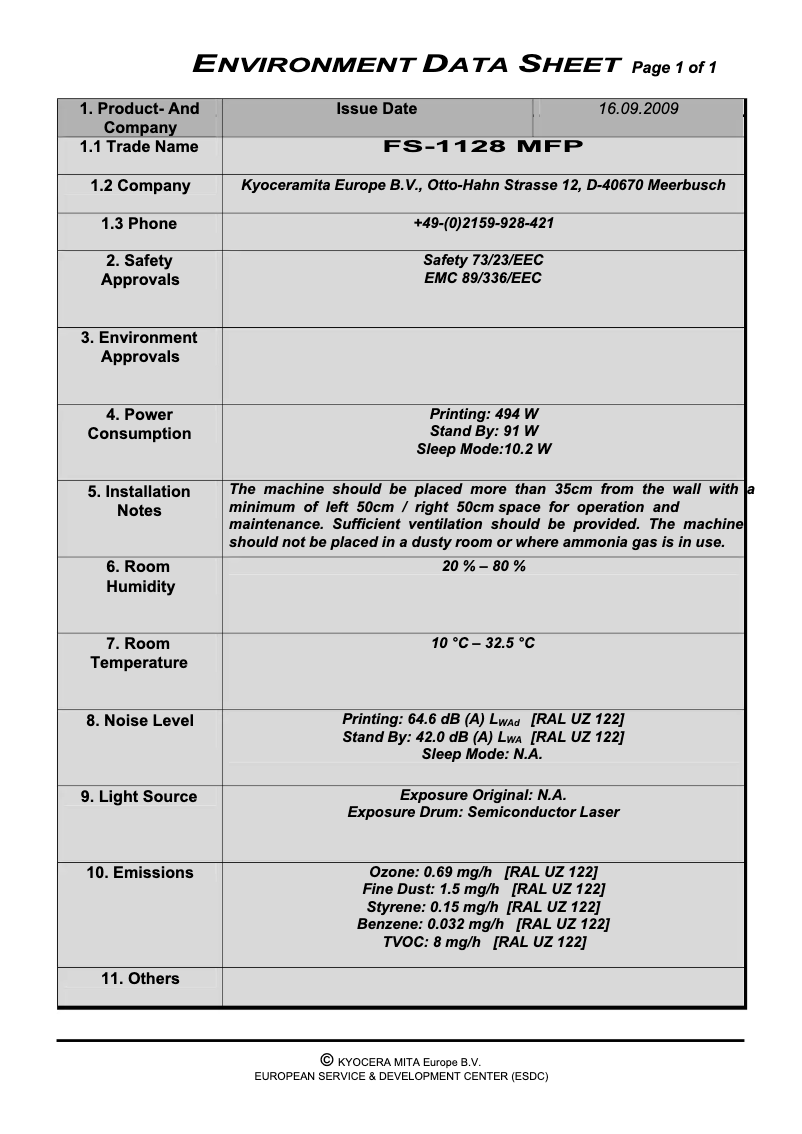
Energy consumption (eco mode)10.2 W
-
Energy consumption (standby mode)91 W
-
Electricity consumption (average operation)494 W
Certificate
-
CertificationTÜV/GS
-
CE
Design
-
Screen-
-
Market positionProfessional
Network
-
Ethernet/LANYes
-
WifiNo
-
Support for network protocols (IPv6)SNMPv3, SSL, IPsec
Sustainability
-
Sustainability certificatesENERGY STAR
Logistics data
-
Harmonized System Code84433100
Frequently Asked Questions
What is the weight of the Kyocera FS-1128MFP?
What is the best method to remove paper jammed in the printer?
Why is my printer not accepting original cartridges?
Why is the quality of my prints poor?
What is the difference between a laser printer and an inkjet printer?
Why is my inkjet printer leaving black streaks?
What does the acronym DPI mean?
What certifications does the Kyocera FS-1128MFP have?
Is the manual for the Kyocera FS-1128MFP available in French?
Similar products


More product categories from brand Kyocera
Phones Kyocera
Other Kyocera
More product types from brand Kyocera


Presentation of product FS-1128MFP specifications from brand Kyocera
General Information
The model Kyocera FS-1128MFP is a multifunction printer from the brand Kyocera, known for its innovations and reliability in the office equipment sector. This model, referenced under the code 1102JN3EU0, is designed to deliver optimal performance, thus facilitating printing, scanning, copying, and faxing tasks. The associated EAN code, 632983012352, allows for unique identification of the product in commerce.
Print Speed
With a maximum resolution of 1200 x 1200 DPI, the Kyocera FS-1128MFP ensures prints of exceptional clarity, suitable for professional needs. It offers a print speed of 28 pages per minute in black and white, allowing for quick processing of large volumes of documents. The time to print the first page is approximately 6 seconds, and a warm-up time of 15 seconds is required before the first use. Thanks to its laser printing technology, it produces precise and high-quality results. The printer also supports color printing, providing vibrant documents that are true to the original colors. Additionally, it features a built-in duplex printing function, contributing to paper savings.
Features
The main print color is black, ensuring a quality visual output. The maximum service cycle reaches 20,000 pages per month, making it suitable for intensive use. It supports multiple page description languages, including PCL 5e, PCL 6, and PCL XL, thus facilitating its integration into various work environments. However, it is worth noting that this device does not offer a digital sending function.
Scanning
The Kyocera FS-1128MFP supports image formats JPG and TIF, ensuring optimal image quality for scanning needs. It also offers the ability to scan in color, producing faithful reproductions of documents. However, it does not support duplex scanning, which may slow down the process for double-sided documents.
Copier
The maximum resolution of copies is 600 x 600 DPI, allowing for professional-quality prints. The time for the first copy is 6.9 seconds, and it is possible to make up to 999 copies at once. The copier also offers resizing from 25 to 400 %, adding flexibility to reproduction tasks, although it does not have an automatic duplex copy function.
Fax
The built-in modem operates at a speed of 33.6 Kbit/s and has a fax memory of 100 pages, facilitating the management of sending and receiving. The transmission speed is 3 seconds per page, ensuring efficiency when sending documents. Fax coding methods include JBIG and MMR, ensuring quality transmission. Note that the device does not support duplex faxing.
Input and Output Capacity
The output capacity is 150 sheets, while the maximum input capacity reaches 800 sheets, allowing for efficient management of large volumes of documents. This feature is essential for high-volume work environments.
Performance and Memory
Equipped with a processor model 440 operating at 667 MHz, the Kyocera FS-1128MFP offers optimal performance. Its internal memory of 256 Mo can be expanded up to 768 Mo, ensuring smooth and efficient use. However, the device is not compatible with Mac operating systems and does not have a built-in memory card reader.
Connectivity
The Kyocera FS-1128MFP is equipped with a standard interface, facilitating connection to various devices. It has a USB 2.0 port for quick connection but lacks wireless connectivity features, which may limit its use in environments where mobility is required.
Weight and Dimensions
With a weight of 15 kg, this printer is designed for easy handling while remaining robust. Its dimensions are 494 x 410 x 366 mm, optimizing the space required for its installation.
Power Consumption
The power consumption in economy mode is 10.2 W, while in standby mode, it is 91 W. Under average operation, the consumption is 494 W, ensuring efficient and energy-saving use.
Certifications and Durability
The Kyocera FS-1128MFP is certified TÜV/GS and CE, ensuring its compliance with safety and performance standards. It is also certified ENERGY STAR, attesting to its energy efficiency and environmental respect.
Logistical Data
The harmonized system code for this product is 84433100, allowing for its identification in international trade.


