
Manual of product FS-7000
Editorial note
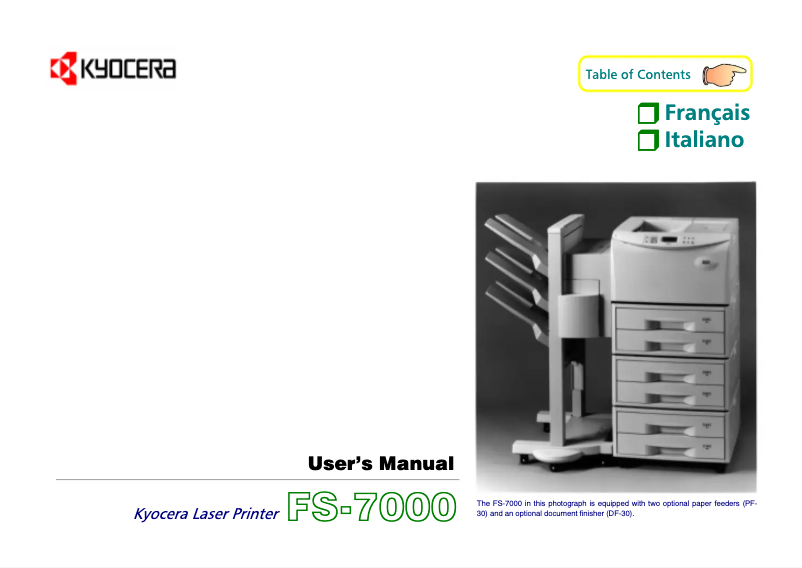
The Kyocera FS-7000 printer stands out for its reliability and print quality. Known for its durability, the Kyocera brand ensures optimal performance, delivering professional results with every use. Thanks to its intuitive features, the user experience is greatly enhanced, making printing accessible to everyone. Additionally, this model is designed to be energy-efficient, thus helping to reduce operating costs and environmental impact. However, it is worth noting that the initial purchase cost is relatively high, which may not suit all budgets. Furthermore, its weight and size can make moving the printer difficult, limiting its flexibility of use in different workspaces. The use of brand-specific toner cartridges can also incur additional long-term costs, especially if the printer is used intensively. Finally, the printing speed may be slower than that of some competing models, and the noise level during printing can be disruptive in shared environments. Overall, the Kyocera FS-7000 is a solid choice for those seeking a high-performing and durable printer, but it is essential to consider the financial and logistical aspects before making a purchase.Score details
User experience
The user experience is enhanced by intuitive features, making printing more accessible for everyone.
Performance
Printing performance is optimal, ensuring professional results, although the printing time may be slower than some competitors.
Value for money
The initial purchase cost is high, which may not suit all budgets, despite the quality and durability of the printer.
Battery life
This model is designed to be energy-efficient, helping to reduce operating costs and environmental impact.
Support
The product comes with a 225-page user manual, providing valuable assistance to maximize its use.
Robustness
The Kyocera brand is known for the durability and performance of its printers, ensuring prolonged use without major issues.
Usability
The weight and size of the printer can make it difficult to move, limiting flexibility of use in different workspaces.
Advantages
Proven reliability and durability
High-quality prints
Intuitive and easy navigation
Energy-efficient and cost-effective
User manual included
Disadvantages
High purchase cost compared to other models
Weight and size make transportation difficult
Specific toner cartridges increase costs
Slower printing speed than some competitors
High noise level during printing
Technical Specifications FS-7000
General Information
-
ModelFS-7000
-
Brand
-
Category
-
Type
-
SKU859923
-
MPN859923
Frequently Asked Questions
What is the recommended method for removing paper jammed in the printer?
Why is my printer not recognizing the original cartridges?
What could be the reasons for poor print quality?
What is the difference between a laser printer and an inkjet printer?
Why does my inkjet printer leave black streaks on prints?
What does the acronym DPI mean?
Is the manual for the Kyocera FS-7000 available in French?
Similar products


More product categories from brand Kyocera
Phones Kyocera
Other Kyocera
More product types from brand Kyocera


Presentation of product FS-7000 specifications from brand Kyocera
General Information
The Kyocera FS-7000 model stands out due to the reputation of the Kyocera brand, known for its commitment to quality and innovation in the printer field. This model is designed to deliver optimal performance, thus ensuring an enhanced user experience.
Advantages
The Kyocera FS-7000 is characterized by several notable strengths:
- Reliability and quality: Known for its durability, this model allows for prolonged use without encountering major issues.
- Optimal performance: It offers high-quality prints, ideal for professional results with every print.
- Improved user experience: Thanks to its intuitive features, using the printer is made more accessible.
- Energy efficiency: This model is designed to be eco-friendly, thus helping to reduce operating costs and environmental impact.
- Technical support: Accompanied by a user manual, it provides valuable assistance to maximize its use.
Disadvantages
However, the Kyocera FS-7000 also has some drawbacks:
- The initial purchase cost can be relatively high compared to other printers, which may not suit all budgets.
- Its size and weight can make the printer difficult to move, limiting its flexibility of use in various work environments.
- The use of specific toner cartridges can incur additional long-term costs, especially if the printer is heavily used.
- The printing speed may be slower than some competitors, which can affect efficiency in a professional setting.
- The noise level during printing can be relatively high, which can be disruptive in open offices or shared spaces.


