

Manuals of product FS-C1020MFP


Editorial note
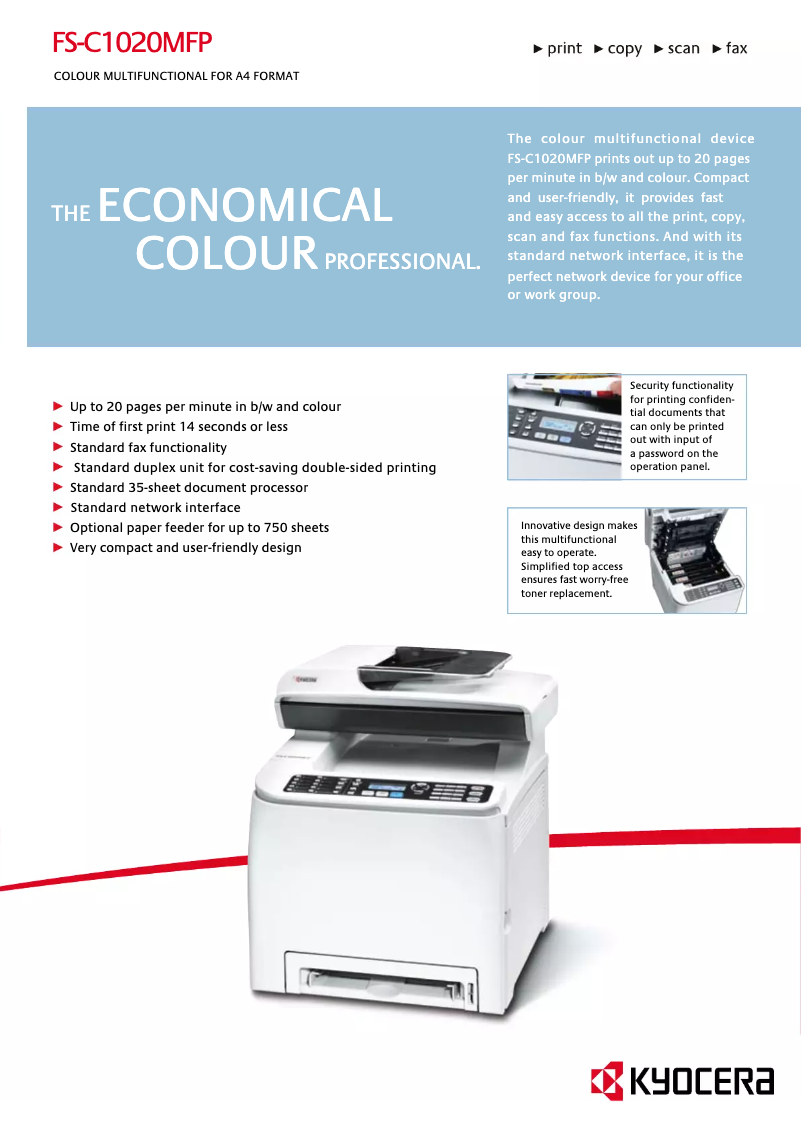
The Kyocera FS-C1020MFP printer stands out for its solid performance and versatility. With a printing speed of 20 pages per minute, both in black and color, it effectively meets daily printing needs in a professional environment. Its laser technology ensures a maximum resolution of 2400 x 600 DPI, providing high-quality prints, essential for professional documents. Additionally, its built-in duplex printing feature helps reduce paper consumption, which is a valuable ecological asset. However, there are a few drawbacks to consider. The lack of compatibility with Mac systems limits its use for some users. Although the printing speed is adequate, it may seem slow compared to newer models, especially in very demanding work environments. Weighing 30 kg makes the device difficult to move, and the output capacity of 150 sheets may prove insufficient for offices with high printing needs. Finally, the internal memory of 128 MB could restrict the handling of large documents, leading to slowdowns. In terms of scoring, the user experience is positive with a score of 78, although the lack of Mac compatibility is a negative point. Performance is rated as good but could be improved, receiving a score of 70. The design, rated at 65, highlights the weight of the device as a limiting factor. Value for money is appreciated with a score of 75, thanks to its input capacity of 500 sheets and practical features. Features, rated at 80, show that the printer effectively meets the varied needs of a modern work environment. Finally, ease of use is rated at 72, emphasizing the intuitiveness of the interface while also highlighting the limitations of the memory. Overall, the Kyocera FS-C1020MFP is a wise choice for professionals looking for a reliable and versatile printer, despite some notable limitations.Score details
User experience
The user experience is positive thanks to well-thought-out features, but the incompatibility with Mac systems can be a drawback for some users.
Performance
Performance is generally good with a print speed of 20 ppm, but may seem slow compared to newer models in very demanding environments.
Design
The weight of 30 kg makes the device difficult to move, which can pose problems during installation or rearranging workspaces.
Value for money
The input capacity of 500 sheets and the duplex printing feature offer good value for money for offices with high printing demands.
Features
The versatility with all-in-one functions, including printing, scanning, and faxing, effectively meets the diverse needs of a modern work environment.
Usability
The interface is intuitive, but the internal memory of 128 MB may limit the handling of large documents, leading to slowdowns.
Advantages
Fast printing: 20 pages per minute
Laser resolution of 2400 x 600 DPI
Double-sided printing for paper savings
Input capacity of 500 sheets
All-in-one functions: printing, scanning, faxing
Disadvantages
Not compatible with Mac systems
Relatively slow printing speed
High weight of 30 kg
Output capacity limited to 150 sheets
Insufficient internal memory of 128 MB
Technical Specifications FS-C1020MFP
General Information
-
ModelFS-C1020MFP
-
Brand
-
Category
-
Type
-
SKU140762
-
MPN140762
Print speed
-
Maximum resolution2400 x 600 DPI
-
Print speed (color, normal quality, A4/US Letter)20 ppm
-
Print speed (color, normal quality, A4/US Letter)20 ppm
-
Copy time for the first page (Black, normal)14 s
-
Copy time for the first page (Black, normal)14 s
-
Preheating time48 s
-
Printing technologyLaser
-
PrintingColor printing
-
Double-sided printingYes
Features
-
Number of print cartridges4
-
Service cycle (Maximum)- pages per month
-
Digital senderNo
Other features
-
Scanning speed5 sec/page
-
Compatible operating systemsWindows 2000/XP/Server, 2003/Vista/Server 2008, Mac OS X Version 10.2.8
-
Network features10/100BaseTX
-
Ready-to-use networkYes
-
Dimensions (LxWxH)420 x 493 x 476 mm
-
EmulationsPostscript 3 ( KPDL3), PCL 6, PCL 5c
-
Power requirementsAC 220 - 240 V, 50/60 Hz
-
All-in-one functionsCopy, Fax, Scan
-
All-in-one color functionsprint, scan
Copier
-
Max. resolution of copies600 x 600 DPI
-
Maximum number of copies99 copies
-
Resizing copy25 - 400 %
-
CopySingle copy
Fax
-
Modem speed33.6 Kbit/s
-
Fax coding methodsMH, MMR (Fax coding method), MR
-
FaxSimple fax
Input and output capacity
-
Total output capacity150 sheets
-
Maximum input capacity500 sheets
-
Total power capacity250 sheets
Representation / realization
-
Processor frequency400 MHz
-
Internal memory128 MB
-
Integrated into the processorYes
-
Sound pressure level (impression)58 dB
-
Sound power level (standby)34 dB
-
Integrated into the processorYes
-
Processor familyARM
Paper management
-
ISO, Format Series A (A0...A9)A4
-
Weight/Grammage of the support, bin 1A5
-
Weight of the multifunctional tray supportA6
-
Maximum ISO A series paper size60–160 g/m²
-
60–105 g/m²
-
A4
Network
-
Ethernet/LANYes
Connectivity
-
Standard interfacesUSB 2.0
-
Quantity of USB 2.0 Ports1
-
USB portYes
Weight and dimensions
-
Weight30000 g
Power
-
Electricity consumption (average operation)1300 W
-
Energy consumption (standby mode)25 W
Digitization
-
DigitizationColor scanning
Design
-
Market positionProfessional
Frequently Asked Questions
What is the weight of the Kyocera FS-C1020MFP printer?
What is the recommended method for removing a jammed paper from the printer?
Why is my printer not recognizing the original cartridges?
What are the reasons if my prints are of poor quality?
What is the difference between a laser printer and an inkjet printer?
Why is my inkjet printer producing black lines on prints?
What does the acronym DPI mean?
How many cartridges can the Kyocera FS-C1020MFP hold?
Is the manual for the Kyocera FS-C1020MFP available in French?
Similar products


More product categories from brand Kyocera
Phones Kyocera
Other Kyocera
More product types from brand Kyocera


Presentation of product FS-C1020MFP specifications from brand Kyocera
General Information
The Kyocera FS-C1020MFP model, from the Kyocera brand, is recognized for its print quality and innovations in the office equipment sector. This model, referenced under the code FS-C1020MFP | 1105JK3NL0, offers an optimized user experience thanks to its reliable performance. The EAN code 0632983015469, 6329830254136, allows for precise identification in distribution systems.
Print Speed
With a maximum resolution of 2400 x 600 DPI, the Kyocera FS-C1020MFP printer produces prints of remarkable clarity, meeting both professional and personal requirements. Its print speed is set at 20 pages per minute (ppm) in black and color, allowing for efficient processing of your daily documents. The first page print time is 14 seconds, for both black and color, ensuring appreciable responsiveness. Additionally, its warm-up time is 48 seconds, ensuring quick availability. The laser printing technology provides precise results, and the built-in duplex printing function contributes to eco-friendly use by reducing paper consumption.
Features
The Kyocera FS-C1020MFP uses four print cartridges to deliver consistent quality. It is designed for an intensive service cycle, although the exact number of pages per month is not specified. Note that it does not have a digital sender, which may limit certain document management features.
Other Features
The scanning speed reaches 5 seconds per page, optimizing the scanning process. This model is compatible with Windows XP, Vista, and 7 operating systems, ensuring smooth integration into Windows environments. The 10/100BaseTX network ensures efficient and fast connectivity, facilitating access to network features. The device dimensions (420 x 493 x 476 mm) allow for practical arrangement in workspaces. It supports multiple emulation modes, including Postscript 3 (KPDL3), PCL 6, and PCL 5c, for extended compatibility. The power requirements are 220-240 V and 50/60 Hz. As an all-in-one device, it offers copy, fax, and scan functions while providing high-quality color prints.
Copier
The maximum copy resolution is 600 x 600 DPI, ensuring high-quality reproductions. The maximum number of copies that can be made is 99, and the copy resizing is adjustable from 25 to 400 %, providing flexibility in use. The copier also allows for vibrant color prints.
Fax
The built-in modem operates at a speed of 33.6 Kbit/s, allowing for fast document transmission. This model uses fax coding methods such as MH, MMR, and MR, ensuring optimal transmission quality.
Input and Output Capacity
The output capacity is 150 sheets, while the maximum input capacity reaches 500 sheets, which is ideal for handling large document volumes. The total feeder can hold up to 250 sheets, ensuring a continuous workflow without interruption.
Representation / Performance
The device's processor operates at a frequency of 400 MHz, influencing the speed of task processing. With an internal memory of 128 MB, the device can store a sufficient volume of data for effective use, although it may encounter limitations when processing heavy documents. This model is not compatible with Mac systems. In terms of sound levels, the sound pressure level during printing is 58 dB, and in standby, it is 34 dB, ensuring relatively quiet operation.
Paper Management
The Kyocera FS-C1020MFP is compatible with ISO A series paper formats, such as A4, A5, and A6. The media weight ranges from 60 to 160 g/m², ensuring optimal print quality. The multifunction tray accepts media from 60 to 105 g/m², ensuring effective paper management.
Network
This model is equipped with Ethernet/LAN connectivity, allowing for easy integration into corporate networks.
Connectivity
The Kyocera FS-C1020MFP offers standard interfaces to ensure optimal connectivity. It has a USB 2.0 port, facilitating quick connections with other devices.
Weight and Dimensions
With a weight of 30 kg, this device is designed for fixed use, although this may complicate its movement during a space reorganization.
Power
The power consumption during operation is 1300 W, ensuring energy efficiency while providing optimal performance. In standby mode, the consumption is reduced to 25 W, contributing to energy savings.
Scanning
The product offers a color scanning function, allowing for faithful reproductions of your documents.
Design
Positioned as a professional device, the Kyocera FS-C1020MFP meets the specific needs of users in a modern office environment.


