

Manual of product FS-C2026MFP/KL3
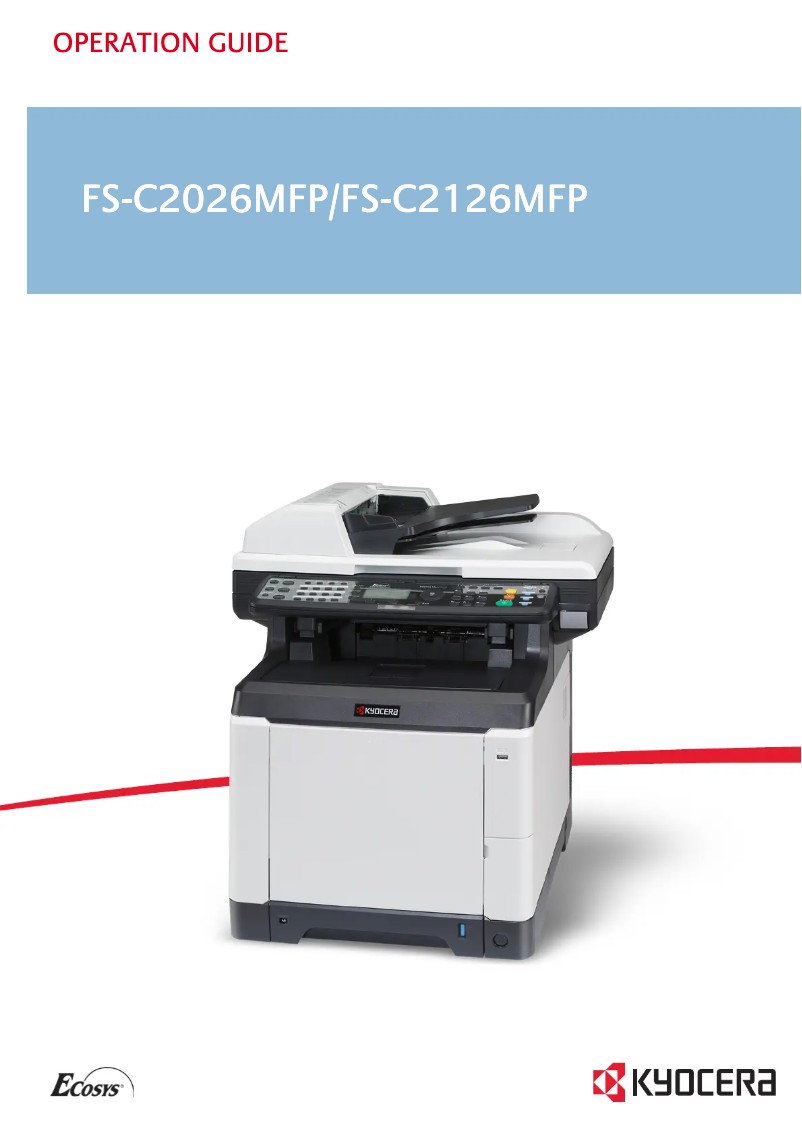
Editorial note
The Kyocera FS-C2026MFP/KL3 printer stands out for its impressive performance, with a printing speed of 26 pages per minute in both black and color. This makes it an ideal choice for demanding work environments where productivity is essential. Its laser printing technology offers a maximum resolution of 9600 x 600 DPI, ensuring high-quality prints with precise details. Additionally, the built-in duplex printing feature helps optimize paper usage, thereby contributing to reduced printing costs. However, some drawbacks deserve to be highlighted. The lack of Wi-Fi connectivity limits wireless printing options, which can be a disadvantage for users wishing to print from multiple mobile devices. Furthermore, the printer does not have duplex scanning functionality, which can make document processing longer and less efficient. Its weight of 36.5 kg also makes moving and installing it more difficult, especially in tight workspaces. Finally, the lack of compatibility with Mac operating systems and the absence of automatic duplex copying may restrict its use. The user experience is generally positive, with an intuitive interface and features tailored to professional needs, although the necessity for manual handling for certain tasks may affect usability. The value for money is satisfactory given the advanced features and high service capacity, but the limitations in connectivity and compatibility may be points to consider when purchasing. In summary, the Kyocera FS-C2026MFP/KL3 is a high-performing printer for offices, offering high print quality and practical features, but it also has limitations that may not suit all users.Score details
User experience
The user experience is overall positive, thanks to an intuitive interface and features tailored to professional needs.
Performance
The performance is excellent with a printing speed of 26 pages per minute, both in black and color, ensuring increased productivity.
Design
The design is compact and professional, well-suited for office environments, but its weight of 36.5 kg can complicate its movement.
Value for money
The value for money is satisfactory due to its advanced features and high service capacity.
Features
Although the printer has interesting features like duplex printing, the lack of Wi-Fi and duplex scanning limits its options.
Usability
The lack of compatibility with Mac systems and the need for manual handling for certain tasks can affect overall usability.
Advantages
Fast printing of 26 pages per minute
Print quality up to 9600 x 600 DPI
Built-in duplex printing
Monthly capacity of 65,000 pages
Compact and professional design
Disadvantages
No Wi-Fi connectivity.
No duplex scanning.
Not compatible with Mac.
High weight of 36.5 kg.
No automatic duplex copies.
Technical Specifications FS-C2026MFP/KL3
General Information
-
ModelFS-C2026MFP/KL3
-
Brand
-
Category
-
Type
-
SKU141198
-
MPN141198
Print speed
-
Maximum resolution9600 x 600 DPI
-
Double-sided printingYes
-
Print speed (color, normal quality, A4/US Letter)26 ppm
-
Print speed (color, normal quality, A4/US Letter)26 ppm
-
Copy time for the first page (color, normal)10.5 s
-
Copy time for the first page (Black, normal)9 s
-
Preheating time29 s
-
Printing technologyLaser
-
Double-sided printingYes
-
PrintingColor printing
-
Double-sided printingYes
Features
-
Number of print cartridges4
-
Languages of the page descriptionMicrosoft XPS, PCL 6, PostScript 3
-
Printing colorsBlack, Cyan, Magenta, Yellow
-
Service cycle (Maximum)65000 pages per month
-
Service cycle (recommended)10000 pages per month
-
Optional featuresFax
-
Digital senderNo
Digitization
-
Maximum scan area216 x 356 mm
-
Gray levels256
-
Supported image formatsJPG, TIF
-
Optical scanning resolution- DPI
-
Scan toE-mail, FTP, OCR, USB
-
DigitizationColor scanning
-
Double-sided scanningYes
Copier
-
Maximum number of copies999 copies
-
Resizing copy25 - 400 %
-
All-in-one function (N=)2, 4
-
Release time of the first print (black, normal)10 s
-
Release time of the first print (color, concept)12 s
-
Max. resolution of copies600 x 600 DPI
-
CopyColor copy
-
Duplex copyYes
Input and output capacity
-
Total output capacity150 sheets
-
Total power capacity250 sheets
-
Input capacity of multi-purpose trays50 sheets
-
Total number of power supply units1
-
Multifunctional trayYes
Representation / realization
-
Processor frequency667 MHz
-
Processor familyPowerPC
-
Internal memory768 MB
-
Integrated into the processorYes
-
Built-in memory card readerNo
-
Sound pressure level (impression)50 dB
-
Sound power level (standby)30 dB
-
Processor model464
-
Integrated into the processorYes
Design
-
Screen-
-
Market positionProfessional
Other features
-
Maximum internal memory1.79 GB
-
Standard average formats140 x 210 mm - 216 x 356 mm
-
Compatible operating systems105 x 148 mm - 216 x 356 mm
-
Network features70 x 138 mm - 216 x 356 mm
-
Power requirementsMac OS X v10.2+
-
Type of power supplyWindows
-
Dimensions (LxWxH)Linux
-
SecurityUnix
-
Supported support weightFast Ethernet
-
Thickness of the support220 - 240V, 50/60Hz
-
Font stylesPower supply
-
All-in-one functions514 x 550 x 580 mm
-
All-in-one color functionsTÜV/GS, CE
-
50 - 120 g/m²
-
0.11 mm
-
Yes
-
Copy, Scan
-
copy, print, scan
Paper management
-
Type of paper tray supportOrdinary paper
-
Maximum print format216 x 356 mm
-
ISO, Format Series A (A0...A9)A4, A5, A6
-
ISO, Formats Series-B (B0...B9)B5
-
Weight/Grammage of the support, bin 160 - 163 g/m²
-
Weight of the multifunctional tray support60 - 220 g/m²
-
Types of multi-purpose binsEnvelopes
-
Photo paper sizes4x6, 5x7 "
-
Non-ISO print support sizesFolio
-
Maximum ISO A series paper sizeA4
Network
-
Email on SSLYes
-
WifiNo
-
Support for network protocols (IPv4)IPsec, IPP, WSD
-
Security-supported algorithmSSL/TLS
-
Management protocolsSNMP v3
-
Email on SSLYes
Connectivity
-
Direct printingYes
-
Quantity of USB 2.0 Ports1
Power
-
Energy consumption (standby mode)79 W
-
Electricity consumption (average operation)466 W
Weight and dimensions
-
Weight36500 g
Sustainability
-
Sustainability certificatesENERGY STAR
Fax
-
FaxNo
Frequently Asked Questions
What is the weight of the Kyocera FS-C2026MFP/KL3 printer?
What is the recommended method for removing paper jammed in the printer?
Why does my printer refuse to accept non-original cartridges?
What could be the reasons for poor print quality?
What is the difference between a laser printer and an inkjet printer?
Why is my inkjet printer producing black streaks on prints?
What does the abbreviation DPI mean?
How many cartridges can be installed in the Kyocera FS-C2026MFP/KL3?
Is the user manual for the Kyocera FS-C2026MFP/KL3 available in French?
Similar products


More product categories from brand Kyocera
Phones Kyocera
Other Kyocera
More product types from brand Kyocera


Presentation of product FS-C2026MFP/KL3 specifications from brand Kyocera
General Information
The printer Kyocera FS-C2026MFP/KL3 is a model from the renowned brand Kyocera, known for its innovation and quality in the home appliance sector. This model, identifiable by the code FS-C2026MFP/KL3 | 870B61102KW3NL0, offers optimal performance for varied use. The EAN code, 632983931578, allows for unique identification in distribution systems.
Print Speed
This printer offers a maximum resolution of 9600 x 600 DPI, ensuring prints of great clarity, suitable for professional or personal needs. Its print speed reaches 26 pages per minute in both black and color, which is ideal for demanding work environments. Additionally, a laser printing system ensures precise and high-quality results. The first page copy times are 9 seconds for black prints and 10.5 seconds for color prints, with a warm-up time of 29 seconds. The printer also includes a duplex printing feature, contributing to more efficient paper use.
Features
The model Kyocera FS-C2026MFP/KL3 is equipped with four print cartridges and supports several page description languages such as Microsoft XPS, PCL 6, and PostScript 3. It is capable of printing in vivid colors thanks to its black, cyan, magenta, and yellow cartridges. With a maximum service cycle of 65,000 pages per month and a recommended cycle of 10,000 pages, this printer is designed for intensive use. It also offers options such as faxing, but does not have a digital sender.
Scanning
The maximum scan area is 216 x 356 mm, allowing for the processing of large documents. Scanning can be done in color and supports image formats such as JPG and TIF. Although the printer does not offer duplex scanning, it provides several scanning modes, including Email, FTP, OCR, and USB.
Copier
The built-in copier allows for up to 999 copies with a resizing of 25 to 400 %. However, it does not support duplex copies, which may lead to paper waste. The first print output times are 10 seconds in black and 12 seconds in color, with a maximum resolution of 600 x 600 DPI for copies.
Input and Output Capacity
The printer's output capacity is 150 sheets, while the feed capacity can reach 250 sheets. The multifunction tray allows for flexible input with a capacity of 50 sheets, thus meeting various printing needs.
Representation / Performance
The printer's processor operates at a frequency of 667 MHz with an internal memory of 768 MB, ensuring smooth performance. This model is not compatible with Mac operating systems and does not have a built-in memory card reader. The sound pressure level during operation is 50 dB, ensuring a quiet working environment.
Design
Designed for professional use, the Kyocera FS-C2026MFP/KL3 features a compact design that easily fits into various office spaces.
Other Features
With a maximum internal memory of 1.79 GB, this device is compatible with Windows XP, Vista, and 7 operating systems. Its network connectivity is provided by Fast Ethernet, but it does not have Wi-Fi functionality. The power requirements are 220 - 240V, 50/60Hz, and its dimensions are 514 x 550 x 580 mm. The weight of the printer is 36.5 kg, which may complicate its movement.
Durability
The Kyocera FS-C2026MFP/KL3 is ENERGY STAR certified, attesting to its energy efficiency and environmental respect.
Fax
This printer does not have fax functionality, which may limit certain communication options for users.


