

Manuals of product FS-C5025N




Editorial note
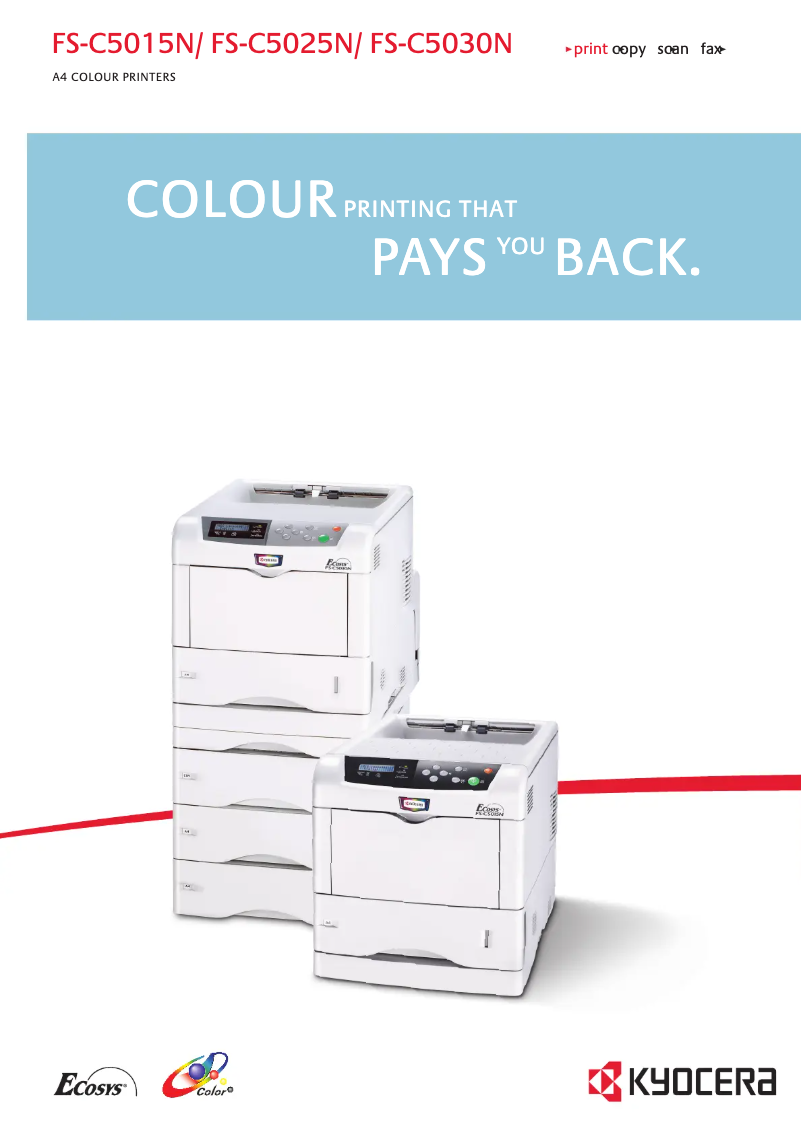
The Kyocera FS-C5025N printer stands out for several advantageous features that make it an interesting choice for demanding work environments. Its printing speed of 20 pages per minute, both in black and color, as well as its print resolution of 600 x 600 DPI ensure quality results, suitable for professional needs. Additionally, its maximum input capacity of 2100 sheets allows for handling a large volume of documents without frequent interruptions, which is an undeniable asset. In terms of energy efficiency, the reduced power consumption of 36 W in standby mode contributes to energy savings while promoting a more environmentally friendly use. Furthermore, the TÜV/GS and ISO 9001 certification ensures that the product meets safety and quality standards, thereby enhancing its credibility in the market. However, the printer also has some drawbacks. Its weight of 25 kg can make it difficult to move, which may pose a problem in offices where flexibility is essential. The printing speed, while adequate, may seem slow compared to some competing models, limiting its effectiveness for heavy use. Additionally, the warm-up time of 68 seconds can be a hindrance for those seeking quick and immediate printing. Finally, although the internal memory of 128 MB is sufficient for standard printing tasks, it may seem inadequate for users with more complex needs. Similarly, the total paper capacity of 500 sheets could require frequent reloading for high-volume printing offices. In summary, the Kyocera FS-C5025N is a high-performing and efficient printer, but it could be improved by reducing its weight and increasing its printing speed to fully meet the expectations of the most demanding users.Score details
User experience
The user experience is acceptable, but the weight of 25 kg can make the printer difficult to move in an office environment.
Performance
The printing speed of 20 ppm is acceptable, but it may seem slow compared to some competing models that offer better performance for heavy use.
Battery life
The power consumption in standby mode is reduced to 36 W, which contributes to energy savings and a more environmentally friendly use.
Features
The maximum input capacity of 2100 sheets and the print resolution of 600 x 600 DPI are major assets, ensuring efficient use and quality prints.
Design
The TÜV/GS and ISO 9001 certification ensures that the product meets safety and quality standards, although the design may appear a bit bulky due to its weight.
Usability
The warm-up time of 68 seconds can be a drawback for users looking for quick and immediate printing, thus limiting its effectiveness in certain scenarios.
Advantages
Print speed of 20 ppm in color
Input capacity of 2100 sheets
Print resolution of 600 x 600 DPI
Low power consumption in standby
TÜV/GS and ISO 9001 certified
Disadvantages
Weight of 25 kg, difficult to move
Print speed of 20 ppm slow
Preheating time of 68 seconds
Internal memory of 128 MB limited
Paper capacity of 500 sheets low
Technical Specifications FS-C5025N
General Information
-
ModelFS-C5025N
-
Brand
-
Category
-
Type
-
SKU1340135
-
MPN1340135
Other features
-
I/O PortsUSB
-
Standard average formatsA4, B5, A 5, Letter, Custom (148 x 210 – 216 x 356 mm
-
Power requirementsAC 220 ~ 240 V, 50/60 Hz
-
Electricity consumption in operation443 W
Representation / realization
-
Internal memory128 MB
-
Processor modelPowerPC 750CXr
-
Processor frequency500 MHz
-
Sound power level (standby)36 dB
-
Sound pressure level (impression)52 dB
-
Integrated into the processorYes
Print speed
-
ColorYes
-
Print speed (color, normal quality, A4/US Letter)20 ppm
-
Maximum resolution600 x 600 DPI
-
Preheating time68 s
-
Print speed (color, normal quality, A4/US Letter)20 ppm
-
Copy time for the first page (Black, normal)13 s
-
Copy time for the first page (Black, normal)13 s
Input and output capacity
-
Maximum input capacity2100 sheets
-
Total power capacity500 sheets
-
Total output capacity250 sheets
Weight and dimensions
-
Dimensions (LxWxH)345 x 470 x 385 mm
-
Weight25000 g
Features
-
Service cycle (Maximum)85000 pages per month
Power
-
Energy consumption (standby mode)36 W
Design
-
CertificationTÜV/GS, CE
-
This product is manufactured according to ISO 9001 quality standard and ISO 14001 environmental standard.
Frequently Asked Questions
What is the weight of the Kyocera FS-C5025N printer?
What is the recommended method for removing paper jammed in the printer?
Why is my printer not recognizing original cartridges?
What could be the reasons for poor print quality?
How does a laser printer differ from an inkjet printer?
Why does my inkjet printer leave black streaks on prints?
What does DPI mean?
What certifications does the Kyocera FS-C5025N have?
Is the manual for the Kyocera FS-C5025N available in French?
Similar products


More product categories from brand Kyocera
Phones Kyocera
Other Kyocera
More product types from brand Kyocera


Presentation of product FS-C5025N specifications from brand Kyocera
General Information
The Kyocera FS-C5025N printer is a model from the Kyocera brand, known for its commitment to quality and innovation in the office equipment sector. This model, designated as the FS-C5025N, ensures reliable performance and a satisfactory user experience. The associated EAN code, 0632983008911, allows for unique identification in distribution systems.
Connectivity and Technical Specifications
The input/output port of the Kyocera FS-C5025N printer includes a USB connection, offering flexibility in connectivity options. Supported paper formats include A4, B5, A5, Letter, and custom dimensions ranging from 148 x 210 to 216 x 356 mm, making it a suitable choice for various printing applications. In terms of power supply, the printer operates on a voltage of 220 to 240 V with a frequency of 50/60 Hz, and consumes 443 W during operation, allowing for an assessment of its energy efficiency.
Performance and Acoustics
Equipped with 128 MB of internal memory, the Kyocera FS-C5025N is designed to efficiently handle common printing tasks. Its PowerPC 750CXr processor, operating at a frequency of 500 MHz, ensures rapid execution of instructions. In terms of noise, the sound level in standby is 36 dB, while the sound pressure level in print mode reaches 52 dB, ensuring relatively quiet operation, ideal for work environments.
Print Speed
This printer is capable of color printing, offering a print speed of 20 pages per minute (ppm) in both black and color, making it efficient for daily use. Its maximum resolution of 600 x 600 DPI ensures high-quality prints, meeting professional and personal needs. The warm-up time is 68 seconds, and the first page copy delay, both in color and black, is 13 seconds.
Input and Output Capabilities
The maximum input capacity of the printer is 2100 sheets, allowing for the management of large volumes of documents without interruption. Additionally, the total feed capacity is 500 sheets, while the output capacity reaches 250 sheets, ensuring smooth performance for all your printing needs.
Dimensions and Weight
The dimensions of the Kyocera FS-C5025N printer are 345 x 470 x 385 mm, allowing for easy integration into various workspaces. Its weight is 25 kg, which may make it more difficult to move, especially in environments where flexibility is essential.
Additional Features
The maximum duty cycle of the printer is 85,000 pages per month, making it a robust choice for users with high printing needs. In standby mode, the power consumption is 36 W, contributing to a more environmentally friendly use. The TÜV/GS and ISO 9001 certification ensures that the product meets the highest safety and quality standards.


