

Manual of product FS-C5250DN/KL3
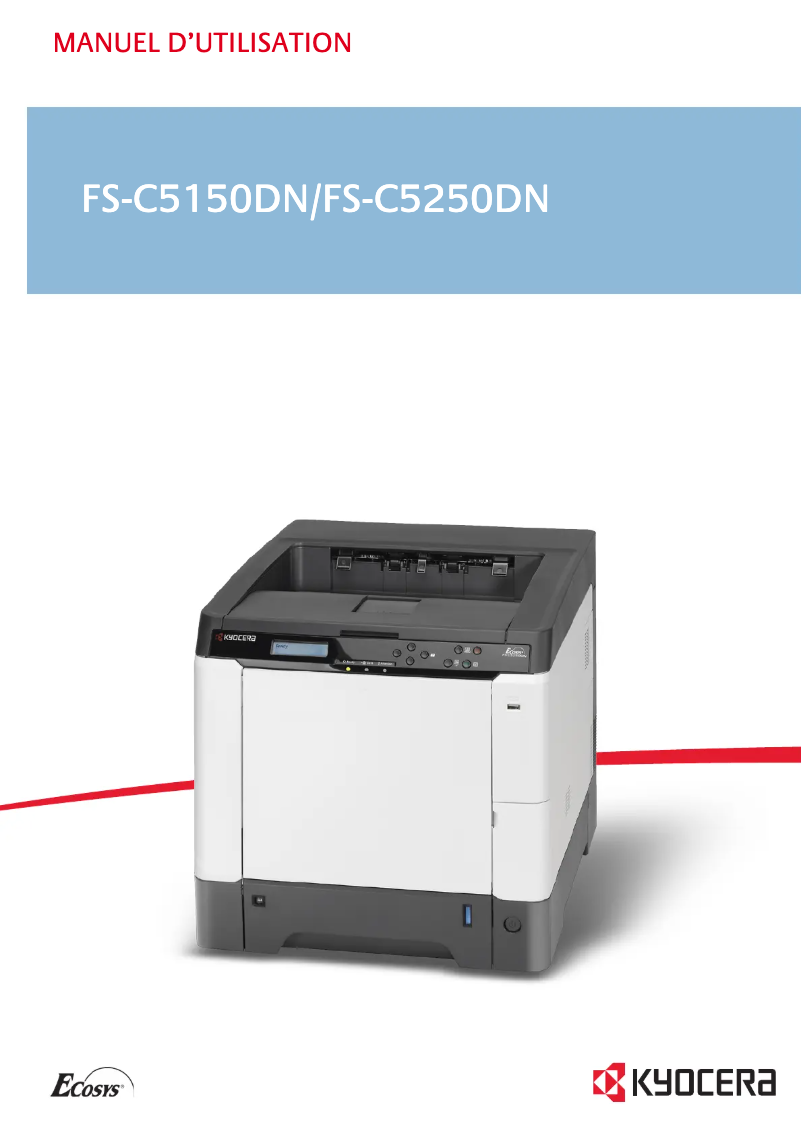
Editorial note
The Kyocera FS-C5250DN/KL3 printer stands out for its solid performance, offering a printing speed of 26 pages per minute in both black and color. Its maximum resolution of 9600 x 600 DPI ensures prints of exceptional clarity, making it ideal for professional documents and visual materials. Additionally, the duplex printing feature not only saves paper but also reduces printing costs while being environmentally friendly. Its 500-sheet paper capacity makes it easy to manage large volumes of documents without requiring frequent refills. However, the printer has some drawbacks. It is not compatible with Mac operating systems, which limits its use for some users. Its power consumption in printing mode, reaching 428 W, can lead to significant energy costs over time. Although the paper capacity is appreciated, it may prove insufficient in very busy work environments, requiring more refills. Furthermore, with a weight of 30.2 kg, the printer can be difficult to move, posing challenges during installation or workspace reorganization. Finally, the 29-second warm-up time may be perceived as long, impacting efficiency during quick prints. In summary, the Kyocera FS-C5250DN/KL3 is a good choice for those looking for a fast and quality printer, but it is important to consider its limitations in terms of compatibility and energy consumption.Score details
User experience
The user experience is generally positive thanks to an intuitive interface and features such as double-sided printing, but the lack of compatibility with Mac systems can be a drawback for some users.
Performance
The performance is excellent with a printing speed of 26 ppm and a resolution of 9600 x 600 DPI, although the 29-second warm-up time may affect efficiency during quick prints.
Battery life
The power consumption in printing mode is relatively high at 428 W, which can lead to significant energy costs for regular use.
Design
The design is functional, but the weight of 30.2 kg makes the printer difficult to move, which can pose problems during installation or workspace reorganization.
Value for money
The 500-sheet paper capacity is appreciated for document management, but may be insufficient in very busy work environments, requiring frequent reloads.
Advantages
Fast printing at 26 pages per minute
Resolution of 9600 x 600 DPI
Double-sided printing to save paper
500-sheet paper capacity
Laser technology for optimal quality
Disadvantages
Not compatible with Mac
High power consumption (428 W)
Insufficient capacity of 500 sheets
Heavy weight (30.2 kg)
Preheating time of 29 seconds
Technical Specifications FS-C5250DN/KL3
General Information
-
ModelFS-C5250DN/KL3
-
Brand
-
Category
-
Type
-
SKU21091
-
MPN21091
Print speed
-
Double-sided printingYes
-
Maximum resolution9600 x 600 DPI
-
Double-sided printingYes
-
Print speed (color, normal quality, A4/US Letter)26 ppm
-
Preheating time29 s
-
Print speed (color, normal quality, A4/US Letter)26 ppm
-
Copy time for the first page (color, normal)10.5 s
-
Copy time for the first page (Black, normal)9 s
-
Double-sided printingYes
-
Printing technologyLaser
Representation / realization
-
Processor frequency667 MHz
-
Processor model464
-
Internal memory256 MB
-
Type of memoryDDR2
-
Maximum internal memory1250 MB
-
Sound power level (standby)30 dB
-
Sound pressure level (impression)50 dB
-
Processor familyPowerPC
-
Integrated into the processorYes
Other features
-
Toner cartridgeTK-590C
-
Standard average formatsTK-590M
-
Network featuresTK-590Y
-
Included fontsTK-590K
-
Compatible operating systems
-
Type of power supply140 x 210 mm - 216 x 356 mm
-
Power requirements105 x 148 mm - 216 x 356 mm
-
Security70 x 138 mm - 216 x 356 mm
-
Included fonts
-
Compliance with industry standardsFast Ethernet
-
EmulationsYes
-
Included fonts
-
Thickness of the supportMac OS X v10.2+
-
Windows
-
Linux
-
Unix
-
-
Sector
-
-
220 - 240V, 50/60Hz
-
-
GS, TÜV, CE
-
Yes
-
-
IEEE 802.3, IEEE 802.3u
-
-
PCL 6 (5c, XL), KPDL 3 (PostScript 3), XPS, PDF
-
Yes
-
-
0.11 mm
Features
-
Number of print cartridges4
-
Printing colorsBlack, Cyan, Magenta, Yellow
-
Service cycle (Maximum)65000 pages per month
-
Service cycle (recommended)10000 pages per month
Input and output capacity
-
Total power capacity500 sheets
-
Input capacity of multi-purpose trays50 sheets
-
Total output capacity250 sheets
-
Multifunctional trayYes
Paper management
-
ISO, Format Series A (A0...A9)A4
-
ISO, Formats Series-B (B0...B9)A5
-
Type of paper tray supportA6
-
Maximum print formatB5
-
Weight/Grammage of the support, bin 1B6
-
Weight of the multifunctional tray supportPlain paper
-
Non-ISO print support sizes216 x 356 mm
-
Maximum ISO A series paper size60 - 163 g/m²
-
60 - 220 g/m²
-
Letter
-
A4
Connectivity
-
Direct printingYes
Network
-
Ready-to-use network-
-
Ethernet/LANYes
-
Management protocolsSNMP
-
WifiNo
-
Wiring technology10/100Base-T(X)
-
LAN Ethernet: data transfer rate10, 100 Mbit/s
Power
-
Energy consumption (standby mode)58 W
-
Average power consumption in Print mode428 W
Weight and dimensions
-
Dimensions (LxWxH)390 x 523 x 397 mm
-
Weight30200 g
Design
-
Screen-
Frequently Asked Questions
What is the weight of the Kyocera FS-C5250DN/KL3 printer?
What is the recommended method for removing a jammed paper from the printer?
Why is my printer not recognizing the original cartridges?
What are the possible reasons for poor print quality?
How does a laser printer differ from an inkjet printer?
Why is my inkjet printer printing black streaks?
What does the acronym DPI mean?
How many cartridges can be installed in the Kyocera FS-C5250DN/KL3?
Is the manual for the Kyocera FS-C5250DN/KL3 available in French?
Similar products


More product categories from brand Kyocera
Phones Kyocera
Other Kyocera
More product types from brand Kyocera


Presentation of product FS-C5250DN/KL3 specifications from brand Kyocera
General Information
The model Kyocera FS-C5250DN/KL3, manufactured by the brand Kyocera, is known for its reliability and efficiency in the printing field. This model, identified by the code EAN 5711045965852, offers remarkable performance and an optimized user experience.
Print Speed
This printer is capable of printing in color, with a maximum resolution of 9600 x 600 DPI, ensuring results of great clarity. Its print speed reaches 26 pages per minute, for both black and color prints, making it perfectly suited for demanding work environments. Additionally, it features a duplex printing function, allowing for paper savings and reduced printing costs. The warm-up time is 29 seconds, and the first page copy delay is 9 seconds for black prints and 10.5 seconds for color prints.
Representation / Performance
The processor of the printer operates at a frequency of 667 MHz, with a processor model 464. It is paired with an internal memory of 256 MB, expandable up to 1250 MB, allowing for smooth management of printing tasks. In terms of noise pollution, the standby power level is 30 dB, while the sound pressure level during printing is 50 dB, making the device discreet during use.
Other Features
The toner cartridges compatible with the Kyocera FS-C5250DN/KL3 include the models TK-590C, TK-590M, TK-590Y, TK-590K, essential for ensuring optimal print quality. The device supports various paper sizes, ranging from 140 x 210 mm to 216 x 356 mm, and has a total paper feed capacity of 500 sheets. Connectivity is ensured by Fast Ethernet features, while it is not compatible with Mac systems.
Specifications
The maximum service cycle is 65,000 pages per month, with a recommended cycle of 10,000 pages per month, making it an ideal choice for users with frequent printing needs. The printer uses four cartridges for black, cyan, magenta, and yellow, ensuring faithful color reproduction.
Input and Output Capacity
Its input capacity for multi-purpose trays is 50 sheets and the total output capacity is 250 sheets, allowing for efficient management of printed documents. It is also equipped with a multifunction tray for versatile use.
Paper Management
The Kyocera FS-C5250DN/KL3 supports standard formats such as A4, A5 as well as B series formats like B5. The supported paper weight ranges from 60 to 220 g/m², ensuring compatibility with different types of printing media.
Connectivity
This printer offers a direct printing feature, allowing quick access to print tasks directly from your devices.
Network
The Kyocera FS-C5250DN/KL3 is equipped with Ethernet/LAN connectivity, facilitating operations in a local network environment. Its management protocol includes SNMP for effective administration of connected devices.
Power
In standby mode, the power consumption is 58 W, while the consumption in print mode reaches 428 W, a factor to consider for users concerned about their energy consumption.
Weight and Dimensions
With dimensions of 390 x 523 x 397 mm and a weight of 30.2 kg, this printer is robust but may be difficult to move, an aspect to consider during installation.
Design
The design of the Kyocera FS-C5250DN/KL3 is intended to easily integrate into an office environment while offering an intuitive user interface for simplified use.


