

Manuals of product FS-C5400DN
Editorial note
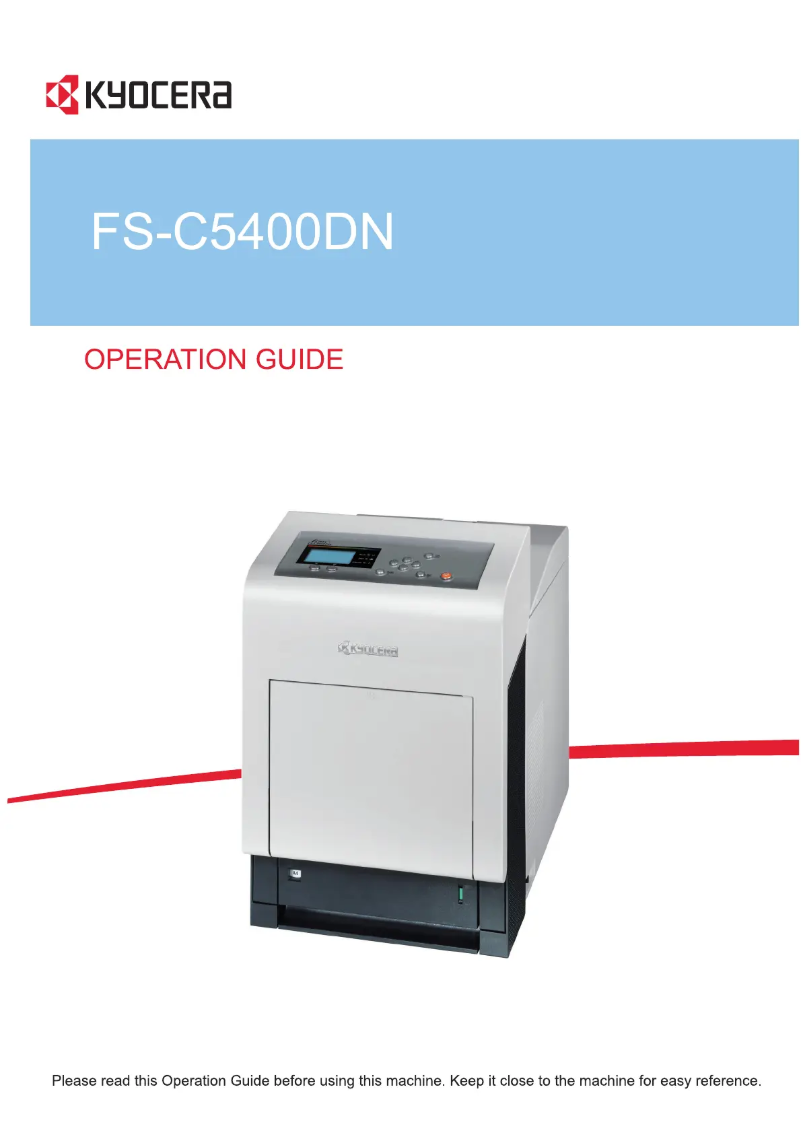
The Kyocera FS-C5400DN printer stands out for its high printing speed, reaching 35 pages per minute, both in black and color. Its maximum resolution of 9600 x 600 DPI ensures sharp and precise prints, ideal for professional documents. Additionally, the duplex printing feature helps optimize resource use and reduce paper waste. With a feed and output capacity of 500 sheets, it is well-suited to handle a large volume of documents without requiring frequent reloads. Its economy mode, consuming only 10 W, also contributes to reducing operating costs. However, this device has some drawbacks. First, it is not compatible with Mac operating systems, which may limit its use for some users. Its weight of 35 kg can complicate its movement and installation, especially in tight spaces. Furthermore, although the printing speed is satisfactory, the 60-second warm-up time can slow down workflow, particularly in high-demand environments. Finally, the 500-sheet capacity may prove insufficient for offices with very high printing needs, leading to frequent reloads. In terms of performance, the Kyocera FS-C5400DN receives positive scores, particularly for energy consumption in economy mode, which is a major advantage. Its design, while functional, could benefit from improvements in mobility. Overall, this printer represents good value for money for users with regular printing needs, but it may not be suitable for demanding environments due to some of its limitations.Score details
User experience
The user experience is generally positive, thanks to the duplex printing feature and an intuitive interface. However, the lack of compatibility with Mac systems may limit its use.
Performance
The printing speed of 35 ppm and the resolution of 9600 x 600 DPI ensure solid performance for quality prints. However, the 60-second warm-up time may hinder workflow.
Battery life
The energy consumption in economy mode of only 10 W is a major asset, allowing for reduced operating costs while maintaining optimal performance.
Design
The design is functional, but the weight of 35 kg can make moving and installing it difficult, especially in tight spaces.
Value for money
For a product in this category, the print quality and input and output capacity of 500 sheets justify the price, although high-volume users may find this insufficient.
Robustness
The printer is robust and designed for heavy use, but its weight and noise level of 52.1 dB may pose problems in environments requiring quiet and mobility.
Advantages
Fast printing: 35 pages per minute
Print quality: 9600 x 600 DPI
Built-in duplex printing
Paper capacity: 500 sheets
Energy-saving mode: only 10 W
Disadvantages
Not compatible with Mac systems
Heavy weight, difficult to move
Preheating time of 60 seconds
Paper capacity limited to 500 sheets
Noise level of 52.1 dB
Technical Specifications FS-C5400DN
General Information
-
ModelFS-C5400DN
-
Brand
-
Category
-
Type
-
SKU55152
-
MPN55152
Print speed
-
Double-sided printingYes
-
Maximum resolution9600 x 600 DPI
-
Print speed (color, normal quality, A4/US Letter)35 ppm
-
Preheating time60 s
-
Print speed (color, normal quality, A4/US Letter)35 ppm
-
Copy time for the first page (color, normal)9 s
-
Copy time for the first page (Black, normal)8 s
-
Printing technologyLaser
-
Double-sided printingYes
Representation / realization
-
Processor frequency733 MHz
-
Internal memory256 MB
-
Maximum internal memory1280 MB
-
Sound power level (standby)36, 36.1 dB
-
Sound pressure level (impression)52.1, 55 dB
Input and output capacity
-
Total power capacity500 sheets
-
Total power capacity500 sheets
Paper management
-
ISO, Format Series A (A0...A9)A4
-
ISO, Formats Series-B (B0...B9)A5
-
Non-ISO print support sizesA6
-
Maximum print formatB5
-
Type of paper tray supportB6
-
Weight of paper tray supportLetter
-
Maximum ISO A series paper size216 x 297 mm
-
Envelopes, Plain paper, Recycled paper
-
60 - 220 g/m²
-
A4
Network
-
Mobile printing technologies-
-
Ready-to-use networkNo
-
WifiYes
-
WifiYes
Other features
-
Mac CompatibilityYes
-
Compatible operating systemsMac OS X 10.2, UNIX, LINUX
-
EmulationsPCL 6, PCL 5c, KPDL3, PDF, XPS
Weight and dimensions
-
Weight35000 g
-
Width345 mm
-
Depth518 mm
-
Height510 mm
Power
-
Energy consumption (eco mode)10 W
-
Energy consumption (standby mode)91 W
-
Average power consumption in Print mode608 W
-
AC input voltage220 - 240 V
-
AC input frequency50 - 60 Hz
Design
-
CertificationGS, TÜV, CE
-
ScreenLCD
-
Product colorGray
-
Built-in screenYes
Features
-
Number of print cartridges-
-
Service cycle (Maximum)150,000 pages per month
Connectivity
-
Standard interfacesUSB 2.0
-
Quantity of USB 2.0 Ports1
Sustainability
-
Sustainability certificatesENERGY STAR
Frequently Asked Questions
What is the weight of the Kyocera FS-C5400DN?
How can we remove the paper that is jammed in the printer?
Why does my printer not recognize the original cartridges?
Why is the quality of my prints poor?
What are the differences between a laser printer and an inkjet printer?
Why does my inkjet printer leave black streaks?
What does the acronym DPI mean?
What certifications does the Kyocera FS-C5400DN have?
How many cartridges can be installed in the Kyocera FS-C5400DN?
What is the height of the Kyocera FS-C5400DN?
What is the width of the Kyocera FS-C5400DN?
What is the depth of the Kyocera FS-C5400DN?
Is the manual for the Kyocera FS-C5400DN available in French?
Similar products


More product categories from brand Kyocera
Phones Kyocera
Other Kyocera
More product types from brand Kyocera


Presentation of product FS-C5400DN specifications from brand Kyocera
General Information
The Kyocera FS-C5400DN model is a device from the Kyocera brand, known for its commitment to quality and innovation in the office equipment sector. This model, identified by the code FS-C5400DN | 1102HG3EU0, is designed to provide an optimal user experience with high performance. Its EAN code, which ensures unique identification, is 4054317107804, 632983012253, 6329830122534, 0632983012253.
Print Speed
The Kyocera FS-C5400DN is a color printer, offering an impressive resolution of 9600 x 600 DPI for exceptionally clear prints. Its print speed reaches 35 pages per minute (ppm) in both black and color, allowing for efficient output for various tasks. The warm-up time is 60 seconds, and the first page copy delay is 9 seconds for color prints and 8 seconds for black prints. Thanks to its laser printing technology, this printer ensures precise and high-quality results. Additionally, it is equipped with a duplex printing feature, contributing to more economical paper usage.
Performance / Execution
Equipped with a processor running at 733 MHz, the Kyocera FS-C5400DN ensures rapid task execution. Its internal memory of 256 MB is expandable up to 1280 MB, providing the necessary capacity for efficient operation. The noise level in standby is 36.1 dB, ensuring a quiet work environment, while the sound pressure level during printing reaches 52.1 dB, which may be perceived as disruptive in spaces requiring a quiet ambiance.
Input and Output Capacity
This printer has a feed and output capacity of 500 sheets, allowing it to handle a considerable volume of documents without frequent interruptions. This feature is ideal for offices with regular printing needs.
Paper Management
The Kyocera FS-C5400DN is compatible with various paper formats, including A series (A4, A5, A6) and B series (B5, B6), as well as Letter size. Its maximum print size is 216 x 297 mm, suitable for large documents. It supports a variety of media types, including recycled paper and envelopes, with a paper weight ranging from 60 to 220 g/m².
Network
In terms of connectivity, the Kyocera FS-C5400DN does not come with a ready-to-use network, but it includes Ethernet/LAN interfaces and Wi-Fi connectivity, allowing for effective wireless connection. Additionally, it supports several mobile printing technologies, facilitating printing from mobile devices.
Other Features
This product is not compatible with Mac operating systems, but it operates optimally with Windows XP, Vista, and 7. The emulation mode supports several formats, including PCL 6, PCL 5c, KPDL3, PDF, and XPS, ensuring broad compatibility with printing systems.
Weight and Dimensions
The Kyocera FS-C5400DN weighs 35 kg, which may complicate its transport and installation. Its dimensions are 345 mm in width, 518 mm in depth, and 510 mm in height, facilitating its integration into suitable workspaces.
Power
In terms of energy efficiency, the consumption in economy mode is 10 W, while in standby mode, it is 91 W. During printing, the average power consumption reaches 608 W. This model is compatible with an AC input voltage of 220 to 240 V and a frequency of 50 to 60 Hz, ensuring its integration into most electrical environments.
Design
The Kyocera FS-C5400DN is certified by GS, TÜV, and CE standards, attesting to its compliance with safety and performance standards. It is equipped with an LCD screen, providing an intuitive user interface. Its gray color gives it a modern and professional aesthetic.
Features
The maximum service cycle of the device is 150000 pages per month, making it suitable for high-demand environments. It is designed to operate with a single print cartridge.
Connectivity
The Kyocera FS-C5400DN features standard interfaces for optimal connectivity, including a USB 2.0 port for quick connection to various devices.
Durability
Finally, this model is ENERGY STAR certified, ensuring that it meets high standards for energy efficiency and environmental sustainability.


