

Manuals of product FS-C8650DN
Editorial note
The Kyocera FS-C8650DN printer stands out for its impressive performance, offering a printing speed of 55 pages per minute in black and 25 pages per minute in color, making it an ideal choice for demanding work environments. Its maximum resolution of 9600 x 600 DPI ensures prints of exceptional clarity, perfectly meeting professional and personal needs. Additionally, the built-in duplex printing feature helps optimize resource use, contributing to paper savings. However, it is important to note some drawbacks. The weight of 111 kg complicates transport and installation, often requiring assistance. The lack of Wi-Fi connectivity limits usage flexibility, forcing users to connect via Ethernet/LAN. Furthermore, the power consumption in printing mode of 1210 W can lead to high electricity costs, especially with intensive use. Regarding user experience, it is generally positive thanks to an intuitive interface and practical features. Nevertheless, the provided documentation, while comprehensive, could be better organized to facilitate access to information. In terms of value for money, although the initial cost may seem high, the printer's features and performance justify this investment for businesses with significant printing needs. In summary, the Kyocera FS-C8650DN is a high-performing printer with robust features, but its weight and energy consumption are factors to consider before purchase.Score details
User experience
The user experience is positive, thanks to an intuitive interface and features such as double-sided printing that optimize resource use.
Performance
With a printing speed of 55 ppm in black and 25 ppm in color, as well as a resolution of 9600 x 600 DPI, the printer's performance is excellent, ideal for demanding work environments.
Battery life
The power consumption in printing mode of 1210 W can lead to high costs, although the sleep mode helps reduce consumption.
Design
The design is functional, but the weight of 111 kg can complicate its transport and installation.
Features
Features such as out-of-the-box network connectivity and a high paper capacity of 7650 sheets are major assets, although the lack of Wi-Fi limits flexibility.
Value for money
The initial cost may be high, but the features and performance justify this investment for companies with significant printing needs.
Support
The provided documentation, while comprehensive, could benefit from a more intuitive organization to facilitate access to information.
Advantages
Fast print speed: 55 ppm in black
High-quality printing: 9600 x 600 DPI
Built-in duplex function for savings
Easy-to-integrate Ethernet network connectivity
Paper capacity: up to 7650 sheets
Disadvantages
High weight complicates transport.
No Wi-Fi connectivity available.
High power consumption during printing.
Relatively long preheating time.
Insufficient input capacity for large enterprises.
Technical Specifications FS-C8650DN
General Information
-
ModelFS-C8650DN
-
Brand
-
Category
-
Type
-
SKU55153
-
MPN55153
Print speed
-
Double-sided printingYes
-
Maximum resolution9600 x 600 DPI
-
Double-sided printingYes
-
Printing technologyLaser
-
Print speed (black, normal quality, A4/US Letter)55 ppm
-
Print speed (black, draft quality, A4/US Letter)50 ppm
-
Print speed (black, normal quality, A3)27 ppm
-
Print speed (color, normal quality, A3)25 ppm
-
Preheating time30 s
-
Copy time for the first page (Black, normal)4.9 s
-
Copy time for the first page (color, normal)6.2 s
Network
-
Ethernet/LANYes
-
Ethernet/LANYes
-
WifiNo
Features
-
Number of print cartridges-
-
Service cycle (Maximum)- pages per month
-
Languages of the page descriptionEpson LQ, IBM ProPrinter, PCL 5c, PCL 6, PDF 1.7, PostScript 3
-
Printer fontsBitmap, PCL, PostScript, Windows
-
PostScript® Fonts136
-
PCL® Fonts93
-
Number of bitmap fonts1
-
Number of Windows fonts8
Representation / realization
-
Internal memory1024 MB
-
Maximum internal memory2048 MB
-
Internal storage capacity160 GB
-
Processor frequency750 MHz
-
Processor model750GL
-
Processor familyPowerPC
-
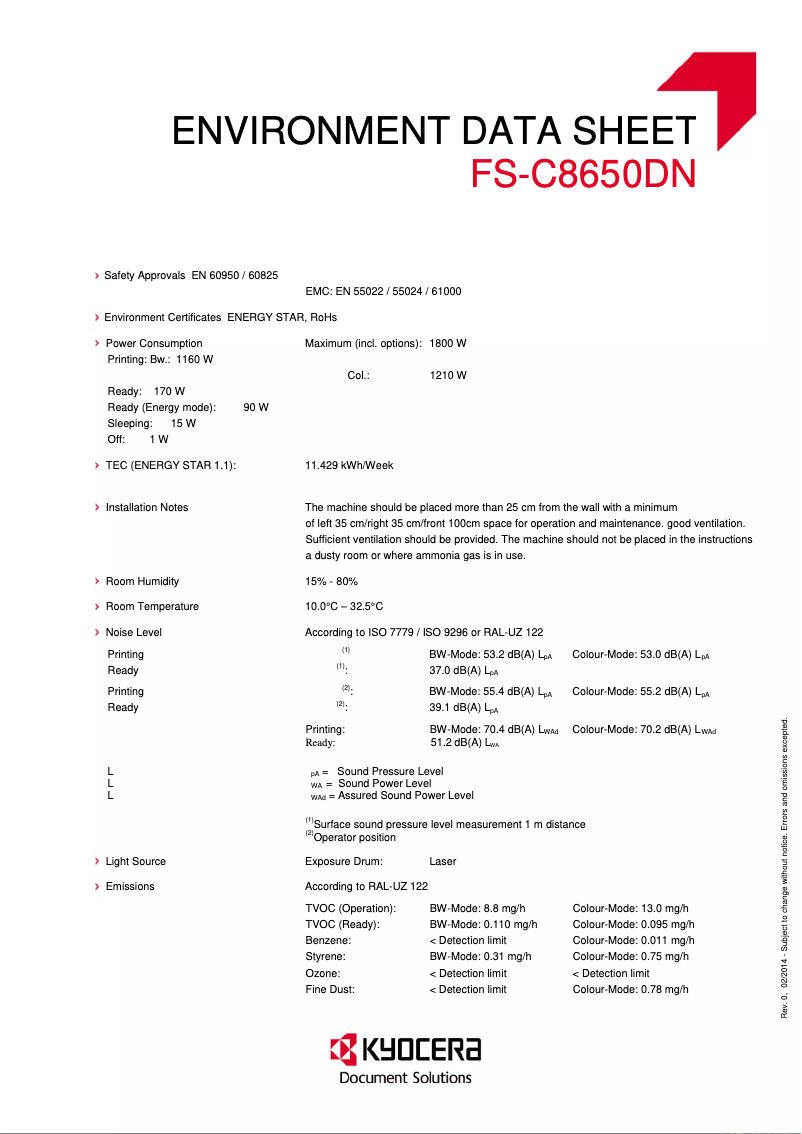
Sound power level (standby)37 dB
-
Sound pressure level (impression)53.2 dB
-
Integrated into the processorYes
-
Storage mediaHDD
Input and output capacity
-
Total power capacity1150 sheets
-
Maximum input capacity7650 sheets
-
Input capacity of multi-purpose trays150 sheets
-
Total output capacity750 sheets
-
Multifunctional trayYes
Paper management
-
Maximum print format297 x 420 mm
-
Type of paper tray supportOrdinary paper
-
ISO, Format Series A (A0...A9)A3, A4, A5
-
Support weight supported in duplex mode60 - 256 g/m²
-
Weight of the multifunctional tray support60 - 300 g/m²
-
Support weight supported in duplex mode60 - 256 g/m²
-
Maximum ISO A series paper sizeA3
Connectivity
-
Standard interfacesEthernet
-
USB 2.0
Minimum system requirements
-
Support for the Linux operating systemYes
-
Support for the Mac operating systemMac OS X 10.4 Tiger, Mac OS X 10.5 Leopard, Mac OS X 10.6 Snow Leopard, Mac OS X 10.7 Lion
-
Support for the Linux operating systemYes
Power
-
Average power consumption in Print mode1210 W
-
Energy consumption (standby mode)170 W
-
Energy consumption (eco mode)15 W
Weight and dimensions
-
Dimensions (LxWxH)672 x 787 x 744 mm
-
Weight111000 g
Sustainability
-
Sustainability certificatesENERGY STAR
Design
-
CertificationTÜV/GS, CE
-
ScreenLCD
Other features
-
Included fontsYes
Frequently Asked Questions
What is the weight of the Kyocera FS-C8650DN printer?
What is the recommended method for removing a jammed paper from the printer?
Why does my printer not recognize the original cartridges?
Why is the quality of my prints poor?
What is the difference between a laser printer and an inkjet printer?
Why does my inkjet printer produce black streaks on prints?
What does the acronym DPI mean?
What certifications does the Kyocera FS-C8650DN have?
How many cartridges can be installed in the Kyocera FS-C8650DN?
What is the storage capacity of the Kyocera FS-C8650DN?
Is the manual for the Kyocera FS-C8650DN available in French?
Similar products


More product categories from brand Kyocera
Phones Kyocera
Other Kyocera
More product types from brand Kyocera


Presentation of product FS-C8650DN specifications from brand Kyocera
General Information
The Kyocera FS-C8650DN model, from the renowned brand Kyocera, stands out for its quality and innovation in the field of printing. This model (reference FS-C8650DN | 870B61102MN3NL0) is designed to deliver optimal performance, ensuring an enhanced user experience. The associated EAN codes (632983027011, 632983932247, 0632983932247) allow for unique identification of the product within the distribution network.
Print Speed
This color printer provides prints at a maximum resolution of 9600 x 600 DPI, ensuring exceptional clarity for all your documents, whether professional or personal. With its built-in duplex printing function, it optimizes resource use, thereby reducing paper consumption. The print speed reaches 55 pages per minute (ppm) in black and 25 ppm in color, ideal for a dynamic work environment. For A3 format prints, the speed is 27 ppm in black and 25 ppm in color. The warm-up time of 30 seconds should be considered, as well as the copy delays of 4.9 seconds for the first page in black and 6.2 seconds in color.
Network
The Kyocera FS-C8650DN is ready to use with Ethernet network connectivity, facilitating its integration into a hassle-free office environment. However, it does not have Wi-Fi connectivity, which limits certain flexibility options.
Features
Designed for intensive use, this model is capable of handling a high service cycle. It supports multiple page description languages, including PCL and PostScript, offering extensive compatibility with various systems. The internal memory of 1024 MB is expandable up to 2048 MB, and the internal storage is 160 GB, allowing for efficient data management. In terms of noise, the sound level in standby is 37 dB, while the sound level during printing reaches 53.2 dB.
Input and Output Capacity
The total feed capacity is 1150 sheets, with a maximum input capacity of 7650 sheets. This allows for handling a significant volume of documents without the need for frequent reloading. Additionally, a multifunction tray is available, facilitating the management of different types of media.
Paper Management
The maximum supported print size is 297 x 420 mm, allowing for printing large documents. The product is compatible with a variety of paper types, including plain paper, and supports various weights ranging from 60 to 300 g/m².
Connectivity
The Kyocera FS-C8650DN features standard interfaces that ensure effective connectivity with other devices, thus simplifying printing operations.
Minimum System Requirements
This printer is compatible with Windows, Mac (from Mac OS X 10.4 Tiger), and Linux operating systems, providing flexibility of use in various environments.
Power
In terms of energy consumption, the model shows an average consumption of 1210 W in print mode, 170 W in standby mode, and only 15 W in energy-saving mode, contributing to efficient energy management.
Weight and Dimensions
The product dimensions are 672 x 787 x 744 mm, and its weight of 111 kg may require assistance for transport and installation.
Durability
The Kyocera FS-C8650DN is ENERGY STAR certified, ensuring compliance with energy efficiency and environmental impact standards.
Design
This model meets safety and performance standards, as evidenced by its TÜV/GS and CE certifications. The integrated LCD screen allows for quality user interaction.
Other Features
Finally, the product includes print fonts, allowing for immediate and practical use, thus providing a smooth user experience from the first setup.


