

Manuals of product TASKalfa 1801

Editorial note
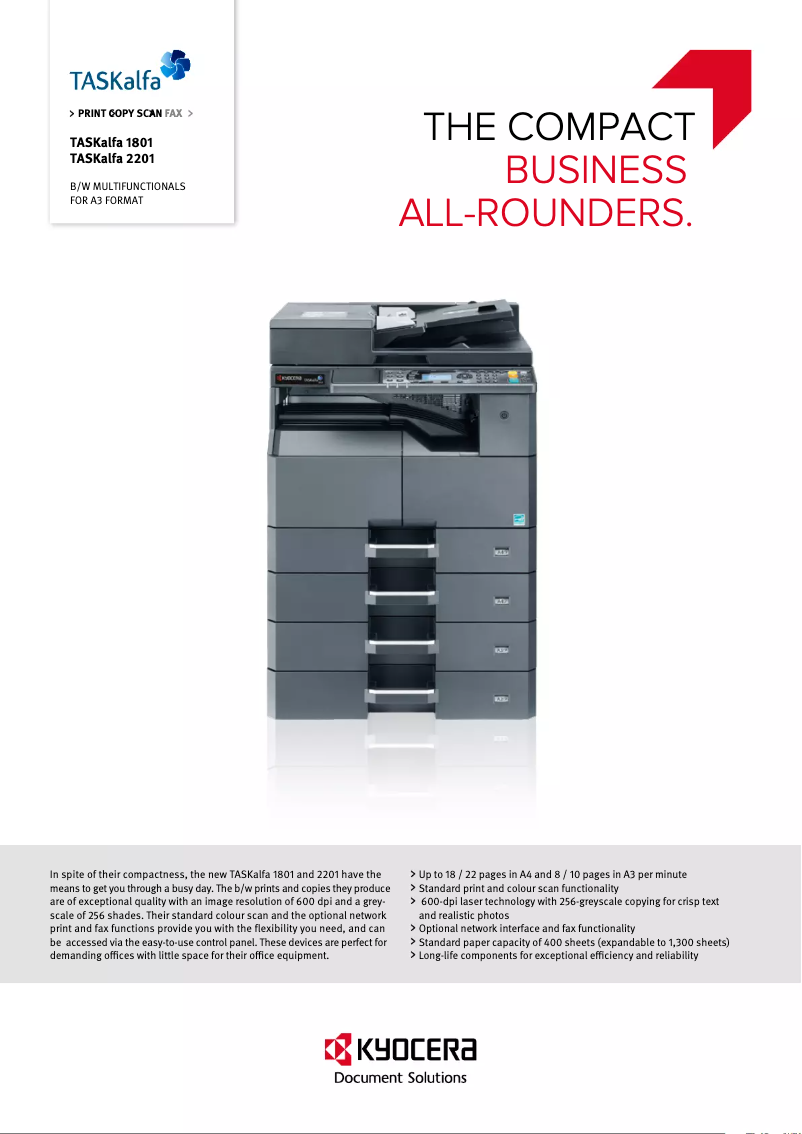
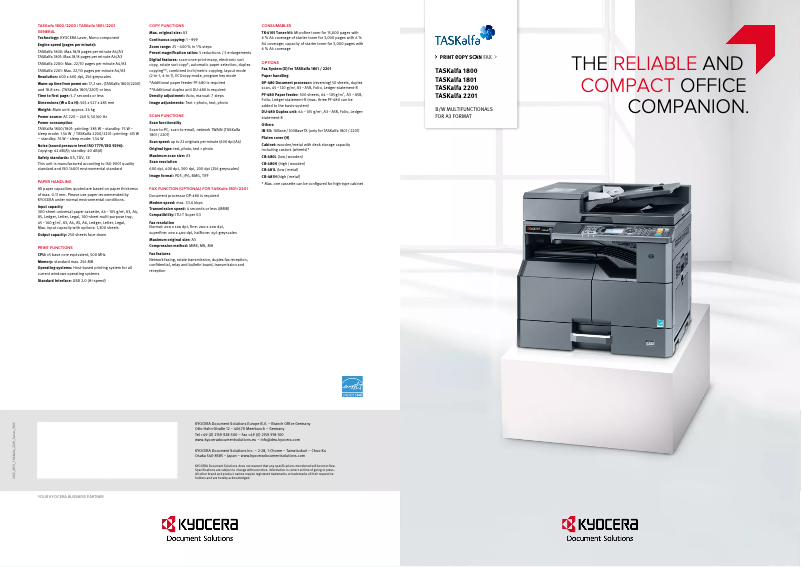
The Kyocera TASKalfa 1801 printer stands out for its solid performance and exceptional color printing quality. With a printing speed of 18 pages per minute, it effectively meets daily printing needs, thereby promoting increased productivity in work environments. Additionally, its maximum paper capacity of 1300 sheets allows for handling a large volume of documents without interruption, which is a major asset for busy offices. However, some drawbacks must be taken into account. The lack of duplex printing can lead to higher paper consumption, which could be an issue for environmentally conscious users. Furthermore, the printer does not have Ethernet or Wi-Fi connectivity, thus limiting connection options and making its use less flexible in modern environments. Finally, the warm-up time of 18.8 seconds is relatively long and could slow down workflow, especially in very busy offices. In terms of durability, the Kyocera TASKalfa 1801 is ENERGY STAR certified, which reflects its energy efficiency and environmental friendliness. However, its weight of 26 kg can make it difficult to move, which could be a disadvantage for some users. In summary, the Kyocera TASKalfa 1801 is a high-performing and quality printer, ideal for professionals, but it has some limitations that should be considered before purchase.Score details
User experience
The user experience is generally positive, with exceptional color print quality, but the lack of duplex printing may pose a problem for eco-friendly use.
Performance
The print speed of 18 ppm is ideal for daily use, but the warm-up time of 18.8 seconds can slow down workflow in very busy offices.
Features
Features such as color copying and a maximum paper capacity of 1300 sheets are advantageous, but the lack of Ethernet and Wi-Fi connectivity limits flexibility.
Battery life
Sustainability certifications like ENERGY STAR ensure energy efficiency, which is a positive point for environmental impact.
Design
Although the design is functional, the weight of 26 kg makes the printer difficult to move, which can be a problem in some workspaces.
Advantages
Fast printing at 18 ppm
Optimal color laser print quality
Color copying with flexible resizing
Maximum paper capacity of 1300 sheets
ENERGY STAR certified for sustainability
Disadvantages
No duplex printing
No Ethernet or Wi-Fi connectivity
Long warm-up time
Fax memory limited to 4 MB
Heavy weight, difficult to move
Technical Specifications TASKalfa 1801
General Information
-
ModelTASKALFA 1801
-
Brand
-
Category
-
Type
-
SKU207007
-
MPN207007
Print speed
-
Printing technologyLaser
-
PrintingMonochrome printing
-
Print speed (black, normal quality, A4/US Letter)18 ppm
-
Maximum resolution600 x 600 DPI
-
Print speed (black, normal quality, A3)8 ppm
-
Copy time for the first page (Black, normal)5.7 s
-
Preheating time18.8 s
-
Double-sided printingNo
Copier
-
CopySimple copy
-
Max. resolution of copies- DPI
-
Resizing copy25 - 400 %
-
Maximum number of copies999 copies
-
All-in-one function (N=)2, 4
-
Duplex copyNo
Digitization
-
DigitizationColor scanning
-
Optical scanning resolution600 x 600 DPI
-
Scan toEmail
-
Supported image formatsBMP, JPG, TIF
-
Support for text formatsPDF
-
Gray levels256
-
Double-sided scanningNo
Fax
-
FaxSimple fax
-
Fax resolution (black)200 x 400 DPI
-
Fax transmission speed4 sec/page
-
Modem speed33.6 Kbit/s
-
Fax Memory4 MB
-
Fax coding methodsMH, MMR (Fax coding method), MR
-
Duplex faxNo
Features
-
Digital sender-
-
Service cycle (Maximum)- pages per month
-
Number of print cartridges1
-
Printing colorsBlack
Representation / realization
-
Processor familyARM
-
Processor frequency500 MHz
-
Internal memory- MB
-
Built-in memory card readerNo
-
Maximum internal memory256 MB
-
Sound pressure level (copy)62 dB
-
Sound pressure level (silent mode)40 dB
Input and output capacity
-
Total power capacity400 sheets
-
Paper feed typeCassette, Paper tray
-
Maximum input capacity1300 sheets
-
Input capacity of multi-purpose trays100 sheets
-
Maximum output capacity250 sheets
-
Maximum output capacity250 sheets
-
Multifunctional trayYes
Paper management
-
Maximum ISO A series paper sizeA3
-
Types of multi-purpose binsPlain paper
-
Types of multi-purpose binsPlain paper
-
ISO, Format Series A (A0...A9)A3, A4, A5, A6
-
Non-ISO print support sizesLedger (media size)
-
Weight of the multifunctional tray support46 - 160 g/m²
-
Weight of paper tray support64 - 105 g/m²
Design
-
ScreenLCD
-
Product colorBlack
-
Built-in screenYes
-
Market positionProfessional
Network
-
WifiNo
-
WifiNo
-
Mobile printing technologiesNot supported
Connectivity
-
Direct printingNo
-
Standard interfacesUSB 2.0
-
Optional connectivityEthernet
-
Quantity of USB 2.0 Ports1
-
USB portYes
Power
-
Electricity consumption (average operation)385 W
-
Energy consumption (eco mode)1.54 W
-
Energy consumption (standby mode)75 W
-
AC input frequency50 - 60 Hz
-
AC input voltage220 - 240 V
Minimum system requirements
-
Support for the Windows operating systemWindows 7 Home Basic
-
Support for the server operating systemWindows 7 Home Basic x64
-
Windows 7 Home Premium
-
Windows 7 Home Premium x64
-
Windows 7 Professional
-
Windows 7 Professional x64
-
Windows 7 Starter
-
Windows 7 Starter x64
-
Windows 7 Ultimate
-
Windows 7 Ultimate x64
-
Windows 8
-
Windows 8 Enterprise
-
Windows 8 Enterprise x64
-
Windows 8 Pro
-
Windows 8 Pro x64
-
Windows 8 x64
-
Windows Vista Business
-
Windows Vista Business x64
-
Windows Vista Enterprise
-
Windows Vista Enterprise x64
-
Windows Vista Home Basic
-
Windows Vista Home Basic x64
-
Windows Vista Home Premium
-
Windows Vista Home Premium x64
-
Windows Vista Ultimate
-
Windows Vista Ultimate x64
-
Windows XP Home
-
Windows XP Home x64
-
Windows XP Professional
-
Windows XP Professional x64
-
Windows Server 2003
-
Windows Server 2008
-
Windows Server 2012
Sustainability
-
Sustainability certificatesENERGY STAR
Weight and dimensions
-
Width565 mm
-
Depth527 mm
-
Height485 mm
-
Weight26000 g
Frequently Asked Questions
What is the weight of the Kyocera TASKalfa 1801?
What is the best method to remove paper jammed in the printer?
Why does my printer not recognize original cartridges?
What are the reasons for poor print quality?
What is the difference between a laser printer and an inkjet printer?
Why is my inkjet printer producing black streaks?
What does the term DPI mean?
How many cartridges are compatible with the Kyocera TASKalfa 1801?
What is the height of the Kyocera TASKalfa 1801?
What is the width of the Kyocera TASKalfa 1801?
What is the depth of the Kyocera TASKalfa 1801?
Is the manual for the Kyocera TASKalfa 1801 available in French?
Similar products


More product categories from brand Kyocera
Phones Kyocera
Other Kyocera
More product types from brand Kyocera


Presentation of product TASKalfa 1801 specifications from brand Kyocera
General Information
The Kyocera TASKalfa 1801 model is an office equipment from the Kyocera brand, known for its innovations and quality in the office device sector. This model, reference 1102NF3NL0, offers reliable performance and an optimized user experience. Its EAN code, including 632983029374, 0632983029374, and 4053162433939, facilitates its identification in distribution systems.
Print Speed
Equipped with laser printing technology, the Kyocera TASKalfa 1801 ensures remarkable print quality with vibrant and accurate colors. Its print speed reaches 18 pages per minute (ppm) in black on A4 paper, ideal for daily use in a professional environment. For A3 format documents, the speed is 8 ppm. The maximum resolution is 600 x 600 DPI, ensuring exceptionally clear prints. The time required to print the first page is 5.7 seconds, while the warm-up time is 18.8 seconds. Note that this model does not offer duplex printing, which may increase paper consumption.
Copier
The integrated copier of the Kyocera TASKalfa 1801 allows for high-quality color copies. It offers a resizing capability from 25% to 400%, providing appreciated flexibility for various printing tasks. With a maximum of 999 copies possible, this device adequately meets high and fast printing needs. However, it does not support duplex copying, meaning automatic double-sided copies cannot be made.
Scanning
The color scanning function of the Kyocera TASKalfa 1801 allows for faithful reproduction of documents and images. With an optical resolution of 600 x 600 DPI, the quality of scanned images is ensured. Supported formats include BMP, JPG, TIF, and PDF, offering great flexibility during scanning. It is important to note that duplex scanning is not available on this model.
Fax
The fax machine of the device allows for sending and receiving documents in black with a resolution of 200 x 400 DPI. The transmission speed is 4 seconds per page, ensuring efficiency in document sending. The fax memory is 4 MB, which may be limited for frequent use, and this model does not offer duplex fax sending.
Features
The Kyocera TASKalfa 1801 is designed for a maximum service cycle suitable for regular printing needs. It uses a single print cartridge, ensuring consistent quality and optimal visual output. The print color is black, which suits most professional needs.
Representation / Performance
This model is equipped with an ARM processor with a frequency of 500 MHz, ensuring quick task execution. The internal memory, although unspecified, is optimized for smooth use. The operating noise level is 62 dB, while in silent mode, it drops to 40 dB.
Input and Output Capacity
The Kyocera TASKalfa 1801 can feed up to 400 sheets and has a maximum input capacity of 1300 sheets. The multifunction tray can hold 100 sheets, offering flexibility in use. The total output capacity is 250 sheets, adequate for professional use.
Paper Management
Compatible with standard paper sizes up to A3, the Kyocera TASKalfa 1801 accepts various types of media, including plain and recycled paper. The paper weight can vary from 64 to 105 g/m² for the trays and from 46 to 160 g/m² for the multifunction tray, ensuring optimal print quality.
Design
With an integrated LCD screen, the Kyocera TASKalfa 1801 features a clear and modern user interface. Its black color gives it a professional aesthetic, suitable for work environments.
Network
This model does not support Ethernet or Wi-Fi connections, thus limiting its network connectivity. However, it offers mobile printing technologies for more flexible use from mobile devices.
Connectivity
The Kyocera TASKalfa 1801 does not allow direct printing, but it has standard interfaces to ensure easy integration with various devices. It includes a USB 2.0 port for quick connections.
Power
In operation, the power consumption is 385 W, while in economy mode, it is reduced to 1.54 W. In standby, the consumption is 75 W, contributing to energy savings. The model operates with an input voltage of 220 to 240 V.
Minimum System Requirements
Compatible with various Windows operating systems, the Kyocera TASKalfa 1801 ensures smooth integration into professional environments, including Windows Server versions.
Durability
Certified ENERGY STAR, the Kyocera TASKalfa 1801 meets strict energy efficiency standards, thus contributing to environmentally friendly practices.
Weight and Dimensions
With dimensions of 565 mm wide, 527 mm deep, and 485 mm high, this equipment weighs 26 kg, which may pose challenges in terms of mobility but ensures stability in its location.


