
Manuals of product TASKalfa 3511i


Editorial note
The Kyocera TASKalfa 3511i stands out for its exceptional print quality, offering a high resolution that ensures sharp and professional documents. Its functional versatility, including printing, copying, scanning, and faxing capabilities, makes it an ideal multifunction device for demanding office environments. Additionally, its intuitive user interface makes navigation easy, enhancing the user experience. The robustness and durability of this model reflect Kyocera's reputation, ensuring reliable long-term use. However, the initial purchase cost can be high, representing a significant investment for some businesses. Furthermore, the printer's footprint may pose issues in smaller workspaces. While print quality is excellent, the printing speed may not be sufficient for very high volumes, leading to delays. Maintenance and consumable costs, such as toners, can also add up, impacting the long-term budget. Finally, connectivity options may be limited compared to other newer models. In summary, the Kyocera TASKalfa 3511i is a solid choice for those seeking a reliable and versatile printer, but it is important to consider its cost and dimensions before making a decision.Score details
User experience
The intuitive user interface and user-friendly control panel make the experience enjoyable and facilitate navigation through the options.
Performance
Although the print quality is exceptional, the print speed may not be sufficient for high volumes, leading to delays.
Design
The printer can be bulky, requiring significant workspace, which can be an issue in smaller offices.
Value for money
The initial purchase cost is high, and maintenance costs can add up, representing a significant investment.
Robustness
Kyocera's reputation for reliability and durability is reflected in this model, ensuring reliable long-term use.
Features
The TASKalfa 3511i offers functional versatility with printing, copying, scanning, and faxing options.
Support
The available documents, such as the user manual and FAQ, provide a good level of support for users.
Documentation
The documentation is comprehensive with 626 pages of content, which helps in better understanding the features.
Advantages
High-quality printing
Efficient energy savings
Complete multifunctional features
Simple user interface
Proven reliability and durability
Disadvantages
High initial purchase cost.
Bulky for small offices.
Insufficient printing speed for high volume.
Significant maintenance and consumable costs.
Limited connectivity compared to recent models.
Technical Specifications TASKalfa 3511i
General Information
-
ModelTASKALFA 3511I
-
Brand
-
Category
-
Type
-
SKU1340151
-
MPN1340151
Frequently Asked Questions
What is the most effective method to remove paper jammed in the printer?
Why is my printer not recognizing the original cartridges?
What could be the causes of poor print quality?
How does a laser printer differ from an inkjet printer?
Why is my inkjet printer leaving black marks on prints?
What does the acronym DPI mean?
Is the manual for the Kyocera TASKalfa 3511i available in French?
Similar products


More product categories from brand Kyocera
Phones Kyocera
Other Kyocera
More product types from brand Kyocera


Presentation of product TASKalfa 3511i specifications from brand Kyocera
General Information
The Kyocera TASKalfa 3511i model is a printer from the Kyocera brand, known for its commitment to quality and innovation in the office equipment sector. This model stands out for its reliable performance and an optimized user interface, providing a smooth and pleasant user experience.
Advantages
The Kyocera TASKalfa 3511i is distinguished by several notable strengths:
- Exceptional print quality: With a high resolution, this device produces documents with remarkable clarity, ideal for demanding work environments.
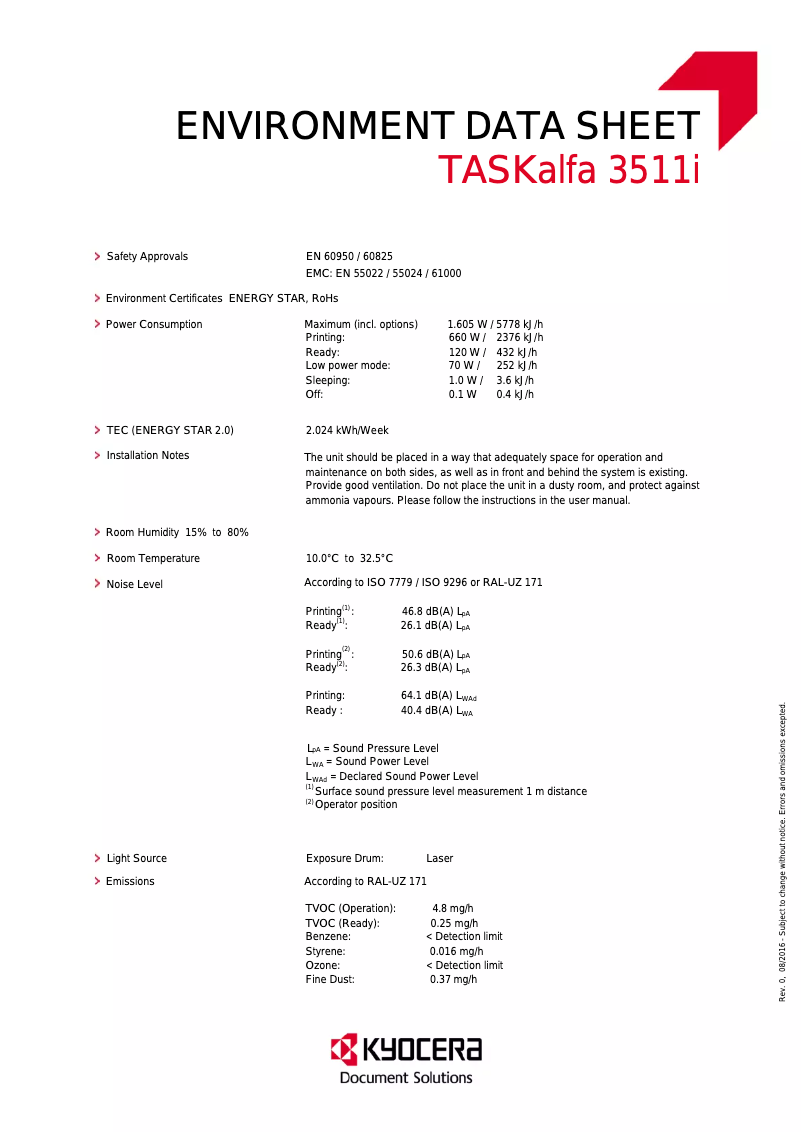
- Energy efficiency: Designed with environmentally friendly technologies, it allows for a significant reduction in energy consumption, thus contributing to savings on electricity bills.
- Functional versatility: In addition to printing, the TASKalfa 3511i also offers copying, scanning, and faxing functions, making it multifunctional and suitable for the varied needs of an office.
- Intuitive user interface: Its user-friendly control panel makes it easy to navigate between different options, making the use of the device more enjoyable.
- Reliability and durability: Kyocera's reputation for robustness is reflected in this model, ensuring reliable long-term use.
Disadvantages
However, the Kyocera TASKalfa 3511i also has some drawbacks:
- High initial cost: The purchase price may be higher than that of other printer models, representing a significant investment for some companies.
- Bulkiness: This model may require a considerable workspace, which can be problematic in offices with limited surfaces.
- Print speed: Although satisfactory, the print speed may not be sufficient for very high volumes, potentially leading to delays.
- Maintenance costs: Expenses related to consumables, such as toners and spare parts, can accumulate over time, impacting the long-term budget.
- Limited connectivity options: Compared to other newer models, the TASKalfa 3511i may have restrictions in terms of connectivity, thus reducing usage flexibility in a modern environment.


