
Manuals of product TASKalfa 6004i


Editorial note
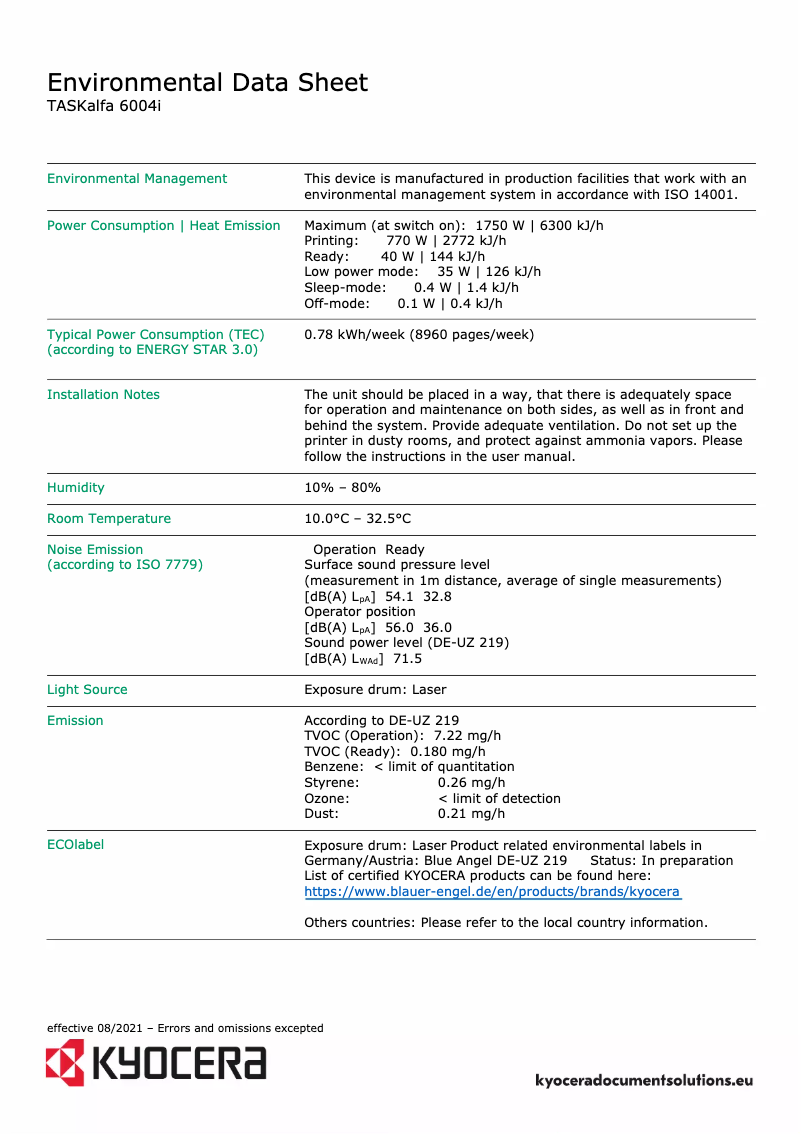
The Kyocera TASKalfa 6004i stands out for its excellent print quality, delivering professional documents with remarkable clarity. Its versatility allows for handling various formats and types of paper, thus meeting different printing needs. Moreover, this device is designed to be energy-efficient, which can help reduce operational costs in the long term while being environmentally friendly. The ease of use, with a clear manual and safety instructions, is a major asset, even though the interface may seem complex for less experienced users. However, some drawbacks must be considered. The initial purchase cost is relatively high, representing a significant investment for some businesses. Additionally, the size and weight of the printer can pose space issues in restricted offices. The costs of toners and replacement parts can also increase long-term expenses. Furthermore, the noise level during printing can be disruptive in quiet work environments. In summary, the Kyocera TASKalfa 6004i is a robust and reliable printer, ideal for demanding work environments, but it requires consideration of available space and the budget to be allocated.Score details
User experience
Ease of use is an asset with a clear manual, but the interface can be complex for unfamiliar users.
Performance
The printer offers excellent print quality with professional documents every time.
Value for money
The initial purchase cost is high, but energy efficiency can reduce long-term costs.
Design
The size and weight of the printer can pose space issues in small offices.
Robustness
The durability and reliability of the Kyocera brand ensure increased longevity, ideal for demanding work environments.
Support
The available documents, such as the manual and safety instructions, facilitate user support and assistance.
noise_level
The noise level during printing can be relatively high, which can be disruptive in quiet environments.
Advantages
Clear and professional prints
Compatible with various paper formats
Reduced energy consumption
Easy to use for everyone
Robust and durable for businesses
Disadvantages
High initial purchase cost.
Bulky size for small offices.
High toner and parts costs.
Complex user interface for beginners.
High noise level during printing.
Technical Specifications TASKalfa 6004i
General Information
-
ModelTASKALFA 6004I
-
Brand
-
Category
-
Type
-
SKU1439965
-
MPN1439965
Frequently Asked Questions
What is the ideal method for removing a jammed paper from the printer?
Why is my printer not recognizing the original cartridges?
What are the possible causes of poor print quality?
How does a laser printer differ from an inkjet printer?
Why is my inkjet printer leaving black streaks on prints?
What does the acronym DPI mean?
Is the manual for the Kyocera TASKalfa 6004i available in French?
Similar products


More product categories from brand Kyocera
Phones Kyocera
Other Kyocera
More product types from brand Kyocera


Presentation of product TASKalfa 6004i specifications from brand Kyocera
General Information
The Kyocera TASKalfa 6004i printer is a renowned model from the Kyocera brand, famous for its commitment to quality and innovation in the printing device sector. This model, TASKalfa 6004i, is designed to deliver exceptional performance, thus ensuring an optimized user experience.
Advantages
This printer stands out for its excellent print quality, producing clear and precise documents, essential for professional presentations. Additionally, its versatility of use allows it to handle various formats and types of paper, making it perfectly suited for a multitude of printing needs.
Moreover, the energy-efficient design of the TASKalfa 6004i contributes to reducing operational costs while being environmentally friendly. To facilitate its use, a clear and detailed manual is provided, simplifying the onboarding process for all users.
Finally, the reputation for reliability and durability of Kyocera ensures increased longevity, making this printer ideal for demanding work environments.
Disadvantages
However, some aspects may pose problems. The initial purchase cost of the TASKalfa 6004i can be relatively high compared to other models on the market, representing a significant investment for some companies. Additionally, its dimensions and weight may make installation difficult in restricted workspaces.
The cost of toners and replacement parts is also a consideration, as it can lead to additional expenses in the long term. The user interface may seem complex for users unfamiliar with professional printers, thus requiring an adjustment period. Finally, it is worth noting that the noise level during printing can be high, which could be disruptive in quiet work environments.


