

Manuals of product TASKalfa 6053ci
Editorial note
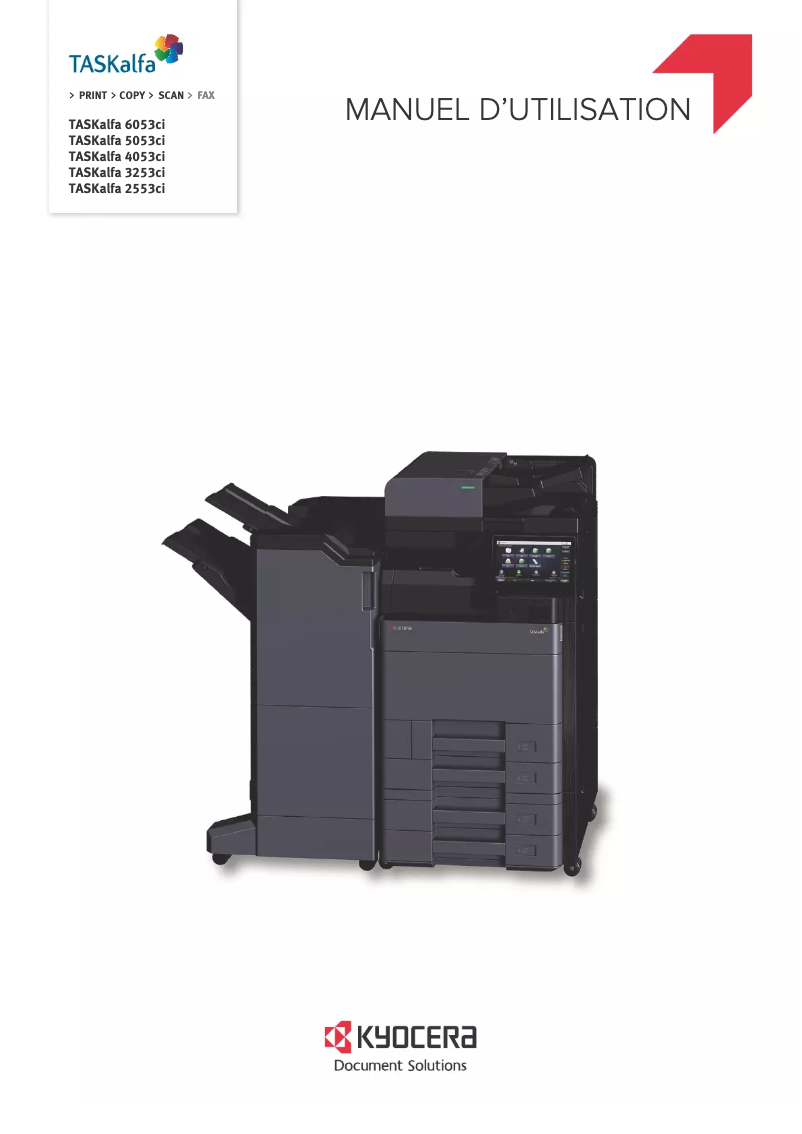
The Kyocera TASKalfa 6053ci stands out for its impressive printing speed, reaching up to 60 pages per minute in black and 55 in color. This performance makes it an ideal choice for demanding work environments where print volume is high. Additionally, its versatile features, such as printing, copying, scanning, and faxing, meet various office needs with a single device. The print quality is also remarkable, thanks to a maximum resolution of 1200 x 1200 DPI, ensuring sharp documents and accurate images. The duplex and economical printing options contribute to a more sustainable use of resources while reducing printing costs. However, some limitations deserve mention. The duplex printing mode being manual can slow down workflow, especially in high-volume contexts. Moreover, the lack of a duplex scanning function may affect efficiency when scanning multi-page documents. The heavy weight of 95 kg complicates moving and installation, potentially requiring assistance. In terms of cost, although the print quality is excellent, the high cost of replacement cartridges can increase long-term expenses. Furthermore, the absence of Wi-Fi connectivity limits usage flexibility, imposing a wired connection for printing from mobile devices. Finally, the provided documentation, including a user manual and a technical sheet, is comprehensive and facilitates the use of the device, contributing to an overall satisfactory user experience.Score details
User experience
The user experience is satisfactory due to the versatility of the features, but the manual duplex printing mode can slow down the workflow.
Performance
The printing speed is remarkable, reaching up to 60 pages per minute in black and 55 in color, ideal for demanding work environments.
Design
The design is functional, but the heavy weight of 95 kg makes moving and installation difficult.
Value for money
Although the print quality is excellent, the high cost of replacement cartridges can increase long-term operating costs.
Features
Features such as duplex printing and economical printing are appreciated, although the lack of duplex scanning limits efficiency.
Documentation
The available documents, such as the user manual and technical sheet, are comprehensive and facilitate the use of the device.
Advantages
Fast printing up to 60 pages per minute
Multifunction feature: printing, copying, scanning
Print quality 1200 x 1200 DPI
Paper savings with double-sided printing
Ethernet connectivity for easy network integration
Disadvantages
Manual duplex printer
No duplex scanning
Heavy weight, difficult to move
High cost of cartridges
No Wi-Fi connectivity
Technical Specifications TASKalfa 6053ci
General Information
-
ModelTASKALFA 6053CI
-
Brand
-
Category
-
Type
-
SKU1142499
-
MPN1142499
Print speed
-
Printing technologyLaser
-
PrintingColor printing
-
Duplex printing modeAuto
-
Double-sided printingYes
-
Print speed (black, normal quality, A4/US Letter)60 ppm
-
Maximum resolution1200 x 1200 DPI
-
Print speed (color, normal quality, A4/US Letter)55 ppm
-
Print speed (black, normal quality, A3)30 ppm
-
Print speed (color, normal quality, A3)27 ppm
-
Copy time for the first page (Black, normal)3.8 s
-
Copy time for the first page (color, normal)5.1 s
-
Preheating time17 s
-
Double-sided printingYes
-
Layout option2, 4, 6, 9, 16, 25
-
Double-sided printingYes
-
Double-sided printingYes
-
Double-sided printingYes
-
Double-sided printingYes
-
Double-sided printingYes
-
CD/DVD PrintingNo
-
Double-sided printingYes
Copier
-
CopyColor copy
-
Duplex copy modeAuto
-
Max. resolution of copies600 x 600 DPI
-
Copy speed (normal quality, black, A4)60 cpm
-
Copy speed (normal quality, color, A4)55 cpm
-
Print speed (black, normal quality, A3)30 cpm
-
Print speed (color, normal quality, A3)27 cpm
-
Release time of the first print (black, normal)4.1 s
-
Release time of the first print (color, concept)6.2 s
-
Maximum number of copies9999 copies
-
Resizing copy25 - 400 %
-
Duplex copyYes
-
All-in-one function (N=)2, 4
-
Duplex copyYes
-
Duplex copyYes
-
Duplex copyYes
-
Duplex copyYes
-
Duplex copyYes
-
Duplex copyYes
-
Duplex copyYes
-
Duplex copyYes
Digitization
-
DigitizationColor scanning
-
Duplex scanning modeAuto
-
Optical scanning resolution600 x 600 DPI
-
Type of scannerFlatbed and ADF scanner
-
Scanning technologyCIS/CCD
-
Double-sided scanningYes
Fax
-
FaxSimple fax
-
Duplex faxYes
Features
-
Service cycle (Maximum)200000 pages per month
-
All-in-one multitaskingYes
-
Number of print cartridges4
-
Ink tank systemNo
-
Service cycle (recommended)15000 - 30000 pages per month
-
Printing colorsBlack, Cyan, Magenta, Yellow
-
All-in-one multitaskingYes
-
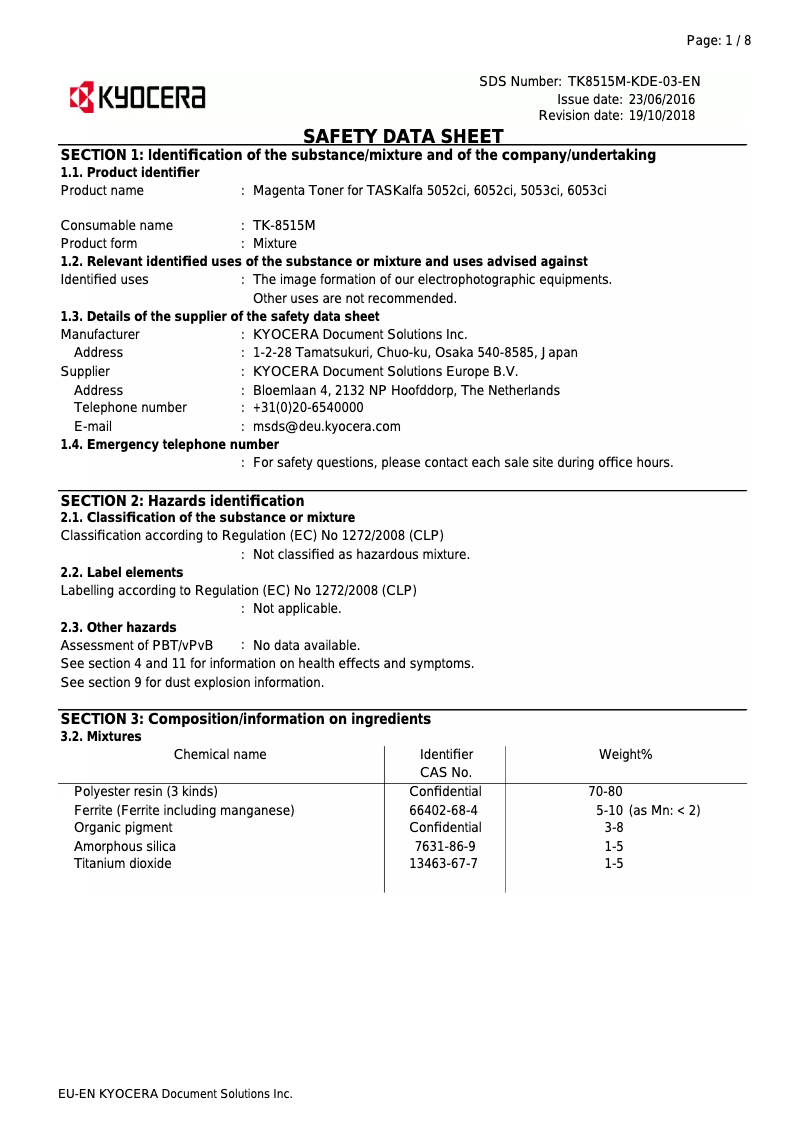
Replacement cartridgesTK-8515K (30k), TK-8515C (20k), TK-8515M (20k), TK-8515Y (20k)
-
Languages of the page descriptionPCL 5c, PCL 6, PCL XL
Design
-
Market positionProfessional
-
Product colorBlack, Blue
-
Color displayYes
-
ScreenTFT
-
Screen size10.1 "
-
Color displayYes
-
Color displayYes
-
Order typeTouchscreen
Other features
-
Documentation CDYes
-
Documentation CDYes
-
Documentation CDYes
-
Documentation CDYes
-
Documentation CDYes
Network
-
Ethernet/LANYes
-
Email protocolsPOP3, SMTP
-
WifiNo
-
Ethernet/LANYes
-
LAN Ethernet: data transfer rate10,100,1000 Mbit/s
-
Mobile printing technologiesApple AirPrint, Google Cloud Print, Kyocera Mobile Print, Mopria Print Service
-
Wiring technology10/100/1000Base-T(X)
Input and output capacity
-
Total power capacity1150 sheets
-
Total output capacity500 sheets
-
Paper feed typeCassette
-
Maximum input capacity7150 sheets
-
Input capacity of multi-purpose trays150 sheets
-
Maximum output capacity4300 sheets
-
Total number of power supply units3
-
Maximum number of feed bins7
-
Multifunctional trayYes
Paper management
-
Maximum ISO A series paper sizeA3+
-
Type of paper tray supportBond paper
-
ISO, Format Series A (A0...A9)Envelopes
-
Weight of paper tray supportLabels
-
Weight of paper tray supportLetterhead
-
Plain paper
-
Pre-Printed
-
Recycled paper
-
Thick paper
-
Thin paper
-
A3+
-
A4
-
A5
-
A6
-
52 - 300 g/m²
-
52 - 300 g/m²
Representation / realization
-
Maximum internal memory4000 MB
-
Built-in memory card readerNo
-
Maximum internal memory4000 MB
-
Internal storage capacity328 GB
Connectivity
-
USB portYes
-
USB portYes
Power
-
Average power consumption in Copy mode990 W
-
Average power consumption in Copy mode990 W
-
Average power consumption in Copy mode990 W
-
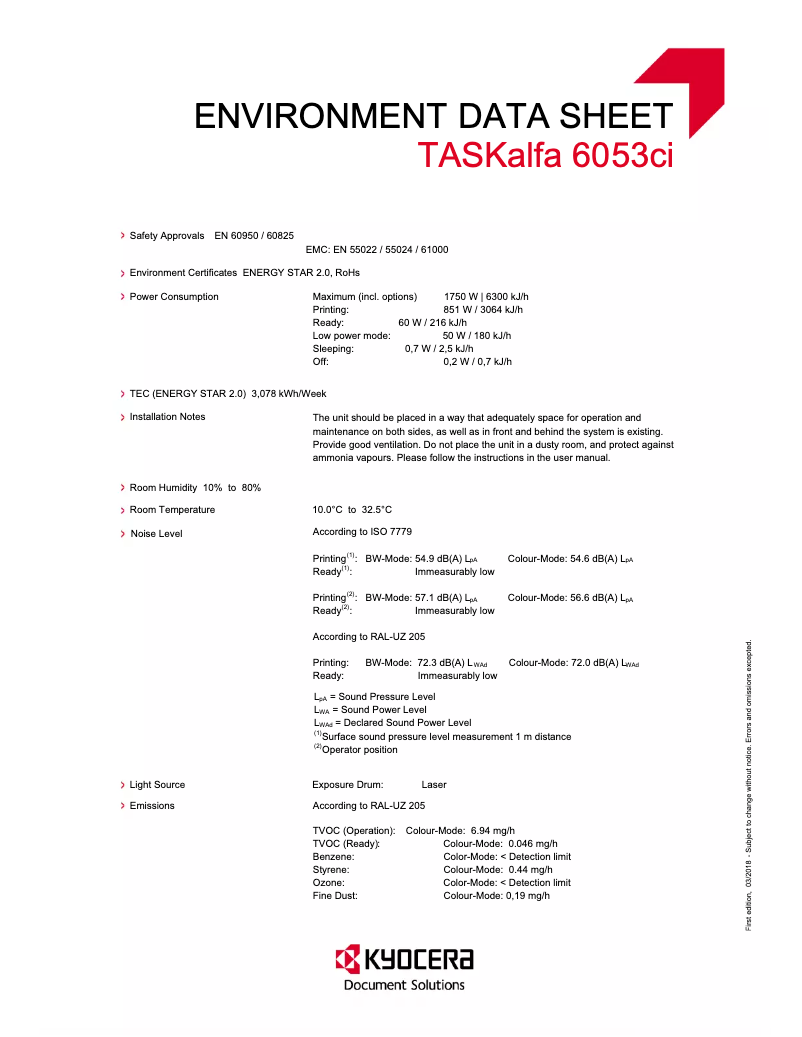
Energy consumption (loan)60 W
-
Energy consumption (standby mode)50 W
-
Energy consumption (in standby mode)0.7 W
-
AC input voltage220 - 240 V
-
AC input frequency50 - 60 Hz
Sustainability
-
Sustainability certificatesBlue Angel
-
RoHS
-
ENERGY STAR
Weight and dimensions
-
Width602 mm
-
Depth665 mm
-
Height790 mm
-
Weight95000 g
Packaging contents
-
Cartridge(s) includedNo
-
Quick Installation GuideYes
-
Quick Installation GuideYes
-
Quick Installation GuideYes
Frequently Asked Questions
What is the weight of the Kyocera TASKalfa 6053ci?
What is the best method to remove paper jammed in the printer?
Why is my printer not recognizing the original cartridges?
What could be the reasons for poor print quality?
What is the difference between a laser printer and an inkjet printer?
Why does my inkjet printer leave black streaks on prints?
What does the acronym DPI mean?
How many cartridges can be installed in the Kyocera TASKalfa 6053ci?
What is the size of the screen on the Kyocera TASKalfa 6053ci?
What is the height of the Kyocera TASKalfa 6053ci?
What is the width of the Kyocera TASKalfa 6053ci?
What is the depth of the Kyocera TASKalfa 6053ci?
What is the storage capacity of the Kyocera TASKalfa 6053ci?
Is the manual for the Kyocera TASKalfa 6053ci available in French?
Similar products


More product categories from brand Kyocera
Phones Kyocera
Other Kyocera
More product types from brand Kyocera


Presentation of product TASKalfa 6053ci specifications from brand Kyocera
General Information
The Kyocera TASKalfa 6053ci is a multifunction printer from the Kyocera brand, known for its innovation and quality in the field of office equipment. This model, identified by the number 1102V83NL0, is designed to deliver high performance and an optimal user experience. The EAN code 0632983055618 allows for unique identification in the distribution system.
Print Speed
Equipped with Laser printing technology, the TASKalfa 6053ci ensures remarkable print quality, with precise results. It allows for color printing, guaranteeing documents and images with vibrant colors. Its print speed reaches up to 60 pages per minute in black and 55 pages per minute in color, making this device particularly suitable for work environments requiring speed and efficiency. The maximum resolution of 1200 x 1200 DPI ensures exceptional clarity for both text and graphics.
The duplex printing mode is manual, offering an economical and eco-friendly solution, although it may be less convenient for those handling large volumes. Additionally, options such as secure printing and watermark creation add a layer of security and authenticity to your documents.
Copier
As a copier, the TASKalfa 6053ci allows for color copies with a speed of 60 copies per minute in black and 55 cpm in color in A4 format. The duplex copying mode is automatic, facilitating double-sided printing and reducing paper consumption. The maximum resolution of copies is 600 x 600 DPI, ensuring high quality for all professional needs.
Scanning
This printer also offers color scanning capabilities, with an optical resolution of 600 x 600 DPI. The duplex scanning mode is automatic, allowing for efficient scanning of double-sided documents. Although it does not offer duplex scanning for multi-page documents, it remains an effective tool for daily scanning needs.
Fax
The TASKalfa 6053ci is equipped with a simple fax machine, allowing for the quick and efficient sending and receiving of documents, although it does not support duplex faxing.
Features
Designed for heavy use, the TASKalfa 6053ci has a maximum monthly duty cycle of 200000 pages per month. It operates with four toner cartridges and offers quality color printing. Although it does not have an ink tank system, the recommended duty cycle is between 15000 and 30000 pages per month, optimizing its performance and durability.
Design
With dimensions of 602 mm wide, 665 mm deep, and 790 mm high, the TASKalfa 6053ci is designed to easily fit into an office environment. Its 10.1-inch TFT screen is touch-sensitive and provides an intuitive user experience, with a color display that facilitates its use.
Connectivity
In terms of connectivity, the TASKalfa 6053ci supports IMAP4, POP3, and SMTP messaging protocols, ensuring efficient email management. It is equipped with USB ports for quick and easy connection, but does not have Wi-Fi connectivity, thus requiring a wired connection for printing from mobile devices.
Input and Output Capacity
The total paper capacity is 1150 sheets, with a maximum input capacity of 7150 sheets, allowing for the management of large volumes of documents without interruption. The output capacity is 500 sheets, optimizing printing performance.
Paper Management
Compatible with ISO A series paper sizes up to A3+, the TASKalfa 6053ci supports various types of media, including standard paper, envelopes, and labels. The media weight can range from 52 to 300 g/m², ensuring flexibility of use.
Durability
The TASKalfa 6053ci is certified with labels such as Blue Angel, RoHS, and ENERGY STAR, attesting to its compliance with environmental standards and energy efficiency.
Weight and Dimensions
With a weight of 95 kg, the TASKalfa 6053ci requires careful handling during installation. Its compact dimensions facilitate integration into workspaces.
Packaging Contents
Inside the packaging, you will find an imaging unit, a power cord, and a quick installation guide to facilitate the setup of the device. However, toner cartridges are not included, necessitating a separate purchase to start using it.


