

Manuals of product TASKalfa 7353ci

Editorial note
The Kyocera TASKalfa 7353ci stands out for its impressive printing speed, reaching 73 pages per minute in black and 65 pages per minute in color. This rapid performance is ideal for demanding work environments, where time is a crucial factor. Additionally, its maximum resolution of 4800 x 1200 DPI ensures high-quality prints that are true to the original documents and images. However, the printer has some drawbacks. The duplex printing mode is manual, which can slow down the process when many documents need to be processed. Furthermore, its weight of 182 kg can complicate its installation and movement in tight spaces. The warm-up time of 44 seconds may also be perceived as long in a professional setting where speed is essential. In terms of connectivity, the TASKalfa 7353ci offers great flexibility with multiple USB ports and a wireless LAN connection option. Nevertheless, the lack of duplex scanning functionality limits its effectiveness for users who need to quickly scan multi-page documents. Overall, the Kyocera TASKalfa 7353ci represents a good investment for businesses due to its paper handling capacity of up to 7650 sheets, which reduces interruptions during high-volume printing. With comprehensive and useful documentation, users can easily navigate its features. Despite some limitations, this printer is a solid choice for those seeking a high-performance and quality printing solution.Score details
User experience
The user experience is overall positive thanks to the intuitive interface and well-thought-out features, although the manual duplex printing mode may slow down printing.
Performance
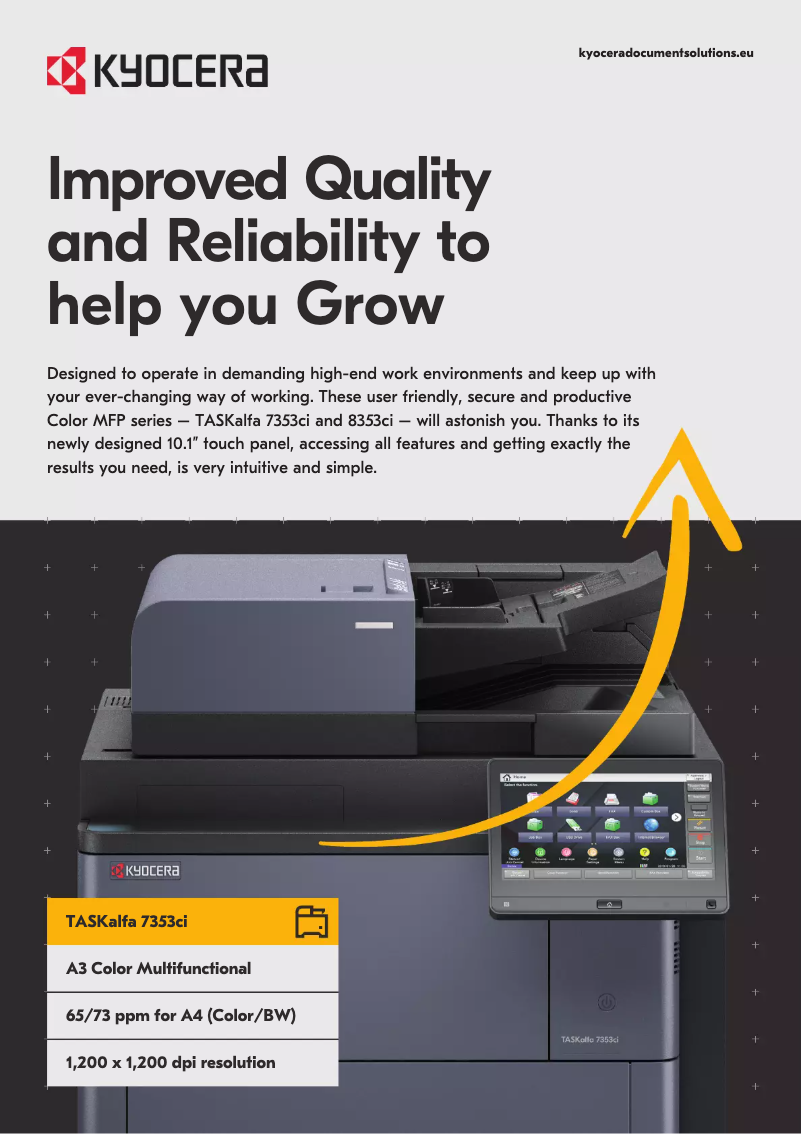
With a printing speed of up to 73 ppm in black and 65 ppm in color, the Kyocera TASKalfa 7353ci quickly meets printing needs, although the warm-up time of 44 seconds may be a drawback.
Design
The product is relatively heavy (182 kg), which can complicate its movement and installation in tight spaces.
Features
The exceptional print quality with a maximum resolution of 4800 x 1200 DPI and eco-friendly features, such as duplex printing, are major assets.
Value for money
Although the purchase cost may be high, the paper handling capacity and durability of the printer justify this investment for businesses.
Usability
The versatile connectivity and USB ports make usage easy, but the lack of duplex scanning limits efficiency for users who need quick scanning.
Support
The provided documentation, including the user manual and safety instructions, is comprehensive and helpful for users.
Advantages
Fast printing up to 73 ppm
Print quality up to 4800 x 1200 DPI
Double-sided printing to reduce paper
USB and wireless LAN connectivity
Input capacity up to 7650 sheets
Disadvantages
Manual duplex printing mode
High weight of 182 kg
Long preheating time (44 seconds)
No duplex scanning
Noise level of 69 dB
Technical Specifications TASKalfa 7353ci
General Information
-
ModelTASKALFA 7353CI
-
Brand
-
Category
-
Type
-
SKU1340144
-
MPN1340144
Print speed
-
Printing technologyLaser
-
PrintingColor printing
-
Double-sided printingYes
-
Duplex printing modeAuto
-
Maximum resolution4800 x 1200 DPI
-
Duplex printing speed (Black, normal quality, A4/US Letter)73 ppm
-
Duplex printing speed (color, normal quality, A4/US Letter)65 ppm
-
Print speed (black, normal quality, A3)36 ppm
-
Print speed (color, normal quality, A3)32 ppm
-
Duplex printing speed (Black, normal quality, A4/US Letter)73 ppm
-
Duplex printing speed (color, normal quality, A4/US Letter)65 ppm
-
Preheating time44 s
-
Copy time for the first page (Black, normal)5.3 s
-
Copy time for the first page (color, normal)6.3 s
Connectivity
-
USB portYes
-
USB portYes
-
Quantity of USB 2.0 Ports4
-
Optional connectivityWireless LAN
Network
-
Wifi-
-
Support for network protocols (IPv6)Yes
-
Wiring technology10/100/1000Base-T(X)
-
LAN Ethernet: data transfer rate10,100,1000 Mbit/s
-
Support for network protocols (IPv6)Yes
-
Support for network protocols (IPv6)Yes
-
Support for network protocols (IPv6)Yes
-
Mobile printing technologiesApple AirPrint, Google Cloud Print, Kyocera Mobile Print
Representation / realization
-
Internal memory4608 MB
-
Internal storage capacity328 GB
-
Maximum internal memory8192 MB
-
Storage mediaHDD + SSD
-
Integrated into the processorYes
-
Processor familyNXP QorIQ
-
Processor modelT1024
-
Processor frequency1200 MHz
-
Number of processor cores4
-
Sound pressure level (impression)69 dB
-
Sound pressure level (impression)69 dB
-
Sound pressure level (standby)56 dB
Design
-
Product colorBlack
-
Market positionProfessional
-
Touch screenYes
-
ScreenTFT
-
Screen size10.1 "
-
Order typeButtons, Touch
-
Touch screenYes
-
Touch screenYes
-
Screen resolution1024 x 600 pixels
Weight and dimensions
-
Width750 mm
-
Depth822 mm
-
HeightBlablabla mm
-
Weight182000 g
Power
-
AC input voltage220 - 240 V
-
AC input frequency50/60 Hz
-
Consumption (max)1360 W
-
Energy consumption (loan)120 W
-
Energy consumption (in standby mode)1 W
Certificate
-
CertificationTÜV/GS
-
CE
Fax
-
Fax-
Paper management
-
Maximum ISO A series paper sizeA3+
-
Maximum print format305 x 1219 mm
-
Type of paper tray supportBanner, Letterhead, Plain paper
-
ISO, Format Series A (A0...A9)A3, A3+, A4, A5, A6
-
ISO, Formats Series-B (B0...B9)B5
-
Support width customization98 - 297 mm
-
Customization of support length148 - 432 mm
-
Weight of the multifunctional tray support60 - 300 g/m²
-
Support weight supported in duplex mode60 - 256 g/m²
-
Support weight supported in duplex mode60 - 256 g/m²
Other features
-
EmulationsPCL6 (PCL5c/PCL-XL)
-
KPDL3
-
PDF Direct Print
-
XPS Direct Print
-
OpenXPS
Input and output capacity
-
Paper tray 2 feed capacity500 sheets
-
Paper tray 2 feed capacity500 sheets
-
Total power capacity4000 sheets
-
Maximum input capacity7650 sheets
-
Total number of power supply units4
-
Maximum output capacity4300 sheets
-
Total output capacity70 sheets
-
Multifunctional trayYes
-
Input capacity of multi-purpose trays150 sheets
Minimum system requirements
-
Support for the Linux operating systemYes
-
Support for the Linux operating systemYes
-
Support for the Linux operating systemYes
Features
-
PCL® Fonts93
-
Number of bitmap fonts1
-
Service cycle (Maximum)- pages per month
-
Double-sided functionsCopy, Print, Scan
-
Number of print cartridges4
-
Printing colorsBlack, Cyan, Magenta, Yellow
-
Languages of the page descriptionPCL 5c, PCL 6, PCL XL, PDF, PostScript 3, XPS
-
Printer fontsBarcode, Bitmap, PCL
Copier
-
CopyColor copy
-
Copy margin (custom)Yes
-
Max. resolution of copies600 x 600 DPI
-
Maximum copy sizeA3+
-
Copy speed (normal quality, black, A4)73 cpm
-
Copy speed (normal quality, color, A4)65 cpm
-
Print speed (black, normal quality, A3)36 cpm
-
Print speed (color, normal quality, A3)32 cpm
-
Release time of the first print (black, normal)5.4 s
-
Release time of the first print (color, concept)6.2 s
-
Maximum number of copies9999 copies
-
Resizing copy25 - 400 %
-
Copy margin (custom)Yes
-
All-in-one function (N=)2, 4, 6, 8, 9, 16
-
Copy margin (custom)Yes
-
Copy margin (custom)Yes
-
Copy margin (custom)Yes
-
Copy margin (custom)Yes
-
Copy margin (custom)Yes
-
Duplex copy modeAuto
Digitization
-
DigitizationColor scanning
-
Double-sided scanningYes
-
Optical scanning resolution600 x 600 DPI
-
Type of scannerFlatbed and ADF scanner
-
Scan toE-mail, FTP, Network folder, SMB, TWAIN, USB, WIA
-
Supported image formatsJPEG, TIFF
-
Support for text formatsPDF, XPS
-
Scan driversTWAIN, WIA
-
Gray levels256
Packaging contents
-
Cartridge(s) includedYes
-
Cables includedSector
Frequently Asked Questions
What is the weight of the Kyocera TASKalfa 7353ci?
What is the recommended method for removing paper jammed in the printer?
Why does my printer not recognize original cartridges?
Why is the print quality of my documents poor?
What are the differences between a laser printer and an inkjet printer?
Why is my inkjet printer producing black lines?
What does the term DPI mean?
What certifications does the Kyocera TASKalfa 7353ci have?
How many cartridges can be installed in the Kyocera TASKalfa 7353ci?
What is the size of the screen on the Kyocera TASKalfa 7353ci?
What is the height of the Kyocera TASKalfa 7353ci?
What is the resolution of the screen on the Kyocera TASKalfa 7353ci?
What is the width of the Kyocera TASKalfa 7353ci?
What is the depth of the Kyocera TASKalfa 7353ci?
What is the storage capacity of the Kyocera TASKalfa 7353ci?
Is the manual for the Kyocera TASKalfa 7353ci available in French?
Similar products


More product categories from brand Kyocera
Phones Kyocera
Other Kyocera
More product types from brand Kyocera


Presentation of product TASKalfa 7353ci specifications from brand Kyocera
General Information
The Kyocera TASKalfa 7353ci is a multifunction printer from the Kyocera brand, known for its innovation and reliability in the office equipment sector. This model, identified by the number 1102XP3NL0, offers high performance and improved ergonomics. Its EAN code, 0632983060629, allows for precise identification within distribution systems.
Print Speed
Equipped with laser printing technology, the Kyocera TASKalfa 7353ci ensures remarkable print quality. Its ability to produce color prints allows for the generation of documents and images with vibrant colors. The printer supports manual duplex printing, contributing to more economical paper management. Its maximum resolution of 4800 x 1200 DPI guarantees exceptionally clear results.
The print speed reaches up to 73 pages per minute in black and 65 pages per minute in color for A4/US Letter formats, while for A3 formats, it reaches 36 ppm in black and 32 ppm in color. The warm-up time is 44 seconds, and the first page output time is 5.3 seconds for black prints and 6.3 seconds for color prints.
Connectivity
The Kyocera TASKalfa 7353ci is designed to offer varied connectivity. It features four USB 2.0 ports for quick connections and wireless LAN connectivity options. This allows for direct printing from various devices, facilitating integration into a dynamic work environment.
Network
For reliable network connectivity, this printer supports Ethernet and Wi-Fi technologies, with transfer rates of 10/100/1000 Mbit/s. It also supports IPv4 and IPv6 protocols, ensuring efficient print management in modern environments.
Representation / Performance
With an internal memory of 4608 MB and a storage capacity of 328 GB, the Kyocera TASKalfa 7353ci is capable of handling a large volume of data. Its NXP QorIQ T1024 processor, operating at 1200 MHz and featuring four cores, ensures optimal efficiency when executing tasks.
Design
The design of the printer is modern, with an elegant black finish. Its 10.1-inch TFT touchscreen display allows for intuitive interaction and easy access to various features. The device is primarily intended for professional use, meeting the specific needs of businesses.
Weight and Dimensions
Measuring 750 mm wide and 822 mm deep, the Kyocera TASKalfa 7353ci weighs 182 kg, which can make its installation in tight spaces more complex.
Power
Operating on an input voltage of 220 - 240 V with a frequency of 50/60 Hz, the printer consumes up to 1360 W at full use, while its standby consumption is 1 W, contributing to responsible energy management.
Paper Management
The maximum input capacity is 7650 sheets, allowing for efficient management of large print volumes. It supports various paper sizes, including A3+, and different types such as plain paper and letterhead.
Copier
The built-in copier allows for color prints with a maximum resolution of 600 x 600 DPI. Although it does not have automatic duplexing, it can copy up to 9999 pages in a single operation.
Scanning
The color scanning function allows for the creation of faithful reproductions of documents at a resolution of 600 x 600 DPI. The scanning mode supports multiple protocols, such as E-mail and USB, offering flexibility of use.
Packaging Contents
The Kyocera TASKalfa 7353ci comes with included cartridges, allowing for immediate startup. A power cable is also provided to ensure proper electrical connection.


