
Manuals of product TASKalfa 8003i


Editorial note
The Kyocera TASKalfa 8003i stands out for its impressive performance, allowing for efficient management of large print volumes with remarkable speed. Its print quality is also a major asset, providing clear and professional documents that meet the demands of a office environment. Furthermore, the advanced features and connectivity options enhance its versatility, easily adapting to the varied needs of users. However, some drawbacks must be considered. The initial purchase cost is relatively high, which can be a barrier for small businesses or individual users. Additionally, its size and weight can complicate installation and movement in tight spaces. Maintenance and consumable costs can also accumulate quickly, impacting the long-term budget. Finally, while the user interface is generally user-friendly, it may seem complex for those unfamiliar with advanced printing technologies, requiring an adjustment period. Overall, the Kyocera TASKalfa 8003i is a solid choice for professionals seeking a robust and high-performing printer, but it is important to weigh the initial and maintenance costs before making an investment.Score details
User experience
The user experience is generally positive due to a user-friendly interface, although some users may find the interface complex at first.
Performance
The printer's performance is excellent, allowing for the handling of large volumes of printing quickly and efficiently.
Design
The design is functional but may seem bulky due to the size and weight of the printer, making installation difficult in tight spaces.
Value for money
The initial purchase cost is high and maintenance costs can accumulate, which may be a barrier for small businesses.
Robustness
The durability and reliability of the Kyocera TASKalfa 8003i are remarkable, ensuring longevity that reduces maintenance costs in the long run.
Features
The advanced features and connectivity options are a major asset, adapting well to the varied needs of an office environment.
Support
The documentation is comprehensive with manuals and safety instructions, although there may be a learning curve for some users.
Advantages
High-quality prints
Exceptional speed and efficiency
Various multitasking features
Reliable robustness and durability
User-friendly and customizable interface
Disadvantages
High purchase cost for small businesses
Difficult installation in tight spaces
High maintenance and consumables costs
Complex interface for novice users
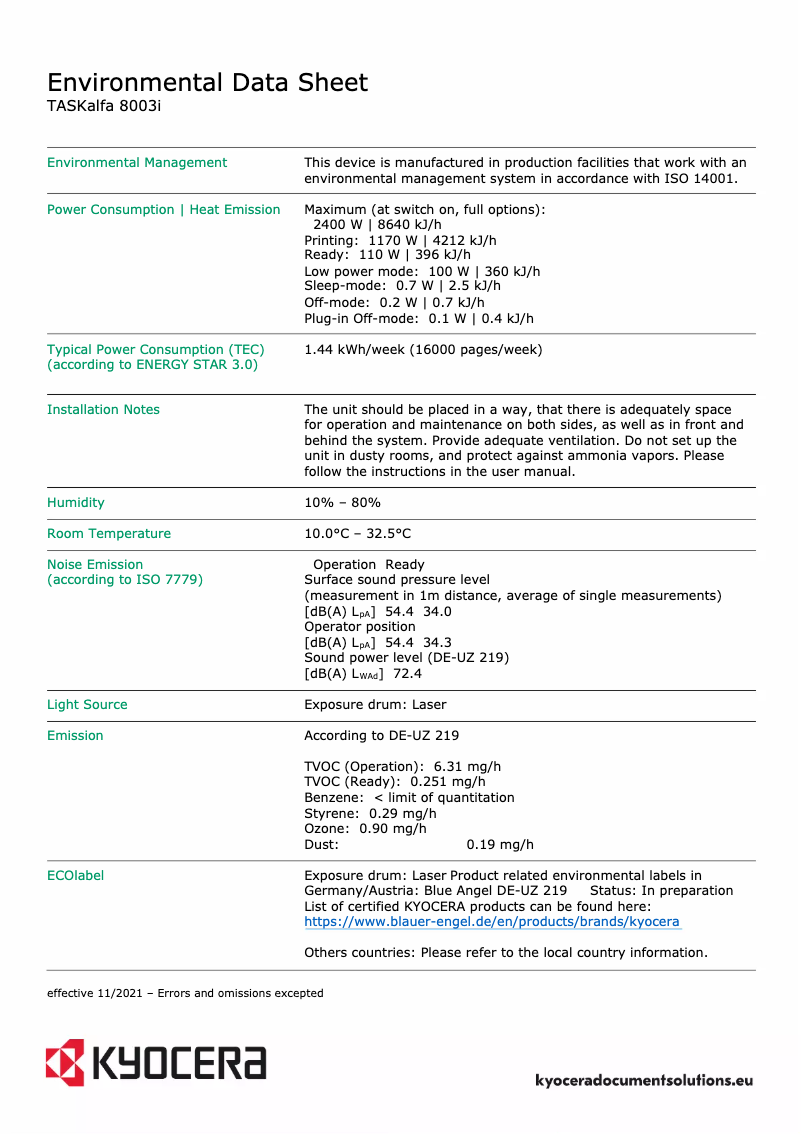
High noise level during printing
Technical Specifications TASKalfa 8003i
General Information
-
ModelTASKALFA 8003I
-
Brand
-
Category
-
Type
-
SKU1340115
-
MPN1340115
Frequently Asked Questions
What is the best method to remove paper jammed in the printer?
Why is my printer not recognizing the original cartridges?
What are the possible causes of poor print quality?
What are the differences between a laser printer and an inkjet printer?
Why is my inkjet printer leaving black streaks on prints?
What does the abbreviation DPI mean?
Is the manual for the Kyocera TASKalfa 8003i available in French?
Similar products


More product categories from brand Kyocera
Phones Kyocera
Other Kyocera
More product types from brand Kyocera


Presentation of product TASKalfa 8003i specifications from brand Kyocera
General Information
The Kyocera TASKalfa 8003i is a renowned printer from the Kyocera brand, distinguished by its commitment to quality and innovation in the printing device sector. This model, the TASKalfa 8003i, is designed to deliver exceptional performance, ensuring a smooth and efficient user experience.
Advantages
This printer stands out for its excellent print quality, guaranteeing clear and professional documents. Its speed and efficiency make it an ideal choice for handling large print volumes without sacrificing performance. Additionally, it offers advanced features such as various connectivity options and multitasking capabilities, easily adapting to the different needs of an office environment.
The durability and reliability of the TASKalfa 8003i are also noteworthy, as Kyocera is known for the robustness of its products, which helps reduce long-term maintenance costs. The user experience is enhanced by a user-friendly interface and customization options, making its use intuitive and pleasant on a daily basis.
Disadvantages
However, it is important to consider some disadvantages. The initial purchase cost of the TASKalfa 8003i can be high, which may pose a barrier for small businesses or individual users. Additionally, its dimensions and weight can complicate installation and movement in tight spaces.
The maintenance costs and consumables, such as toners and replacement parts, can quickly add up and impact the long-term budget. The user interface may seem complex for those unfamiliar with advanced printing technologies, requiring a certain learning curve. Finally, the noise level during the printing process can be relatively high, which could disrupt a quiet work environment.


