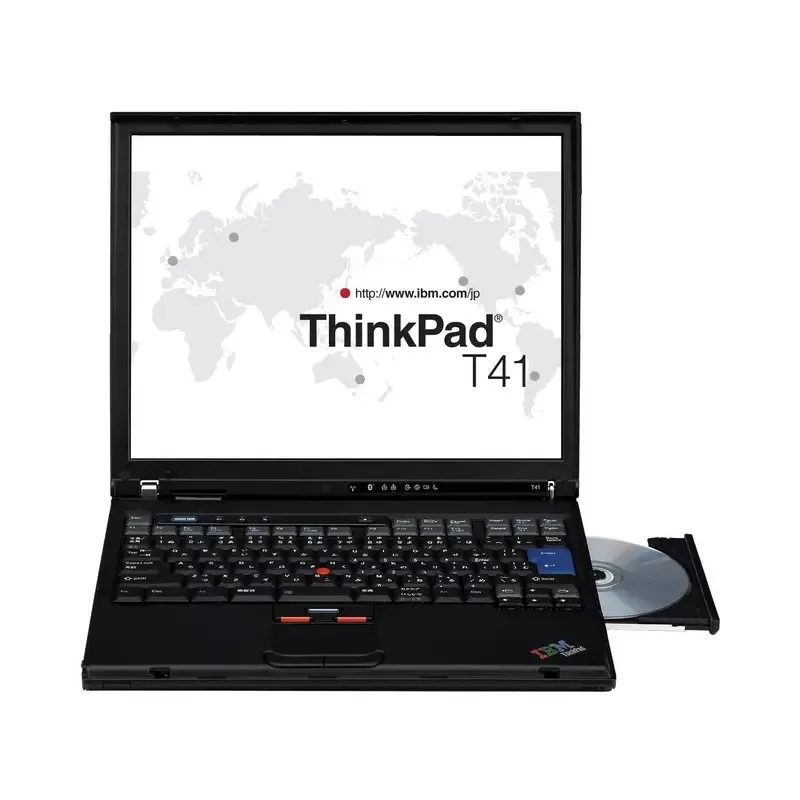

Manual of product ThinkPad T41

Editorial note
The Lenovo ThinkPad T41 stands out for its lightweight and compact design, making it an ideal choice for professionals on the go. Weighing 2250 g, it is easily portable, and its battery life of up to 4.7 hours allows for extended use without interruption. Additionally, its ergonomic keyboard and intuitive touchpad promote a comfortable user experience, which is appreciated for long work sessions. However, despite these advantages, the T41 has several drawbacks. The screen resolution of 1024 x 768 pixels is relatively low compared to current standards, which may limit the visual experience for multimedia content. The internal memory of only 0.5 Go, expandable to 2 Go, as well as the storage capacity of 40 Go, may prove insufficient for users with high multitasking or storage needs. Furthermore, the 1.6 GHz processor and 400 MHz system bus may seem outdated for modern applications, resulting in unsatisfactory performance. In terms of connectivity, although the T41 offers wireless connection via IEEE 802.11b and Bluetooth, the lack of modern ports such as USB 3.0 or HDMI limits its versatility. Finally, the Windows XP Professional operating system, which no longer receives security updates, poses risks for security and compatibility with recent software. In summary, the Lenovo ThinkPad T41 is a laptop that combines lightness and battery life, but has limitations in terms of performance and connectivity, which may not suit all users.Score details
User experience
The user experience is positive thanks to an ergonomic keyboard and an intuitive touchpad, but the screen resolution is relatively low, limiting the visual experience.
Performance
The performance of the Lenovo ThinkPad T41 may seem outdated with a 1.6 GHz processor and only 0.5 GB of internal memory, which can cause slowdowns when using modern applications.
Battery life
The battery life is satisfactory, reaching up to 4.7 hours, which is ideal for professionals on the go.
Design
The lightweight and compact design of the Lenovo ThinkPad T41 makes it easy to transport, although its weight of 2250 g may be a bit heavy for some users.
Value for money
The value for money is fair, but the limitations in memory and storage may not justify the purchase for users with higher needs.
connectivity
Wireless connectivity via IEEE 802.11b and Bluetooth is a plus, but the absence of modern ports like USB 3.0 or HDMI limits versatility.
Support
The Windows XP Professional operating system is outdated and no longer receives security updates, which poses risks for security and compatibility.
Advantages
Lightweight and easy to carry
Recognized durability and robustness
Ergonomic keyboard for typing comfort
Convenient wireless connectivity
Battery life of up to 4.7 hours
Disadvantages
Low screen resolution, 1024 x 768 pixels
Insufficient internal memory, only 0.5 GB
Limited storage capacity of 40 GB
Obsolete processor, 1.6 GHz
No modern ports, USB 3.0 or HDMI
Outdated operating system, Windows XP
Technical Specifications ThinkPad T41
General Information
-
ModelTHINKPAD T41
-
Brand
-
Category
-
Type
-
SKU1389707
-
MPN1389707
Screen
-
Screen size14.1 "
-
Screen resolution
-
Image format1024 x 768 pixels
-
4:3
Storage support
-
Total storage capacity40 GB
-
Hard disk rotation speed5400 RPM
-
Hard drive interfaceUltra-ATA/100
-
Optical readerDVD-ROM
Memory
-
Internal memory0.5 GB
-
Type of internal memoryDDR-SDRAM
-
Maximum internal memory2 GB
Other features
-
ScreenLCD
-
Modem speed56 Kbit/s
-
Infrared portYes
-
Modem typeV.92
-
Infrared portYes
-
TV InputNo
-
Dimensions (LxWxH)311 x 255 x 27 mm
-
Wireless technologyIEEE 802.11b/Bluetooth
-
Home solutionDock II / Port Replicator II
Graphique
-
Maximum graphics card memory0.032 GB
-
Distinct graphics adapter modelAMD Mobility Radeon 7500
-
Dedicated graphics card adapterYes
Weight and dimensions
-
Weight2250 g
-
Height27 mm
-
Width311 mm
-
Depth255 mm
Processor
-
System bus processor400 MHz
-
Processor frequency1.6 GHz
-
Processor cache typeL2
-
Processor cache memory1 MB
Optical reader
-
CD writing speed16 x
-
CD reading speed24 x
-
CD rewrite speed10 x
-
DVD reading speed8 x
Audio
-
Audio systemSoundMAX
-
Number of built-in speakers2
Network
-
Network featuresEthernet
-
Fast Ethernet
-
Gigabit Ethernet
Battery
-
Number of battery cells6
-
Maximum battery life4.7 h
Software
-
Provided softwareAccess Support
-
Installed operating systemAccess Program
-
Drive Letter Access
-
Rapid Restore Ultra
-
Record Now
-
ThinkVantage Access Connections
-
IBM Update Connector
-
Norton AntiVirus 2003 OEM Version
-
PC-Doctor
-
Adobe Acrobat Reader
-
Windows XP Professional
Connectivity
-
Number of VGA (D-Sub) ports1
-
Number of IEEE 1394/Firewire Ports0
-
Number of IEEE 1394/Firewire Ports0
-
Quantity of USB 2.0 Ports2
-
Number of IEEE 1394/Firewire Ports0
-
Number of IEEE 1394/Firewire Ports0
-
Number of VGA (D-Sub) ports1
-
Number of VGA (D-Sub) ports1
-
Number of VGA (D-Sub) ports1
-
TV OutputYes
-
SmartCard HousingNo
-
SmartCard HousingNo
-
Number of VGA (D-Sub) ports1
-
Type of housing for CardBus PCMCIAType III
-
SmartCard HousingNo
-
Number of VGA (D-Sub) ports1
-
TV OutputYes
-
TV OutputYes
-
TV output typeS-video
-
Charging port typeDC-in jack
Keyboard
-
Pointing deviceThinkPad UltraNav
-
Number of keyboard keys86
Camera
-
Front cameraNo
Security
-
Cable anti-theft lockYes
-
Cable lock location typeIBM
Frequently Asked Questions
What influences the download speed on the Internet?
What are the dimensions of my laptop screen?
What does the acronym HDMI stand for?
What is the best method to clean my laptop?
How can I clean my keyboard?
What is Bluetooth?
What is the weight of the Lenovo ThinkPad T41?
What is the screen size of the Lenovo ThinkPad T41?
What is the height of the Lenovo ThinkPad T41?
What is the resolution of the screen of the Lenovo ThinkPad T41?
What is the width of the Lenovo ThinkPad T41?
What is the depth of the Lenovo ThinkPad T41?
Is the manual for the Lenovo ThinkPad T41 available in French?
Similar products


More product categories from brand Lenovo
Computers and accessories Lenovo
Phones Lenovo
Audio Lenovo
Other Lenovo
Interior Lenovo
Software Lenovo
More product types from brand Lenovo


Presentation of product ThinkPad T41 specifications from brand Lenovo
General Information
The Lenovo ThinkPad T41 is a laptop from the renowned brand Lenovo, known for its innovation and reliability. This model, ThinkPad T41 | TC14FFR, is designed to deliver solid performance and a smooth user experience. It is identifiable by its unique EAN code, which facilitates its identification in distribution systems.
Screen
Its 14.1-inch screen provides a satisfactory visual experience with a resolution of 1024 x 768 pixels. Although the 4:3 aspect ratio is traditional, it remains optimal for immersion in common content.
Storage Support
The T41 has a storage capacity of 40 GB, sufficient for daily needs, although limited for heavy users. With a rotational speed of 5400 RPM, its hard drive ensures quick access to data. The Ultra-ATA/100 interface ensures efficient transfer, and the DVD-ROM optical drive allows reading and writing on optical media, adding a versatile dimension to storage.
Memory
This model is equipped with 0.5 GB of RAM, expandable up to 2 GB, which may be insufficient for modern multitasking. The DDR-SDRAM memory allows for efficient storage of applications and data, although the limited memory capacity may lead to slowdowns with heavy applications.
Other Features
The T41 uses an LCD screen for satisfactory image quality. It is equipped with an internal modem 56 Kbit/s and IEEE 802.11b/Bluetooth wireless technology, facilitating connection to the Internet and other devices. Its compact dimensions of 311 x 255 x 27 mm allow for easy integration into various work environments.
Graphics
The T41 integrates an AMD Mobility Radeon 7500 graphics adapter with a maximum graphics memory of 0.032 GB, ensuring acceptable graphics performance for basic applications.
Weight and Dimensions
Weighing 2250 g, the T41 is lightweight and easy to carry. Its dimensions ensure a practical fit in your workspace.
Processor
The T41's processor operates at a frequency of 1.6 GHz with a system bus at 400 MHz, providing adequate performance for common tasks. With a cache memory of 1 MB, it allows for quick access to frequently used data.
Optical Drive
The T41's optical drive offers CD writing and reading speeds of 16x and 24x respectively, with a DVD reading speed of 8x, ensuring good performance for burning and reading needs.
Audio
The stereo audio system with two built-in speakers provides a quality sound experience, enhancing listening for videos and music.
Network
The T41 supports Ethernet/Fast Ethernet/Gigabit Ethernet connections, ensuring fast and reliable connectivity for all your online activities.
Battery
Equipped with a 6-cell battery, the T41 offers a maximum battery life of 4.7 hours, allowing for extended use without frequent recharging.
Software
The Lenovo ThinkPad T41 comes pre-installed with Windows XP Professional and includes useful applications such as Norton AntiVirus 2003 and Adobe Acrobat Reader, thus optimizing the user experience.
Connectivity
In terms of connectivity, the T41 has 2 USB 2.0 ports, an RJ11 port for telephone connection, and an Ethernet LAN port. Although it does not include modern ports like USB 3.0 or HDMI, it remains functional for basic connections.
Keyboard
The touchpad and the 86-key keyboard provide a comfortable typing experience, promoting increased productivity through their ergonomic design.
Camera
The Lenovo ThinkPad T41 does not have a front camera, which limits video conferencing functions.
Security
Regarding security, the T41 does not have a port for a security cable, but it is equipped with an IBM cable lock system, providing basic theft protection.
Advantages and Disadvantages
The Lenovo ThinkPad T41 stands out for its lightness and durability, making it an ideal choice for mobile professionals. However, its screen resolution and memory and processor capabilities may seem limited against modern demands, which can impact the user experience for more intensive tasks.


