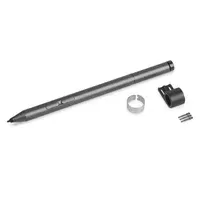
Thumbnail of product Active Pen 2 from brand Lenovo
Logo of brand Lenovo

Tablet Lenovo Active Pen 2

The Lenovo Active Pen 2 is a stylus designed for tablet users, offering a smooth and precise writing experience. With its universal compatibility, this stylus adapts to a wide range of devices, ensuring optimal usage flexibility.
Its modern gray color gives it an elegant look, while its Bluetooth connectivity allows for convenient wireless connection with other compatible devices.

With an impressive battery life of 2000 hours, the Lenovo Active Pen 2 lets you fully enjoy your applications without interruption. This product is specifically designed to work with 10-inch tablets, ensuring optimal use.
Weighing only 86 g, it is lightweight and easy to carry, making it an ideal accessory for professionals and students on the go.

In summary, the Lenovo Active Pen 2 is an essential tool for those seeking precision and comfort when using their tablet.

Manual of product Active Pen 2

8 10

Editorial note

The Lenovo Active Pen 2 stands out for its universal compatibility, allowing for smooth use with a wide range of devices, which is a major advantage for users who own multiple devices. Its Bluetooth connection also facilitates wireless interaction, enhancing the user experience. Additionally, its remarkable battery life of 2000 hours ensures prolonged use without the need to worry about frequent recharges, which is particularly appreciated for intensive use. However, a few drawbacks deserve to be highlighted. The price of the Lenovo Active Pen 2 may seem high compared to other active pens available on the market, which could deter some buyers. Although compatibility is generally excellent, some users may encounter connectivity issues with older devices. Furthermore, despite its modern and sleek design, the size and weight of the stylus, while light, may not suit everyone, especially those who prefer more compact pens. Finally, the lack of advanced features, such as customizable pressure levels, could disappoint professionals and digital artists looking for more sophisticated tools. In summary, the Lenovo Active Pen 2 is an excellent choice for those seeking a versatile and durable stylus, but it is important to consider its limitations in terms of price and features before making a purchase.

Score details

User experience

The user experience is generally positive due to universal compatibility and Bluetooth connectivity, although some users encounter connectivity issues with older devices.

Performance

The performance is solid, with a battery life of 2000 hours, but the lack of advanced features may disappoint professional users.

Battery life

The battery life is exceptional, allowing for prolonged use without recharging, although this may vary depending on usage.

Design

The modern and sleek design, with its gray color, is attractive, but the size and weight may not suit all users.

Value for money

The price is relatively high compared to other active pens on the market, which could deter some buyers.


Advantages

Compatibility with many devices

Convenient wireless Bluetooth connection

2000 hours of battery life

Modern and sleek design

Lightweight and easy to carry

Disadvantages

High price compared to other pens.

Connectivity issues with older devices.

Size and weight not suitable for everyone.

Lack of advanced features for artists.

Battery life varies depending on usage.

Technical Specifications Active Pen 2

General Information

Features

  • Device compatibility
    Laptop
  • Product color
    Gray
  • Brand compatibility
    Lenovo
  • Bluetooth
    Yes
  • Battery life
    2000 h
  • Compatibility
    Tablet 10

Packaging information

  • Quantity
    1 piece(s)
  • Package weight
    86 g

Logistics data

  • Harmonized System Code
    84733080

Frequently Asked Questions

What influences the download speed on the Internet?
The download speed on the Internet is determined by the type of connection you have. For example, a 25 Mb/s connection means that you should theoretically be able to download 25 MB per second. Q: What are the dimensions of my tablet's screen? A: The size of your tablet is usually indicated in inches, where 1 inch equals 2.54 centimeters. This size refers to the diagonal of your tablet, measured from the bottom left corner to the top right corner of the screen. Q: How do I connect my Lenovo Active Pen 2 to my tablet? A: To connect your Lenovo Active Pen 2 to your tablet, make sure Bluetooth is enabled on it. Then, press and hold the top button of the stylus for a few seconds until the LED starts blinking. On your tablet, go to the Bluetooth settings and search for available devices. Select the stylus from the list to complete the pairing. Q: How do I adjust the pressure sensitivity of my Lenovo Active Pen 2? A: To adjust the pressure sensitivity of your Lenovo Active Pen 2, open your tablet's settings and find the options related to the stylus. Locate the pressure sensitivity option and follow the on-screen instructions to properly calibrate the stylus so that it responds accurately to pressure variations when you write or draw. Q: Can I replace the battery of the Lenovo Active Pen 2? A: Yes, the battery of the Lenovo Active Pen 2 is replaceable. To do this, gently unscrew the cap of the stylus counterclockwise, remove the old battery, and insert a new one, ensuring it is positioned correctly. Then, screw the cap back on clockwise until it is securely fastened. Q: How do I customize the button functions of my Lenovo Active Pen 2? A: To customize the button functions of your Lenovo Active Pen 2, open the tablet's settings and look for options for the stylus. You will find a section to assign different functions to the buttons. Select the button to customize, then choose the desired function from the available options to tailor the stylus to your preferences. Q: Can the Lenovo Active Pen 2 be used for handwriting recognition or text input? A: Yes, the Lenovo Active Pen 2 can be used for handwriting recognition and text input on your tablet. Simply open a compatible application or software that supports this feature, such as a note-taking app or word processor. Hold the stylus like a traditional pen and start writing on the screen: the tablet will convert your handwriting into text, making digital note-taking easier. Q: Is the Lenovo Active Pen 2 compatible with laptops? A: Yes, the Lenovo Active Pen 2 is compatible with laptops, allowing users to benefit from its features on their portable devices. Q: Is the Lenovo Active Pen 2 only compatible with Lenovo devices? A: Yes, the Lenovo Active Pen 2 is specifically designed to work with Lenovo devices, ensuring optimal performance and functionality. Q: Does the Lenovo Active Pen 2 have Bluetooth connectivity? A: Yes, the Lenovo Active Pen 2 is equipped with Bluetooth connectivity, allowing for convenient wireless connection with compatible devices. Q: What is the battery life of the Lenovo Active Pen 2? A: The Lenovo Active Pen 2 offers an impressive battery life of 2000 hours, allowing users to enjoy extended use before needing to replace or recharge the battery. Q: How many styluses are included in a pack of the Lenovo Active Pen 2? A: Each pack of the Lenovo Active Pen 2 contains one stylus, providing everything needed to start using and enjoying the features of the stylus. Q: Is the manual for the Lenovo Active Pen 2 available in French? A: Unfortunately, the manual for the Lenovo Active Pen 2 is not available in French. It is only accessible in English.
Quelles sont les dimensions de l’écran de ma tablette ?
La dimension de votre tablette est généralement indiquée en pouces, où 1 pouce équivaut à 2,54 centimètres. Cette taille se réfère à la diagonale de votre tablette, mesurée du coin inférieur gauche au coin supérieur droit de l'écran.
Comment connecter mon Lenovo Active Pen 2 à ma tablette ?
Pour connecter votre Lenovo Active Pen 2 à votre tablette, assurez-vous que le Bluetooth est activé sur celle-ci. Puis, appuyez et maintenez le bouton supérieur du stylet pendant quelques secondes jusqu'à ce que la LED commence à clignoter. Sur votre tablette, allez dans les paramètres Bluetooth et recherchez les appareils disponibles. Sélectionnez le stylet dans la liste pour finaliser l'association.
Comment ajuster la sensibilité à la pression de mon Lenovo Active Pen 2 ?
Pour ajuster la sensibilité à la pression de votre Lenovo Active Pen 2, ouvrez les paramètres de votre tablette et trouvez les options relatives au stylet. Localisez l'option de sensibilité à la pression et suivez les instructions à l'écran pour calibrer correctement le stylet, afin qu'il réponde précisément aux variations de pression lorsque vous écrivez ou dessinez.
Puis-je remplacer la batterie du Lenovo Active Pen 2 ?
Oui, la batterie du Lenovo Active Pen 2 est remplaçable. Pour ce faire, dévissez délicatement le capuchon du stylet dans le sens inverse des aiguilles d'une montre, retirez l'ancienne batterie et insérez une nouvelle en veillant à son bon positionnement. Ensuite, revissez le capuchon dans le sens des aiguilles d'une montre jusqu'à ce qu'il soit bien fixé.
Comment personnaliser les fonctions des boutons de mon Lenovo Active Pen 2 ?
Pour personnaliser les fonctions des boutons de votre Lenovo Active Pen 2, ouvrez les paramètres de la tablette et cherchez les options pour le stylet. Vous y trouverez une section pour attribuer différentes fonctions aux boutons. Sélectionnez le bouton à personnaliser, puis choisissez la fonction souhaitée parmi les options disponibles pour adapter le stylet à vos préférences.
Le Lenovo Active Pen 2 peut-il être utilisé pour la reconnaissance de l'écriture ou la saisie de texte ?
Oui, le Lenovo Active Pen 2 peut être utilisé pour la reconnaissance de l'écriture manuscrite et la saisie de texte sur votre tablette. Ouvrez simplement une application ou un logiciel compatible qui prend en charge cette fonctionnalité, comme une application de prise de notes ou un traitement de texte. Tenez le stylet comme un stylo classique et commencez à écrire sur l'écran : la tablette convertira votre écriture en texte, facilitant ainsi la prise de notes numérique.
Le Lenovo Active Pen 2 est-il compatible avec les ordinateurs portables ?
Oui, le Lenovo Active Pen 2 est compatible avec les ordinateurs portables, permettant aux utilisateurs de bénéficier de ses fonctionnalités sur leurs dispositifs portables.
Le Lenovo Active Pen 2 est-il uniquement compatible avec les appareils Lenovo ?
Oui, le Lenovo Active Pen 2 est spécialement conçu pour fonctionner avec les appareils Lenovo, assurant une performance et une fonctionnalité optimales.
Le Lenovo Active Pen 2 dispose-t-il de la connectivité Bluetooth ?
Oui, le Lenovo Active Pen 2 est équipé de la connectivité Bluetooth, ce qui permet une connexion sans fil pratique avec des appareils compatibles.
Quelle est la durée de vie de la batterie du Lenovo Active Pen 2 ?
Le Lenovo Active Pen 2 offre une autonomie impressionnante de 2000 heures, permettant aux utilisateurs de profiter d'une utilisation prolongée avant de devoir remplacer ou recharger la batterie.
Combien de stylets sont inclus dans un pack du Lenovo Active Pen 2 ?
Chaque pack du Lenovo Active Pen 2 contient un stylet, fournissant tout ce qu'il faut pour commencer à utiliser et à profiter des fonctionnalités du stylet.
Le manuel du Lenovo Active Pen 2 est-il disponible en français ?
Malheureusement, le manuel du Lenovo Active Pen 2 n'est pas disponible en français. Il est uniquement accessible en anglais.

Similar products


Discover the technical sheet of ThinkPad from Lenovo and its manuals...
Available manuals:
Discover the technical sheet of ThinkPad Tablet 8 from Lenovo and its manuals...
Available manuals:
Discover the technical sheet of Tab E7 from Lenovo and its manuals...
Available manuals:
Discover the technical sheet of XOOM Wifi from Motorola and its manuals...
Available manuals:
Discover the technical sheet of XYBOARD 8.2 from Motorola and its manuals...
Available manuals:
Discover the technical sheet of DROID XYBOARD 10.1 from Motorola and its manuals...
Available manuals:
Discover the technical sheet of XOOM 2 from Motorola and its manuals...
Available manuals:
Discover the technical sheet of DROID XYBOARD 8.2 from Motorola and its manuals...
Available manuals:
Discover the technical sheet of XOOM Family Edition from Motorola and its manuals...
Available manuals:
Discover the technical sheet of ThinkPad Twist from Lenovo and its manuals...
Available manuals:
Discover the technical sheet of Yoga 710 from Lenovo and its manuals...
Available manuals:
Discover the technical sheet of TAB 2 A7-20 from Lenovo and its manuals...
Available manuals:

Presentation of product Active Pen 2 specifications from brand Lenovo

General Information

The Lenovo Active Pen 2 is a stylus from the Lenovo brand, known for its technological innovations and product quality. This model, identified by the reference Active Pen 2 | 4X80N95873, is designed to deliver superior performance and an enhanced user experience. The EAN code 0191545309724 allows for precise identification of the product in distribution chains.

Features

The Lenovo Active Pen 2 stands out for its universal compatibility, allowing it to easily pair with a wide range of devices, regardless of their brand. With its gray hue, it showcases a modern and elegant design, perfectly integrating into various technological environments. This stylus is also equipped with Bluetooth technology, facilitating a wireless connection with other compatible devices for simplified use. Its impressive battery life of 2000 hours ensures prolonged use without frequent interruptions. Furthermore, it is specifically designed to be used with 10-inch tablets, ensuring optimal compatibility.

Packaging Information

The Lenovo Active Pen 2 is sold as a single unit in its packaging. The package weight is 86 g, providing adequate protection during transport and delivery while remaining lightweight and easy to handle.

Logistics Data

The harmonized system code for the Lenovo Active Pen 2 is 84733080, which allows for unique identification of the product in international trade.