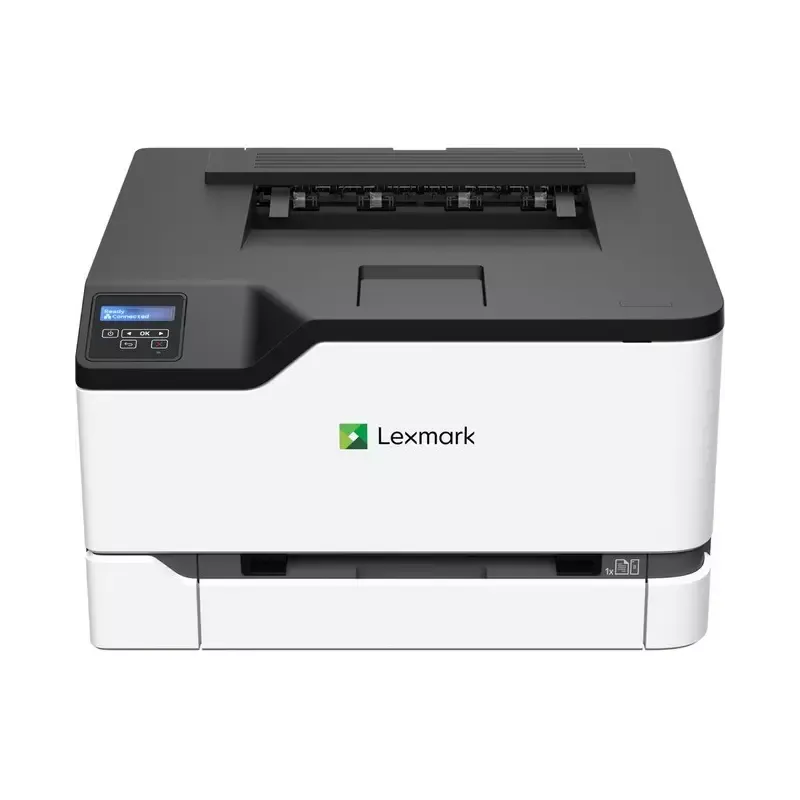

Manual of product CS331

Editorial note
The Lexmark CS331 printer stands out with its impressive printing speed of 26 pages per minute, both in color and black and white, which promotes high productivity for users with frequent printing needs. Additionally, it features duplex printing, contributing to a more eco-friendly use of resources. Its wireless connectivity and Ethernet support facilitate integration into various work environments, allowing for direct printing from mobile devices. However, the printer's weight, at 16,100 g, can make its movement and installation more complicated, especially in tight spaces. The print resolution, while adequate at 600 x 600 DPI, may not be sufficient for high-quality prints, particularly for detailed images. Furthermore, the limited number of paper trays, with only two trays, may require frequent refills. Although it supports multiple operating systems, compatibility issues may arise with some less common versions. Overall, the Lexmark CS331 offers good value for money thanks to its advanced features and energy efficiency, as evidenced by its ENERGY STAR certification. Despite some limitations, it proves to be a solid choice for professionals seeking a high-performing and reliable printer.Score details
User experience
The user experience is generally positive due to an intuitive interface and wireless connectivity that facilitates integration into various work environments.
Performance
The printing speed of 26 ppm in color and black is impressive, which promotes high productivity. However, the resolution limited to 600 x 600 DPI may not meet all printing needs.
Design
The design is modern and sleek, but its weight of 16,100 g can make it difficult to move in tight spaces.
Value for money
The product offers good value for money with features such as duplex printing and a 250-sheet paper capacity, but the limited number of input trays can be a drawback.
Robustness
The product is built to last and has certifications like ENERGY STAR, attesting to its energy efficiency and compliance with environmental standards.
Usability
Ease of use is enhanced by connectivity features, although compatibility issues with certain operating systems may arise.
Features
Features include built-in duplex printing and extensive connectivity, but the print resolution could be improved for more detailed images.
Support
Although there is good support for multiple operating systems, issues may arise with less common versions.
Documentation
The user manual is comprehensive with 164 pages, making it easy to understand and use the printer.
Advantages
Fast printing: 26 pages per minute
Built-in duplex printing
Wireless and Ethernet connectivity
Resolution of 600 x 600 DPI
250-sheet paper capacity
ENERGY STAR certified for energy efficiency
Disadvantages
Heavy printer, difficult to move.
Resolution limited to 600 x 600 DPI.
Only 2 input trays available.
Variable compatibility with certain systems.
High noise level at 51 dB.
Technical Specifications CS331
General Information
-
ModelCS331
-
Brand
-
Category
-
Type
-
SKU1366812
-
MPN1366812
Print speed
-
Double-sided printingYes
-
Printing technologyLaser
-
Print speed (color, normal quality, A4/US Letter)26 ppm
-
Print speed (color, normal quality, A4/US Letter)26 ppm
-
Copy time for the first page (color, normal)10.9 s
-
Copy time for the first page (color, normal)10.9 s
-
Black print resolution600 x 600 DPI
-
Black print resolution600 x 600 DPI
-
Maximum resolution- DPI
-
Double-sided printingYes
Design
-
Market position-
-
Product colorBlack, White
-
ScreenLCD
-
Built-in screenYes
-
Number of lines displayed2 lines
-
Color displayNo
Paper management
-
Maximum ISO A series paper sizeA4
-
ISO, Format Series A (A0...A9)A4, A5, A6
-
JIS series B format (B0...B9)B5
-
Envelope sizes7 3/4, 9,10, B5, C5, DL
-
Non-ISO print support sizesExecutive (184 x 267mm), Folio (media size), Hagaki card, Legal (media size), Letter (media size), Oficio (media size), Statement (140 x 216mm), Universal
-
Type of paper tray supportCard stock, Envelopes, Plain paper
Network
-
Ready-to-use networkYes
-
Wifi standards802.11b, 802.11g, Wi-Fi 4 (802.11n)
-
Ready-to-use networkYes
-
Ready-to-use networkYes
-
Wiring technology10/100/1000Base-T(X)
-
Mobile printing technologiesApple AirPrint
-
LAN Ethernet: data transfer rate10,100,1000 Mbit/s
Connectivity
-
USB portYes
-
Quantity of USB 2.0 Ports1
-
USB connectorUSB Type-B
Weight and dimensions
-
Width411.2 mm
-
Depth394.1 mm
-
Height243.7 mm
-
Weight16100 g
Packaging information
-
Package width332 mm
-
Package depth556 mm
-
Package height519 mm
-
Package weight19100 g
Input and output capacity
-
Total number of power supply units2
-
Total number of power supply units2
-
Maximum input capacity250 sheets
-
Maximum input capacity250 sheets
-
Maximum output capacity100 sheets
-
Maximum output capacity100 sheets
Features
-
Service cycle (recommended)600 - 2500 pages per month
-
Service cycle (Maximum)50000 pages per month
-
Languages of the page descriptionPCL 5, PCL 6, PCLm, PostScript 3
-
Printing colorsBlack, Cyan, Magenta, Yellow
-
Number of print cartridges4
Representation / realization
-
Internal memory512 MB
-
Internal memory512 MB
-
Integrated into the processorYes
-
Processor frequency1000 MHz
-
Number of processor cores2
-
Sound pressure level (impression)51 dB
Sustainability
-
Sustainability certificatesENERGY STAR
Power
-
Energy Star, typical electrical consumption (TEC)0.31 kWh/week
-
Average power consumption in Print mode395 W
-
Energy consumption (loan)15 W
Minimum system requirements
-
Support for the Windows operating systemWindows 10
-
Support for the Linux operating systemWindows 7
-
Support for the server operating systemWindows 8
-
Support for other operating systemsWindows 8.1
-
Debian 7.0
-
Debian 8.0
-
Fedora 23
-
Fedora 24
-
Red Hat Enterprise Linux WS 6.0
-
Red Hat Enterprise Linux WS 7.0
-
Ubuntu 16.04
-
openSUSE 13.2
-
openSUSE 42.3
-
SUSE Linux Enterprise Server 10
-
SUSE Linux Enterprise Server 11
-
SUSE Linux Enterprise Server 12
-
Windows 2000 Server
-
Windows Server 2012
-
IBM AIX 6.1
-
IBM AIX 7.1
-
Solaris 10
-
Solaris 10 SPARC
-
Solaris 11
-
Solaris 11 SPARC
Environmental conditions
-
Operating temperature10 - 32 °C
-
Operating relative humidity (H-H)8 - 80 %
Frequently Asked Questions
What is the weight of the Lexmark CS331 printer?
What is the best way to clear a paper jam in the printer?
Why is my printer not recognizing the original cartridges?
What are the reasons for poor print quality?
What is the difference between a laser printer and an inkjet printer?
Why is my inkjet printer printing black streaks?
What does the acronym DPI mean?
How many cartridges can be installed in the Lexmark CS331?
What is the height of the Lexmark CS331 printer?
What is the width of the Lexmark CS331 printer?
What is the depth of the Lexmark CS331?
Is the manual for the Lexmark CS331 available in French?
Similar products


More product categories from brand Lexmark
Other Lexmark
More product types from brand Lexmark


Presentation of product CS331 specifications from brand Lexmark
General Information
The Lexmark CS331 printer, manufactured by the renowned brand Lexmark, is a model dedicated to professional users seeking performance and reliability. The CS331 | 40N9020 model is designed to provide a superior printing experience. Its EAN code, which includes references such as 0734646679817 and 0818275802720, allows for easy identification in the distribution circuit.
Print Speed
This printer is equipped with laser printing technology, ensuring precise and high-quality results. It offers an impressive print speed of 26 pages per minute in both black and color, making it an ideal choice for demanding work environments. The first page print time is quick, at just 10.9 seconds for both black and color prints. Its print resolution of 600 x 600 DPI allows for sharp and colorful documents. Additionally, the built-in duplex printing function optimizes paper usage, contributing to a more eco-friendly approach.
Design
The Lexmark CS331 features a modern and sleek design, available in black and white. Its integrated LCD screen facilitates navigation and management of printing tasks, while the two-line display allows for clear reading of information. However, it is worth noting that it does not have a color display.
Paper Management
This printer supports various paper sizes, including standard A4, A5, and B5 sizes, and can handle a maximum of 250 sheets in its input tray. The envelope size options are also varied, including formats such as C5, DL, and B5, allowing for increased flexibility for various printing needs.
Network
The Lexmark CS331 is designed to easily integrate into modern work environments thanks to its wireless connectivity and Ethernet support. It supports multiple Wi-Fi standards (802.11b, 802.11g, Wi-Fi 4) and also offers mobile printing options, making it easy to print from various devices. The data transfer speed reaches up to 1000 Mbit/s, ensuring a fast and efficient connection.
Connectivity
With a USB Type-B port and a USB 2.0 port, the Lexmark CS331 allows for quick and easy connection to various devices, making data transfer and charging straightforward.
Weight and Dimensions
The printer's dimensions are optimal for an office: a width of 411.2 mm, a depth of 394.1 mm, and a height of 243.7 mm. However, its weight of 16,100 g may pose challenges for moving and installing in tight spaces.
Packaging Information
The printer's package measures 332 mm in width, 556 mm in depth, and 519 mm in height, with a total weight of 19,100 g, ensuring adequate protection during transport.
Input and Output Capacity
With two input trays, the Lexmark CS331 has an input capacity of 250 sheets, while its output capacity reaches 100 sheets. This allows for efficient document management without the need for frequent reloading.
Features
The recommended service cycle is between 600 and 2500 pages per month, with a maximum that can reach 50,000 pages per month, suitable for heavy users. The print cartridges include various colors (black, cyan, magenta, yellow) for optimal visual output.
Performance / Execution
Equipped with 512 MB of internal memory, the Lexmark CS331 allows for smooth data processing. The 1000 MHz dual-core processor ensures efficient task management, while its noise level of 51 dB during printing may be a factor to consider in noise-sensitive environments.
Durability
This printer is ENERGY STAR certified, attesting to its energy efficiency and compliance with environmental standards.
Power
The typical power consumption is 0.31 kWh/week, with a printing mode consumption of 395 W and 15 W in standby mode, reflecting good energy efficiency.
Minimum System Requirements
The Lexmark CS331 is compatible with several operating systems, including Windows (10, 7, 8, 8.1) and Linux (Debian, Fedora, Ubuntu). It also supports server systems such as SUSE Linux Enterprise Server and Windows Server, thus broadening its application range.
Environmental Conditions
To operate optimally, the printer should be used within a temperature range of 10 to 32 °C and a relative humidity of 8 to 80 %, ensuring reliable operation in various work environments.


