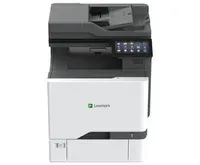

Manual of product CX730de

Editorial note
The Lexmark CX730de is a laser printer that stands out for its high performance and print quality. With a printing speed of 40 pages per minute and a maximum resolution of 1200 x 1200 DPI, it perfectly meets the demands of professional environments, ensuring clear and precise documents. Additionally, the built-in duplex printing feature optimizes paper usage, which is a significant advantage for environmentally conscious users. However, some limitations can be noted. The lack of duplex scanning functionality and limited Wi-Fi connectivity may restrict its use in modern offices where flexibility is paramount. Furthermore, its weight of 39 kg can complicate installation and movement, especially in tight spaces. The time to first print, while acceptable, is not among the fastest, which could impact productivity in highly demanding work environments. In terms of value for money, the Lexmark CX730de offers a reduced operating cost thanks to its laser technology and the longevity of its cartridges. Nevertheless, the initial price represents a significant investment. The functional design of the printer is appreciated, but the heavy weight can pose a challenge for some users. In summary, the Lexmark CX730de is a robust and high-performing printer, ideal for professionals, despite some limitations in connectivity and scanning features.Score details
User experience
The user experience is overall positive thanks to the intuitive interface and practical features, notably the built-in duplex printing that simplifies document management.
Performance
The printer's performance is excellent with a printing speed of 40 ppm and a resolution of 1200 x 1200 DPI, ideal for professional environments.
Features
The features are varied, with a large input capacity of 2850 sheets and flexible scanning options, but the lack of duplex scanning and Wi-Fi connectivity can be limiting.
Value for money
The operating cost is low thanks to laser technology and the longevity of the cartridges, although the initial price can be a significant investment.
Design
The design is functional, but the weight of 39 kg can make installation difficult, especially in tight spaces.
Robustness
The printer's robustness is satisfactory, but the model does not have a fax machine, which could be a disadvantage for some users.
Advantages
Fast printing: 40 pages per minute
Built-in duplex printing to save paper
2850-sheet tray for fewer interruptions
Flexible scanning to email and network folders
Laser technology for sharp and durable prints
Disadvantages
No duplex scanning
No Wi-Fi connectivity
Heavy weight, difficult to move
Average print speed
Lack of fax function
Technical Specifications CX730de
General Information
-
ModelCX730DE
-
Brand
-
Category
-
Type
-
SKU1648844
-
MPN1648844
Print speed
-
Maximum resolution1200 x 1200 DPI
-
Copy time for the first page (color, normal)7 s
-
Print speed (black, normal quality, A4/US Letter)40 ppm
-
Print speed (black, normal quality, A4/US Letter)40 ppm
-
Double-sided printingYes
-
Copy time for the first page (Black, normal)6.4 s
-
Color resolution2400 x 600 DPI
-
Printing technologyLaser
-
PrintingColor printing
-
Maximum resolution1200 x 1200 DPI
Copier
-
Duplex copy-
-
CopyColor copy
-
Max. resolution of copies- DPI
-
Resizing copy25 - 400 %
-
Release time of the first print (black, normal)6.7 s
-
Release time of the first print (color, concept)7.3 s
-
Copy speed (normal quality, black, A4)39.5 cpm
-
Copy speed (normal quality, black, A4)39.5 cpm
Digitization
-
Supported image formatsJPEG, JPS, TIFF
-
Maximum scan area216 x 356 mm
-
Optical scanning resolution300 x 300 DPI
-
Double-sided scanningYes
-
Scan driversTWAIN
-
Optical analysis resolution (color)600 x 600 pixels per inch
-
Scan toE-mail, FTP, LDSS, Network folder, PC, USB
-
Scanning technologyCIS
-
Type of scannerFlatbed scanner and ADF
-
Support for text formatsPDF, XPS
-
Optical analysis resolution (color)600 x 600 pixels per inch
-
DigitizationMonochrome scanning
Paper management
-
Maximum ISO A series paper sizeA4
-
Type of paper tray supportBanner, Card stock, Envelopes, Labels, Plain paper
-
Non-ISO print support sizesExecutive (184 x 267mm), Folio (media size), Legal (media size), Letter (media size), Oficio (media size), Statement (140 x 216mm), Universal
-
JIS series B format (B0...B9)B5
-
Weight of the multifunctional tray support60 - 218 g/m²
-
Weight of the multifunctional tray support60 - 218 g/m²
-
ISO, Format Series A (A0...A9)A4, A5, A6
-
Envelope sizes7 3/4, 9, 10, B5, C5, DL
Network
-
LAN Ethernet: data transfer rate10,100,1000 Mbit/s
-
Wiring technology10/100/1000Base-T(X)
-
Security-supported algorithmIPSec, LEAP, MD5, MSCHAPv2, PEAP, SNMPv3, SSL/TLS, TLS, TTLS
-
WifiNo
-
Management protocolsDHCP, APIPA (AutoIP), BOOTP, RARP, mDNS, IGMP, WINS, DDNS, SNMPv3, SNMPv1, SNMPv2c, Telnet, NTP, ICMP, HTTP, DNS, ARP, HTTPs (SSL/TLS), Finger
-
Ethernet/LANYes
Power
-
Average power consumption in Print mode630 W
-
Energy consumption (standby mode)1 W
-
Energy consumption (in standby mode)0.1 W
-
Energy consumption (loan)61 W
-
Average power consumption in Scanning mode44.5 W
-
Energy Star, typical electrical consumption (TEC)0.55 kWh/week
-
Average power consumption in Copy mode640 W
Connectivity
-
Direct printing-
-
Optional connectivityNear Field Communication (NFC)
-
USB portWireless LAN
-
USB connectorYes
-
Quantity of USB 2.0 PortsUSB Type-A / USB Type-B
-
3
Packaging contents
-
Imaging unit includedYes
-
Cables includedAC, Phone
-
Included cartridge capacity (black)5000 pages
-
Imaging unit includedYes
-
Included cartridge capacity (black)5000 pages
Design
-
Screen size7 "
-
Color display
-
Color displayYes
-
Order typeYes
-
Product colorTouch
-
Market positionBlack, White
-
Working group
Packaging information
-
Package weight52500 g
-
Package height838 mm
-
Package width700 mm
-
Package depth735 mm
Weight and dimensions
-
Width479 mm
-
Depth533 mm
-
Weight39000 g
-
Height621 mm
Environmental conditions
-
Operating temperature10 - 32 °C
-
Operating relative humidity (H-H)8 - 80 %
-
Operating altitude0 - 2896 m
Minimum system requirements
-
Support for the server operating systemSUSE Linux Enterprise Server 10
-
Support for the Linux operating systemSUSE Linux Enterprise Server 11
-
Support for the Windows operating systemSUSE Linux Enterprise Server 12
-
Windows Server 2008
-
Windows Server 2008 R2
-
Windows Server 2008 x64
-
Windows Server 2012
-
Windows Server 2012 R2
-
Debian 7.0
-
Debian 8.0
-
Fedora 21
-
Fedora 22
-
Linpus Lite 2.1
-
Linux Mint 13
-
Linux Mint 17
-
Linux Mint 17.1
-
Linux Mint 17.2
-
Linux Mint Debian Edition 2 (LMDE 2)
-
PCLinuxOS 2014.12
-
Red Hat Enterprise Linux WS 4.0
-
Red Hat Enterprise Linux WS 5.0
-
Red Hat Enterprise Linux WS 6.0
-
Red Hat Enterprise Linux WS 7.0
-
SUSE Linux Enterprise Desktop 10
-
SUSE Linux Enterprise Desktop 11
-
SUSE Linux Enterprise Desktop 12
-
Ubuntu 12.04
-
Ubuntu 14.04
-
Ubuntu 15.04
-
openSUSE 13.1
-
openSUSE 13.2
-
openSUSE Tumbleweed
-
Windows 10
-
Windows 7
-
Windows 7 x64
-
Windows 8
-
Windows 8 x64
-
Windows 8.1
-
Windows 8.1 x64
-
Windows RT
-
Windows RT 8.1
-
Windows Vista
-
Windows Vista x64
-
Windows XP
Fax
-
FaxNo
Input and output capacity
-
Automatic document feeder capacity100 sheets
-
Maximum input capacity2850 sheets
-
Maximum number of feed bins6
-
Total number of power supply units2
-
Total power capacity650 sheets
-
Input capacity of the paper tray 1550 sheets
-
Maximum output capacity300 sheets
-
Maximum output capacity300 sheets
Representation / realization
-
Integrated into the processorYes
-
Maximum internal memory2048 MB
-
Sound pressure level (duplex printing)53 dB
-
Sound pressure level (standby)14 dB
-
Sound pressure level (scanning)51 dB
-
Number of processor cores4
-
Sound pressure level (impression)52 dB
-
Sound pressure level (copy)55 dB
-
Maximum internal memory2048 MB
-
Processor frequency1200 MHz
Sustainability
-
Sustainability certificatesENERGY STAR
-
Compliance with sustainabilityYes
Features
-
Number of print cartridges4
-
Double-sided functionsPrint, Scan
-
Languages of the page descriptionPCL 5, PCL 6, PDF 1.7, PPDS, PostScript 3
-
Service cycle (recommended)1500 - 15000 pages per month
-
Service cycle (Maximum)120000 pages per month
-
Printing colorsBlack, Cyan, Magenta, Yellow
-
Printer fontsBitmap, PCL, PPDS, PostScript, Scalable
Frequently Asked Questions
What is the weight of the Lexmark CX730de?
What is the best method to remove jammed paper from the printer?
Why is my printer not accepting original cartridges?
Why is the quality of my prints poor?
What is the difference between a laser printer and an inkjet printer?
Why is my inkjet printer leaving black streaks?
What does the acronym DPI mean?
How many cartridges can be installed in the Lexmark CX730de?
What is the size of the screen on the Lexmark CX730de?
What is the height of the Lexmark CX730de?
What is the width of the Lexmark CX730de?
What is the depth of the Lexmark CX730de?
Is the manual for the Lexmark CX730de available in French?
Similar products


More product categories from brand Lexmark
Other Lexmark
More product types from brand Lexmark


Presentation of product CX730de specifications from brand Lexmark
General Information
The Lexmark CX730de is a multifunction printer from the Lexmark brand, known for its innovation and quality in the field of office equipment. The CX730de model, identified by the code 47C9567, promises high performance and a smooth user experience. Its EAN code, 0734646735612, allows for its unique identification in distribution systems.
Print Speed
The printer offers a black print resolution of 1200 x 1200 DPI, ensuring documents of remarkable clarity. The print speed reaches 40 pages per minute for both color and black prints, thus efficiently meeting daily printing needs. The time for the first color page is 7 seconds, and 6.4 seconds for black prints. Additionally, the CX730de supports duplex printing, allowing for paper savings while facilitating document management.
Copier
The built-in copier allows for color copies at a speed of 39.5 copies per minute in A4 format. Although it does not include an automatic duplex copy function, it offers a copy resizing feature ranging from 25 % to 400 %, providing valuable flexibility for various reproduction needs.
Scanning
The CX730de supports multiple image formats, including JPEG, JPS, and TIFF. Its maximum scanning area is 216 x 356 mm, and it offers an optical scanning resolution of 300 x 300 DPI for high-quality images. While it does not have a duplex scanning function, it offers various scanning protocols, such as email sending and scanning to network folders.
Paper Management
This printer supports paper sizes up to A4 and is compatible with various media types, including envelopes and labels. With a maximum input capacity of 2850 sheets and an output tray that can hold up to 300 sheets, it is designed to efficiently handle large print volumes without frequent interruptions.
Network
The Lexmark CX730de features Ethernet connectivity with a data transfer rate of 10/100/1000 Mbit/s. Although it does not offer Wi-Fi connectivity, it supports multiple management protocols for effective network integration.
Power
In terms of energy efficiency, the CX730de consumes an average of 630 W in print mode, while it only consumes 1 W in standby, thus allowing for significant reductions in energy costs.
Connectivity
It is equipped with USB ports (Type-A and Type-B) for easy connection, as well as three USB 2.0 ports, facilitating connection with various devices.
Design
The model features a 7-inch touchscreen for intuitive navigation. Its modern black and white design fits perfectly into a professional work environment.
Durability
The Lexmark CX730de is ENERGY STAR certified, ensuring that it meets high standards for energy efficiency and environmental respect.
Additional Features
With an internal memory of 2048 MB and a processor frequency of 1200 MHz, it ensures fast task processing. The recommended service cycle is 1500 to 15000 pages per month, making it suitable for demanding work environments.


