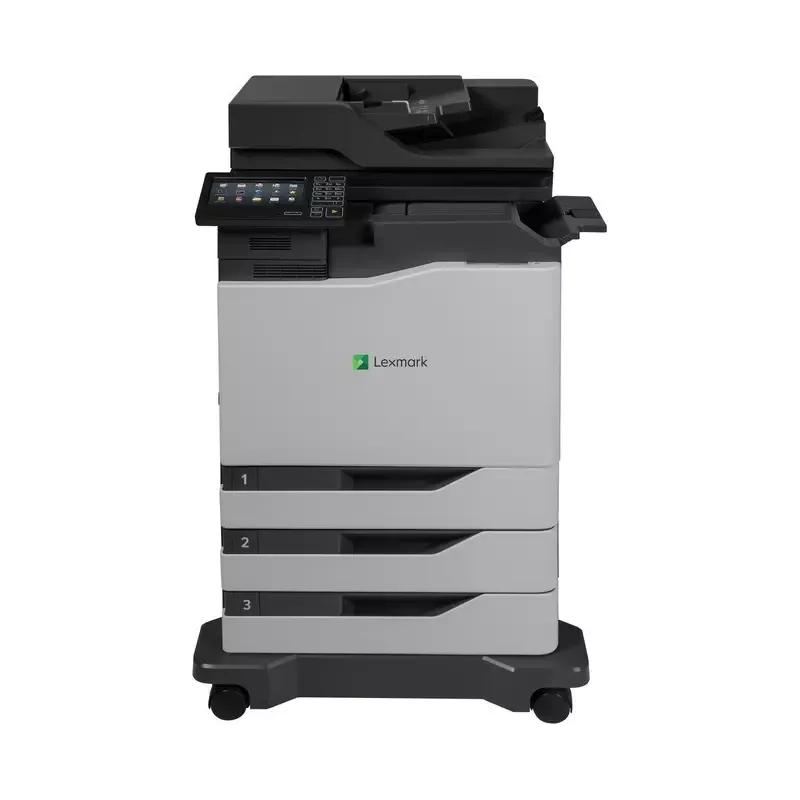

Manual of product CX820dtfe

Editorial note
The Lexmark CX820dtfe is a multifunction printer that stands out for its impressive performance. With a printing speed of up to 50 pages per minute and a maximum resolution of 1200 x 1200 DPI, it is ideal for professional environments requiring high print quality. Additionally, its all-in-one features, including printing, scanning, copying, and faxing, offer great versatility for document management. However, there are a few drawbacks to note. The purchase cost can be a barrier for small businesses or individual users, representing a significant investment. Furthermore, the complexity of setup and use may pose challenges for less experienced users. The printer's heavy weight, at 146.5 kg, makes installation and relocation difficult, often requiring the assistance of several people. The lack of duplex scanning may also limit its effectiveness in certain work contexts. Finally, the operating noise level, which can reach 58 dB, may not be suitable for noise-sensitive environments. In terms of evaluation, user experience is rated good with a score of 78, while performance receives a high score of 85, highlighting the speed and print quality. The design, although functional, is rated at 70 due to its weight. Value for money is considered average with a score of 65, and features are well-rated at 80, despite the lack of duplex scanning. Compatibility with various operating systems is also a positive point, rated at 75. Finally, the user manual is deemed comprehensive, with a score of 80, which is an asset for users. Overall, the Lexmark CX820dtfe is a solid choice for professionals seeking a high-performing and versatile printer, provided that its limitations are taken into account.Score details
User experience
The user experience is generally good, although the complexity of setup may pose problems for less experienced users.
Performance
The printing performance is excellent, with a speed of up to 50 ppm and a maximum resolution of 1200 x 1200 DPI, ideal for professional use.
Design
The design is functional, but the heavy weight (146.5 kg) can make installation and movement difficult.
Value for money
Although the product offers many features, its high cost can represent a significant investment for small businesses.
Features
The all-in-one features (printing, scanning, copying, faxing) offer great versatility, although the lack of duplex scanning is a drawback.
Support
Compatibility with various operating systems (Windows, Mac, Linux) facilitates integration into different work environments.
Documentation
The user manual is comprehensive, with a total of 176 pages, providing a good level of support for users.
Advantages
Fast printing up to 50 pages per minute
All-in-one features: printing, scanning, copying, faxing
Print resolution of 1200 x 1200 DPI
Input capacity of up to 4500 sheets
Compatible with Windows, Mac, and Linux
ENERGY STAR and Blue Angel certifications
Disadvantages
High purchase cost for small businesses
Complex setup for novice users
Heavy weight making transportation difficult
Lack of duplex scanning
High noise level during operation
Technical Specifications CX820dtfe
General Information
-
ModelCX820DTFE
-
Brand
-
Category
-
Type
-
SKU1384463
-
MPN1384463
Print speed
-
Printing technologyLaser
-
PrintingColor printing
-
Print speed (color, normal quality, A4/US Letter)50 ppm
-
Maximum resolution1200 x 1200 DPI
-
Print speed (color, normal quality, A4/US Letter)50 ppm
-
Duplex printing speed (color, normal quality, A4/US Letter)25 ppm
-
Duplex printing speed (color, normal quality, A4/US Letter)25 ppm
-
Copy time for the first page (color, normal)7 s
-
Copy time for the first page (color, normal)7 s
-
Double-sided printingYes
Digitization
-
DigitizationColor scanning
-
Optical scanning resolution600 x 1200 DPI
-
Maximum scan area216 x 355 mm
-
Type of scannerFlatbed and ADF scanner
-
Scan toE-mail, FTP, USB
-
Duplex scanning speed (black)57 ppm
-
Duplex scanning speed (black)57 ppm
-
Duplex scanning speed (black)57 ppm
-
Duplex scanning speed (black)57 ppm
-
Scanning technologyCCD (charge-coupled device)
-
Double-sided scanningYes
Fax
-
FaxColor fax
-
Fax transmission speed3 sec/page
-
Modem speed33.6 Kbit/s
Copier
-
CopyColor copy
-
Max. resolution of copies- DPI
-
Copy speed (normal quality, black, A4)50 cpm
-
Copy speed (normal quality, black, A4)50 cpm
-
Resizing copy25 - 400 %
-
Release time of the first print (black, normal)6.5 s
-
Release time of the first print (color, concept)7.5 s
Features
-
Service cycle (Maximum)200000 pages per month
-
Digital senderNo
-
Service cycle (recommended)2500 - 25000 pages per month
-
Languages of the page descriptionMicrosoft XPS, PCL 5c, PCL 6, PPDS, PostScript 3
-
Printing colorsBlack, Cyan, Magenta, Yellow
Other features
-
Printer managementHTTP
-
All-in-one functionsHTTPs (SSL/TLS)
-
All-in-one color functionsSNMPv1
-
Finishing optionSNMPv2c
-
SNMPv3
-
WINS
-
IGMP
-
BOOTP
-
RARP
-
APIPA (AutoIP)
-
DHCP
-
ICMP
-
DNS
-
Bonjour
-
DDNS
-
mDNS
-
ARP
-
NTP
-
Telnet
-
Finger
-
Copy
-
Fax
-
Print
-
Scan
-
copy
-
fax
-
print
-
scan
-
Yes
Network
-
Wifi-
-
Mobile printing technologies-
-
Authentication methodMD5
-
Ethernet/LANMSCHAPv2
-
Network printing methodsLEAP
-
Support for network protocols (IPv4)PEAP
-
Support for network protocols (IPv6)TLS
-
TTLS
-
Yes
-
LPR/LPD
-
Direct IP (Port 9100)
-
Enhanced IP (Port 9400)
-
Secure IP (Port 96xx)
-
FTP
-
TFTP
-
ThinPrint .print integration
-
Telnet
-
IPP 1.0
-
1.1
-
2.0
-
Microsoft Web Services WSD
-
Pull Printing
-
TCP/IP
-
TCP
-
UDP
Representation / realization
-
Processor frequency1330 MHz
-
Internal memory2048 MB
-
Built-in memory card readerYes
-
Maximum internal memory4096 MB
-
Sound pressure level (copy)58 dB
-
Sound power level (standby)15 dB
-
Sound pressure level (scanning)55 dB
-
Sound pressure level (scanning)55 dB
-
Sound pressure level (silent mode)52 dB
-
Sound pressure level (duplex printing)56 dB
Input and output capacity
-
Maximum input capacity4500 sheets
-
Automatic document feeder capacity150 sheets
-
Total number of power supply units4
-
Maximum number of feed bins6
-
Maximum output capacity300 sheets
-
Maximum output capacity300 sheets
-
Total power capacity1750 sheets
-
Automatic Document Feeder (ADF)Yes
Paper management
-
Maximum ISO A series paper sizeA4
-
Type of paper tray supportBanner, Card stock, Labels, Plain paper, Transparencies
-
ISO, Format Series A (A0...A9)A4, A5, A6
-
Non-ISO print support sizesFolio (media size), Index card, Oficio (media size), Statement (140 x 216mm)
-
JIS series B format (B0...B9)B5
-
Envelope sizes7 3/4, 9,10, B5, C4, C5, DL
-
Maximum print format216 x 356 mm
Design
-
Screen size7 "
-
Screen
-
Built-in screenLCD
-
Product colorYes
-
Built-in screenBlack, White
-
Market positionYes
-
Order typeProfessional
-
Touchscreen
Connectivity
-
USB portYes
-
Standard interfacesEthernet, USB 2.0
-
Optional connectivityWireless LAN
-
Quantity of USB 2.0 Ports4
-
USB portYes
Power
-
Electricity consumption (average operation)- W
-
Energy Star, typical electrical consumption (TEC)3.1 kWh/week
-
Average power consumption in Print mode760 W
-
Average power consumption in Copy mode870 W
-
Average power consumption in Scanning mode115 W
-
Energy consumption (loan)80 W
-
Energy consumption (in standby mode)3.2 W
-
Electricity consumption (stop)0.3 W
Minimum system requirements
-
Support for the Windows operating systemWindows 7 Home Basic
-
Support for the Mac operating systemWindows 7 Home Basic x64
-
Support for the Linux operating systemWindows 7 Home Premium
-
Support for the server operating systemWindows 7 Home Premium x64
-
Windows 7 Professional
-
Windows 7 Professional x64
-
Windows 7 Starter
-
Windows 7 Starter x64
-
Windows 7 Ultimate
-
Windows 7 Ultimate x64
-
Windows Vista Business
-
Windows Vista Business x64
-
Windows Vista Enterprise
-
Windows Vista Enterprise x64
-
Windows Vista Home Basic
-
Windows Vista Home Basic x64
-
Windows Vista Home Premium
-
Windows Vista Home Premium x64
-
Windows Vista Ultimate
-
Windows Vista Ultimate x64
-
Windows XP Home
-
Windows XP Home x64
-
Windows XP Professional
-
Windows XP Professional x64
-
Mac OS X 10.10 Yosemite
-
Mac OS X 10.6 Snow Leopard
-
Mac OS X 10.7 Lion
-
Mac OS X 10.8 Mountain Lion
-
Mac OS X 10.9 Mavericks
-
Fedora 14
-
Fedora 15
-
RedHat EL Linux 5.0
-
RedHat EL Linux 5.1
-
RedHat EL Linux 5.2
-
RedHat EL Linux 5.3
-
Solaris 10 U4
-
Solaris 10 U5
-
SuSE Linux 10
-
SuSE Linux 10.2
-
SuSE Linux 10.3
-
SuSE Linux 11
-
Windows Server 2008 R2
-
Windows Server 2012
-
Windows Server 2012 R2
Sustainability
-
Sustainability certificatesBlue Angel
-
ENERGY STAR
Certificate
-
CertificationENERGY STAR
-
ICES-003 Class A
-
BSMI Class A
-
VCCI Class A
-
FCC Class A
-
NOM-032
-
UL
-
cUL
-
NOM
-
US FDA/CDRH
-
IEC 60825-1
-
CB Report
-
ISO-532B
-
CE (EU) DoC
-
EFTA (CE)
-
KC logo
-
CCC
-
C-tick DoC
-
EuP
-
CECP
-
CEL
-
EC 1275/2008
-
ECMA-370
-
TED
-
SII
-
TER
-
SABS
-
UL-AR
-
GS Mark
-
Green Dot
-
ISO-9296
-
COC
-
CCD-035 EcoLogo
-
Green Mark
-
EPEAT
-
Blue Angel (Blauer Engel)
Environmental conditions
-
Operating relative humidity (H-H)15 - 80 %
-
Temperature out of operation10 - 32 °C
-
Operating altitude0 - 2896 m
Weight and dimensions
-
Width649 mm
-
Depth588 mm
-
Height1137.4 mm
-
Weight146500 g
Packaging information
-
Package width762 mm
-
Package depth830 mm
-
Package height1380 mm
-
Package weight161400 g
Logistics data
-
Harmonized System Code84433100
Frequently Asked Questions
What is the weight of the Lexmark CX820dtfe?
What is the recommended method for removing paper jammed in the printer?
Why is my printer rejecting original cartridges?
What are the possible causes of poor print quality?
What are the differences between a laser printer and an inkjet printer?
Why is my inkjet printer leaving black streaks on prints?
What is DPI?
What certifications does the Lexmark CX820dtfe have?
What is the size of the screen on the Lexmark CX820dtfe?
What is the height of the Lexmark CX820dtfe?
What is the width of the Lexmark CX820dtfe?
What is the depth of the Lexmark CX820dtfe?
Is the manual for the Lexmark CX820dtfe available in French?
Similar products


More product categories from brand Lexmark
Other Lexmark
More product types from brand Lexmark


Presentation of product CX820dtfe specifications from brand Lexmark
General Information
The model Lexmark CX820dtfe, from the brand known for its quality and innovation, is designed to deliver optimal performance. This product, identified by the EAN code 0734646575386 and other variants, stands out for an enhanced user experience, particularly suited for demanding work environments.
Print Speed
Equipped with Laser printing technology, the Lexmark CX820dtfe ensures superior print quality with vibrant and accurate colors. The print speed reaches 50 pages per minute in both black and color, with a maximum resolution of 1200 x 1200 DPI, thus guaranteeing documents of exceptional clarity. In duplex mode, the speed is 25 ppm for both black and color prints. The first page output time is 7 seconds, ensuring speed and efficiency.
Scanning
Color scanning is one of the key features of the CX820dtfe, offering an optical resolution of 600 x 1200 DPI for precise details. The maximum scan area of 216 x 355 mm allows for processing large documents. The flatbed scanner and ADF (Automatic Document Feeder) ensure fast scanning, with a speed of 57 ppm in color and black. However, it does not offer duplex scanning.
Fax
This model integrates a color fax machine capable of sending and receiving documents quickly, with a transmission speed of 3 seconds per page and a modem operating at 33.6 Kbit/s, ensuring effective connectivity.
Copier
The Lexmark CX820dtfe allows color copies at a speed of 50 copies per minute in normal quality. The resizing of copies ranges from 25 to 400 %, thus offering flexible usage tailored to various needs. The time for the first copy is 6.5 seconds for black and 7.5 seconds for color.
Features
With a maximum duty cycle of 200000 pages per month, this model is designed for intensive use. The recommended duty cycle is between 2500 and 25000 pages per month, allowing for optimal and sustainable use. It supports multiple page description languages, including Microsoft XPS and PostScript 3.
Other Features
The printer management system includes various features such as copying, faxing, printing, and scanning. The management interfaces allow for simplified administration, while a finishing option is also available to meet users' aesthetic preferences.
Network
The Lexmark CX820dtfe offers advanced connectivity capabilities via Ethernet and Wifi, facilitating integration with various devices. It supports various network printing protocols, ensuring increased flexibility in print management.
Representation / Performance
With a processor running at 1330 MHz and an internal memory of 2048 Mo, this model ensures smooth performance. It is also equipped with a built-in memory card reader for convenient storage.
Input and Output Capacity
The CX820dtfe has a maximum input capacity of 4500 sheets and an automatic feeder that can hold 150 sheets. Its total output capacity is 300 sheets, thus meeting high demands for print volume.
Paper Management
Compatible with paper sizes up to A4, this model supports various media types, from transparencies to labels, and allows for flexible usage according to printing needs.
Design
Featuring a 7-inch LCD screen and an intuitive touch interface, the design of the Lexmark CX820dtfe combines modernity and functionality. Its black and white color gives it an elegant look suitable for professional environments.
Connectivity
This model offers the possibility of direct printing from various devices, with 4 USB 2.0 ports for quick and easy connections. Its wireless LAN connectivity expands usage options.
Power
The Lexmark CX820dtfe has a typical energy consumption of 3.1 kWh/week, with values varying according to the mode of use (printing, copying, scanning). In standby mode, it consumes only 3.2 W, promoting energy-efficient use.
Minimum System Requirements
Compatible with several operating systems such as Windows, Mac, and Linux, the Lexmark CX820dtfe ensures smooth integration into different work environments.
Durability
This model meets high energy efficiency standards, as certified by the Blue Angel and ENERGY STAR labels, ensuring a reduced environmental impact.
Environmental Conditions
The Lexmark CX820dtfe operates optimally in a relative humidity of 15 - 80 % and at temperatures ranging from 10 to 32 °C, with an operational altitude of up to 2896 m.
Weight and Dimensions
With dimensions of 649 mm wide by 588 mm deep and 1137.4 mm high, the weight of 146.5 kg may require several people for installation.
Packaging Information
The package of the Lexmark CX820dtfe measures 762 mm in width, 830 mm in depth, and 1380 mm in height, weighing 161.4 kg, ensuring adequate protection during transport.
Logistics Data
The harmonized system code for the Lexmark CX820dtfe is 84433100, allowing for unique identification in international trade.


