
Manual of product E120

Editorial note
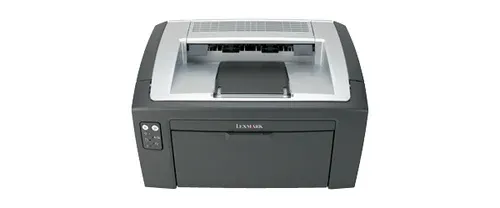
The Lexmark E120 is a laser printer that stands out for its print quality and speed. With a print capacity of 19 pages per minute, it proves particularly effective for demanding work environments. Its laser printing technology ensures clear and precise results, making it ideal for both professional and personal use. Additionally, its 150-sheet paper capacity allows for handling a large volume of documents without interruption, thereby increasing productivity. However, there are some drawbacks to consider. The lack of Wi-Fi connectivity limits usage flexibility and requires wiring to connect to a network. Furthermore, the maximum print resolution of 600 x 600 DPI may not be sufficient for high-quality prints, especially for graphics or images. The model does not support automatic duplex printing, which can lead to excessive paper use. Finally, the internal memory of 8 MB may be inadequate for more complex printing tasks. In terms of design, the Lexmark E120 is compact and lightweight, making it easy to integrate into various office spaces. However, the absence of a built-in screen may make the use and diagnosis of the printer less intuitive for some users. The value for money is good, thanks to its performance and paper capacity, but the limited features, such as the lack of Wi-Fi and duplex printing, may restrict its appeal. In summary, the Lexmark E120 is an efficient printer that meets basic printing needs well, but it has limitations that may not suit all users.Score details
User experience
The user experience is acceptable, but the lack of a built-in screen and Wi-Fi connectivity may make its use less intuitive for some users.
Performance
The performance is good with a printing speed of 19 pages per minute, but the maximum resolution of 600 x 600 DPI may be insufficient for high-quality prints.
Design
The design is compact and lightweight, making it easy to integrate into various office spaces, but the lack of a built-in screen limits interaction.
Value for money
The value for money is good due to the laser print quality and the 150-sheet paper capacity, which enhances productivity.
Features
Although Ethernet connectivity is an advantage, the absence of Wi-Fi and automatic duplex printing limits the features.
Support
The user manual is available, but additional online resources could have improved support.
Documentation
The provided documentation is sufficient, but a quick start guide would have been beneficial to facilitate installation.
Advantages
High-quality laser printing
Print speed of 19 pages per minute
150-sheet capacity
Built-in Ethernet connectivity
Compact and lightweight design
Disadvantages
No Wi-Fi connectivity.
Print resolution limited to 600 DPI.
No automatic duplex printing.
Insufficient internal memory of 8 MB.
No built-in display.
Technical Specifications E120
General Information
-
ModelE120
-
Brand
-
Category
-
Type
-
SKU1437503
-
MPN1437503
Network
-
Ethernet/LANYes
-
Ethernet/LANYes
-
WifiNo
Print speed
-
Double-sided printingNo
-
Double-sided printingNo
-
Printing technologyLaser
-
Maximum resolution600 x 600 DPI
-
Print speed (black, normal quality, A4/US Letter)19 ppm
-
Copy time for the first page (Black, normal)8 s
Features
-
Number of print cartridges-
-
Service cycle (Maximum)10000 pages per month
-
Printing colorsBlack
Representation / realization
-
Internal memory8 MB
-
Maximum internal memory16 MB
-
Processor frequency183 MHz
-
Sound power level (standby)26 dB
-
Sound pressure level (impression)49 dB
Design
-
ScreenNo
-
CertificationFCC B, UL 60950-1, U.S. FDA, IEC 60320-1, CSA 60950-1-03, ICES B, CE B, CB IEC 60950-1, IEC 60825-1, GS (TÜV), SEMKO, UL AR, CS, TÜV Rh, N Mark, ACA C-tick B, CCC B, BSMI B, VCCI B, MIC, EK Mark, PSB
Input and output capacity
-
Maximum input capacity150 sheets
-
Maximum input capacity150 sheets
-
Maximum output capacity50 sheets
-
Maximum output capacity50 sheets
Paper management
-
Maximum print format216 x 297 mm
-
Type of paper tray supportCard stock, Labels, Plain paper, Transparencies
-
ISO, Format Series A (A0...A9)A4, A5, A6
-
Non-ISO print support sizesExecutive (184 x 267mm), Folio (media size), Letter (media size), Statement (140 x 216mm), Legal (media size)
-
JIS series B format (B0...B9)B5
-
Envelope sizes7 3/4, 9,10, B5, C5, DL
-
Weight of paper tray support60 - 163 g/m²
-
Maximum ISO A series paper sizeA4
Connectivity
-
Standard interfacesEthernet, USB 2.0
-
Optional connectivityEthernet, Wireless LAN
Minimum system requirements
-
Support for the Windows operating systemWindows 2000
-
Support for the server operating systemWindows 2000 Professional
-
Windows 7 Home Premium
-
Windows 7 Home Premium x64
-
Windows 7 Professional
-
Windows 7 Professional x64
-
Windows 7 Starter
-
Windows 7 Starter x64
-
Windows 7 Ultimate
-
Windows 7 Ultimate x64
-
Windows 98
-
Windows ME
-
Windows Vista Business
-
Windows Vista Business x64
-
Windows Vista Home Basic
-
Windows Vista Home Basic x64
-
Windows Vista Home Premium
-
Windows Vista Home Premium x64
-
Windows Vista Ultimate
-
Windows Vista Ultimate x64
-
Windows XP Home
-
Windows XP Home x64
-
Windows XP Professional
-
Windows XP Professional x64
-
Windows 2000 Advanced Server
-
Windows 2000 Server
-
Windows Server 2003
-
Windows Server 2003 x64
Power
-
Average power consumption in Print modeW
Weight and dimensions
-
Dimensions (LxWxH)388 x 370 x 250 mm
-
Weight6900 g
Other features
-
Package dimensions (LxWxH)485 x 292 x 325 mm
-
Standby LEDYes
-
Standby LEDYes
-
Network featuresFast Ethernet
Environmental conditions
-
Operating altitude0 - 2500 m
-
Operating relative humidity (H-H)8 - 80 %
-
Operating temperature16 - 32 °C
Frequently Asked Questions
What is the weight of the Lexmark E120 printer?
What is the recommended method for removing paper jammed in the printer?
Why does my printer not recognize the original cartridges?
What are the possible reasons for poor print quality?
How does a laser printer differ from an inkjet printer?
Why does my inkjet printer leave black streaks on prints?
What does the acronym DPI mean?
What certifications does the Lexmark E120 have?
How many cartridges can be installed in the Lexmark E120?
Is the manual for the Lexmark E120 available in French?
Similar products


More product categories from brand Lexmark
Other Lexmark
More product types from brand Lexmark


Presentation of product E120 specifications from brand Lexmark
General Information
The Lexmark E120 model, offered by the renowned brand Lexmark, stands out for its build quality and innovation in the printer sector. With a compact design, this product is designed to provide reliable performance and an enhanced user experience.
Network
The Lexmark E120 is equipped with out-of-the-box network connectivity, ensuring immediate access to the Internet upon setup. It also features an Ethernet/LAN interface for easy wired connection. However, it does not support Wi-Fi, which may limit usage flexibility in certain environments.
Print Speed
This monochrome printer does not offer color printing or automatic duplex printing functionality. It uses laser printing technology, ensuring high print quality with a maximum resolution of 600 x 600 DPI. Its print speed reaches 19 pages per minute, making it efficient for daily printing, with a first page out time of only 8 seconds.
Features
The Lexmark E120 is designed for a maximum service cycle of 10,000 pages per month, which is ideal for users with high printing needs. It operates with a single cartridge that delivers black prints, ensuring professional results.
Performance and Technical Specifications
With an internal memory of 8 MB, the Lexmark E120 allows for smooth operation, although this capacity may be limited for more complex tasks. The 183 MHz processor ensures quick execution of instructions, while the sound levels in standby (26 dB) and during printing (49 dB) guarantee discreet operation.
Paper Management
This printer can handle up to 150 sheets in its input tray, allowing for the processing of a large volume of documents without interruption. It supports various media types, ranging from plain paper to transparencies, and is compatible with standard paper sizes such as A4 and A5.
Connectivity
The Lexmark E120 features standard interfaces that allow for easy integration with various devices. In addition to Ethernet connectivity, it offers a wireless connectivity option, although this is not integrated by default.
Minimum System Requirements
This model is compatible with several Windows operating systems, including Windows 2000, Windows XP, and versions of Windows 7, ensuring smooth integration into various work environments.
Energy Consumption
In terms of energy efficiency, the Lexmark E120 is designed to minimize electrical consumption while providing optimal performance during printing.
Dimensions and Weight
With dimensions of 388 x 370 x 250 mm and a weight of 6900 g, this model easily fits into an office space without clutter.
Other Features
The packaging of the Lexmark E120 is designed for secure transport, measuring 485 x 292 x 325 mm. It is also equipped with a power LED indicator to clearly show the device's status, as well as a sleep mode to reduce energy consumption.
Environmental Conditions
The Lexmark E120 operates within an altitude range of 0 to 2500 m, with a supported relative humidity of 8 to 80% and an operating temperature of 16 to 32 °C, ensuring optimal performance in various environments.


