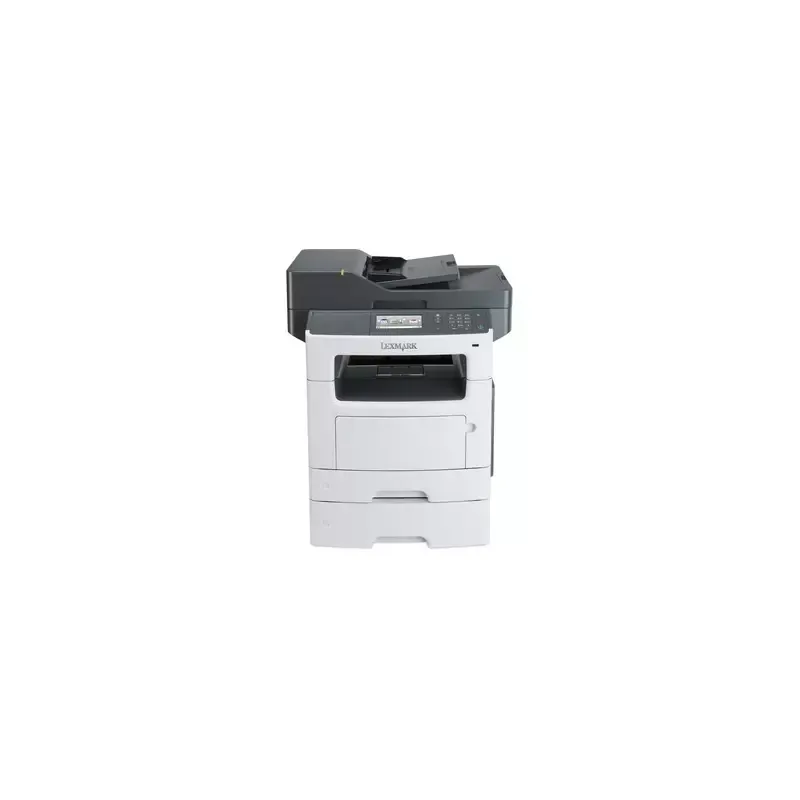

Manual of product MX511dte

Editorial note
The Lexmark MX511dte is an all-in-one laser printer that stands out for its high printing speed of 42 pages per minute and its resolution of 1200 x 1200 DPI, ensuring high-quality results. This model is particularly suited for demanding work environments due to its maximum paper capacity of 2000 sheets, thereby reducing interruptions during printing and copying tasks. Additionally, its versatile features, including printing, scanning, copying, and faxing, make it an interesting choice for users with varied needs. However, there are some drawbacks to consider. The lack of Wi-Fi connectivity limits installation flexibility and wireless access to documents, which may be a drawback for some users. Furthermore, the absence of automatic duplex copying functionality can make the copying process less convenient. The weight of 26.5 kg can also complicate moving and installation, especially in tight spaces. Finally, the incompatibility with Mac operating systems may pose issues for users on that platform. In terms of performance, the product scores 85, highlighting its excellent features for professional use. The user experience is rated positively with a score of 80, despite some practical limitations. However, the value for money is rated at 75, due to its weight and installation challenges. The design is functional but receives a score of 70, reflecting concerns regarding its portability and compatibility. Overall, the Lexmark MX511dte represents a solid choice for office environments, provided that its limitations are taken into account.Score details
User experience
The user experience is generally positive thanks to the all-in-one features, although the lack of Wi-Fi and automatic duplex copying may affect practicality.
Performance
The printing speed of 42 pages per minute and laser printing technology with a resolution of 1200 x 1200 DPI ensure excellent performance for demanding work environments.
Features
The product offers many features such as printing, scanning, copying, and faxing, but the lack of Wi-Fi and automatic duplex copying limits some options.
Value for money
With a maximum paper capacity of 2000 sheets and high performance, the value for money is fair, but the heavy weight of 26.5 kg may pose installation issues.
Design
The design is functional and suitable for offices, but its heavy weight and lack of compatibility with Mac systems may be drawbacks for some users.
Advantages
Print speed of 42 pages per minute
All-in-one features: printing, scanning, copying, faxing
Laser printing, resolution up to 1200 x 1200 DPI
Paper capacity of 2000 sheets
Network connectivity: Ethernet and USB ports
Disadvantages
No Wi-Fi connection available.
No automatic duplex printing.
Incompatible with Mac systems.
High weight of 26.5 kg.
Output capacity limited to 150 sheets.
Technical Specifications MX511dte
General Information
-
ModelMX511DTE
-
Brand
-
Category
-
Type
-
SKU55070
-
MPN55070
Print speed
-
Printing technologyLaser
-
Maximum resolution1200 x 1200 DPI
-
Print speed (black, normal quality, A4/US Letter)42 ppm
-
Duplex printing speed (Black, normal quality, A4/US Letter)18 ppm
-
Copy time for the first page (Black, normal)6.5 s
-
PrintingMonochrome printing
-
Double-sided printingYes
Other features
-
All-in-one functionsCopy
-
All-in-one color functionsFax
-
Ready-to-use networkPrint
-
Finishing optionScan
-
Packaging dimensions (L x W x H)Copy
-
Supported support weightYes
-
No
-
21.38 x 23.58 x 31.7 "
-
60 - 120 g/m²
Features
-
Service cycle (Maximum)100000 pages per month
-
Languages of the page descriptionPCL 5e, PCL 6, PDF 1.7, PostScript 3, PPDS, XML
-
Country of originChina
-
Digital senderNo
Copier
-
Max. resolution of copies1200 x 1200 DPI
-
Copy speed (normal quality, black, A4)42 cpm
-
Resizing copy25 - 400 %
-
Release time of the first print (black, normal)6.5 s
-
CopyColor copy
-
Duplex copyYes
Digitization
-
Optical scanning resolution600 x 1200 DPI
-
Maximum scan area216 x 356 mm
-
Type of scannerFlatbed scanner and ADF
-
Scanning speed (color)20 ppm
-
Scanner speed (black)43 ppm
-
Duplex scanning speed (color)9 ppm
-
Duplex scanning speed (black)19 ppm
-
Scanning technologyCIS
-
DigitizationMonochrome scanning
-
Double-sided scanningYes
Fax
-
Fax transmission speed3 sec/page
-
Modem speed33.6 Kbit/s
-
FaxSimple fax
-
Duplex faxYes
Input and output capacity
-
Total power capacity900 sheets
-
Maximum input capacity2000 sheets
-
Automatic document feeder capacity50 sheets
-
Total number of power supply units3
-
Maximum number of feed bins5
-
Maximum output capacity150 sheets
-
Maximum output capacity150 sheets
-
Automatic Document Feeder (ADF)Yes
Paper management
-
ISO, Format Series A (A0...A9)A4
-
Maximum print formatA5
-
Type of paper tray supportA6
-
Non-ISO print support sizes216 x 356 mm
-
JIS series B format (B0...B9)Card stock
-
Envelope sizesEnvelopes
-
Maximum ISO A series paper sizeLabels
-
Plain paper
-
Transparencies
-
Executive (184 x 267mm)
-
Folio (media size)
-
Legal (media size)
-
Letter (media size)
-
Oficio (media size)
-
Statement (140 x 216mm)
-
B5
-
7 3/4
-
9
-
10
-
DL
-
A4
Design
-
Screen-
-
Screen size4.3 "
-
Market position
-
Professional
Connectivity
-
USB portYes
-
Standard interfacesEthernet, USB 2.0
-
Optional connectivityParallel, Serial (RS-232), Wireless LAN
-
Quantity of USB 2.0 Ports3
-
USB portYes
Network
-
Ethernet/LANYes
-
WifiNo
-
Security-supported algorithm802.1x RADIUS, LEAP, MD5, PEAP
-
Network printing methodsLPR/LPD, Direct IP (Port 9100), Enhanced IP (Port 9400) FTP, TFTP, IPP 1.0, 1.1, 2.0
-
Support for network protocols (IPv4)TCP/IP, AppleTalk
-
Support for network protocols (IPv6)TCP/IP, TCP, UDP
-
Management protocolsHTTP, HTTPs (SSL*/TLS), SNMPv1, SNMPv2c, SNMPv3, WINS, IGMP, BOOTP, RARP, APIPA (AutoIP), DHCP, ICMP, DNS, Bonjour, DDNS, mDNS, ARP, NTP, Telnet, Finger
Representation / realization
-
Internal memory512 MB
-
Maximum internal memory2560 MB
-
Built-in memory card readerNo
-
Processor frequency800 MHz
-
Sound pressure level (impression)56 dB
-
Sound pressure level (impression)56 dB
-
Sound pressure level (scanning)55 dB
-
Sound pressure level (duplex printing)54 dB
-
Mac CompatibilityYes
Power
-
Electricity consumption (average operation)W
Weight and dimensions
-
Width489 mm
-
Depth452 mm
-
Height610 mm
-
Weight26500 g
Packaging information
-
Package width543 mm
-
Package depth599 mm
-
Package height805 mm
-
Package weight32000 g
Environmental conditions
-
Operating temperature16 - 32 °C
-
Operating relative humidity (H-H)8 - 80 %
-
Operating temperature60 - 90 °F
-
Operating altitude0 - 2896 m
Minimum system requirements
-
Support for the Mac operating systemMac OS X 10.5 Leopard
-
Support for the Linux operating systemMac OS X 10.6 Snow Leopard
-
Support for the server operating systemMac OS X 10.7 Lion
-
Support for other operating systemsMac OS X 10.8 Mountain Lion
-
-
Fedora 14
-
Fedora 15
-
RedHat EL Linux 4.0 U5
-
RedHat EL Linux 4.0 U6
-
RedHat EL Linux 4.0 U7
-
RedHat EL Linux 5.0
-
RedHat EL Linux 5.1
-
RedHat EL Linux 5.2
-
RedHat EL Linux 5.3
-
SuSE Linux 10
-
SuSE Linux 10.2
-
SuSE Linux 10.3
-
SuSE Linux 11
-
-
Windows Server 2003
-
Windows Server 2003 x64
-
Windows Server 2008
-
Windows Server 2008 R2
-
Windows Server 2008 x64
-
-
Novell NetWare 5.x
-
Novell NetWare 6.x
-
Novell Open Enterprise Server
Sustainability
-
Sustainability certificatesENERGY STAR
Frequently Asked Questions
What is the weight of the Lexmark MX511dte?
What is the best method to remove paper jammed in the printer?
Why is my printer not recognizing the original cartridges?
What are the possible reasons for poor print quality?
What is the difference between a laser printer and an inkjet printer?
Why is my inkjet printer leaving black streaks?
What does the abbreviation DPI mean?
What is the size of the screen on the Lexmark MX511dte?
What is the height of the Lexmark MX511dte?
What is the width of the Lexmark MX511dte?
What is the depth of the Lexmark MX511dte?
Is the manual for the Lexmark MX511dte available in French?
Similar products


More product categories from brand Lexmark
Other Lexmark
More product types from brand Lexmark


Presentation of product MX511dte specifications from brand Lexmark
General Information
The model Lexmark MX511dte, developed by the renowned brand Lexmark, is a multifunction device that stands out for its quality and innovation. This model, referenced under the code MX511dte | 35S5941, ensures optimal performance for professional use. Its EAN code, 0734646453967, allows for unique identification in the distribution system.
Print Speed
Equipped with laser printing technology, the Lexmark MX511dte offers a maximum resolution of 1200 x 1200 DPI, ensuring prints of remarkable clarity. Its print speed reaches 42 pages per minute for black and white documents, allowing for increased productivity in demanding work environments. For double-sided printing, it reaches 18 ppm, thus optimizing print time. The time to the first page is set at 6.5 seconds, ensuring appreciable responsiveness.
All-in-One Features
The Lexmark MX511dte is distinguished by its numerous all-in-one features including printing, scanning, copying, and faxing, thus offering versatility suited to various professional needs. Although it includes a color printing function, it does not offer any special finishing options. The network is ready to use, ensuring instant connectivity upon setup.
Input and Output Capacities
This model has a maximum paper capacity of 2000 sheets, reducing interruptions during printing tasks. The automatic document feeder supports 50 sheets, and the device can handle up to 900 sheets in output. The maximum output capacity is 150 sheets, ensuring reliable performance during printing.
Paper Management
The Lexmark MX511dte is compatible with various paper formats, including ISO series A4, A5, and A6. Its maximum print size is 216 x 356 mm, suitable for large documents. It supports different types of media such as envelopes, labels, and plain paper, thus offering flexibility in use.
Connectivity
This model features multiple connectivity options, including standard interfaces and 3 USB 2.0 ports for quick connections. It is compatible with Ethernet/LAN networks but does not support Wi-Fi, which may limit wireless access. Network printing methods include LPR/LPD and IPP, facilitating integration into diverse environments.
Environmental Conditions
The Lexmark MX511dte operates within a temperature range of 16 to 32 °C and a relative humidity of 8 to 80 %, ensuring optimal operation in multiple environments. It is designed to operate at altitudes of up to 2896 meters.
Durability
Certified ENERGY STAR, the Lexmark MX511dte meets high standards of energy efficiency, thus contributing to environmental sustainability.
Dimensions and Weight
With dimensions of 489 mm in width, 452 mm in depth, and 610 mm in height, it easily fits into an office space. Its weight of 26.5 kg may, however, make its movement and installation more challenging.
Minimum System Configuration
The Lexmark MX511dte is compatible with various operating systems, including Windows Server and certain Linux distributions, but is not compatible with Mac systems, which may be a disadvantage for some users.


