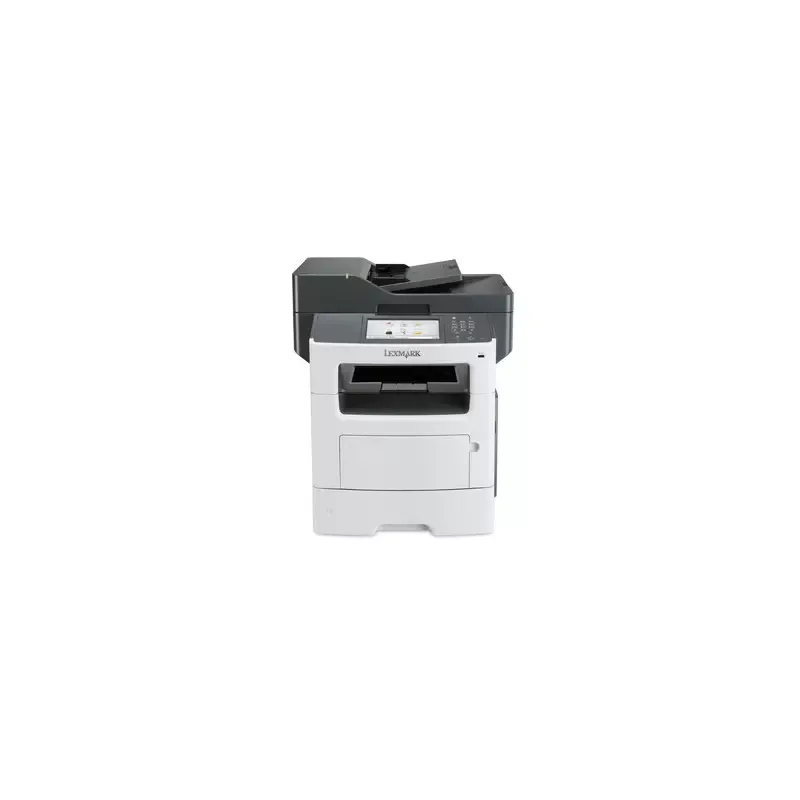

Manual of product MX611dhe

Editorial note
The Lexmark MX611dhe is a laser printer that stands out for its impressive performance, offering a print speed of 47 pages per minute and a maximum resolution of 1200 x 1200 DPI. These features make it an ideal choice for demanding work environments, where speed and quality are paramount. Additionally, its all-in-one functionalities, including printing, copying, scanning, and faxing, provide valuable versatility to meet various professional needs. However, the product has some notable drawbacks. Its incompatibility with Mac systems may limit its use for some users. Furthermore, the lack of duplex scanning and faxing features could reduce efficiency for those who require these specific options. The relatively high weight of 23.6 kg and its dimensions may also pose mobility and installation issues in tight workspaces. Finally, the sound pressure level of 56 dB may be considered high in noise-sensitive environments. In terms of value for money, although the Lexmark MX611dhe offers a good maximum paper capacity of 2300 sheets and solid performance, its price may seem high for users with more basic needs. The functional design, while effective, is hindered by its weight and size, which can make its integration into certain offices more difficult. In summary, the Lexmark MX611dhe is a solid choice for professionals seeking a high-performing and versatile printer, but potential users should consider its limitations and weight before making their decision.Score details
User experience
The user experience is positive thanks to all-in-one features and an interface that meets the varied needs of users.
Performance
The printing speed of 47 ppm and the resolution of 1200 x 1200 DPI ensure excellent performance, ideal for demanding work environments.
Features
The all-in-one features, including automatic duplex printing, increase versatility, although the lack of duplex scanning limits some options.
Value for money
Although the product offers good paper handling capacity and solid performance, its price may be high for users with more basic needs.
Design
The design is functional, but the weight of 23600 g and the dimensions may pose space and mobility issues.
Usability
The lack of compatibility with Mac systems and some limitations in scanning may restrict its use for certain users.
Robustness
The product is designed for heavy use with a maximum paper capacity of 2300 sheets, but its noise level of 56 dB can be a drawback in sensitive environments.
Advantages
Printing up to 47 pages per minute
Maximum resolution of 1200 x 1200 DPI
Print, copy, scan, and fax functions
Maximum capacity of 2300 sheets
Automatic duplex printing
Disadvantages
Not compatible with Mac systems
No duplex scanning
Bulky size and weight
High noise level (56 dB)
Only two input trays
Technical Specifications MX611dhe
General Information
-
ModelMX611DHE
-
Brand
-
Category
-
Type
-
SKU55071
-
MPN55071
Print speed
-
Printing technologyLaser
-
Black print resolution1200 x 1200 DPI
-
Print speed (black, normal quality, A4/US Letter)47 ppm
-
Duplex printing speed (Black, normal quality, A4/US Letter)20 ppm
-
Black print resolution1200 x 1200 DPI
-
Copy time for the first page (Black, normal)6.5 s
-
PrintingMonochrome printing
-
Double-sided printingYes
Other features
-
All-in-one functionsCopy
-
All-in-one color functionsFax
-
Finishing optionPrint
-
Supported support weightScan
-
Copy
-
Yes
-
60 - 120 g/m²
Features
-
Service cycle (Maximum)150,000 pages per month
-
Languages of the page descriptionMicrosoft XPS, PCL 5, PCL 6, PDF 1.7, PostScript 3, PPDS, XML
-
Country of originChina
-
Digital senderNo
Copier
-
Max. resolution of copies1200 x 1200 DPI
-
Copy speed (normal quality, black, A4)47 cpm
-
Resizing copy25 - 400 %
-
Release time of the first print (black, normal)6.5 s
-
CopyColor copy
-
Duplex copyYes
Digitization
-
Optical scanning resolution600 x 1200 DPI
-
Maximum scan area216 x 356 mm
-
Type of scannerFlatbed scanner and ADF
-
Scanning speed (color)32 ppm
-
Scanner speed (black)48 ppm
-
Duplex scanning speed (color)14 ppm
-
Duplex scanning speed (black)21 ppm
-
Scanning technologyCCD (charge-coupled device)
-
DigitizationMonochrome scanning
-
Double-sided scanningYes
Fax
-
Fax transmission speed3 sec/page
-
Modem speed33.6 Kbit/s
-
FaxSimple fax
-
Duplex faxYes
Input and output capacity
-
Total power capacity650 sheets
-
Maximum input capacity2300 sheets
-
Automatic Document Feeder (ADF) production capacity50 sheets
-
Total number of power supply units2
-
Maximum number of feed bins5
-
Maximum output capacity250 sheets
-
Maximum output capacity250 sheets
-
Automatic Document Feeder (ADF) production capacity50 sheets
-
Automatic Document Feeder (ADF)Yes
Paper management
-
ISO, Format Series A (A0...A9)A4
-
Maximum print formatA5
-
Type of paper tray supportA6
-
Non-ISO print support sizes216 x 356 mm
-
JIS series B format (B0...B9)Card stock
-
Envelope sizesEnvelopes
-
Maximum ISO A series paper sizeLabels
-
Plain paper
-
Transparencies
-
Executive (184 x 267mm)
-
Folio (media size)
-
Legal (media size)
-
Letter (media size)
-
Oficio (media size)
-
Statement (140 x 216mm)
-
B5
-
7 3/4
-
9
-
10
-
DL
-
A4
Design
-
Screen-
-
Screen size7 "
-
Market positionProfessional
Connectivity
-
USB portYes
-
Standard interfacesEthernet, USB 2.0
-
Optional connectivityParallel, Serial (RS-232), Wireless LAN
-
Quantity of USB 2.0 Ports3
-
USB portYes
Network
-
Ethernet/LANYes
-
WifiNo
-
Security-supported algorithm802.1x RADIUS, LEAP, MD5, PEAP
-
Network printing methodsLPR/LPD, HTTP NDPS/NEPS, FTP, TFTP, IPP 1.1
-
Support for network protocols (IPv4)TCP/IP, AppleTalk
-
Support for network protocols (IPv6)TCP/IP, TCP, UDP
-
Management protocolsHTTP, HTTPs (SSL*/TLS), SNMPv1, SNMPv2c, SNMPv3, WINS, IGMP, BOOTP, RARP, APIPA (AutoIP), DHCP, ICMP, DNS, Bonjour, DDNS, mDNS, ARP, NTP, Telnet, Finger
Representation / realization
-
Built-in memory card reader-
-
Internal memory1024 MB
-
Maximum internal memory3072 MB
-
Processor frequency800 MHz
-
Sound pressure level (copy)56 dB
-
Sound pressure level (scanning)55 dB
-
Sound pressure level (scanning)55 dB
-
Sound pressure level (duplex printing)54 dB
-
Mac CompatibilityYes
Power
-
Electricity consumption (average operation)W
Weight and dimensions
-
Width489 mm
-
Depth479 mm
-
Height561 mm
-
Weight23600 g
Packaging information
-
Package width572 mm
-
Package depth599 mm
-
Package height673 mm
-
Package weight28000 g
Environmental conditions
-
Operating temperature16 - 32 °C
-
Operating relative humidity (H-H)8 - 80 %
-
Operating temperature60 - 90 °F
-
Operating altitude0 - 2896 m
Minimum system requirements
-
Support for the Mac operating systemMac OS X 10.5 Leopard
-
Support for the Linux operating systemMac OS X 10.6 Snow Leopard
-
Support for the server operating systemMac OS X 10.7 Lion
-
Support for other operating systemsMac OS X 10.8 Mountain Lion
-
Fedora 14
-
Fedora 15
-
RedHat EL Linux 4.0 U5
-
RedHat EL Linux 4.0 U6
-
RedHat EL Linux 4.0 U7
-
RedHat EL Linux 5.0
-
RedHat EL Linux 5.1
-
RedHat EL Linux 5.2
-
RedHat EL Linux 5.3
-
SuSE Linux 10
-
SuSE Linux 10.2
-
SuSE Linux 10.3
-
SuSE Linux 11
-
Windows Server 2003
-
Windows Server 2003 x64
-
Windows Server 2008
-
Windows Server 2008 R2
-
Windows Server 2008 x64
-
Novell NetWare 5.x
-
Novell NetWare 6.x
-
Novell Open Enterprise Server
Sustainability
-
Sustainability certificatesENERGY STAR
Frequently Asked Questions
What is the weight of the Lexmark MX611dhe model?
What is the recommended method for removing paper jams from the printer?
Why is my printer refusing to accept original cartridges?
What could be the reasons for poor print quality?
What is the difference between a laser printer and an inkjet printer?
Why is my inkjet printer leaving black streaks on my prints?
What does the acronym DPI mean?
What is the size of the screen on the Lexmark MX611dhe?
What is the height of the Lexmark MX611dhe?
What is the width of the Lexmark MX611dhe?
What is the depth of the Lexmark MX611dhe?
Is the manual for the Lexmark MX611dhe available in French?
Similar products


More product categories from brand Lexmark
Other Lexmark
More product types from brand Lexmark


Presentation of product MX611dhe specifications from brand Lexmark
General Information
The model Lexmark MX611dhe, manufactured by the renowned brand Lexmark, is designed to deliver high-quality performance and a smooth user experience. Its EAN code, which allows for unique identification, is as follows: 0012304730323, 0734646409193, 0790145108432.
Print Speed
This printer uses laser printing technology, ensuring highly accurate results. With a maximum resolution of 1200 x 1200 DPI, it produces clear and detailed prints. The print speed reaches 47 pages per minute in black and normal quality, which is ideal for demanding work environments. In duplex mode, it maintains a speed of 20 ppm, allowing for paper savings. Additionally, the first page print time is 6.5 seconds, providing appreciable speed.
Additional Functions
The Lexmark MX611dhe is a multifunction device, integrating copying, scanning, and faxing capabilities. Its color copying function allows for vibrant document production, while the finishing capability adds a personalized touch to your prints. The supported media weight ranges from 60 to 120 g/m², ensuring versatile use.
Technical Specifications
This model has a service cycle of up to 150,000 pages per month, making it suitable for heavy users. It supports multiple page description languages such as Microsoft XPS, PCL 5e, and PostScript 3. Manufactured in China, it meets high-quality standards.
Scanning Capabilities
The optical scanning resolution is 600 x 1200 DPI, ensuring high-quality scans. The flatbed scanner and ADF (Automatic Document Feeder) allow for processing multiple documents simultaneously, with a scanning speed of 32 ppm in color and 48 ppm in black. However, it does not offer duplex scanning functionality.
Fax and Connectivity
The fax operates at a transmission speed of 3 seconds per page, with a modem speed of 33.6 Kbit/s. In terms of connectivity, the printer is equipped with USB 2.0 ports and can connect via Ethernet, but does not support Wi-Fi. Supported network protocols include TCP/IP and AppleTalk.
Paper Management
The Lexmark MX611dhe can hold up to 2300 sheets in its input trays, making it ideal for heavy use. Its output capacity is 250 sheets, ensuring efficient management of printed documents. It accepts various paper sizes, including A4 and A5, and is compatible with different types of media.
Dimensions and Weight
With dimensions of 489 mm wide, 479 mm deep, and 561 mm high, the printer weighs 23600 g, which may pose challenges in terms of mobility and installation in tight spaces.
Environmental Conditions
The optimal operation of the printer is guaranteed within a temperature range of 16 to 32 °C and a relative humidity of 8 to 80%. Its operating altitude ranges from 0 to 2896 m.
Durability
The Lexmark MX611dhe is ENERGY STAR certified, indicating that it meets high standards for energy efficiency.


