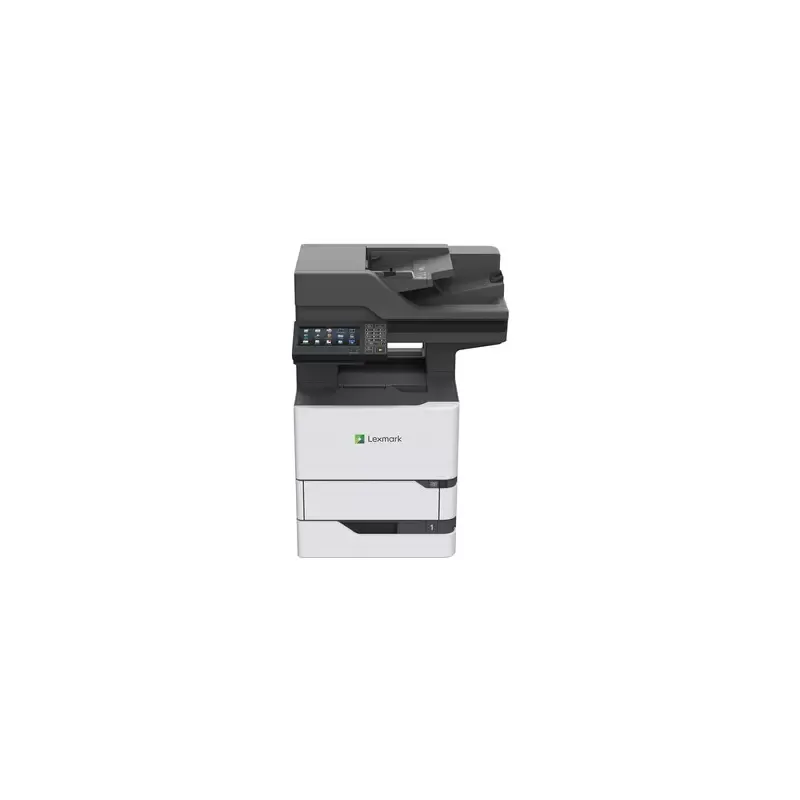

Manual of product MX721

Editorial note
The Lexmark MX721 stands out with its impressive printing speed of 65 pages per minute, making it an ideal choice for demanding work environments. Its internal storage capacity of 160 GB and the ability to expand memory up to 6144 MB allow for efficient management of data and applications. Additionally, the laser printing technology, accompanied by a maximum resolution of 1200 x 1200 DPI, ensures exceptional print quality. The printer also offers an automatic duplex printing feature, contributing to paper savings and reducing printing costs. However, the device's weight of 44 kg can pose challenges during installation and relocation, especially in tight workspaces. Furthermore, although it offers high printing speed, the cost of consumables, such as cartridges, can be high, leading to additional expenses. The lack of advanced features such as automatic duplex copying and duplex scanning may also limit its use for certain professional tasks. Finally, the noise level, while reasonable, may be perceived as intrusive in very quiet work environments. Overall, the Lexmark MX721 proves to be a high-performing and robust printer, suited to the needs of professionals, but users must consider certain drawbacks, including its weight and the cost of consumables.Score details
User experience
The user experience is generally positive due to intuitive features and compatibility with multiple operating systems, including Windows, Mac, and Linux.
Performance
The printing speed of 65 pages per minute is impressive, ideal for demanding work environments. However, the cost of consumables can be high, which may lead to additional expenses.
Features
The laser printing technology and maximum resolution of 1200 x 1200 DPI ensure exceptional print quality. However, the lack of automatic duplex copying and duplex scanning limits some functionalities.
Robustness
Weighing 44 kg makes this device relatively heavy, which can complicate its installation and movement. This can be problematic in tight workspaces.
Usability
Features like automatic duplex printing help save paper, but the absence of automatic duplex copying can reduce efficiency when managing double-sided documents.
noise_level
Although the noise level during printing is reasonable, it can be perceived as intrusive in very quiet work environments.
Advantages
Fast printing of 65 pages per minute
Internal storage of 160 GB, expandable memory
Laser quality up to 1200 x 1200 DPI
Automatic duplex printing
Compatible with Windows, Mac, and Linux
Disadvantages
Relatively heavy, difficult to move.
No automatic double-sided copying.
High cost of consumables.
Absence of double-sided scanning.
Intrusive noise level in silence.
Technical Specifications MX721
General Information
-
ModelMX721
-
Brand
-
Category
-
Type
-
SKU1302669
-
MPN1302669
Representation / realization
-
Built-in memory card reader-
-
Internal storage capacity160 GB
-
Storage mediaHDD
-
Internal memory2048 MB
-
Maximum internal memory6144 MB
-
Number of processor cores4
-
Processor frequency1200 MHz
-
Sound pressure level (duplex printing)57 dB
-
Sound pressure level (duplex printing)57 dB
-
Sound pressure level (copy)60 dB
-
Sound pressure level (scanning)56 dB
-
Sound pressure level (standby)14 dB
-
Integrated into the processorYes
Print speed
-
Print speed (black, normal quality, A4/US Letter)65 ppm
-
Duplex printing speed (Black, normal quality, A4/US Letter)39 ppm
-
Copy time for the first page (Black, normal)4.2 s
-
Printing technologyLaser
-
PrintingMonochrome printing
-
Double-sided printingYes
-
Maximum resolution1200 x 1200 DPI
Copier
-
Copy speed (normal quality, black, A4)65 cpm
-
Release time of the first print (black, normal)4.2 s
-
CopySingle copy
-
Max. resolution of copies- DPI
-
Resizing copy25 - 400 %
-
Duplex copyYes
Features
-
Number of print cartridges-
-
Printing colors-
-
Service cycle (recommended)5000 - 75000 pages per month
-
Country of originChina
-
Service cycle (Maximum)30000 pages per month
-
Languages of the page descriptionMicrosoft XPS, PCL 5, PCL 6, PDF 1.7, PPDS, PostScript 3
Power
-
Energy Star, typical electrical consumption (TEC)0.95 kWh/week
-
Energy consumption (in standby mode)1.7 W
-
Energy consumption (loan)41.5 W
-
Average power consumption in Print mode800 W
-
Average power consumption in Copy mode830 W
-
Average power consumption in Scanning mode75 W
-
Electricity consumption (average operation)- W
Certificate
-
CertificationICES-003 Class A
-
BSMI Class A
-
VCCI Class A
-
US FDA/CDRH
-
UL 60950-1
-
FCC Class A
-
cUL CAN/CSA-C22.2 60950-1
-
NOM
-
MET-I
-
IEC 60825-1
-
CB EN/IEC 60950-1
-
CB EN/IEC 60825-1
-
CCD-035
-
CE DoC (EN 62301 Class A, EN 62311, CE EN/IEC 60950-1, CE EN/IEC 60825-1, EN 61000-3, EN 55022 Class A, EuP, EN 55024, UL)
-
EFTA (CE)
-
CISPR 22 Class A
-
KCC
-
CCC
-
CECP
-
CEL
-
A-tick DoC
-
C-tick CoC
-
UL-AR
-
KC mark
-
UL GS mark
-
ISO 532B
-
ECMA-370
-
TED
-
GOST-R
-
SII
-
TER
-
Bel GISS
-
RAL-UZ 205
-
China Green Product (CGP)
Paper management
-
Type of paper tray supportCard stock
-
Maximum ISO A series paper sizeLabels
-
ISO, Format Series A (A0...A9)Plain paper
-
Non-ISO print support sizesTransparencies
-
JIS series B format (B0...B9)A4
-
Envelope sizesA4, A5, A6
-
Weight of paper tray supportExecutive (184 x 267mm), Folio (media size), Legal (media size), Letter (media size), Oficio (media size), Statement (140 x 216mm), Universal
-
B5
-
7 3/4, 9,10, B5, C5, DL
-
75 - 203 g/m²
Connectivity
-
Direct printing-
-
USB portYes
-
USB connectorUSB Type-A / USB Type-B
-
Optional connectivityWireless LAN
Network
-
Wifi-
-
Ethernet/LANYes
-
Wiring technology10/100/1000Base-T(X)
-
LAN Ethernet: data transfer rate10,100,1000 Mbit/s
-
Security-supported algorithmIPSec, LEAP, MD5, MSCHAPv2, PEAP, SNMPv3, TLS, TTLS
Design
-
Product colorBlack, White
-
Market positionProfessional
-
Color displayYes
-
Screen size7 "
-
Order typeTouchscreen
-
Color displayYes
Digitization
-
DigitizationColor scanning
-
Double-sided scanningYes
-
Optical scanning resolution600 x 600 DPI
-
Optical analysis resolution (color)600 x 600 pixels per inch
-
Optical analysis resolution (color)600 x 600 pixels per inch
-
Maximum scan area215.9 x 355.6 mm
-
Scanning technologyCCD (charge-coupled device)
-
Type of scannerFlatbed and ADF scanner
-
Scan toEmail, FTP, PC, USB
-
Scanner speed (black)75 ppm
-
Scanner speed (black)75 ppm
-
Duplex scanning speed (color)150 ppm
-
Duplex scanning speed (color)150 ppm
-
Supported image formatsJPEG, JPG, TIFF
-
Support for text formatsPDF, XPS
Sustainability
-
Sustainability certificatesENERGY STAR
Minimum system requirements
-
Support for the Linux operating systemYes
-
Support for the Linux operating systemYes
-
Support for the Linux operating systemYes
Fax
-
FaxSimple fax
-
Fax transmission speed3 sec/page
-
Modem speed33.6 Kbit/s
Environmental conditions
-
Operating relative humidity (H-H)8 - 80 %
-
Operating temperature10 - 32 °C
-
Operating altitude0 - 2896 m
Weight and dimensions
-
Width558.8 mm
-
Depth579.1 mm
-
Height739.1 mm
-
Weight44089 g
Packaging information
-
Package width701 mm
-
Package depth734 mm
-
Package height1021 mm
-
Package weight58513 g
Input and output capacity
-
Total number of power supply units2
-
Total power capacity650 sheets
-
Maximum output capacity550 sheets
-
Maximum number of feed bins5
-
Maximum input capacity3300 sheets
-
Maximum output capacity550 sheets
Packaging contents
-
Cables includedSector
Frequently Asked Questions
What is the weight of the Lexmark MX721?
What is the recommended method for removing jammed paper from the printer?
Why is my printer not accepting original cartridges?
What are the possible reasons for poor print quality?
How does a laser printer differ from an inkjet printer?
Why is my inkjet printer producing black streaks?
What does the acronym DPI mean?
What certifications does the Lexmark MX721 have?
How many cartridges can the Lexmark MX721 hold?
What is the size of the screen on the Lexmark MX721?
What is the height of the Lexmark MX721?
What is the width of the Lexmark MX721?
What is the depth of the Lexmark MX721?
What is the storage capacity of the Lexmark MX721?
Is the manual for the Lexmark MX721 available in French?
Similar products


More product categories from brand Lexmark
Other Lexmark
More product types from brand Lexmark


Presentation of product MX721 specifications from brand Lexmark
General Information
The Lexmark MX721 model is a multifunction device from the Lexmark brand, known for its reliability and innovation in printing solutions. Identified by the model MX721 | 25B0003, this device offers optimal performance and an enhanced user experience. It is easily identifiable by its EAN code 0734646664066, ensuring effective traceability in the distribution system.
Representation / Performance
The Lexmark MX721 has an internal storage capacity of 160 GB, allowing for the retention of a multitude of data, applications, and multimedia files. Equipped with an HDD, this device provides quick and easy access to your information. Its internal memory of 2048 MB is expandable up to 6144 MB, thus facilitating the efficient management of multiple tasks. The 4-core processor operating at a frequency of 1200 MHz allows for rapid execution of instructions. In terms of noise level, the Lexmark MX721 maintains a sound pressure level of 57 dB during printing, ensuring relatively quiet operation, ideal for professional environments.
Print Speed
The print speed of the Lexmark MX721 reaches 65 pages per minute in black and white, which is particularly suitable for high-volume work environments. In duplex mode, it prints at 39 ppm and has a delay of 4.2 seconds for the first page. Thanks to its laser printing technology, it produces documents of exceptional quality with a maximum resolution of 1200 x 1200 DPI. Additionally, it supports color printing and offers duplex printing functionality, allowing for paper savings.
Copier
The copier integrated into the Lexmark MX721 achieves a speed of 65 copies per minute (black, normal quality, A4). It also provides an optimal copy resolution and is capable of resizing copies from 25 to 400 %. However, this model does not offer an automatic duplex copy function.
Features
The recommended service cycle for the Lexmark MX721 varies from 5000 to 75000 pages per month, making it suitable for intensive use. It is designed to operate with a single print cartridge, ensuring consistent quality. Furthermore, it supports multiple page description languages such as Microsoft XPS, PCL, and PostScript, thus offering usage flexibility.
Power
In terms of power consumption, the Lexmark MX721 shows a typical consumption of 0.95 kWh/week and maintains a low consumption in standby mode of 1.7 W. During printing, the average consumption rises to 800 W, which is relatively standard for this type of device.
Certification
The Lexmark MX721 is certified compliant with safety and performance standards, including accreditations such as ENERGY STAR and other international regulations, thus ensuring its energy efficiency and safety of use.
Paper Management
This model supports various media types, including plain paper, labels, and transparencies, with a total input capacity of 650 sheets and an output capacity of 550 sheets. It is compatible with several standard paper sizes, including A4 and A5, as well as other non-ISO formats.
Connectivity
The Lexmark MX721 is equipped with a USB port, allowing for easy and quick connection to various devices. It also supports wireless LAN connectivity, thus expanding usage possibilities. The device is compatible with multiple operating systems, including Windows, Mac, and Linux, making it versatile for various users.
Network
This model offers Ethernet connectivity with 10/100/1000Base-T(X) cabling technology, ensuring a fast and reliable network connection. Supported security algorithms, such as IPSec and TLS, ensure the protection of your data when used on a network.
Design
With a modern design, the Lexmark MX721 is available in black and white and is primarily aimed at professional users. It features a 7-inch touchscreen, facilitating its use, and offers color display for an enhanced user experience.
Scanning
This model allows for color scanning with an optical resolution of 600 x 600 DPI, ensuring high-quality images. It is important to note that it does not offer a duplex scanning function.
Durability
The Lexmark MX721 is certified ENERGY STAR, highlighting its commitment to energy efficiency and environmental sustainability.
Minimum System Requirements
This model is compatible with various operating systems, including Mac, Windows, and Linux, offering usage flexibility for all users.
Fax
The integrated fax machine in the Lexmark MX721 allows for quick sending and receiving of documents, with a transmission speed of 3 seconds per page and a modem operating at 33.6 Kbit/s.
Environmental Conditions
The Lexmark MX721 operates in a relative humidity of 8 to 80 % and a temperature range of 10 to 32 °C, ensuring optimal performance in various environments.
Weight and Dimensions
The product measures 558.8 mm in width, 579.1 mm in depth, and 739.1 mm in height, with a weight of 44 kg, which may make its installation and movement more complex.
Packaging Information
The package of the Lexmark MX721 has dimensions of 701 mm in width, 734 mm in depth, and 1021 mm in height, weighing a total of 58.5 kg, ensuring adequate protection during transport.
Input and Output Capacity
This model has 2 input trays and can hold up to 3300 sheets for efficient document management, while allowing a maximum output of 550 sheets.
Contents of the Package
The Lexmark MX721 comes with a power cable, essential for ensuring optimal electrical connection.


