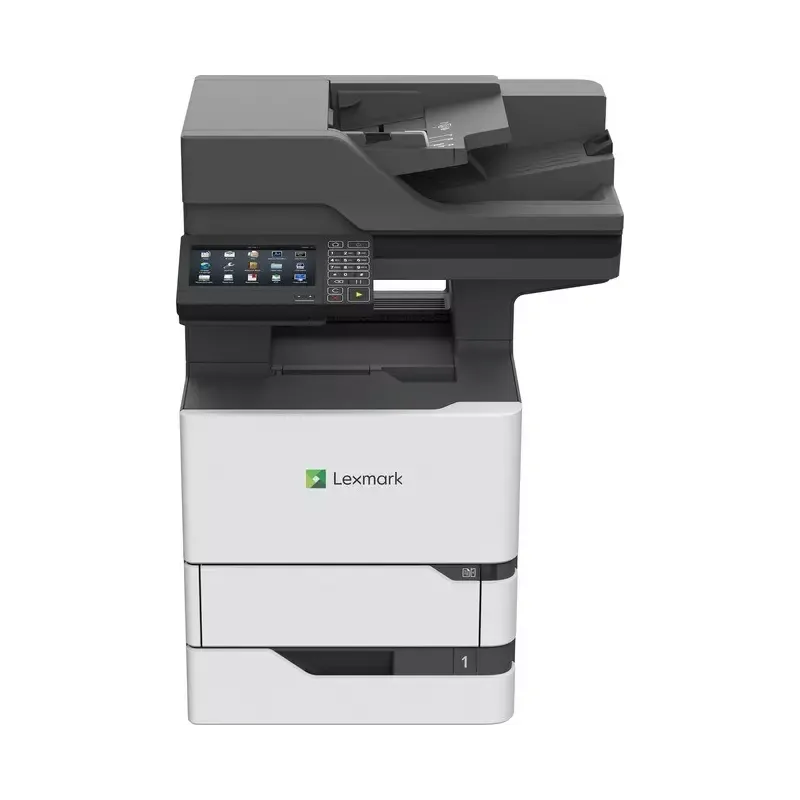

Manual of product MX721ade

Editorial note
The Lexmark MX721ade printer stands out with its impressive printing speed of 62 pages per minute, ideal for professional environments requiring rapid document production. Its laser printing technology offers exceptional quality with a maximum resolution of 1200 x 1200 DPI, ensuring sharp and precise prints. Additionally, its maximum paper capacity of 3300 sheets allows for efficient management of large workloads, while benefiting from the built-in duplex printing feature that helps reduce paper consumption. However, this device has some drawbacks. Although it is high-performing, the lack of duplex scanning functionality may slow down the processing of double-sided documents. Furthermore, its weight of 44.1 kg complicates its mobility, limiting its flexibility in dynamic office environments. The absence of Wi-Fi connectivity could also restrict its integration into modern offices, where wireless connections are preferred. Finally, the noise level of 60 dB could be disruptive in quiet workspaces, and while the printing speed is fast, it may not be sufficient for businesses with extremely high printing needs. In terms of user experience, the 7-inch touchscreen makes navigation and use of the various functions easy. The 279-page user manual provides comprehensive information, making it easier to get acquainted with the product. However, the limitations in connectivity and the noise level could pose issues in certain work environments. Overall, the Lexmark MX721ade is a robust and efficient printer, but it may not be suitable for all types of users.Score details
User experience
The user experience is enhanced by a 7-inch touchscreen, allowing for intuitive navigation and user-friendly access to the various functions of the printer.
Performance
The printing speed of 62 pages per minute is impressive, although it may not be sufficient for businesses with extremely high printing needs.
Design
The weight of 44.1 kg can make moving it difficult, which limits flexibility of use in an office environment.
Features
The printer offers a maximum paper capacity of 3300 sheets and built-in duplex printing, but lacks the duplex scanning feature.
Value for money
Although the price is justified by its features, the absence of Wi-Fi and a noise level of 60 dB may pose issues in certain environments.
Documentation
The 279-page user manual provides comprehensive information on using the device, making it easier for users to get started.
Advantages
Fast printing of 62 pages per minute
Laser quality with 1200 x 1200 DPI
Maximum capacity of 3300 sheets
Built-in duplex printing
7-inch touchscreen
Disadvantages
No duplex scanning.
Heavyweight, difficult to move.
No Wi-Fi connection.
High noise level (60 dB).
Insufficient printing speed for some businesses.
Technical Specifications MX721ade
General Information
-
ModelMX721ADE
-
Brand
-
Category
-
Type
-
SKU1384438
-
MPN1384438
Print speed
-
Printing technologyLaser
-
PrintingMonochrome printing
-
Print speed (black, normal quality, A4/US Letter)62 ppm
-
Maximum resolution1200 x 1200 DPI
-
Preheating time50 s
-
Double-sided printingYes
Copier
-
CopySimple copy
-
Max. resolution of copies- DPI
-
Copy speed (normal quality, black, A4)61 cpm
-
Resizing copy25 - 400 %
-
Release time of the first print (black, normal)4.2 s
-
Duplex copyYes
Digitization
-
DigitizationColor scanning
-
Optical scanning resolution600 x 600 DPI
-
Maximum scan area216 x 355 mm
-
Type of scannerFlatbed and ADF scanner
-
Scan toEmail, FTP, USB
-
Scanning technologyCCD (charge-coupled device)
-
Double-sided scanningYes
Fax
-
FaxSimple fax
-
Fax transmission speed3 sec/page
-
Modem speed33.6 Kbit/s
Features
-
Digital sender-
-
Number of print cartridges-
-
Printing colors-
-
Service cycle (Maximum)300000 pages per month
-
Service cycle (recommended)5000 - 75000 pages per month
-
Languages of the page descriptionPCL 5e, PCL 6, PDF 1.7, PPDS, PostScript 3, XPS
-
Double-sided functionsPrinting
Design
-
Market positionProfessional
-
Color displayYes
-
Screen size7 "
-
Color displayYes
-
Color displayYes
-
Order typeTouch
-
Product colorBlack, White
Network
-
Management protocolsDHCP
-
WifiAPIPA (AutoIP)
-
Ethernet/LANBOOTP
-
LAN Ethernet: data transfer rateRARP
-
Security-supported algorithmmDNS
-
Mobile printing technologiesIGMP
-
Wiring technologyBonjour
-
WINS
-
DDNS
-
SNMPv3
-
SNMPv1
-
SNMPv2c
-
Telnet
-
NTP
-
ICMP
-
HTTP
-
DNS
-
ARP
-
HTTPs (SSL/TLS)
-
Finger
-
No
-
Yes
-
10,100,1000 Mbit/s
-
802.1x RADIUS
-
IPSec
-
LEAP
-
MD5
-
MSCHAPv2
-
PEAP
-
SNMPv3
-
TTLS
-
Apple AirPrint
-
10/100/1000Base-T(X)
Input and output capacity
-
Total number of power supply units-
-
Total power capacity650 sheets
-
Maximum input capacity3300 sheets
-
Automatic Document Feeder (ADF) production capacity200 sheets
-
Input capacity of multi-purpose trays100 sheets
-
Maximum output capacity550 sheets
-
Maximum output capacity550 sheets
-
Automatic Document Feeder (ADF) production capacity200 sheets
-
Automatic Document Feeder (ADF)Yes
-
Automatic Document Feeder (ADF)Yes
Paper management
-
Maximum ISO A series paper sizeA4
-
Type of paper tray supportCard stock
-
ISO, Format Series A (A0...A9)Envelopes
-
Non-ISO print support sizesLabels
-
JIS series B format (B0...B9)Plain paper
-
Envelope sizesTransparencies
-
Weight of paper tray supportA4
-
A5
-
A6
-
Executive (184 x 267mm)
-
Folio (media size)
-
Legal (media size)
-
Letter (media size)
-
Oficio (media size)
-
Statement (140 x 216mm)
-
Universal
-
B5
-
7 3/4
-
9
-
10
-
B5
-
C5
-
DL
-
60 - 176 g/m²
Connectivity
-
Direct printing-
-
Standard interfacesEthernet, USB 2.0
-
Quantity of USB 2.0 Ports3
-
USB connectorUSB Type-A / USB Type-B
-
Optional connectivityParallel, Serial (RS-232), Wireless LAN
-
USB portYes
Representation / realization
-
Built-in memory card reader-
-
Internal memory2048 MB
-
Maximum internal memory6144 MB
-
Number of processor cores4
-
Processor frequency1200 MHz
-
Sound pressure level (copy)60 dB
-
Sound pressure level (impression)57 dB
-
Sound pressure level (duplex printing)56 dB
-
Sound pressure level (duplex printing)56 dB
-
Integrated into the processorYes
Power
-
Energy Star, typical electrical consumption (TEC)2.9 kWh/week
-
Average power consumption in Print mode800 W
-
Average power consumption in Copy mode830 W
-
Average power consumption in Scanning mode75 W
-
Energy consumption (loan)41.5 W
-
Energy consumption (in standby mode)1.8 W
Minimum system requirements
-
Support for the Linux operating systemYes
-
Support for the Mac operating systemMac OS X 10.10 Yosemite, Mac OS X 10.11 El Capitan, Mac OS X 10.12 Sierra, Mac OS X 10.6 Snow Leopard, Mac OS X 10.7 Lion, Mac OS X 10.8 Mountain Lion, Mac OS X 10.9 Mavericks
-
Support for the Linux operating systemYes
Sustainability
-
Sustainability certificatesENERGY STAR
Certificate
-
CertificationENERGY STAR
-
ICES-003 Class A
-
BSMI Class A
-
VCCI Class A
-
US FDA/CDRH
-
UL 60950-1
-
FCC Class A
-
cUL CAN/CSA-C22.2 60950-1
-
NOM
-
MET-I
-
IEC 60825-1
-
CB EN/IEC 60950-1
-
CB EN/IEC 60825-1
-
CCD-035
-
CE DoC (EN 62301 Class A, EN 62311, CE EN/IEC 60950-1, CE EN/IEC 60825-1, EN 61000-3, EN 55022 Class A, EuP, EN 55024, UL)
-
EFTA (CE)
-
CISPR 22 Class A
-
KCC
-
CCC
-
CECP
-
CEL
-
A-tick DoC
-
C-tick CoC
-
UL-AR
-
KC mark
-
UL GS mark
-
ISO 532B
-
ECMA-370
-
TED
-
GOST-R
-
SII
-
TER
-
Bel GISS
Weight and dimensions
-
Width558.8 mm
-
Depth578.4 mm
-
Height739.1 mm
-
Weight44100 g
Environmental conditions
-
Operating relative humidity (H-H)8 - 80 %
-
Operating temperature10 - 32 °C
-
Operating altitude0 - 2896 m
Frequently Asked Questions
What is the weight of the Lexmark MX721ade?
What is the best method to remove a paper jam from the printer?
Why is my printer not recognizing the original cartridges?
What could be the reasons for poor print quality?
How does a laser printer differ from an inkjet printer?
Why does my inkjet printer leave black streaks on my prints?
What does the acronym DPI mean?
What certifications does the Lexmark MX721ade have?
How many cartridges can the Lexmark MX721ade hold?
What is the size of the screen on the Lexmark MX721ade?
What is the height of the Lexmark MX721ade?
What is the width of the Lexmark MX721ade?
What is the depth of the Lexmark MX721ade?
Is the manual for the Lexmark MX721ade available in French?
Similar products


More product categories from brand Lexmark
Other Lexmark
More product types from brand Lexmark


Presentation of product MX721ade specifications from brand Lexmark
General Information
The model Lexmark MX721ade is a multifunction printer from the brand Lexmark, known for its innovation and quality in the field of printing devices. This model, referenced under the code 25B0048, is designed to deliver high performance and an intuitive user experience. The associated EAN codes, 0734646612456, 0734646697835, and 0734646676342, ensure unique identification in distribution systems.
Print Speed
Equipped with laser printing technology, the Lexmark MX721ade guarantees remarkable print quality with a maximum resolution of 1200 x 1200 DPI. It is capable of printing in color, producing documents and images with vibrant and accurate colors. With an impressive print speed of 62 pages per minute, this device is ideal for professional environments requiring fast production. The warm-up time of 50 seconds ensures quick availability. Additionally, the built-in duplex printing feature optimizes paper usage.
Copier
The copier of the Lexmark MX721ade allows color copies, ensuring faithful reproductions of original documents. It reaches a speed of 61 copies per minute in black and white mode, and the resizing of copies can vary from 25 to 400 %, thus offering flexibility according to needs. The first copy output time is 4.2 seconds. However, this model does not offer an automatic duplex copy function.
Scanning
The color scanning function of the Lexmark MX721ade allows for accurate reproductions of documents. With an optical scanning resolution of 600 x 600 DPI, it processes high-quality images. The maximum scan area is 216 x 355 mm, suitable for large documents. The flatbed scanner and automatic document feeder (ADF) facilitate quick scanning of multiple pages. Scanning protocols include E-mail, FTP, and USB, but duplex scanning is not supported.
Fax
The integrated fax machine of the Lexmark MX721ade offers fast transmission, with a speed of 3 seconds per page. The modem operates at a speed of 33.6 Kbit/s, ensuring an efficient connection for sending and receiving documents.
Features
The maximum duty cycle of the Lexmark MX721ade is 300,000 pages per month, making it suitable for heavy use. The recommended duty cycle ranges from 5,000 to 75,000 pages per month, optimizing its performance. The printer supports multiple page description languages, such as PCL 5e, PCL 6, PDF 1.7, PostScript 3, and XPS. It is also equipped with duplex functions for eco-friendly use.
Design
Designed for professional use, the Lexmark MX721ade features a 7-inch touchscreen, facilitating navigation and interaction with the various functions of the device. Its sleek design, available in black and white, easily integrates into any office environment.
Network
The Lexmark MX721ade supports several network management protocols such as DHCP, BOOTP, and SNMP, allowing centralized management of devices. Although it is equipped with Ethernet connectivity, it does not have Wi-Fi, which may limit its integration into modern offices. The data transfer rate is 10/100/1000 Mbit/s, ensuring a fast connection.
Input and Output Capacity
With a total paper capacity of 650 sheets and a maximum input capacity of 3,300 sheets, the Lexmark MX721ade is designed to efficiently handle large workloads. The automatic document feeder capacity is 200 sheets, and the multifunction tray allows for versatile use. The total output is 550 sheets, ensuring optimal performance.
Paper Management
This model supports a variety of paper sizes, including A4, and is compatible with various media types such as labels and transparencies. The recommended paper weight ranges from 60 to 176 g/m², ensuring optimal print quality.
Connectivity
The Lexmark MX721ade is equipped with three USB 2.0 ports and standard interfaces for optimal connectivity. While it offers optional connectivity via parallel and serial, the lack of wireless connectivity may be a drawback in modern environments.
Representation / Performance
With an internal memory of 2048 MB and a maximum capacity of 6144 MB, the Lexmark MX721ade allows for smooth data processing. Its 4-core processor operates at a frequency of 1200 MHz, optimizing multitasking performance. The noise level is 60 dB, which may be considered high in quiet work environments.
Power
The typical power consumption is 2.9 kWh/week, with average values of 800 W in print mode and 75 W in scan mode. In standby, the consumption is reduced to 1.8 W, contributing to better energy efficiency.
Minimum System Requirements
The Lexmark MX721ade is compatible with several operating systems, including Windows, Mac (versions ranging from 10.6 to 10.12), and Linux, ensuring easy integration into various work environments.
Durability
Certified ENERGY STAR, the Lexmark MX721ade meets high standards for energy efficiency, contributing to sustainable and environmentally friendly use.
Certification
The Lexmark MX721ade has several certifications, ensuring its compliance with safety and performance standards, including ICES-003, UL 60950-1, and FCC Class A.
Weight and Dimensions
With dimensions of 558.8 mm in width, 578.4 mm in depth, and 739.1 mm in height, the Lexmark MX721ade weighs 44.1 kg, which may make it difficult to move.
Environmental Conditions
The Lexmark MX721ade operates in a relative humidity of 8 to 80 % and in a temperature range of 10 to 32 °C, ensuring optimal operation in various office environments.


