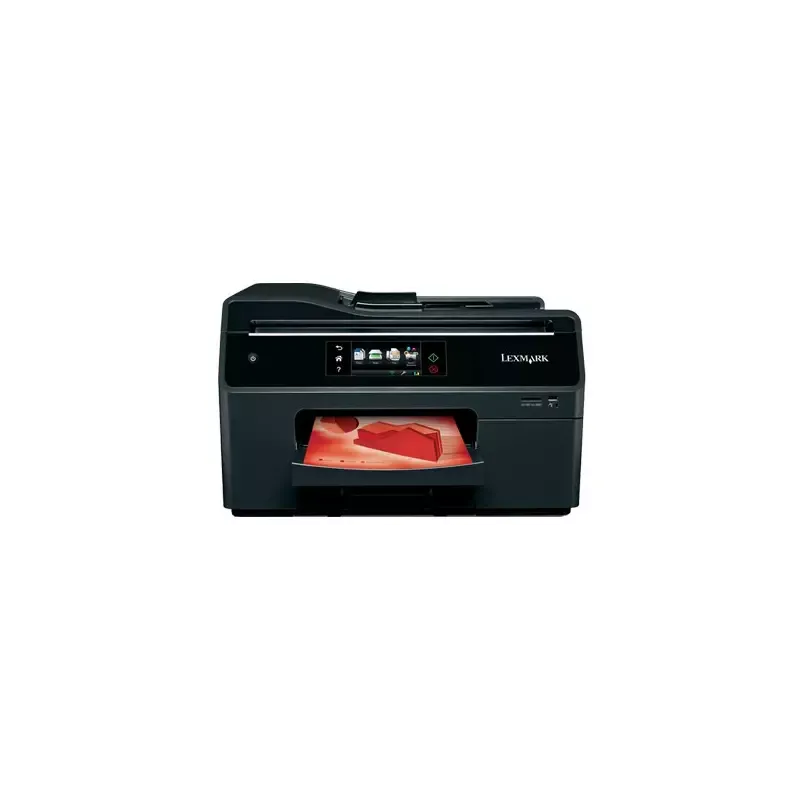

Manual of product OfficeEdge Pro 5500

Editorial note
The Lexmark OfficeEdge Pro 5500 stands out for its impressive performance and all-in-one features, making it ideal for demanding work environments. With a printing speed of 40 pages per minute in black and 36 pages per minute in color, this device ensures optimal efficiency for all your printing needs. Its high print resolution of 4800 x 3600 DPI guarantees exceptional quality results, with precise details and vibrant colors. Additionally, its maximum paper capacity of 850 sheets and automatic duplex printing help reduce paper consumption and optimize resources. However, the product has some notable drawbacks. The lack of wireless connectivity may limit its use in modern offices where flexibility is essential. Furthermore, the duplex scanning feature is not available, which could pose a problem for users needing to quickly scan double-sided documents. The weight of 16.1 kg may also complicate its installation or movement. Finally, the limited compatibility with certain operating systems, particularly the lack of support for Mac, may restrict its use for some users. Regarding user experience, the product receives a score of 80, highlighting an overall positive experience thanks to intuitive features despite some limitations. Performance is excellent with a score of 85, reflecting the speed and efficiency of the device. The all-in-one features receive a high score of 90, due to their versatility. The design, while functional, receives a score of 70, due to the weight that could pose difficulties during installation. In terms of value for money, it scores 75, indicating that the product offers good value despite compatibility restrictions. Finally, usability and support are rated at 65 and 70, respectively, with suggestions for improvement for an even better user experience. In summary, the Lexmark OfficeEdge Pro 5500 is a solid choice for professionals looking for a high-performing and versatile printer, but it is important to consider its limitations in connectivity and compatibility.Score details
User experience
The user experience is generally positive thanks to all-in-one features and an intuitive interface, but the lack of wireless connectivity may limit its use in modern environments.
Performance
The performance is excellent with a printing speed of 40 ppm in black and 36 ppm in color, ideal for demanding work environments.
Features
The all-in-one features, including printing, copying, scanning, and faxing, offer optimal versatility to meet various professional needs.
Design
The design is functional, but the weight of 16.1 kg can pose difficulties during installation or relocation.
Value for money
The product offers good value for money considering its features, but limited compatibility with certain operating systems may restrict its use.
Usability
Although the use is generally intuitive, the lack of duplex scanning and limited compatibility with systems like Mac can be drawbacks for some users.
Support
The user manual is available, but more accessible technical support could be beneficial for less experienced users.
Documentation
The product comes with comprehensive documentation, although access to additional online resources could enhance the user experience.
Advantages
Fast printing: 40 ppm black, 36 ppm color
All-in-one function: printing, copying, scanning, faxing
High resolution: 4800 x 3600 DPI
Automatic duplex printing
850-sheet capacity
Disadvantages
No wireless connectivity
No duplex scanning
Relatively heavy (16.1 kg)
Limited compatibility with operating systems
Unspecified noise level
Technical Specifications OfficeEdge Pro 5500
General Information
-
ModelOFFICEEDGE PRO 5500
-
Brand
-
Category
-
Type
-
SKU55089
-
MPN55089
Print speed
-
Printing technologyInkjet
-
Color resolution4800 x 3600 DPI
-
Print speed (black, normal quality, A4/US Letter)40 ppm
-
Print speed (color, normal quality, A4/US Letter)36 ppm
-
Color resolution4800 x 3600 DPI
-
Black print resolution2400 x 1800 DPI
-
PrintingColor printing
-
Double-sided printingYes
Other features
-
All-in-one functionsCopy
-
All-in-one color functionsFax
-
Dimensions (LxWxH)Print
-
Package dimensions (LxWxH)Scan
-
Network featurescopy
-
Color scanningfax
-
Type of power supplyprint
-
Compatible operating systemsscan
-
Wireless technology500 x 427 x 300 mm
-
Color scanning395 x 595 x 509 mm
-
Color scanningFast Ethernet
-
Connectivity technologyYes
-
Power
-
Microsoft Windows XP
-
Microsoft Windows Server 2003
-
Microsoft Windows XP x64
-
Microsoft Windows Server 2003 x64
-
Microsoft Windows Vista
-
Microsoft Windows Vista x64
-
Microsoft Windows Server 2008
-
Microsoft Windows Server 2008 x64
-
Microsoft Windows 7
-
Microsoft Windows 7 x64
-
Microsoft Windows Server 2008 R2
-
Apple Mac OS X (10.4, 10.5, 10.6, 10.7)
-
No
-
Yes
-
Yes
-
Wired
Features
-
Service cycle (Maximum)30000 pages per month
-
All-in-one multitaskingYes
-
Number of print cartridges4
-
Languages of the page descriptionPCL 5c, PCL 6, PDF 1.6, PostScript 3, xHTML
-
Printing colorsBlack, Cyan, Magenta, Yellow
-
Digital senderNo
Copier
-
Max. resolution of copies- DPI
-
Copy speed (normal quality, black, A4)34 cpm
-
Copy speed (normal quality, color, A4)26 cpm
-
Resizing copy25 - 400 %
-
Release time of the first print (color, concept)7 s
-
Release time of the first print (color, concept)7 s
-
CopyColor copy
Digitization
-
Optical scanning resolution1200 x 4800 DPI
-
Maximum scan area216 x 356 mm
-
Type of scannerFlatbed and ADF scanner
-
Scanning technologyCIS
-
DigitizationColor scanning
-
Double-sided scanningYes
Fax
-
Modem speed33.6 Kbit/s
-
FaxColor fax
Input and output capacity
-
Total power capacity300 sheets
-
Maximum input capacity850 sheets
-
Maximum output capacity150 sheets
-
Maximum output capacity150 sheets
Paper management
-
Maximum print format210 x 297 mm
-
Type of paper tray supportCard stock
-
ISO, Format Series A (A0...A9)Envelopes
-
Non-ISO print support sizesLabels
-
Envelope sizesPhoto paper
-
Photo paper sizesPlain paper
-
Maximum ISO A series paper sizeTransparencies
-
A4
-
A5
-
A6
-
Executive (184 x 267mm)
-
Folio (media size)
-
Legal (media size)
-
Letter (media size)
-
Oficio (media size)
-
7 3/4
-
9
-
10
-
B5
-
C5
-
DL
-
10x15 "
-
A4
Design
-
ScreenLCD
-
Screen size4.3 "
-
Built-in screenYes
-
Built-in screenYes
-
Market positionProfessional
-
Order typeTouchscreen
Connectivity
-
Direct printingNo
-
Standard interfacesEthernet, USB 2.0
-
Optional connectivityWireless LAN
-
USB portYes
Network
-
Ethernet/LANYes
-
WifiNo
-
Support for network protocols (IPv4)TCP/IP, AppleTalk
-
Support for network protocols (IPv6)TCP/IP, TCP, UDP
Representation / realization
-
Maximum internal memory256 MB
-
Maximum internal memory256 MB
-
Built-in memory card readerNo
-
Processor frequency660 MHz
-
Sound pressure level (scanning)0 dB
-
Sound pressure level (scanning)0 dB
-
Sound pressure level (scanning)0 dB
-
Mac CompatibilityYes
Power
-
Electricity consumption (average operation)W
Weight and dimensions
-
Weight16100 g
Packaging information
-
Package weight18600 g
Minimum system requirements
-
Support for the Linux operating systemYes
-
Support for the Linux operating systemYes
-
Support for the Linux operating systemYes
-
Support for the server operating systemWindows 2000 Advanced Server, Windows 2000 Server, Windows Server 2003, Windows Server 2003 x64, Windows Server 2008 R2, Windows Server 2008 x64
-
Support for other operating systemsIBM AS/400, IBM iSeries, Novell NetWare 5.x, Novell NetWare 6.x, Novell Open Enterprise Server
Environmental conditions
-
Operating temperature16 - 32 °C
-
Operating altitude0 - 3048 m
Sustainability
-
Sustainability certificatesENERGY STAR
Certificate
-
CertificationEnergy Star
-
CSA
-
c-UL-us
-
ICES Class B
-
Executive Order 132221
-
CE Class B
-
CB IEC 60950 IEC 60825-1
-
GS (TÜV)
-
SEMKO
-
C-tick mark Class B
-
V85
-
CCC Class B
-
BSMI Class B
-
METI(PSE)
-
VCCI Class B
-
FCC Class B
-
UL 60950 3rd Edition
-
CCIB
Frequently Asked Questions
What is the weight of the Lexmark OfficeEdge Pro 5500?
What is the best method to remove paper jammed in the printer?
Why does my printer not recognize the original cartridges?
Why is the quality of my prints poor?
What is the difference between a laser printer and an inkjet printer?
Why does my inkjet printer leave black streaks on prints?
What does the acronym DPI mean?
What certifications does the Lexmark OfficeEdge Pro 5500 have?
How many cartridges can the Lexmark OfficeEdge Pro 5500 hold?
What is the size of the screen on the Lexmark OfficeEdge Pro 5500?
Is the manual for the Lexmark OfficeEdge Pro 5500 available in French?
Similar products


More product categories from brand Lexmark
Other Lexmark
More product types from brand Lexmark


Presentation of product OfficeEdge Pro 5500 specifications from brand Lexmark
General Information
The Lexmark OfficeEdge Pro 5500 is a printer from the Lexmark brand, known for its innovation and quality in the field of office equipment. This model, designated by the code 90P0000, offers optimal performance and an enhanced user experience. The EAN code 0734646232197 allows for product identification in the distribution system.
Print Speed
The Lexmark OfficeEdge Pro 5500 uses Inkjet printing technology, ensuring remarkable print quality. The maximum resolution reaches 4800 x 3600 DPI, providing prints of exceptional clarity. With a print speed of 40 ppm in black and 36 ppm in color, this device is particularly suited for demanding work environments. Additionally, it allows for duplex printing, optimizing paper usage while reducing waste.
Other Features
The Lexmark OfficeEdge Pro 5500 is a multifunction device, offering copy, fax, print, and scan functions. Its compact dimensions of 500 x 427 x 300 mm facilitate integration into various workspaces. Equipped with Fast Ethernet technology, it provides a fast and reliable network connection. This device operates on mains power and is compatible with Windows XP, Vista, and 7 operating systems. However, it does not support wireless connectivity, which may limit its use in modern environments.
Specifications
The maximum service cycle is 30,000 pages per month, making it suitable for intensive use. The printer uses four cartridges for optimal print quality, supporting page description languages such as PCL and PostScript. In terms of colors, it uses a printing system in Black, Cyan, Magenta, and Yellow.
Copier
The Lexmark OfficeEdge Pro 5500 has a copy speed of 34 cpm in black and 26 cpm in color. It also allows for a copy resizing of 25 to 400 %, providing great flexibility according to needs. The first print output time is 7 seconds, ensuring increased efficiency.
Scanning
This printer features an optical scanning resolution of 1200 x 4800 DPI, allowing for high-quality images. The flatbed scanner and ADF facilitate the quick scanning of multiple documents. Although it does not offer a duplex scanning function, it allows for accurate and faithful color scans.
Fax
The built-in modem operates at a speed of 33.6 Kbit/s, enabling fast and efficient transmission of color faxes.
Input and Output Capacity
The paper feed capacity is 300 sheets, while the maximum input capacity reaches 850 sheets. The total output capacity is 150 sheets, ensuring effective management of printed documents.
Paper Management
The Lexmark OfficeEdge Pro 5500 supports various paper formats, with a maximum print size of 210 x 297 mm. It is compatible with several types of media, including plain paper, labels, and photo paper, providing great flexibility for different printing needs.
Design
Equipped with a 4.3-inch LCD screen, the printer offers an intuitive user interface. Its design is primarily oriented towards professional use, with touch controls for easy navigation.
Connectivity
The Lexmark OfficeEdge Pro 5500 does not have a direct printing function, but it is equipped with standard interfaces for effective connectivity with various devices. Optional connectivity includes a USB port for quick connections.
Network
This printer is compatible with Ethernet/LAN, ensuring a reliable connection. However, it does not support Wi-Fi, which could limit its use in modern setups requiring wireless connectivity.
Representation / Performance
With an internal memory of 256 MB, the Lexmark OfficeEdge Pro 5500 ensures effective data management. Its processor frequency of 660 MHz contributes to solid performance. Note that this device does not have a built-in memory card reader.
Environmental Conditions
For optimal operation, the operating temperature must be between 16 and 32 °C, and the device can operate at altitudes of up to 3048 m.
Durability
The Lexmark OfficeEdge Pro 5500 is certified ENERGY STAR, ensuring energy efficiency and environmental compliance.
Certification
This printer has several safety certifications, such as CE, FCC, and UL, attesting to its compliance with safety and performance standards.


