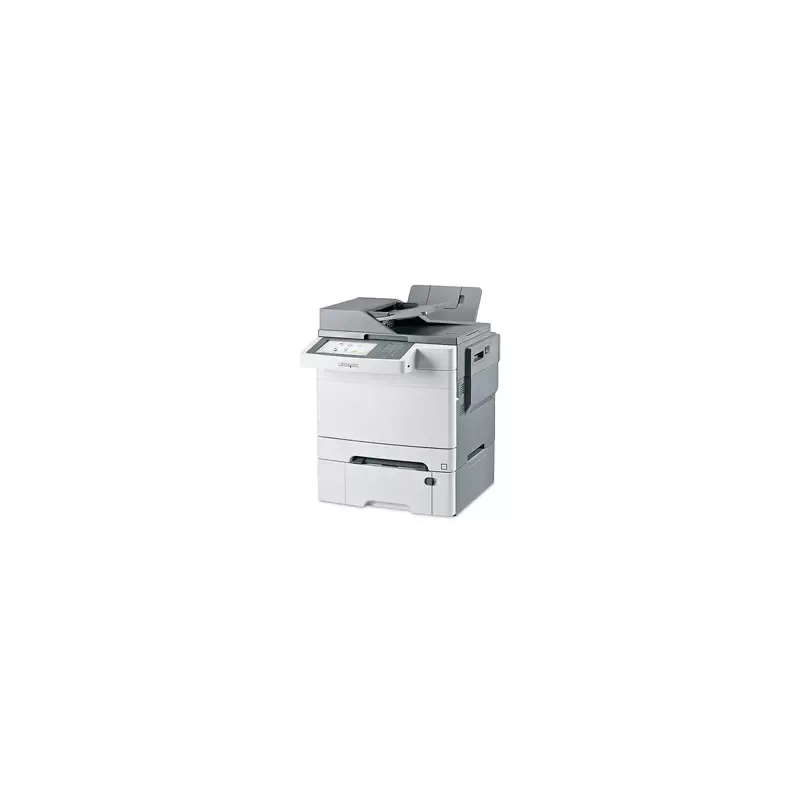

Manual of product X548dte

Editorial note
The Lexmark X548dte printer stands out for its versatility thanks to its all-in-one functions, including printing, copying, scanning, and faxing. With a printing speed of 23 pages per minute, it effectively meets the needs of daily use, while its maximum resolution of 1200 x 1200 DPI ensures high-quality prints. Additionally, its maximum input capacity of 1450 sheets and its duplex printing functionality optimize resource use, which is an asset for work environments. However, some drawbacks must be considered. Its weight of 32.1 kg can make installation and relocation difficult, especially in offices where flexibility is needed. The lack of Wi-Fi connectivity limits wireless printing options, which may disappoint some users. Furthermore, while the printing speed is adequate, it may not be sufficient in contexts where high print volumes are required. The automatic document feeder capacity, limited to 50 sheets, can also slow down document processing. Overall, the Lexmark X548dte offers good value for money, bolstered by its robust features and exceptional print quality. The user experience is generally satisfactory thanks to an intuitive interface, although there are areas for improvement, particularly regarding wireless connectivity and the automatic feeder capacity. The provided documentation is comprehensive but could include more detailed usage examples to maximize the utilization of advanced features.Score details
User experience
The user experience is satisfactory due to the all-in-one versatility of the printer, but the heavy weight can make it difficult to move.
Performance
The printing speed of 23 ppm is acceptable, but may not be sufficient in very demanding work environments.
Design
The design is functional, but the weight of 32.1 kg can pose installation problems in certain environments.
Value for money
The printer offers good value for money with its all-in-one features and exceptional print quality.
Usability
The device's interface and features are intuitive, but the lack of Wi-Fi connectivity can be a disadvantage for some users.
Features
Features such as duplex printing and paper handling capacity are excellent, although the ADF capacity is limited to 50 sheets.
Support
The user manual is available, but it could be improved to facilitate troubleshooting.
Documentation
The provided documentation is comprehensive, but could include more detailed usage examples for advanced features.
Advantages
All-in-one printer: printing, copying, scanning, faxing
Print speed of 23 pages per minute
Print quality of 1200 x 1200 DPI
Maximum input capacity of 1450 sheets
Double-sided printing to reduce resources
Network connectivity with secure Ethernet ports
Disadvantages
Heavy weight, difficult to move
No Wi-Fi connectivity
Print speed limited to 23 ppm
ADF with a capacity of 50 sheets
Average scanning resolution
Technical Specifications X548dte
General Information
-
ModelX548DTE
-
Brand
-
Category
-
Type
-
SKU24786
-
MPN24786
Other features
-
All-in-one functionsCopy
-
All-in-one color functionsFax
-
Print
-
Scan
-
copy
-
fax
-
print
-
scan
Print speed
-
Printing technologyInkjet
-
Maximum resolution1200 x 1200 DPI
-
Print speed (color, normal quality, A4/US Letter)23 ppm
-
Print speed (color, normal quality, A4/US Letter)23 ppm
-
Copy time for the first page (Black, normal)12.5 s
-
Copy time for the first page (color, normal)14 s
-
Print margins (top, bottom, right, left)4.2 mm
-
PrintingColor printing
-
Double-sided printingYes
Features
-
Service cycle (Maximum)85000 pages per month
-
Languages of the page descriptionMicrosoft XPS, PCL 5c, PCL 6, PDF 1.6, PostScript 3, PPDS
-
Printing colorsBlack, Cyan, Magenta, Yellow
-
Digital senderNo
Copier
-
Max. resolution of copies- DPI
-
Copy speed (normal quality, color, A4)23 cpm
-
Copy speed (normal quality, color, A4)23 cpm
-
Resizing copy25 - 400 %
-
Release time of the first print (black, normal)15 s
-
Release time of the first print (color, concept)16.5 s
-
CopyColor copy
Digitization
-
Optical scanning resolution600 x 600 DPI
-
Maximum scan area216 x 356 mm
-
Type of scannerFlatbed scanner and ADF
-
DigitizationColor scanning
Fax
-
Modem speed33.6 Kbit/s
-
FaxColor fax
Input and output capacity
-
Total power capacity900 sheets
-
Maximum input capacity1450 sheets
-
Automatic Document Feeder (ADF) production capacity50 sheets
-
Maximum output capacity150 sheets
-
Maximum output capacity150 sheets
-
Automatic Document Feeder (ADF) production capacity50 sheets
-
Automatic Document Feeder (ADF)Yes
Paper management
-
Maximum print format216 x 356 mm
-
Type of paper tray supportCard stock, Envelopes, Labels, Plain paper, Transparencies
-
ISO, Format Series A (A0...A9)A4, A5, A6
-
Non-ISO print support sizesExecutive (184 x 267mm), Folio (media size), Legal (media size), Letter (media size), Oficio (media size), Statement (140 x 216mm)
-
JIS series B format (B0...B9)B5
-
Envelope sizes7 3/4, 9,10, B5, C5, DL
-
Maximum ISO A series paper sizeA4
Design
-
ScreenLCD
-
Screen size7 "
-
Built-in screenYes
-
Product colorGray
-
Built-in screenYes
-
Market positionProfessional
-
Order typeTouchscreen
Connectivity
-
Direct printing-
-
Standard interfacesEthernet, USB 2.0
-
USB portYes
Network
-
Mobile printing technologies-
-
Ethernet/LANYes
-
WifiNo
-
Support for network protocols (IPv6)TCP/IP
-
Support for network protocols (IPv6)TCP/IP
-
Management protocolsHTTP, HTTPs, SNMPv3, WINS, IGMP, BOOTP, RARP, APIPA, DHCP, ICMP, DNS, SNMPv2c, Bonjour, DDNS, mDNS, ARP, NTP, Telnet, Finger
-
Security-supported algorithmEAP-TLS, EAP-TTLS, LEAP, MD5, PEAP
Representation / realization
-
Internal memory512 MB
-
Maximum internal memory1536 MB
-
Built-in memory card readerNo
-
Processor frequency900 MHz
-
Sound pressure level (copy)51 dB
-
Sound power level (standby)23 dB
-
Sound pressure level (impression)48 dB
-
Sound pressure level (silent mode)46 dB
-
Sound pressure level (duplex printing)50 dB
-
Sound pressure level (silent mode)46 dB
Power
-
Electricity consumption (average operation)W
Weight and dimensions
-
Weight32100 g
-
Width440 mm
-
Height597 mm
-
Height597 mm
Minimum system requirements
-
Support for the Linux operating systemYes
-
Support for the Linux operating systemYes
-
Support for the Linux operating systemYes
-
Support for the server operating systemWindows 2000 Server, Windows Server 2008, Windows Server 2008 R2
Environmental conditions
-
Operating temperature16 - 32 °C
-
Operating relative humidity (H-H)8 - 80 %
-
Operating altitude0 - 3048 m
Sustainability
-
Sustainability certificatesENERGY STAR
Certificate
-
CertificationCAN/CSA-C22.2 60950-1-07
-
ICES-003 A
-
FCC A
-
UL 60950-1
-
EN/IEC 60320-1
-
CB IEC 60950-1
-
NOM-019-SCFI-1998
-
EN/IEC 60825-1
-
EN 60950-1
-
EN/IEC 61000-3
-
EN 55022 A
-
EN 55024
-
CISPIR 22 Class A
-
IEC 60320-1
-
CE A
-
GS (TÜV)
-
N Mark
-
UL AR
-
CS
-
TÜV Rh
-
ACMA A-tick A
-
AS/NZS 60950-1
-
CCC A
-
EK-K60950
-
KCC
-
PSB
-
SABS
-
ZIK
-
KPSIM
-
Bel GISS
-
GOST-R 'Cpt' Mark
Packaging information
-
Package width645 mm
-
Package depth560 mm
-
Package height781 mm
-
Package weight38100 g
Frequently Asked Questions
What is the weight of the Lexmark X548dte?
What is the best method to remove paper jammed in the printer?
Why is my printer not accepting original cartridges?
What are possible reasons for poor print quality?
What is the difference between a laser printer and an inkjet printer?
Why is my inkjet printer leaving black streaks on prints?
What does the acronym DPI mean?
What certifications does the Lexmark X548dte have?
What is the size of the screen on the Lexmark X548dte?
What is the height of the Lexmark X548dte?
What is the width of the Lexmark X548dte?
What is the depth of the Lexmark X548dte?
Is the manual for the Lexmark X548dte available in French?
Similar products


More product categories from brand Lexmark
Other Lexmark
More product types from brand Lexmark


Presentation of product X548dte specifications from brand Lexmark
General Information
The Lexmark X548dte is a multifunction printer from the Lexmark brand, known for its commitment to quality and innovation. This model, identified by the code X548dte | 26G0207, offers optimal performance and an enhanced user experience. The product can be identified by its EAN codes: 734646266208, 734646266239, and 0734646266239, allowing for precise management in the distribution system.
Other Features
Designed to meet various needs, the Lexmark X548dte combines several functions: printing, copying, scanning, and faxing. This versatility makes it ideal for professional environments where multiple tasks need to be performed efficiently. Additionally, its color printing capabilities allow for vibrant and accurate documents.
Print Speed
Equipped with inkjet printing technology, the Lexmark X548dte ensures exceptional print quality with a maximum resolution of 1200 x 1200 DPI. Its print speed reaches 23 pages per minute, both in black and color, guaranteeing rapid document production. For demanding work environments, the time to first page output is 12.5 seconds for black prints and 14 seconds for color prints, optimizing productivity.
Specifications
The service cycle of this printer can reach up to 85,000 pages per month, making it suitable for intensive use. It supports multiple page description languages, such as Microsoft XPS, PCL 5c, PCL 6, PDF 1.6, and PostScript 3, ensuring great flexibility in printing tasks. The available print colors include black, cyan, magenta, and yellow, guaranteeing high-quality visual results.
Copier
The copier of the Lexmark X548dte offers a copying speed of 23 copies per minute, both in black and color. It also allows resizing of copies from 25 to 400%, providing flexibility in the size of reproduced documents. The output times for the first copy are 15 seconds for black and 16.5 seconds for color, ensuring efficiency in dynamic work environments.
Scanning
Scanning is facilitated by an optical resolution of 600 x 600 DPI and a maximum scan area of 216 x 356 mm, allowing for the processing of large documents. The scanner is flatbed and ADF type, offering the ability to quickly scan multiple documents while maintaining faithful image quality.
Fax
The built-in modem operates at a speed of 33.6 Kbit/s, ensuring fast transmissions for sending and receiving documents. The fax machine also supports color faxing, thus increasing the versatility of this device.
Input and Output Capacity
The total paper capacity of the Lexmark X548dte is 900 sheets, with a maximum input capacity of 1450 sheets, allowing for high volumes of documents to be managed without interruption. The automatic document feeder (ADF) can handle up to 50 sheets at a time, facilitating batch scanning and copying tasks. Its output capacity is also 150 sheets.
Paper Management
The maximum supported print size is 216 x 356 mm, optimizing quality for larger documents. The paper tray is compatible with various types of media, including plain paper, envelopes, and transparencies. Additionally, this printer supports different standard paper sizes, providing flexibility for various printing needs.
Design
The Lexmark X548dte features a 7-inch LCD screen, offering a clear and intuitive user interface. Its modern gray design is intended to integrate harmoniously into a professional environment. The touch interface enhances the user experience, making operations more accessible.
Connectivity
This printer is equipped with standard interfaces that facilitate connectivity with various devices. It has a USB port for quick connection but does not support Wi-Fi connectivity.
Network
The Lexmark X548dte is compatible with Ethernet/LAN connectivity, ensuring effective integration into corporate networks. It supports IPv4 and IPv6 protocols, allowing for optimal print management in modern environments. Advanced security protocols ensure data protection during transmissions.
Representation / Performance
This printer has an internal memory of 512 MB, expandable up to 1536 MB, ensuring smooth performance during printing tasks. The processor operates at a frequency of 900 MHz, contributing to the overall efficiency of the device. The sound pressure level during operation is 51 dB, ensuring a non-intrusive work environment.
Power
The power consumption of the Lexmark X548dte is optimized for efficient operation, although the exact value is not specified.
Weight and Dimensions
The weight of the printer is 32.1 kg, which may make its relocation less convenient. Its dimensions are 440 mm in width, 597 mm in depth, and 597 mm in height, making it a relatively imposing piece of equipment for an office.
Minimum System Requirements
The Lexmark X548dte is compatible with various operating systems, including Windows, Mac, and Linux. It also supports several versions of Windows servers, meeting the requirements of modern IT environments.
Environmental Conditions
This printer operates optimally within a temperature range of 16 to 32 °C, with a relative humidity of 8 to 80%. It is designed to function effectively at altitudes of up to 3048 m.
Durability
The Lexmark X548dte is ENERGY STAR certified, ensuring that it meets high standards for energy efficiency and environmental sustainability.
Certification
This printer complies with several safety and performance standards, including CAN/CSA-C22.2 60950-1-07, FCC A, and EN 55022 A, among others, attesting to its quality and reliability.
Packaging Information
The packaging dimensions include a width of 645 mm, a depth of 560 mm, and a height of 781 mm. The total weight of the package is 38.1 kg, ensuring adequate protection during transport and storage.


