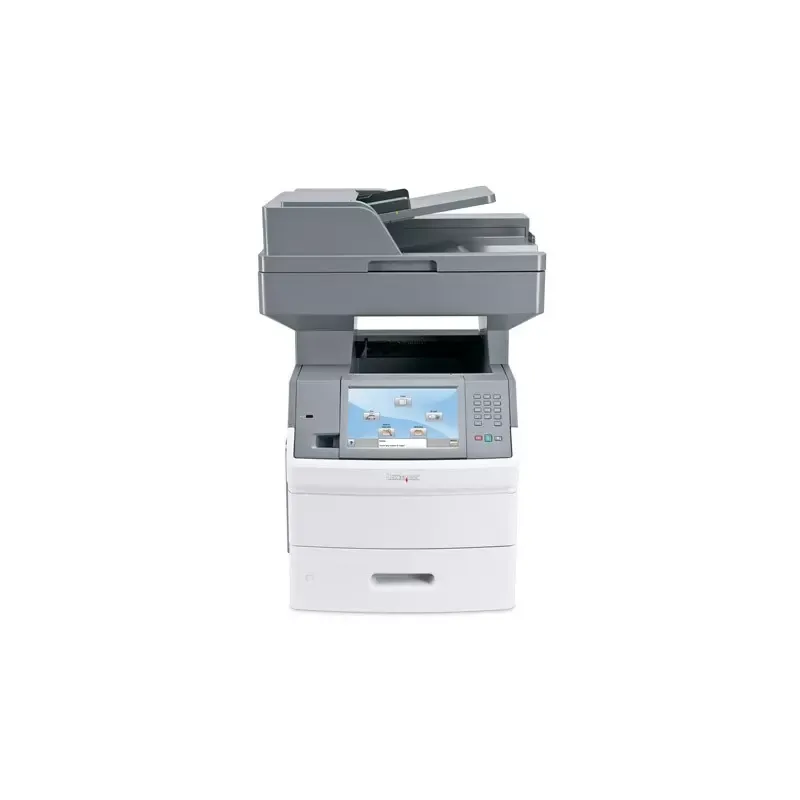

Manual of product X656de

Editorial note
The Lexmark X656de printer stands out for its impressive performance, with a printing speed of up to 53 pages per minute and a maximum resolution of 1200 x 1200 DPI. These features make it an ideal choice for demanding work environments, ensuring high-quality prints in record time. Additionally, its all-in-one functionalities, including printing, scanning, copying, and faxing, provide valuable versatility to meet various office needs. However, some drawbacks deserve to be highlighted. Limited compatibility with Mac operating systems may frustrate some users, as well as the lack of Wi-Fi connectivity, which requires an Ethernet connection for operation. Furthermore, its weight of 45 kg can make installation and relocation more challenging. Finally, the high cost of cartridges and maintenance represents a significant long-term investment. In terms of user experience, the product offers an intuitive interface and various features, although Mac compatibility and the absence of Wi-Fi may reduce its accessibility. The robustness of laser printing technology ensures durability, while the user manual provides comprehensive information to optimize its use. In summary, the Lexmark X656de is a solid choice for professionals seeking a high-performing printer, but it is essential to consider its limitations when making a purchase.Score details
User experience
The user experience is positive thanks to all-in-one features and an intuitive interface, but limited compatibility with Mac can be an issue.
Performance
The printing speed of up to 53 ppm and a resolution of 1200 x 1200 DPI ensure excellent performance, ideal for professional use.
Design
The design is functional, but the weight of 45 kg can make installation difficult, which is a drawback to consider.
Value for money
The cost of cartridges and maintenance can be high, representing a significant long-term investment.
Robustness
Laser printing technology ensures durability and optimal print quality, making it a good choice for demanding work environments.
Usability
The features are varied and suited to office needs, but the lack of Wi-Fi connectivity may limit use for some users.
Support
The user manual is comprehensive, but the lack of support for certain operating systems can frustrate users.
Documentation
The available document is detailed, providing useful information to maximize product use.
Advantages
Fast printing of 53 pages per minute.
Maximum resolution of 1200 x 1200 DPI.
All-in-one features: printing, scanning, copying.
Input capacity of 3200 sheets.
High-quality laser printing technology.
Disadvantages
Incompatible with Mac operating systems.
Heavy device, difficult to move.
No Wi-Fi connectivity available.
High cost of cartridges and maintenance.
High noise level, up to 56 dB.
Technical Specifications X656de
General Information
-
ModelX656DE
-
Brand
-
Category
-
Type
-
SKU987048
-
MPN987048
Print speed
-
Maximum resolution1200 x 1200 DPI
-
Print speed (black, normal quality, A4/US Letter)53 ppm
-
Copy time for the first page (Black, normal)9.5 s
-
Printing technologyLaser
-
Duplex printing speed (Black, normal quality, A4/US Letter)36, 37 ppm
-
PrintingNo
-
Double-sided printingYes
Other features
-
Scanning speed55 sec/page
-
Maximum internal memory1 Go
-
Compatible operating systemsWindows 2000/XP/Vista/7;
-
Dimensions (LxWxH)Apple Mac OS 9.2;
-
Package dimensions (LxWxH)Novell;
-
Finishing optionLinux;
-
Print cartridge volume (metric)UNIX.
-
Network features611 x 548 x 755 mm
-
All-in-one functions735 x 700 x 1020 mm
-
All-in-one color functionsNo
-
18000
-
Fast Ethernet
-
Copy, Fax, Scan
-
scan, n
Copier
-
Copy speed (normal quality, black, A4)53 cpm
-
Copy speed (US letter, black)55 cpm
-
Copy speed (US letter, black)55 cpm
-
Release time of the first print (black, normal)7.5 s
-
CopySingle copy
Fax
-
Modem speed33.6 Kbit/s
-
FaxSimple fax
Input and output capacity
-
Total output capacity550 sheets
-
Total output capacity550 sheets
-
Maximum input capacity3200 sheets
-
Automatic document feeder capacity75 sheets
-
Total power capacity650 sheets
-
Total number of power supply units2
-
Automatic Document Feeder (ADF)Yes
Representation / realization
-
Processor frequency600 MHz
-
Internal memory256 MB
-
Mac CompatibilityYes
-
Built-in memory card readerNo
-
Sound pressure level (duplex printing)56 dB
-
Sound pressure level (scanning)55 dB
-
Sound pressure level (duplex printing)56 dB
Design
-
ScreenLCD
-
Screen size9 "
-
Built-in screenYes
-
Built-in screenYes
-
Market positionProfessional
-
Order typeTouchscreen
Paper management
-
Type of paper tray supportCard stock
-
Maximum print formatEnvelopes
-
Envelope sizesLabels
-
ISO, Format Series A (A0...A9)Plain paper
-
JIS series B format (B0...B9)Transparencies
-
Non-ISO print support sizes216 x 356 mm
-
Maximum ISO A series paper size7 3/4, 9,10, B5
-
A4, A5, A6
-
B5
-
Executive (184 x 267mm), Folio (media size), Legal (media size), Letter (media size), Statement (140 x 216mm)
-
A4
Network
-
Ethernet/LANYes
-
WifiNo
-
Support for network protocols (IPv4)TCP/IP, IPX/SPX, DLC, UDP
-
Network printing methodsLPR/LPD, IP, HTTP, NDS, NDPS/NEPS, FTP, TFTP, IPP
-
Management protocolsHTTP, SNMPv3, WINS, SLPv1, IGMP, BOOTP, RARP, APIPA, DHCP, ICMP, DNS, SNMPv2c, DDNS, mDNS, ARP, NTP
Connectivity
-
Standard interfacesUSB 2.0
-
USB portYes
-
Quantity of USB 2.0 Ports1
-
USB portYes
Power
-
Electricity consumption (average operation)W
Weight and dimensions
-
Weight45400 g
Packaging information
-
Package weight5990 g
Sustainability
-
Sustainability certificatesENERGY STAR
Certificate
-
CertificationBlue Angel (RAL-UZ-122)
-
U.S. FDA
-
FCC Class A
-
UL 60950-1
-
IEC 60320-1
-
ECMA 74:8
-
CAN/CSA-C22.2 60950-1-03
-
ICES-003 Class A
-
VCCI Class A
-
BSMI Class A
-
47CFR-68 FCC
-
CS-03
-
JATE
-
NCC
-
COFETEL NOM-EM-151-SCTI-1999
-
ANATEL
Features
-
Service cycle (Maximum)275000 pages per month
-
Service cycle (recommended)30000 pages per month
-
Digital senderNo
Digitization
-
Scanning speed simplex (A4/Letter, Black): up to55 ppm
-
Type of scannerFlatbed scanning
-
DigitizationColor scanning
Frequently Asked Questions
What is the weight of the Lexmark X656de?
What is the best method to remove paper jammed in the printer?
Why does my printer not recognize original cartridges?
What could be the reasons for poor print quality?
What is the difference between a laser printer and an inkjet printer?
Why is my inkjet printer producing black lines?
What does the acronym DPI mean?
What certifications does the Lexmark X656de have?
What is the size of the screen on the Lexmark X656de?
Is the manual for the Lexmark X656de available in French?
Similar products


More product categories from brand Lexmark
Other Lexmark
More product types from brand Lexmark


Presentation of product X656de specifications from brand Lexmark
General Information
The Lexmark X656de printer is a renowned model from the Lexmark brand, known for its innovation and quality in the field of printing devices. This model, designated X656de | 16M1804, is designed to deliver high performance and an optimized user experience, tailored to professional needs.
Print Speed
With a maximum resolution of 1200 x 1200 DPI, the Lexmark X656de ensures prints of remarkable clarity, making your professional and personal documents sharp and precise. Its print speed reaches 53 pages per minute for black prints in normal quality, making it an ideal choice for high-volume environments. The time to first page output is only 9.5 seconds, allowing for quick document processing. Thanks to its laser printing technology, it guarantees optimal quality. Additionally, its ability to print in color produces vibrant and accurate results, while duplex printing at 36.37 pages per minute optimizes paper usage.
Other Features
Scanning is also fast with a speed of 55 seconds per page, and the Lexmark X656de is equipped with an internal memory of 1 GB, allowing for efficient data storage. Compatible with Windows XP, Vista, and 7 operating systems, it easily integrates into various work environments. Its dimensions of 611 x 548 x 755 mm ensure a proper fit in your workspace. It is also worth noting that it does not offer an aesthetic finishing option and its print cartridge volume of 18,000 pages ensures prolonged use. Network capabilities include Fast Ethernet, ensuring a stable and fast connection. As an all-in-one device, it combines copying, faxing, and scanning functions, providing appreciated versatility.
Copier
The integrated copier offers a speed of 53 copies per minute in normal quality and black, while reaching 55 copies per minute in draft mode. The time to first copy output is 7.5 seconds, ensuring increased efficiency. Additionally, it also allows for faithful color copies.
Fax
The modem of the Lexmark X656de operates at a speed of 33.6 Kbit/s, allowing for quick and efficient sending and receiving of documents via fax.
Input and Output Capacity
This printer offers a maximum output capacity of 550 sheets and an input capacity of 3200 sheets, which is particularly useful for offices with high printing needs. With an automatic document feeder of 75 sheets and a total feed capacity of 650 sheets, it allows for efficient processing of large volumes. It also includes two feed trays and features an automatic document feeder (ADF).
Representation / Performance
The Lexmark X656de is equipped with a processor operating at 600 MHz and a memory of 256 MB, ensuring smooth and efficient performance. It is not compatible with Mac systems and does not have a built-in memory card reader. The sound pressure level reaches 56 dB during printing, while it is 55 dB in scanning mode, ensuring discreet operation.
Design
The model features a 9" LCD screen, providing satisfactory display quality and facilitating interaction with the device. It is primarily designed for professional use, with a touch control type that simplifies its operation.
Paper Management
The Lexmark X656de is capable of handling various types of media, including plain paper, labels, envelopes, and transparencies. It supports print sizes up to 216 x 356 mm, and is compatible with standard paper sizes such as A4 and B5. Its printing flexibility is enhanced by its ability to handle non-ISO formats such as Legal and Letter.
Network
This model is equipped with Ethernet connectivity but does not offer Wi-Fi connection. It supports various network protocols, ensuring efficient print management with methods such as LPR/LPD and IPP.
Connectivity
The Lexmark X656de includes standard interfaces for easy integration with other devices. It offers direct printing and is equipped with a USB 2.0 port for easy connection.
Power
The power consumption of the Lexmark X656de is optimized to ensure efficient operation, although specific values are not mentioned.
Weight and Dimensions
Weighing approximately 45 kg, this device is designed for robust use, although its weight may complicate installation and movement.
Packaging Information
The package weight is 5990 g, ensuring adequate protection during transport.
Durability
The Lexmark X656de is ENERGY STAR certified, attesting to its compliance with energy efficiency and environmental sustainability standards.
Certificate
It complies with several safety and performance standards, including Blue Angel, FCC Class A, and UL 60950-1 certifications, ensuring its reliability.
Features
The maximum service cycle is 275,000 pages per month, while the recommended cycle is 30,000 pages per month, optimizing the printer's durability. It does not include a digital shipping function.
Scanning
The simplex scanning speed reaches 55 ppm, and the flatbed scanner allows for quick and efficient document scanning, with the ability to reproduce color images accurately.


