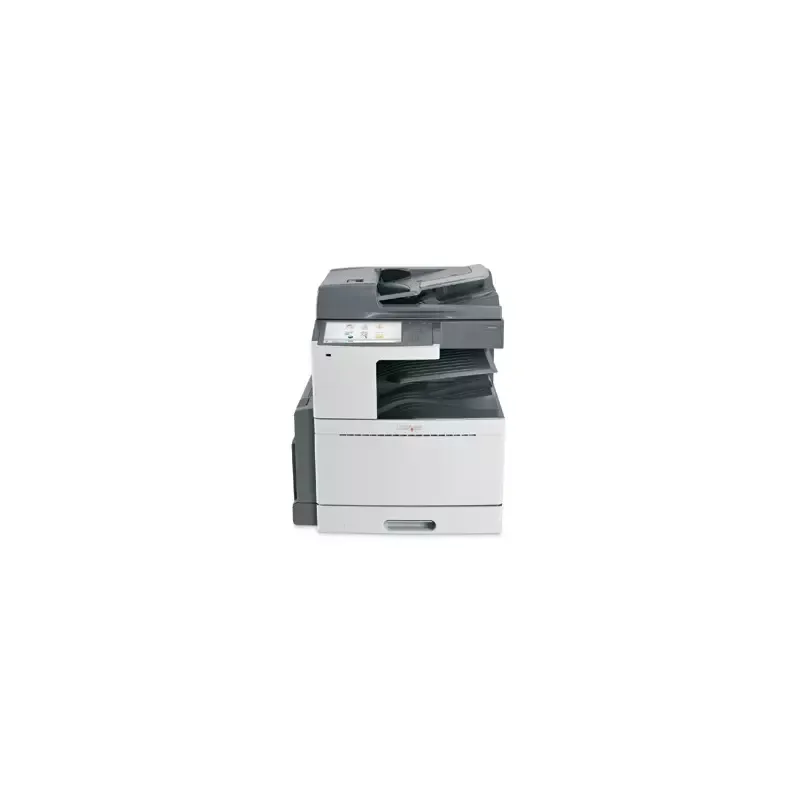

Manual of product X952de

Editorial note
The Lexmark X952de printer stands out for its all-in-one features that greatly facilitate office tasks, particularly due to its printing, copying, scanning, and faxing capabilities. With an impressive printing speed of 50 pages per minute in black and 45 pages per minute in color, this device optimizes work time and promotes increased productivity. The print quality is also noteworthy, with a maximum resolution of 1200 x 1200 DPI, ensuring results of exceptional clarity, suitable for professional documents. However, some drawbacks need to be considered. The lack of compatibility with Mac operating systems limits accessibility for some users. Additionally, its substantial weight of 116 kg can make installation and handling difficult, especially in tight spaces. The absence of Wi-Fi connectivity may pose a problem in modern work environments that favor wireless printing. Finally, the high cost of consumables, such as toners, can impact the long-term budget. In terms of design, the Lexmark X952de is functional, but its weight can be a hindrance. The printer's varied connectivity facilitates its integration into different work environments, although the lack of Wi-Fi is a disadvantage for those who prefer wireless solutions. Its excellent paper capacity, which can reach 5140 sheets, demonstrates its robustness and ability to handle large print volumes. Support could, however, be improved, particularly for Mac users. Finally, the user manual, complete and detailed, provides the necessary instructions for optimal use of the device. Overall, the Lexmark X952de proves to be an effective printing solution for professionals, despite some limitations.Score details
User experience
The user experience is overall positive thanks to the all-in-one features that simplify office tasks. However, the lack of compatibility with Mac systems limits accessibility.
Performance
Performance is excellent with a printing speed of 50 ppm in black and 45 ppm in color, which promotes increased productivity. The print quality of 1200 x 1200 DPI ensures results of exceptional clarity.
Design
The design is functional, but its weight of 116 kg can pose difficulties during installation and handling in tight spaces.
Value for money
Although the printer is efficient, the high cost of consumables can impact users' budgets in the long term.
Usability
The varied connectivity facilitates integration into different work environments, but the lack of Wi-Fi can be a disadvantage for those who prefer wireless printing.
Robustness
The printer is designed to handle large volumes of printing with a maximum paper capacity of 5140 sheets, which demonstrates its robustness.
Support
Support could be improved, especially for Mac users who cannot use the printer.
Documentation
The user manual is comprehensive with 371 pages, providing detailed instructions for optimal use.
Advantages
All-in-one functions: printing, copying, scanning, faxing
Print speed of up to 50 pages per minute
Print quality of 1200 x 1200 DPI
Paper capacity of up to 5140 sheets
Varied and efficient network connectivity
Disadvantages
Not compatible with Mac systems
Weight of 116 kg, difficult to move
No Wi-Fi connectivity
High cost of consumables
High noise level during operation
Technical Specifications X952de
General Information
-
ModelX952DE
-
Brand
-
Category
-
Type
-
SKU24785
-
MPN24785
Other features
-
All-in-one functionsCopy
-
All-in-one color functionsFax
-
Dimensions (LxWxH)Print
-
Package dimensions (LxWxH)Scan
-
Compatible operating systemscopy
-
fax
-
print
-
scan
-
640 x 685 x 762 mm
-
848 x 769 x 870 mm
-
Apple Mac OS X
-
Microsoft Windows XP
-
Microsoft Windows Server 2003
-
Microsoft Windows XP x64
-
Microsoft Windows Server 2003 Terminal Services
-
Microsoft Windows Server 2003 x64
-
Microsoft Windows Server 2003 x64 Terminal Services
-
Microsoft Windows Vista
-
Microsoft Windows Vista x64
-
Microsoft Windows Server 2008
-
Microsoft Windows Server 2008 x64
-
Microsoft Windows Server 2008 Terminal Services
-
Microsoft Windows Server 2008 x64 Terminal Services
-
Microsoft Windows 7
-
Microsoft Windows 7 x64
-
Microsoft Windows Server 2008 R2
-
Microsoft Windows Server 2008 R2 Terminal Services
-
Debian GNU/Linux 5.0
-
SUSE Linux Enterprise Server 10, 11
-
SUSE Linux Enterprise Desktop 10, 11
-
openSUSE 11.0, 11.1
-
Red Hat Enterprise Linux WS 4.0, 5.0
-
Red Flag Linux Desktop 6.0
-
Linpus Linux Desktop 9.6
-
Ubuntu 9.04, 9.10, 10.04
-
Fedora 12, 13
-
Novell NetWare 6.5 Open Enterprise Server
-
Novell NetWare 5.1(SP 6+), 6.0(SP 3+) Novell Distributed Print Services (NDPS)
-
Novell Open Enterprise Server @ SUSE Linux Enterprise Server
-
Sun Solaris SPARC 8, 9, 10
-
Sun Solaris x86 10
-
HP-UX 11.11, 11.23, 11.31
-
IBM AIX 5.2, 5.3, 6.1
Print speed
-
Printing technologyLaser
-
Maximum resolution1200 x 1200 DPI
-
Duplex printing speed (Black, normal quality, A4/US Letter)50 ppm
-
Duplex printing speed (color, normal quality, A4/US Letter)45 ppm
-
Duplex printing speed (Black, normal quality, A4/US Letter)50 ppm
-
Duplex printing speed (color, normal quality, A4/US Letter)45 ppm
-
Copy time for the first page (Black, normal)5.2 s
-
Copy time for the first page (color, normal)7.7 s
-
PrintingColor printing
-
Double-sided printingYes
Features
-
Service cycle (Maximum)225000 pages per month
-
Languages of the page descriptionMicrosoft XPS, PCL 5c, PCL 6, PDF 1.6, PostScript 3, PPDS, xHTML
-
Digital senderNo
Copier
-
Max. resolution of copies1200 x 1200 DPI
-
Copy speed (normal quality, black, A4)50 cpm
-
Copy speed (normal quality, color, A4)45 cpm
-
Release time of the first print (black, normal)6.8 s
-
Release time of the first print (color, concept)10.4 s
-
CopyColor copy
Digitization
-
Optical scanning resolution- DPI
-
Maximum scan area297 x 432 mm
-
Type of scannerFlatbed scanner and ADF
-
DigitizationColor scanning
Fax
-
Modem speed33.6 Kbit/s
-
FaxColor fax
Input and output capacity
-
Total power capacity620 sheets
-
Maximum input capacity5140 sheets
-
Total output capacity500 sheets
-
Maximum output capacity3750 sheets
Paper management
-
Maximum print format297 x 420 mm
-
Type of paper tray supportCard stock
-
ISO, Format Series A (A0...A9)Envelopes
-
Non-ISO print support sizesGlossy paper
-
JIS series B format (B0...B9)Labels
-
Envelope sizesPlain paper
-
Maximum ISO A series paper sizeTransparencies
-
A3
-
A4
-
A5
-
A6
-
Executive (184 x 267mm)
-
Folio (media size)
-
Legal (media size)
-
Letter (media size)
-
Oficio (media size)
-
Statement (140 x 216mm)
-
B4
-
B5
-
7 3/4
-
10
-
C5
-
DL
-
A3
Design
-
Screen size10.2 "
-
Touch screen
-
Market positionYes
-
Order typeProfessional
-
Touchscreen
Connectivity
-
Standard interfacesEthernet, USB 2.0
-
USB portYes
-
Quantity of USB 2.0 Ports1
-
USB portYes
Network
-
Ethernet/LANYes
-
WifiNo
-
Security-supported algorithmEAP-TTLS, LEAP, PEAP, SSL/TLS
-
Network printing methodsLPR/LPD, Direct IP (Port 9100), HTTP, NDPS/NEPS, FTP, TFTP, IPP 1.1, ThinPrint
-
Support for network protocols (IPv4)TCP/IP IPv4, AppleTalk, TCP/IP IPv6, TCP, UDP
Representation / realization
-
Internal memory1024 MB
-
Maximum internal memory2048 MB
-
Built-in memory card readerNo
-
Processor frequency1200 MHz
-
Sound power level (standby)24 dB
-
Sound pressure level (impression)52 dB
-
Sound pressure level (scanning)55 dB
-
Sound pressure level (duplex printing)54 dB
-
Integrated into the processorYes
-
Integrated into the processorYes
Power
-
Electricity consumption (average operation)W
Weight and dimensions
-
Weight116000 g
Packaging information
-
Package weight125000 g
Minimum system requirements
-
Support for the Linux operating systemYes
-
Support for the Linux operating systemYes
-
Support for the Linux operating systemYes
Environmental conditions
-
Operating temperature10 - 32 °C
-
Operating relative humidity (H-H)20 - 80 %
-
Operating altitude0 - 2300 m
Sustainability
-
Sustainability certificatesENERGY STAR
Certificate
-
CertificationEnergy Star
-
CAN/CSA-C22.2 60950-1-07
-
ICES-003 Class A
-
BSMI Class A
-
CNS 13438 and 14336
-
VCCI Class A
-
FCC Class A
-
UL 60950-1
-
EN/IEC 60320-1
-
NOM-019-SCFI-1998
-
CB IEC 60950-1
-
EN 60950-1
-
EN/IEC 61000-3
-
EN 55022 Class A
-
EN 55024
-
GS (TÜV)
-
SAT
-
SABS
-
ZIK
-
KPSIM
-
Bel GISS
-
GOST-R 'Cpt' Mark
-
N Mark
-
IRAM
-
CS
-
TÜV Rh
-
ACMA A-tick mark Class A
-
AS/NZS 60950-1
-
CCC Class A
-
GB4943
-
CISPIR 22 Class A
-
MIC Mark
-
EK-K60950
-
PSB-SS 337
Logistics data
-
Harmonized System Code84433100
Frequently Asked Questions
What is the weight of the Lexmark X952de printer?
What is the proper procedure for removing a paper jam from the printer?
Why is my printer not recognizing the original cartridges?
What could be the reasons for poor print quality?
What is the difference between a laser printer and an inkjet printer?
Why is my inkjet printer printing black streaks?
What does the acronym DPI mean?
What certifications does the Lexmark X952de have?
What is the size of the screen on the Lexmark X952de?
Is the user manual for the Lexmark X952de available in French?
Similar products


More product categories from brand Lexmark
Other Lexmark
More product types from brand Lexmark


Presentation of product X952de specifications from brand Lexmark
General Information
The Lexmark X952de printer is a model from the Lexmark brand, known for its innovation and quality in the field of printing solutions. This model, referenced X952de | 22Z0053, is designed to deliver remarkable performance and an optimized user experience. The product's EAN code, which allows for unique identification in the distribution system, is 734646287098, 734646287289, 0734646286992.
Versatile Features
The Lexmark X952de stands out for its all-in-one capabilities, integrating copying, faxing, printing, and scanning functions. This versatility effectively meets various professional requirements. Additionally, it offers color printing features, allowing for vibrant and precise prints. Its dimensions of 640 x 685 x 762 mm make it suitable for most workspaces, while its package dimensions of 848 x 769 x 870 mm ensure secure transport. Compatible with Windows XP, Vista, and 7 operating systems, it guarantees smooth usage.
Print Speed
Equipped with laser printing technology, the Lexmark X952de ensures superior print quality with a maximum resolution of 1200 x 1200 DPI. It is distinguished by its speed, with a print speed of up to 50 pages per minute in black and 45 pages in color. This efficiency is enhanced by the duplex printing feature, optimizing resource use while maintaining high print quality. The first page copy time is also competitive, at just 5.2 seconds for black prints and 7.7 seconds for color.
Advanced Capabilities
The maximum service cycle of the Lexmark X952de reaches 225,000 pages per month, thus meeting the needs of the most demanding users. It supports multiple page description languages, such as Microsoft XPS, PCL, and PDF, allowing for increased flexibility according to user preferences. Regarding scanning, it offers high-quality optical scanning resolution and can handle large documents thanks to its maximum scan area of 297 x 432 mm. Additionally, it includes a color fax machine, ensuring fast and efficient sending.
Paper Management
The Lexmark X952de has an impressive feeding capacity, accommodating up to 5140 sheets, which reduces the need for frequent replenishment. It is compatible with various paper formats, including ISO and non-ISO sizes, allowing for great flexibility in use for different printing projects.
Connectivity and Networking
This model offers varied connectivity, with standard interfaces that facilitate integration into various work environments. Although it does not include Wi-Fi connectivity, it supports Ethernet/LAN, providing multiple network printing methods, such as LPR/LPD and IPP, for efficient print job management.
Design and Ergonomics
The Lexmark X952de features a 10.2-inch touchscreen, providing an intuitive and accessible user interface. Primarily designed for professional use, it ensures practical operation. However, its weight of 116 kg may pose a challenge during installation and handling, particularly in confined spaces.
Durability and Certifications
This model is ENERGY STAR certified, ensuring energy efficiency and environmental compliance. It also meets various safety standards, ensuring reliable and secure use.
Environmental Conditions
The Lexmark X952de operates optimally within a temperature range of 10 to 32 °C and supports a relative humidity of 20 to 80%. It is designed to be effective in a variety of work environments.


