

Manual of product Vega 100
Editorial note
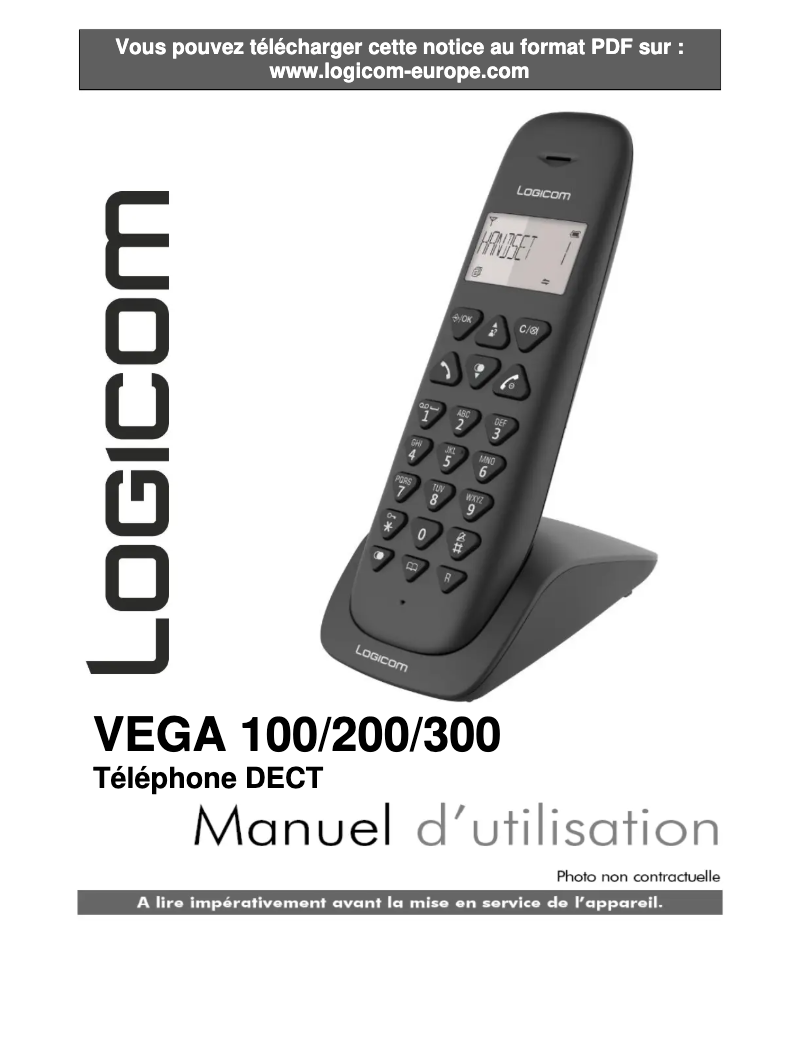
The Logicom Vega 100 is presented as a convenient cordless phone, offering impressive battery life with 100 hours on standby and 7 hours of talk time. This feature is particularly appreciated by users looking to minimize frequent recharges. Its modern and standalone design allows for smooth use and great freedom of movement, ideal for those who wish to stay connected while on the go. However, the product has some drawbacks. The directory capacity is limited to 20 entries, which may not suit users with many contacts. Additionally, the lack of a built-in answering machine may be disappointing for those who want effective management of missed calls. The 7 hours of talk time may seem short for heavy users, thus requiring frequent recharges during prolonged use. In terms of features, although the Vega 100 includes practical options such as caller ID and a silent mode, it lacks advanced options like Bluetooth connectivity, which may limit its appeal to some consumers. In summary, the Logicom Vega 100 offers good value for money and interesting features for daily use, but its limitations in terms of directory and advanced features may not meet the needs of all users.Score details
User experience
The user experience is generally satisfactory thanks to features like caller ID and silent mode, but the lack of a built-in answering machine may disappoint some users.
Performance
The performance is adequate for daily use, but the communication time of 7 hours may seem insufficient for heavy users.
Battery life
The battery life is impressive with 100 hours on standby, but the limited communication time could lead to more frequent recharges during intensive use.
Design
The design of the cordless handset is practical and modern, offering great freedom of movement thanks to its standalone installation.
Value for money
The Logicom Vega 100 offers good value for money, but some limitations like the directory capacity and the lack of advanced features may disappoint.
Features
Although the product has useful features, it lacks advanced options like Bluetooth connectivity, which limits its usefulness for some users.
Advantages
7 hours of communication autonomy
Wireless handset for more mobility
Silent mode for discreet use
Quality speaker for immersive calls
Caller ID for easy management
Disadvantages
Directory capacity limited to 20 contacts.
No built-in answering machine.
Communication autonomy of 7 hours.
Uses non-rechargeable AAA batteries.
No Bluetooth and Wi-Fi.
Technical Specifications Vega 100
Power
-
Communication time7 h
-
Standby autonomy100 h
-
Battery typeAAA
-
Number of supported batteries2
-
Battery technologyNickel-metal hydride (NiMH)
-
Battery capacity300 mAh
Representation / realization
-
Built-in answering machine-
-
Silent modeYes
-
Type of handsetWireless handset
-
TypeAnalog phone
Design
-
Keyboard LockYes
-
Product colorBlack
-
Mounting typeAutonomous
Phone features
-
Directory capacity20 entries
-
SpeakerYes
Call management
-
RecomposeYes
-
RecomposeYes
Packaging contents
-
Number of included bundles1
-
Cables includedTelephone (RJ-11)
Screen
-
Built-in screenYes
Frequently Asked Questions
How do I set up my Logicom Vega 100 for the first time?
What is the method to transfer files between my Logicom Vega 100 and a computer?
What tips can I apply to extend the battery life of my Logicom Vega 100?
How can I take a screenshot on my Logicom Vega 100?
What is the procedure to reset my Logicom Vega 100 to factory settings?
Does the Logicom Vega 100 offer a talk time of 7 hours?
Does the Logicom Vega 100 have a silent mode feature?
What is the battery capacity of the Logicom Vega 100?
Does the Logicom Vega 100 allow for multiple handsets to be connected?
Is the Logicom Vega 100 equipped with a built-in screen?
Is the user manual for the Logicom Vega 100 available in French?
Similar products


More product categories from brand Logicom
More product types from brand Logicom








Presentation of product Vega 100 specifications from brand Logicom
General Information
The Logicom Vega 100 is a phone from the Logicom brand, known for its commitment to quality and innovation in the home appliance sector. This model, identified by the EAN code 3483078906523, is designed to provide reliable performance and a pleasant user experience.
Power
With a communication time of 7 hours, the Logicom Vega 100 allows for prolonged use without interruption. Its standby time reaches up to 100 hours, thus reducing the need for frequent recharges. It operates with two AAA batteries, which ensure stable performance thanks to nickel-metal hybrid (NiMH) technology. Its capacity of 300 mAh ensures effective daily use.
Representation / Realization
The Logicom Vega 100 is equipped with a silent mode, ideal for environments requiring discretion. This cordless handset offers great freedom of movement, making it practical for everyday use. Its island design optimizes space while adding an aesthetic touch to your interior.
Design
This model features a keypad lock, ensuring protection against accidental manipulation. Its modern black color contributes to its elegant appearance. The standalone mounting facilitates quick and hassle-free installation.
Phone Features
The Logicom Vega 100 allows you to store up to 20 contacts in its directory, providing easy access to your essential information. Additionally, it is equipped with a quality speaker, ensuring an immersive audio experience during calls.
Call Management
This phone integrates a caller ID function, allowing you to easily recognize the identity of the people contacting you. It also has a redial function, simplifying the management of your communications.
Packaging Contents
The Logicom Vega 100 comes with a handset, suitable for meeting your daily needs. The packaging also includes a power cable, essential for ensuring a reliable electrical connection.
Screen
The Logicom Vega 100 features a built-in screen that facilitates practical use and enhances the overall visual experience.


