

Manual of product Sculpt Ergonomic Desktop

Technical Specifications Sculpt Ergonomic Desktop
General Information
-
ModelSCULPT ERGONOMIC DESKTOP
-
Brand
-
Category
-
Type
-
SKU110267
-
MPN110267
Keyboard
-
Keyboard layout-
-
Device interfaceWireless RF
-
UtilityPC/server
-
Recommended useOffice
-
Windows keysYes
-
Keyboard languageAmerican English
-
Frequency band2.4 GHz
-
Windows keysYes
-
Windows keysYes
-
Connectivity technologyWireless
Design
-
Keyboard styleCurved
-
Wrist restsYes
-
Product colorBlack
-
BacklightingNo
Mouse
-
Scroll wheelYes
-
Resolution in motion1000 DPI
-
Motion detector technologyBlueTrack
-
Quantity of programmable buttons7
-
Scroll wheelYes
-
Type ScrollWheel
-
Type of mouse batteryAA
-
Number of batteries (mouse)2
Features
-
Wireless router range3 m
Packaging contents
-
Wireless reception interfaceUSB Type-A
-
Receiver dimensions (L x W x H)13.7 x 27.5 x 4.5 mm
-
Receiver weight2.5 g
Weight and dimensions
-
Keyboard dimensions (LxWxH)392 x 228 x 59 mm
-
Weight of the keyboard842 g
-
Mouse dimensions (LxWxH)74.9 x 98.2 x 56.7 mm
-
Mouse weight155 g
Minimum system requirements
-
Support for the Windows operating systemYes
Power
-
Power supply typeBattery
-
Keyboard battery typeAAA
-
Number of batteries (keyboard)2
Environmental conditions
-
Operating temperature0 - 40 °C
-
Temperature out of operation-40 - 60 °C
-
Operating relative humidity (H-H)5 - 80 %
-
Relative humidity rate (storage)5 - 65 %
Logistics data
-
Harmonized System Code84716060
Similar products




More product categories from brand Microsoft
More product types from brand Microsoft


Presentation of product Sculpt Ergonomic Desktop specifications from brand Microsoft
Design
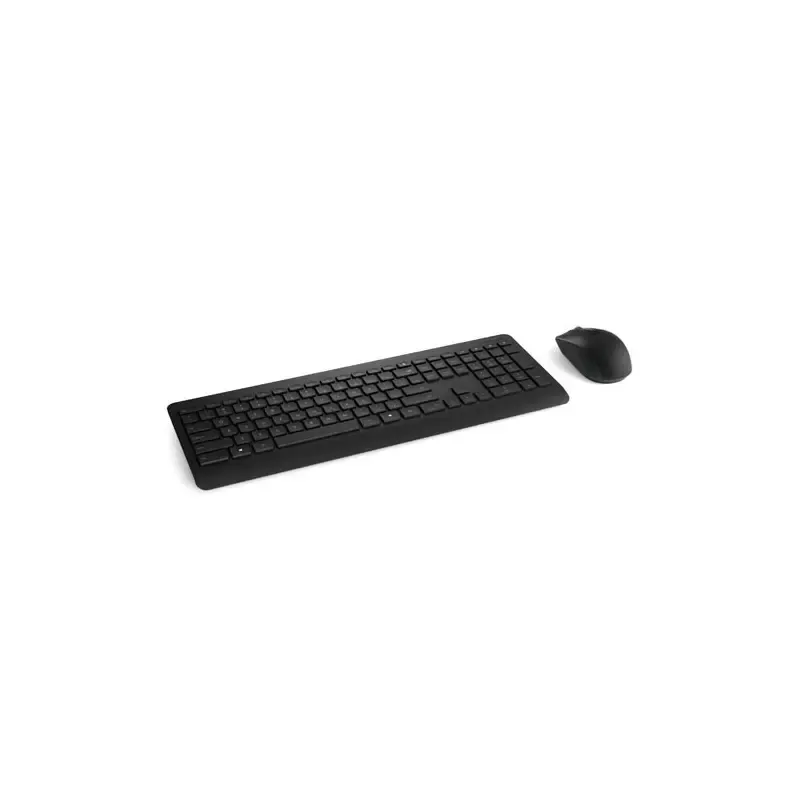
The keyboard style of the product Microsoft Sculpt Ergonomic Desktop is straight. This style provides a comfortable and ergonomic typing experience. The color of the product Microsoft Sculpt Ergonomic Desktop is Noir. This shade gives it a modern and elegant look. Does the product have a Wrist Rest? Oui. This wrist rest provides ergonomic support for optimal comfort during your work or gaming sessions. Does the product Microsoft Sculpt Ergonomic Desktop have a Backlight? Non. This backlight enhances visibility and user comfort, even in low-light conditions.
Generalities
The brand of the product Microsoft Sculpt Ergonomic Desktop is Microsoft. This brand is known for its quality and innovation in the field of household appliances. The EAN code of the product Microsoft Sculpt Ergonomic Desktop is 21111545211, 4988648918122, 5052916815600, 78356828944, 88020916655, 885370598711, 885370598766, 8853705987662, 885370598773, 885370598780, 885370598797, 885370598803, 885370598810, 885370598827, 885370598896, 0885370598711, 0088020916655, 0021111545211, 0078356828944, 8853705987112, 0088021306967, 8656122512291, 4923113169999, 0724627135043. This code allows for the unique identification of the product in the distribution system. The product model Microsoft Sculpt Ergonomic Desktop is Sculpt Ergonomic Desktop | L5V-00001. This model ensures optimal performance and an enhanced user experience.
Features
The wireless range of the Microsoft Sculpt Ergonomic Desktop router is 3 m. This range ensures a stable and efficient connection in your space.
Mouse
Does the product Microsoft Sculpt Ergonomic Desktop come with a mouse included? Oui. This feature allows for immediate and convenient use right out of the box. The motion resolution of the product Microsoft Sculpt Ergonomic Desktop is 1000 DPI. This feature allows for exceptional accuracy during your movements. The motion detection technology of the product Microsoft Sculpt Ergonomic Desktop is BlueTrack. This technology allows for increased accuracy in tracking movements, thus providing an optimal user experience. The number of programmable buttons on the Microsoft Sculpt Ergonomic Desktop is 7. These buttons allow for advanced customization for optimized use. Does the product Microsoft Sculpt Ergonomic Desktop have a scroll wheel? Oui. This feature is essential for smooth and fast navigation. The scrolling type of the product Microsoft Sculpt Ergonomic Desktop is a wheel. This type of scrolling allows for smooth and precise navigation through your documents and applications. The battery of the mouse Microsoft Sculpt Ergonomic Desktop uses batteries of type AA. This type of battery ensures extended battery life and optimal performance. The Microsoft Sculpt Ergonomic Desktop mouse contains 2 batteries. This specification ensures extended battery life for optimal use.
Keyboard
The device interface of the product Microsoft Sculpt Ergonomic Desktop contains RF sans fil. This interface allows for easy and quick connection with other devices. The usefulness of the product Microsoft Sculpt Ergonomic Desktop is PC/serveur. This product has been designed to meet specific needs and provide an optimal experience for its users. The recommended use of the product Microsoft Sculpt Ergonomic Desktop is Bureau. This model is ideal for use with a PC or a laptop. The layout of the keyboard keys of the product Microsoft Sculpt Ergonomic Desktop is -. This layout is designed to provide an optimal and intuitive typing experience. Does the product Microsoft Sculpt Ergonomic Desktop have direct keys? Oui. This feature allows for quick and efficient access to essential commands. The keyboard layout of the product Microsoft Sculpt Ergonomic Desktop is Anglais américain. This keyboard is designed to provide an optimal typing experience in this language. Does the product Microsoft Sculpt Ergonomic Desktop have a numeric keypad? No. This product does not have this feature. The frequency band of the product Microsoft Sculpt Ergonomic Desktop is 2.4 GHz. This feature allows for effective communication within the specified frequency range. Does the product Microsoft Sculpt Ergonomic Desktop have Windows Keys? Oui. These keys make it easier to access Windows features, thereby enhancing your user experience. The product Microsoft Sculpt Ergonomic Desktop features a Sans fil connectivity technology. This functionality allows for practical and flexible use without the constraints of cables.
Packaging contents
The dimensions of the Microsoft Sculpt Ergonomic Desktop receiver are 13.7 x 27.5 x 4.5 mm. These dimensions ensure optimal integration into your space. The product Microsoft Sculpt Ergonomic Desktop has a wireless reception interface: USB Type-A. This interface allows for a simple and quick connection to various devices. The weight of the Microsoft Sculpt Ergonomic Desktop receiver is 2.5 g. This weight is essential to ensure optimal use and easy handling.
Weight and dimensions
The keyboard of the product Microsoft Sculpt Ergonomic Desktop has dimensions of 565 x 235 x 48 mm. These dimensions provide a perfect balance between comfort and functionality for optimal use. The dimensions of the Microsoft Sculpt Ergonomic Desktop mouse are 74.9 x 98.2 x 56.7 mm. These dimensions ensure a comfortable grip suitable for prolonged use. The weight of the mouse Microsoft Sculpt Ergonomic Desktop is 155 g. This lightweight design allows for prolonged use without fatigue. The weight of the Microsoft Sculpt Ergonomic Desktop keyboard is 842 g. This weight contributes to the stability and durability of the device.
Environmental conditions
The operating temperature of the product Microsoft Sculpt Ergonomic Desktop is 0 - 40 °C. This specification ensures optimal performance within a temperature range suitable for various environments. The non-operating temperature of the product Microsoft Sculpt Ergonomic Desktop is -40 - 60 °C. This specification ensures that the product can withstand extreme conditions without suffering damage. The relative humidity (storage) rate of the product Microsoft Sculpt Ergonomic Desktop is 5 - 65 %. This rate ensures optimal conditions for the preservation and durability of the product. The product Microsoft Sculpt Ergonomic Desktop has an operating relative humidity (H-H) of 5 - 80 %. This specification ensures optimal operation in a wide range of ambient humidity.
Power
The battery type of the product Microsoft Sculpt Ergonomic Desktop is AAA. This specification ensures reliable and long-lasting power for optimal use. The type of power source for the product Microsoft Sculpt Ergonomic Desktop is Batterie. This type of power supply ensures optimal performance and efficient use of the device. The number of batteries for the product Microsoft Sculpt Ergonomic Desktop is 2. This keyboard operates efficiently thanks to this power supply.
Minimum system requirements
Does the product Microsoft Sculpt Ergonomic Desktop support the Windows operating system? Oui. This feature ensures optimal compatibility with Windows systems, providing a smooth and uninterrupted user experience.
Logistics data
The Harmonized System code for the product Microsoft Sculpt Ergonomic Desktop is 84716060. This code allows for the unique identification of goods in international trade.


