

Manual of product CD301
Editorial note
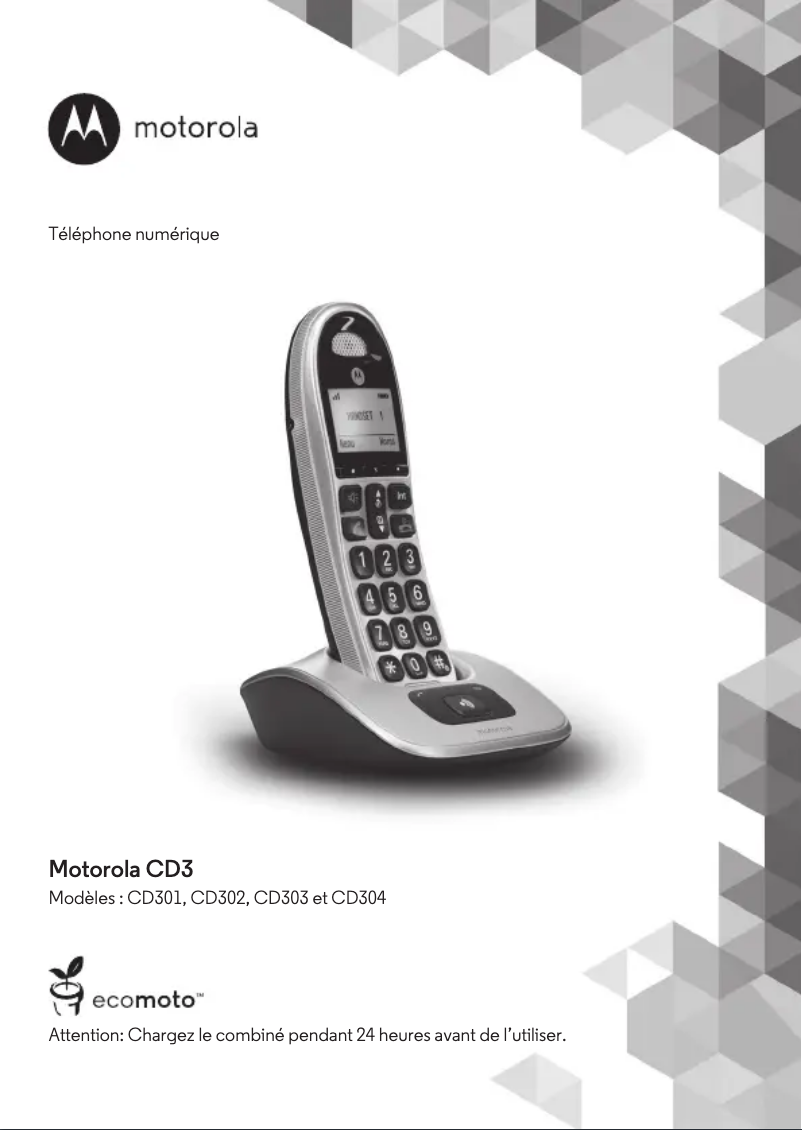
The Motorola CD301 is a phone that stands out for its modern and elegant design, particularly thanks to its silver finish and desk mount that facilitates installation. Its features, such as caller ID and the backlit LCD screen, enhance the user experience, allowing for optimal visibility even in low-light conditions. Additionally, the backlit and large buttons provide an easy grip, although the product is not specifically designed for elderly people. However, the Motorola CD301 has some drawbacks. The lack of a built-in answering machine may be a drawback for those who wish to manage their voicemail independently. Furthermore, the capacity of its directory is limited to 50 entries, which may not be sufficient for users with a large number of contacts. Finally, the model only offers a single handset, which may prove inadequate for households needing multiple phones. In terms of performance, the speaker provides satisfactory sound quality for everyday use, but the lack of modern features, such as Bluetooth connectivity, may limit the product's appeal to more demanding users. Overall, while the Motorola CD301 offers interesting advantages, its value for money is mixed due to certain limitations.Score details
User experience
The user experience is generally positive thanks to features such as caller ID and a backlit LCD screen. However, the lack of a built-in answering machine and advanced features may limit the experience.
Performance
The performance is satisfactory for daily use. The speaker offers good sound quality, but the lack of modern features limits its appeal to demanding users.
Design
The design is modern and sleek with a silver finish. The desk mount ensures easy installation, although the absence of multiple handsets may pose a problem for some users.
Value for money
Although the Motorola CD301 offers interesting features, its value for money is mixed due to the lack of an answering machine and the directory capacity limited to 50 entries.
Usability
The backlit and large buttons improve grip, but the product is not specifically designed for elderly people, which could pose usability difficulties.
Advantages
Integrated caller ID
Backlit LCD screen for low light
Modern and sleek silver design
Quality speaker for good sound
Directory of 50 contacts
Backlit and easy-to-use buttons
Disadvantages
No built-in answering machine.
Limit capacity to 50 contacts.
Not specifically designed for seniors.
Only one handset included.
Lacks modern features.
Technical Specifications CD301
Call management
-
Caller IDYes
Screen
-
Backlight screenYes
-
ScreenLCD
-
Backlight screenYes
Indication
-
Battery capacity indicatorYes
-
Battery capacity indicatorYes
Design
-
Big buttonsYes
-
Mounting typeOffice
-
Product colorMoney
-
Elderly people's phoneNo
-
Quantity of programmable buttons21
-
Big buttonsYes
Phone features
-
SpeakerYes
-
Directory capacity50 entries
Management features
-
Volume orderButtons
-
Navigation buttonYes
Representation / realization
-
Built-in answering machine-
-
TypeDECT phone
-
Type of handsetCordless handset
Packaging contents
-
Number of included bundles1
Frequently Asked Questions
How do I perform the initial setup of my Motorola CD301?
What is the method to transfer my contacts to my Motorola CD301?
What are some tips to increase the battery life of my Motorola CD301?
What is the procedure to take a screenshot with my Motorola CD301?
How can I free up storage space on my Motorola CD301?
What does the caller ID feature mean for the user?
How does the built-in screen benefit the user?
How does the LCD screen differ from other types of displays?
Is the phonebook capacity of 50 entries sufficient?
What advantages does the cordless handset feature provide to the user?
Is the manual for the Motorola CD301 available in French?
Similar products

More product categories from brand Motorola
More product types from brand Motorola








Presentation of product CD301 specifications from brand Motorola
General Information
The Motorola CD301 is a phone from the Motorola brand, known for its innovation and reliability in the communication device sector. This model, referenced under the code CD301 | 107CD301EF, is designed to deliver optimal performance and a smooth user experience. Its EAN code, 5055374792308, 8437014296723, allows for precise identification in the distribution circuit.
Call Management
This phone is equipped with the Caller ID feature, allowing users to know who is calling them, which enhances the communication experience.
Screen
The Motorola CD301 features a LCD screen that ensures superior image quality for enjoyable use. Additionally, the screen is backlit, making it easier to see in low-light environments.
Indication
Integrated indicators show the operational status of the device. Furthermore, a battery capacity indicator allows users to monitor the charge level, thus improving battery management.
Design
The Motorola CD301 has backlit buttons that provide optimal visibility in the dark. Its Desk mount ensures simple and quick installation. The Silver hue gives it a modern aesthetic. Although it is not specifically designed for elderly users, it includes 21 programmable buttons and large buttons to facilitate access to functions.
Phone Features
This model is equipped with a quality speaker, ensuring an immersive sound experience. With a directory capacity of 50 entries, it allows for sufficient contact storage for quick access.
Management Features
The Motorola CD301 offers a digital volume control, ensuring precise sound management. A navigation button is also present to facilitate use.
Representation / Realization
This phone model is designed as an island, providing a solution that is both functional and aesthetic to optimize your space. The handset is wireless, allowing for great freedom of movement in daily use.
Packaging Contents
The Motorola CD301 comes with one handset, ideal for home or individual use.


