

Manuals of product TX-50DX780E

Editorial note
The Panasonic TX-50DX780E stands out for its exceptional image quality thanks to its 4K Ultra HD resolution (3840 x 2160 pixels), providing an immersive visual experience. Its modern and sleek silver design, combined with VESA mount capability, allows for seamless integration into various spaces. Additionally, its energy rating of A and annual consumption of 133 kWh contribute to savings on the electricity bill, although this consumption may seem high compared to other more energy-efficient models. However, the product has some drawbacks. The lack of Smart TV features limits access to streaming apps and the Internet, which may restrict its use for some users. Furthermore, although it has built-in speakers with quality sound thanks to Dolby Digital decoders, the audio power of 20 W may not be sufficient for larger spaces, potentially requiring the addition of external speakers. Finally, the screen's response time is not specified, raising questions about fluidity when viewing fast-paced content. In summary, the Panasonic TX-50DX780E offers good value for money considering its features, but some users may be disappointed by its limitations in terms of connectivity and audio performance.Score details
User experience
The user experience is satisfactory thanks to a modern design and the possibility of VESA mounting, although the lack of Smart TV features limits access to streaming applications.
Performance
The picture quality is exceptional with a 4K Ultra HD resolution, but the unspecified response time raises questions about fluidity during fast-paced content.
Battery life
Although rated A for energy efficiency, the annual consumption of 133 kWh is relatively high compared to other more energy-efficient models on the market.
Design
The silver design is sleek and modern, fitting harmoniously into various spaces.
Value for money
The value for money is reasonable given the features, although the audio power of 20 W may require external speakers in larger spaces.
Features
Connectivity is versatile with three HDMI ports and USB ports, but the lack of 3D compatibility and Smart TV limits options for some users.
Advantages
Exceptional 4K Ultra HD image
Modern and elegant design
Energy efficiency class A
Immersive sound with built-in speakers
Connectivity with multiple HDMI and USB ports
Disadvantages
No Smart TV features
Lack of 3D compatibility
Insufficient audio power (20 W)
Relatively high energy consumption
Unspecified screen response time
Technical Specifications TX-50DX780E
General Information
-
ModelTX-50DX780E
-
Brand
-
Category
-
Type
-
SKU864466
-
MPN864466
Design
-
Product colorSilver
-
Built-in power buttonYes
-
Built-in power buttonYes
-
VESA standard400 x 200 mm
-
Product colorSilver
-
Built-in power buttonYes
-
Built-in power buttonYes
-
VESA standard400 x 200 mm
Other features
-
Energy efficiency class (old)A
-
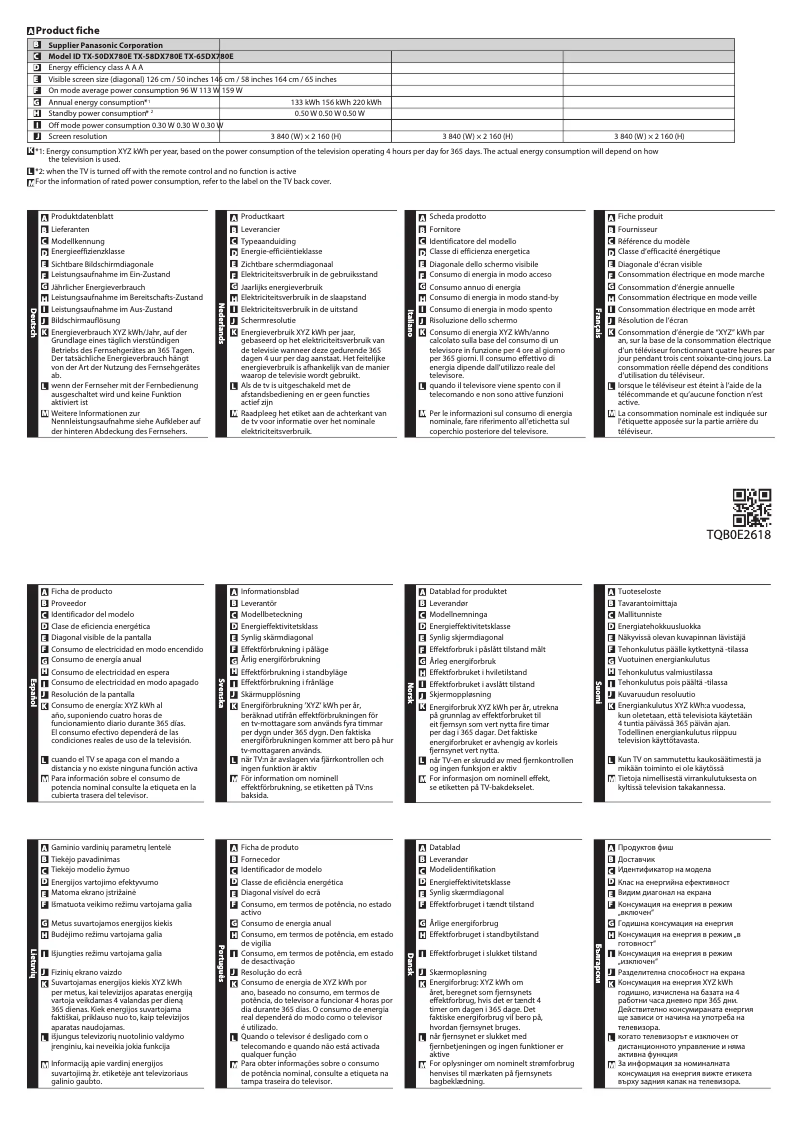
Annual energy consumption133 kWh
-
Certified DLNA (Digital Living New-York Alliance)Yes
-
3D compatibility typeActive
-
Certified DLNA (Digital Living New-York Alliance)Yes
-
Certified DLNA (Digital Living New-York Alliance)Yes
-
Energy efficiency class (old)A
-
Annual energy consumption133 kWh
-
Certified DLNA (Digital Living New-York Alliance)Yes
-
Certified DLNA (Digital Living New-York Alliance)Yes
-
Certified DLNA (Digital Living New-York Alliance)Yes
-
Certified DLNA (Digital Living New-York Alliance)Yes
Power
-
Typical electricity consumption96 W
-
Energy consumption (standby mode)0.5 W
-
Electricity consumption (stop)0.3 W
-
AC input voltage220 - 240 V
-
AC input frequency50 - 60 Hz
-
Typical electricity consumption96 W
-
Energy consumption (standby mode)0.5 W
-
AC input voltage220 - 240 V
-
AC input frequency50 - 60 Hz
Screen
-
Screen diagonal (cm)126 cm
-
Screen size50 "
-
Type HD4K Ultra HD
-
Screen resolution3840 x 2160 pixels
-
Image format16:9
-
Screen brightness- cd/m²
-
Response time- ms
-
Screen shapeFlat
-
Interpolation movement technologyBMR IFC
-
Motion interpolation frequency1800 Hz
-
Supported graphic resolutions3840 x 2160
-
Supported video modes2160p
-
Display technologyLED
-
Image format16:9
-
Screen diagonal (cm)126 cm
-
Screen size50 "
-
Type HD4K Ultra HD
-
Screen resolution3840 x 2160 pixels
-
Image format16:9
-
Screen brightness- cd/m²
-
Response time- ms
-
Screen shapeFlat
-
Interpolation movement technologyBMR IFC 1800 Hz
-
Smart ModesCinema, Custom, Dynamic, Normal, True Cinema
-
Supported graphic resolutions3840 x 2160
-
Display technologyLED
Representation / realization
-
Supported video format3GPP
-
Supported image formatsAVI
-
Supported audio formatsFLV
-
Number of processor coresH.265
-
Backlight dimming technologyM4V
-
HbbTV (Hybrid Broadcast Broadband TV)MKV
-
TeletextMP4
-
HbbTV (Hybrid Broadcast Broadband TV)MPO
-
Supported video formatPS
-
Supported audio formatsTS
-
Backlight dimming technologyVOB
-
HbbTV (Hybrid Broadcast Broadband TV)VRO
-
HbbTV (Hybrid Broadcast Broadband TV)JPG
-
Multilingual display on screenMPO
-
HbbTV (Hybrid Broadcast Broadband TV)AAC
-
TeletextFLAC
-
HbbTV (Hybrid Broadcast Broadband TV)MP3
-
HbbTV (Hybrid Broadcast Broadband TV)WMA
-
Installed operating system4
-
HbbTV (Hybrid Broadcast Broadband TV)Local Dimming
-
HbbTV (Hybrid Broadcast Broadband TV)Yes
-
Video apps1500 pages
-
Yes
-
3GPP
-
AVI
-
FLV
-
H.265
-
M4V
-
MKV
-
MP4
-
MPO
-
PS
-
TS
-
VOB
-
VRO
-
AAC
-
FLAC
-
MP3
-
WMA
-
Local Dimming
-
Yes
-
Yes
-
BUL
-
CRO
-
CZE
-
DAN
-
DEU
-
DUT
-
ENG
-
ESP
-
EST
-
FIN
-
FRE
-
GRE
-
HUN
-
ITA
-
LAT
-
LIT
-
MAC
-
NOR
-
POR
-
RUS
-
SER
-
SLV
-
SWE
-
TUR
-
Yes
-
1500 pages
-
Yes
-
Yes
-
Firefox OS
-
Yes
-
Yes
-
Netflix
TV Tuner
-
Analog signal format system-
-
Analog signal format system-
-
Tuner typeAnalog and digital
-
Digital signal system formatDVB-C, DVB-S2, DVB-T, DVB-T2
-
Tuner typeAnalog and digital
-
Digital signal system formatDVB-C, DVB-S2, DVB-T, DVB-T2
Management features
-
Basic hotel modeYes
-
Basic hotel modeYes
-
Number of OSD languages27
-
Multilingual display on screenBUL, CRO, CZE, DAN, DEU, DUT, ENG, ESP, EST, FIN, FRE, GRE, HUN, ITA, LAT, LIT, MAC, NOR, POR, RUS, SER, SLV, SWE, TUR
-
Basic hotel modeYes
Packaging contents
-
Remote control providedYes
-
Remote control providedYes
Smart TV / smart TV
-
Smart ModesCinema
-
HbbTV (Hybrid Broadcast Broadband TV)Custom
-
Installed operating systemDynamic
-
HbbTV (Hybrid Broadcast Broadband TV)Normal
-
HbbTV (Hybrid Broadcast Broadband TV)True Cinema
-
HbbTV (Hybrid Broadcast Broadband TV)Yes
-
Video appsFirefox OS
-
Yes
-
Yes
-
Yes
-
Netflix
Network
-
BluetoothYes
-
BluetoothYes
-
BluetoothYes
-
BluetoothYes
-
BluetoothYes
-
BluetoothYes
Certificate
-
DLNA SpecificationDMP
-
DMR
-
DMS
-
DTCP-IP
-
RUI 2.0
Audio
-
Number of speakers2
-
Rated power of RMS20 W
-
Integrated audio decodersDolby Digital
-
Sound modesAmbience, Music, Standard
-
Number of speakers2
-
Rated power of RMS20 W
-
Integrated audio decodersDolby Digital
-
Sound modesAmbience, Music, Standard
Connectivity
-
Consumer Electronics Control (CEC)VIERA Link
-
Quantity of HDMI ports3
-
DVI PortNo
-
DVI PortNo
-
S-Video Input0
-
Coaxial digital audio output1
-
Quantity of USB 2.0 Ports2
-
Coaxial digital audio output1
-
Coaxial digital audio output1
-
Coaxial digital audio output1
-
Common Interface Plus (Cl+)Yes
-
Common Interface Plus (Cl+)Yes
-
S-Video Input0
-
Common Interface Plus (CI+) Version1.3
-
Consumer Electronics Control (CEC)VIERA Link
-
Quantity of HDMI ports3
-
DVI PortNo
-
DVI PortNo
-
S-Video Input0
-
Coaxial digital audio output1
-
Quantity of USB 2.0 Ports2
-
Coaxial digital audio output1
-
Coaxial digital audio output1
-
Common Interface Plus (Cl+)Yes
-
Common Interface Plus (Cl+)Yes
-
S-Video Input0
-
Common Interface Plus (CI+) Version1.3
Weight and dimensions
-
Device width (support included)1115 mm
-
Depth (without support)40 mm
-
Height (without support)647 mm
-
Weight (without support)16000 g
-
Device width (support included)1115 mm
-
Depth (support included)198 mm
-
Height (support included)692 mm
-
Weight (with support)17000 g
-
Device width (support included)1115 mm
-
Depth (without support)40 mm
-
Height (without support)647 mm
-
Weight (without support)16000 g
-
Device width (support included)1115 mm
-
Depth (support included)198 mm
-
Height (support included)692 mm
-
Weight (with support)17000 g
Packaging information
-
Package width1443 mm
-
Package depth124 mm
-
Package height744 mm
-
Package weight21000 g
-
Package width1443 mm
-
Package depth124 mm
-
Package height744 mm
-
Package weight21000 g
Hospitality functions
-
My Home ScreenYes
Frequently Asked Questions
What is the recommended viewing distance for my Panasonic television?
What should I do if my television is not receiving a signal?
What are the dimensions of the screen of my television?
What does the acronym HDMI stand for?
Is it possible to connect devices from different brands via Bluetooth?
What is the screen diagonal of the Panasonic TX-50DX780E?
What is the resolution of the screen of the Panasonic TX-50DX780E?
Is the Panasonic TX-50DX780E compatible with VESA mounting?
What is the energy efficiency class of the Panasonic TX-50DX780E?
What is the average power consumption of the Panasonic TX-50DX780E?
What is the annual power consumption of the Panasonic TX-50DX780E?
How many processor cores does the Panasonic TX-50DX780E have?
How to troubleshoot if the remote control of the Panasonic TX-50DX780E is not working?
What should I do if the playback controls for the VCR, DVD player, or video content are not working on the Panasonic TX-50DX780E television?
How to diagnose a problem with the one-touch recording function on the Panasonic TX-50DX780E television?
What are the steps to change the remote control code on the Panasonic TX-50DX780E television?
Is the manual for the Panasonic TX-50DX780E available in French?
Similar products


More product categories from brand Panasonic
Home appliances Panasonic
Phones Panasonic
Audio Panasonic
Camera and photography Panasonic
Personal care Panasonic
Other Panasonic
Tools Panasonic
Interior Panasonic
More product types from brand Panasonic








Presentation of product TX-50DX780E specifications from brand Panasonic
General Information
The Panasonic TX-50DX780E is a television from a brand recognized for its quality and innovation in the field of electronics. This model, with a unique reference (EAN: 5025232839407), is designed to deliver optimal performance and an enhanced user experience.
Design
With its silver finish, the Panasonic TX-50DX780E features a modern and elegant design that fits perfectly into various environments. It is compatible with VESA mounting (400 x 200 mm), making wall installation easy and optimizing space. Additionally, it has a built-in power button for practical use.
Other Features
This television benefits from an energy efficiency class A, with an annual energy consumption of 133 kWh, which helps reduce electricity costs. Although it does not offer 3D compatibility, it is equipped with built-in speakers that provide a satisfying audio experience. It also includes a customizable home screen for an optimized user interface.
Power
The typical power consumption of the Panasonic TX-50DX780E is 96 W, while in standby mode, it drops to 0.5 W. When turned off, the consumption is 0.3 W. It operates on an input voltage of 220 to 240 V and a frequency of 50 to 60 Hz, ensuring compatibility with standard electrical systems.
Screen
This television has a 50-inch (126 cm) screen with a 4K Ultra HD resolution (3840 x 2160 pixels), offering exceptional image quality. The aspect ratio is 16:9, ideal for immersive viewing. Although brightness is not specified, it is designed to ensure optimal visibility, even in varying lighting conditions. The response time and image fluidity are enhanced by BMR IFC technology, with an interpolation frequency of 1800 Hz.
Representation / Performance
The Panasonic TX-50DX780E supports multiple video formats such as 3GPP, AVI, FLV, H.265, MKV, and MP4, allowing for smooth playback of various multimedia content. It is compatible with common audio formats like AAC, FLAC, MP3, and WMA. Additionally, it has built-in Dolby Digital audio decoders for a high-quality sound experience.
TV Tuner
The television is equipped with an analog and digital tuner, supporting DVB-C, DVB-S2, DVB-T, and DVB-T2 formats. This allows for the reception of various signals, ensuring optimal image and sound quality.
Management Features
The Panasonic TX-50DX780E includes an electronic program guide for easy access to features. Its on-screen display is multilingual, supporting up to 27 languages, making it user-friendly for a wide audience.
Connectivity
This model offers varied connectivity with three HDMI ports, two USB 2.0 ports, and one Ethernet port. It is also equipped with VIERA Link technology for simplified management of connected devices. The television supports Bluetooth for convenient wireless connections.
Weight and Dimensions
The Panasonic TX-50DX780E measures 1115 mm in width, 647 mm in height (without stand), and 40 mm in depth. With the stand, its height reaches 692 mm, and its total weight is 17 kg, facilitating transport and installation.
Packaging Information
The packaging dimensions are 1443 mm in width, 124 mm in depth, and 744 mm in height, with a total weight of 21 kg, ensuring adequate protection during transport.
Hospitality Functions
The Panasonic TX-50DX780E offers a customizable home screen, allowing for an interface tailored to the user's preferences.


