

Manuals of product TX-58AX800E

Editorial note
The Panasonic TX-58AX800E is a television that stands out for its exceptional picture quality thanks to its 4K Ultra HD resolution (3840 x 2160 pixels). This feature, combined with wide viewing angles of 176°, allows for an immersive visual experience, ideal for gatherings with family or friends. The Local Dimming backlight technology enhances contrast, ensuring an even more refined picture quality. However, this model has some notable drawbacks. The lack of Smart TV features limits access to applications and streaming services, which may disappoint modern users. Additionally, the television does not support 3D technology, which could be a drawback for those seeking an even more immersive experience. Its energy efficiency class B is not optimal compared to other newer models, and its weight of 33 kg can complicate transportation. In terms of audio performance, the built-in speakers with a subwoofer provide a satisfactory experience, although some users may seek higher sound power. The black and modern design fits well into various decors, but the heavy weight could pose issues during installation. Finally, although the price is competitive for the features offered, the absence of USB 3.0 ports and the energy efficiency class B may reduce the appeal of this product compared to newer models. In summary, the Panasonic TX-58AX800E is a solid choice for those who prioritize picture quality but may be disappointed by the lack of modern multimedia features.Score details
User experience
The user experience is enhanced by the exceptional image quality and wide viewing angles, although the lack of Smart TV features may disappoint some users.
Performance
The performance is excellent thanks to the 4K Ultra HD resolution and Local Dimming backlight technology, providing an immersive visual experience.
audio
The built-in speakers with subwoofer offer a satisfying audio experience, although some users may find the sound less powerful compared to external systems.
Design
The design is modern and sleek, with a black color that fits well into most decors, but the heavy weight of 33 kg may pose transportation issues.
Value for money
Although the price is competitive for the features offered, the lack of USB 3.0 ports and the energy efficiency class B may make this product less attractive compared to newer models.
Features
The television has useful features like hotel mode, but the lack of 3D compatibility and Smart TV features limits its appeal for users seeking a complete multimedia experience.
Advantages
Immersive 4K Ultra HD resolution
Wide viewing angles of 176°
Enhanced contrast with Local Dimming
Compatibility with multiple broadcast formats
Immersive sound with subwoofer
Hotel mode for an optimized experience
Disadvantages
No Smart TV features
Lack of 3D compatibility
Energy efficiency class B
Weight of 33 kg
No USB 3.0 ports
Technical Specifications TX-58AX800E
General Information
-
ModelTX-58AX800E
-
Brand
-
Category
-
Type
-
SKU864419
-
MPN864419
Screen
-
Screen size58 "
-
Type HD4K Ultra HD
-
Screen resolution3840 x 2160 pixels
-
Image format16:9
-
Screen brightness- cd/m²
-
Response time- ms
-
LED backlightingEdge-LED
-
Vertical viewing angle176 °
-
Vertical viewing angle176 °
-
Motion interpolation frequency2000 Hz
-
Interpolation movement technologyBLS (Back Light Scanning)
-
Screen diagonal (cm)146 cm
-
Screen shapeFlat
-
Screen size58 "
-
Type HD4K Ultra HD
-
Screen resolution3840 x 2160 pixels
-
Image format16:9
-
Screen brightness- cd/m²
-
Response time- ms
-
LED backlightingEdge-LED
-
Vertical viewing angle176 °
-
Vertical viewing angle176 °
-
Interpolation movement technologyBLS (Back Light Scanning) 2000 Hz
-
Screen diagonal (cm)146 cm
-
Screen shapeFlat
-
Smart ModesHotel
Other features
-
Certified DLNA (Digital Living New-York Alliance)Yes
-
Certified DLNA (Digital Living New-York Alliance)Yes
-
Certified DLNA (Digital Living New-York Alliance)Yes
-
Energy efficiency class (old)B
-
Certified DLNA (Digital Living New-York Alliance)Yes
-
Certified DLNA (Digital Living New-York Alliance)Yes
-
RMS Power of the Subwoofer10 W
-
Certified DLNA (Digital Living New-York Alliance)Yes
-
Energy efficiency class (old)B
-
Certified DLNA (Digital Living New-York Alliance)Yes
TV Tuner
-
Analog signal format system-
-
Analog signal format system-
-
Tuner typeAnalog and digital
-
Digital signal system formatDVB-C, DVB-S2, DVB-T, DVB-T2
-
Tuner typeAnalog and digital
-
Digital signal system formatDVB-C, DVB-S2, DVB-T, DVB-T2
Smart TV / smart TV
-
Internet TVYes
-
Internet TVYes
-
Smart ModesHotel
Audio
-
Number of speakers3
-
Rated power of RMS18 W
-
Built-in subwooferYes
-
RMS Power of the Subwoofer10 W
-
Sound modesMusic, Standard
-
Integrated audio decodersDolby Digital, Dolby Digital DTS, Dolby Digital Plus
-
Number of speakers3
-
Rated power of RMS18 W
-
Built-in subwooferYes
-
Sound modesMusic, Standard
-
Integrated audio decodersDolby Digital, Dolby Digital DTS, Dolby Digital Plus
Connectivity
-
Integrated PC connector (D-Sub)-
-
Integrated PC connector (D-Sub)-
-
Quantity of HDMI ports4
-
DVI PortNo
-
S-Video Input0
-
Quantity of USB 2.0 Ports2
-
Number of Ethernet LAN ports (RJ-45)1
-
Number of Ethernet LAN ports (RJ-45)1
-
Number of Ethernet LAN ports (RJ-45)1
-
Number of Ethernet LAN ports (RJ-45)1
-
Number of Ethernet LAN ports (RJ-45)1
-
Common Interface Plus (Cl+)Yes
-
Common Interface Plus (Cl+)Yes
-
S-Video Input0
-
Consumer Electronics Control (CEC)VIERA Link
-
Number of Ethernet LAN ports (RJ-45)1
-
Common Interface Plus (Cl+)Yes
-
Compatible memory cardsSDXC
-
Quantity of HDMI ports4
-
DVI PortNo
-
S-Video Input0
-
Quantity of USB 2.0 Ports2
-
Number of Ethernet LAN ports (RJ-45)1
-
Number of Ethernet LAN ports (RJ-45)1
-
Number of Ethernet LAN ports (RJ-45)1
-
Number of Ethernet LAN ports (RJ-45)1
-
Number of Ethernet LAN ports (RJ-45)1
-
Common Interface Plus (Cl+)Yes
-
Common Interface Plus (Cl+)Yes
-
S-Video Input0
-
Consumer Electronics Control (CEC)VIERA Link
Network
-
WifiYes
-
WifiYes
-
WifiYes
-
WifiYes
Management features
-
Basic hotel modeYes
-
Basic hotel modeYes
Representation / realization
-
Backlight dimming technologyLocal Dimming
-
Teletext1500 pages
-
Ambient light sensorYes
-
Ambient light sensorYes
-
Ambient light sensorYes
-
Ambient light sensorYes
-
Ambient light sensorYes
-
Ambient light sensorYes
-
Backlight dimming technologyLocal Dimming
-
Teletext1500 pages
-
Ambient light sensorYes
-
Ambient light sensorYes
-
Ambient light sensorYes
Design
-
Built-in power button-
-
Built-in power button-
-
Product colorBlack
-
VESA mountYes
-
Product colorBlack
-
VESA mountYes
Power
-
Energy consumption (standby mode)- W
-
AC input voltage220 - 240 V
-
AC input frequency50 - 60 Hz
-
Energy consumption (standby mode)- W
-
AC input voltage220 - 240 V
-
AC input frequency50 - 60 Hz
Weight and dimensions
-
Height (without support)803 mm
-
Width (without support)1306 mm
-
Depth (without support)294 mm
-
Weight (without support)33000 g
-
Width (without support)1306 mm
-
Depth (without support)294 mm
-
Height (without support)803 mm
-
Weight (without support)33000 g
Frequently Asked Questions
What distance do you recommend for my Panasonic television?
Que faire si ma télévision ne reçoit plus de signal ?
Quelles sont les dimensions de l’écran de mon téléviseur ?
Que signifie l'acronyme HDMI ?
Peut-on connecter des appareils de marques différentes via Bluetooth ?
Quelle est la dimension de l’écran du Panasonic TX-58AX800E ?
Quelle est la résolution de l’écran du Panasonic TX-58AX800E ?
Pourquoi mon Panasonic TX-58AX800E ne produit-il pas de son ?
Comment puis-je ajuster les paramètres d'image sur mon Panasonic TX-58AX800E ?
Comment connecter des appareils externes à mon Panasonic TX-58AX800E ?
Pourquoi mon Panasonic TX-58AX800E refuse-t-il de s'allumer ?
Comment accéder et naviguer dans les fonctionnalités intelligentes de mon Panasonic TX-58AX800E ?
Le Panasonic TX-58AX800E prend-il en charge la 3D ?
Quel est le type de HD du Panasonic TX-58AX800E ?
Quelle est la fréquence d'interpolation de mouvement du Panasonic TX-58AX800E ?
Le Panasonic TX-58AX800E est-il un téléviseur intelligent ?
Le manuel du Panasonic TX-58AX800E est-il disponible en français ?
Similar products


More product categories from brand Panasonic
Home appliances Panasonic
Phones Panasonic
Audio Panasonic
Camera and photography Panasonic
Personal care Panasonic
Other Panasonic
Tools Panasonic
Interior Panasonic
More product types from brand Panasonic








Presentation of product TX-58AX800E specifications from brand Panasonic
General Information
The Panasonic TX-58AX800E is a television from the renowned brand Panasonic, known for its innovation and quality in the field of electronic devices. This model, identified by the EAN code 5025232772599, ensures optimal performance and an enhanced viewing experience.
Screen
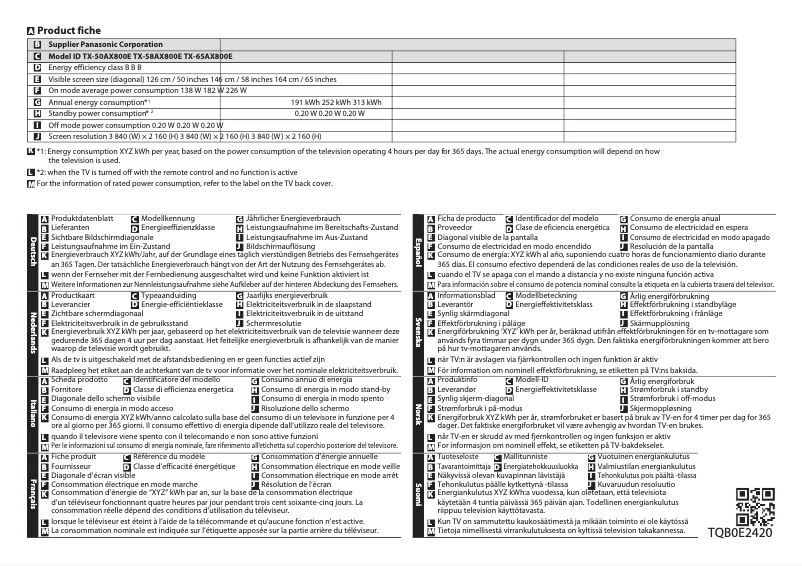
With a 58-inch (146 cm) screen, the Panasonic TX-58AX800E offers an immersive visual experience thanks to its 4K Ultra HD resolution of 3840 x 2160 pixels. The 16:9 aspect ratio guarantees compatibility with most multimedia content. Its Edge-LED backlighting allows for improved brightness, while the wide viewing angles of 176° ensure comfortable viewing from different perspectives. The motion interpolation frequency of 2000 Hz, along with Back Light Scanning technology, contributes to superior image fluidity.
Other Features
The Panasonic TX-58AX800E does not support 3D technology, but it is equipped with a 2D-3D converter that allows standard content to be transformed into immersive experiences. It has built-in speakers that provide enriching audio quality, complemented by a subwoofer. Its energy efficiency class is B, and it is DLNA certified, allowing for seamless integration with other multimedia devices.
TV Tuner
This model is equipped with an analog and digital tuner, supporting DVB-C, DVB-S2, DVB-T, and DVB-T2 formats, ensuring optimal signal reception. This allows for flexibility in receiving television channels.
Smart TV
The Panasonic TX-58AX800E is not a Smart TV model, which means it does not offer access to applications or the Internet. Its Hotel mode is designed to optimize the viewing experience in specific environments.
Audio
This television integrates 3 speakers with an RMS power of 18 W, ensuring satisfactory sound quality for movies and music. It also includes audio decoders such as Dolby Digital, DTS, and Dolby Digital Plus, providing an immersive audio experience.
Connectivity
The Panasonic TX-58AX800E features 4 HDMI ports and 2 USB 2.0 ports, facilitating connection with various multimedia devices. It also has a digital optical audio output, an S-Video input, and an Ethernet port for a stable network connection. The common interface allows for optimal connectivity with other devices.
Network
This television has Ethernet/LAN connectivity as well as a Wifi function, allowing for quick and reliable connection with your devices.
Management Features
The Panasonic TX-58AX800E includes an Electronic Program Guide for easy access to features, as well as a hotel mode for efficient reservation management.
Design
The television features a sleek and modern black color. It is compatible with VESA mounting, making wall installation easy for space-saving.
Power
The energy consumption in standby mode is optimized to reduce electricity costs. It operates on an input voltage of 220 - 240 V with a frequency of 50 - 60 Hz, ensuring compatibility with standard electrical systems.
Weight and Dimensions
The Panasonic TX-58AX800E measures 803 mm wide, 294 mm high, and has a depth of 1306 mm. With a weight of 33 kg, it may require assistance for transport and installation.


