

Manuals of product Viera TX-43CX750E


Editorial note
The Panasonic Viera TX-43CX750E stands out for its exceptional picture quality, thanks to its 4K Ultra HD resolution (3840 x 2160 pixels) and Brilliant Contrast technology, which provides deep blacks and bright whites. With a viewing angle of 178°, it allows for optimal viewing from different angles, making it ideal for family or friends movie nights. Additionally, its compatibility with various digital signal formats (DVB-C, DVB-S2, DVB-T, DVB-T2) ensures a versatile viewing experience. However, this model has some limitations. The lack of Smart TV features reduces access to streaming apps and the Internet, which may disappoint users looking for a modern multimedia experience. Furthermore, it does not support 3D technology, which can also be a drawback for some. Its annual energy consumption of 120 kWh places it in a less favorable energy efficiency category (class B), potentially leading to higher electricity costs. Regarding connectivity, although the television has 3 HDMI ports and 2 USB ports, this may prove insufficient for users with many devices to connect simultaneously. Finally, the audio quality is limited, with a power of only 20 W, which may not satisfy audiophiles seeking a rich sound experience. In summary, the Panasonic Viera TX-43CX750E offers excellent picture quality and a modern design, but limitations in connectivity and audio, as well as the absence of Smart TV features, may cause some buyers to hesitate.Score details
User experience
The user experience is positive due to exceptional image quality, but the lack of Smart TV features limits access to streaming applications.
Performance
The performance is excellent with a 4K Ultra HD resolution and backlight dimming technology, providing high-quality images.
Battery life
The annual energy consumption of 120 kWh is less favorable, which may lead to higher electricity costs.
Design
The design is modern and sleek, with good integration into various spaces, but a limited number of ports may pose a problem for some users.
Value for money
The value for money is good due to the image quality, but the lack of 3D compatibility and Smart TV features may disappoint some users.
audio
The audio quality is limited with a power of only 20 W, which may not satisfy audiophiles.
Advantages
4K Ultra HD image quality
178° viewing angle
Compatibility with various digital formats
Local Dimming backlighting
PIP and Dolby Digital features
Disadvantages
No Smart TV features
No 3D compatibility
High power consumption (120 kWh/year)
Insufficient HDMI and USB ports
Limited audio quality (20 W)
Technical Specifications Viera TX-43CX750E
General Information
-
ModelVIERA TX-43CX750E
-
Brand
-
Category
-
Type
-
SKU864522
-
MPN864522
Screen
-
LED backlighting-
-
LED backlighting-
-
Screen size43 "
-
Type HD4K Ultra HD
-
Screen resolution3840 x 2160 pixels
-
Image format16:9
-
Image format16:9
-
Supported graphic resolutions3840 x 2160
-
Supported video modes2160p
-
Screen brightness- cd/m²
-
Response time- ms
-
Vertical viewing angle178 °
-
Vertical viewing angle178 °
-
Motion interpolation frequency1000 Hz
-
Interpolation movement technologyIFC
-
Screen diagonal (cm)108 cm
-
Screen shapeFlat
-
Marketing name of the dynamic contrast ratioBrilliant Contrast
-
Screen size43 "
-
Type HD4K Ultra HD
-
Screen resolution3840 x 2160 pixels
-
Image format16:9
-
Supported graphic resolutions3840 x 2160
-
Screen brightness- cd/m²
-
Response time- ms
-
Vertical viewing angle178 °
-
Vertical viewing angle178 °
-
Interpolation movement technologyIFC (Intelligent Frame Creation) 1000 Hz
-
Screen diagonal (cm)108 cm
-
Screen shapeFlat
-
Smart ModesCinema, Dynamic, Game, Movie, Natural
-
Image processing technologySamsung Wide Color Enhancer
-
Marketing name of the dynamic contrast ratioBrilliant Contrast
Other features
-
Certified DLNA (Digital Living New-York Alliance)Yes
-
Certified DLNA (Digital Living New-York Alliance)Yes
-
Certified DLNA (Digital Living New-York Alliance)Yes
-
Certified DLNA (Digital Living New-York Alliance)Yes
-
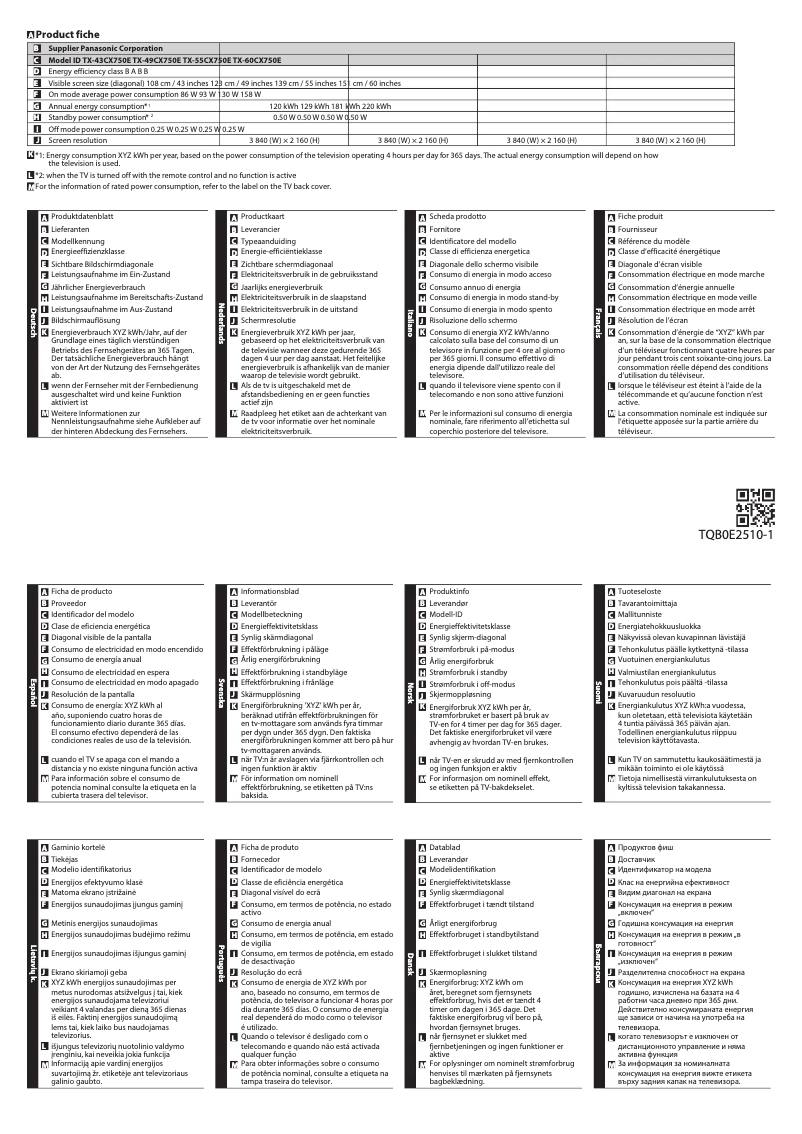
Annual energy consumption120 kWh
-
Energy efficiency class (old)B
-
Certified DLNA (Digital Living New-York Alliance)Yes
-
Certified DLNA (Digital Living New-York Alliance)Yes
-
Certified DLNA (Digital Living New-York Alliance)Yes
-
Certified DLNA (Digital Living New-York Alliance)Yes
-
Certified DLNA (Digital Living New-York Alliance)Yes
-
Annual energy consumption120 kWh
-
Energy efficiency class (old)B
-
Certified DLNA (Digital Living New-York Alliance)Yes
-
Certified DLNA (Digital Living New-York Alliance)Yes
TV Tuner
-
Analog signal format system-
-
Analog signal format system-
-
Tuner typeAnalog and digital
-
Digital signal system formatDVB-C, DVB-S2, DVB-T, DVB-T2
-
Tuner typeAnalog and digital
-
Digital signal system formatDVB-C, DVB-S2, DVB-T, DVB-T2
Smart TV / smart TV
-
Internet TV-
-
Smart TVYes
-
Smart ModesCinema
-
Dynamic
-
Game
-
Movie
-
Natural
Audio
-
Number of speakers2
-
Rated power of RMS20 W
-
Sound modesCustom, Music, Standard
-
Integrated audio decodersDolby Digital, Dolby Digital Plus
-
Number of speakers2
-
Rated power of RMS20 W
-
Sound modesCustom, Music, Standard
-
Integrated audio decodersDolby Digital, Dolby Digital Plus
Connectivity
-
Common Interface (CI)-
-
Common Interface (CI)-
-
Quantity of HDMI ports3
-
DVI PortNo
-
Common Interface Plus (Cl+)Yes
-
DVI PortNo
-
S-Video Input0
-
Quantity of USB 2.0 Ports2
-
Number of Ethernet LAN ports (RJ-45)1
-
Number of Ethernet LAN ports (RJ-45)1
-
Number of Ethernet LAN ports (RJ-45)1
-
Number of Ethernet LAN ports (RJ-45)1
-
Number of Ethernet LAN ports (RJ-45)1
-
Common Interface Plus (Cl+)Yes
-
S-Video Input0
-
Number of Ethernet LAN ports (RJ-45)1
-
Common Interface Plus (Cl+)Yes
-
Compatible memory cardsSD
-
Quantity of HDMI ports3
-
DVI PortNo
-
DVI PortNo
-
S-Video Input0
-
Quantity of USB 2.0 Ports2
-
Number of Ethernet LAN ports (RJ-45)1
-
Number of Ethernet LAN ports (RJ-45)1
-
Number of Ethernet LAN ports (RJ-45)1
-
Number of Ethernet LAN ports (RJ-45)1
-
Number of Ethernet LAN ports (RJ-45)1
-
Common Interface Plus (Cl+)Yes
-
S-Video Input0
Network
-
BluetoothYes
-
WifiNo
-
BluetoothYes
-
Supported browsersFirefox
-
BluetoothYes
-
WifiNo
-
BluetoothYes
-
Supported browsersFirefox
Management features
-
Basic hotel modeYes
-
Basic hotel modeYes
-
Number of OSD languages29
-
Basic hotel modeYes
-
Basic hotel modeYes
-
Basic hotel modeYes
Representation / realization
-
Internet TV-
-
Backlight dimming technologyLocal Dimming
-
Teletext1500 pages
-
Ambient light sensorYes
-
Supported video format3GPP, AVCHD, AVI, FLV, M4V, MP4, TS, VOB, VRO
-
Supported audio formatsAAC, FLAC, MP3, WAV, WMA
-
Supported image formatsJPG, MPO
-
Image processing technologySamsung Wide Color Enhancer
-
Ambient light sensorYes
-
Ambient light sensorYes
-
Ambient light sensorYes
-
Ambient light sensorYes
-
Ambient light sensorYes
-
Backlight dimming technologyLocal Dimming
-
Teletext1500 pages
-
Ambient light sensorYes
-
Supported video format3GPP, AVCHD, AVI, FLV, M4V, MP4, TS, VOB, VRO
-
Supported audio formatsAAC, FLAC, MP3, WAV, WMA
-
Ambient light sensorYes
-
Ambient light sensorYes
Design
-
Product colorBlack
-
Built-in power buttonYes
-
Built-in power buttonYes
-
Built-in power buttonYes
-
Product colorBlack
-
Built-in power buttonYes
-
Built-in power buttonYes
-
Built-in power buttonYes
Power
-
Energy consumption (standby mode)0.5 W
-
Typical electricity consumption86 W
-
AC input voltage220 - 240 V
-
AC input frequency50 - 60 Hz
-
Energy consumption (standby mode)0.5 W
-
Typical electricity consumption86 W
-
AC input voltage220 - 240 V
-
AC input frequency50 - 60 Hz
Weight and dimensions
-
Device width (support included)969 mm
-
Depth (without support)46 mm
-
Height (without support)567 mm
-
Weight (without support)12500 g
-
Device width (support included)969 mm
-
Depth (support included)179 mm
-
Height (support included)601 mm
-
Weight (with support)14500 g
-
Device width (support included)969 mm
-
Depth (without support)46 mm
-
Height (without support)567 mm
-
Weight (without support)12500 g
-
Device width (support included)969 mm
-
Depth (support included)179 mm
-
Height (support included)601 mm
-
Weight (with support)14500 g
Packaging information
-
Package width1359 mm
-
Package depth115 mm
-
Package height660 mm
-
Package weight18000 g
-
User manualYes
-
Package width1359 mm
-
Package depth115 mm
-
Package height660 mm
-
Package weight18000 g
Packaging contents
-
Desktop supportYes
-
Desktop supportYes
-
Desktop supportYes
-
Desktop supportYes
Frequently Asked Questions
What is the recommended viewing distance for my Panasonic television?
What should I do if my television is no longer receiving a signal?
What are the dimensions of my television screen?
What does the acronym HDMI stand for?
Is it possible to connect devices from different brands via Bluetooth?
What is the screen size of the Panasonic Viera TX-43CX750E?
What is the resolution of the screen on the Panasonic Viera TX-43CX750E?
Is the Panasonic Viera TX-43CX750E compatible with 3D?
What is the display resolution of the Panasonic Viera TX-43CX750E?
Can the screen format be adjusted on the Panasonic Viera TX-43CX750E?
What is the viewing angle of the Panasonic Viera TX-43CX750E?
What is the motion interpolation frequency of the Panasonic Viera TX-43CX750E?
How can I troubleshoot if the touch control panel of the Panasonic Viera TX-43CX750E is not working?
How can I resolve connection issues with the touch control of the Panasonic Viera TX-43CX750E?
How can I diagnose a malfunctioning touch panel on the Panasonic Viera TX-43CX750E?
How can I adjust the sensitivity of the touch control?
What should I do if I have difficulty using the touch control of the Panasonic Viera TX-43CX750E?
How can I diagnose a lack of response from the touch control panel of the Panasonic Viera TX-43CX750E?
What should I do if I cannot connect my device to the Panasonic Viera TX-43CX750E?
What should I do if the touch control of the Panasonic Viera TX-43CX750E is not working?
How can I adjust the sensitivity of the touch slider on the Panasonic Viera TX-43CX750E?
What troubleshooting steps should I follow if I have difficulty using the touch control panel of the Panasonic Viera TX-43CX750E?
Is the manual for the Panasonic Viera TX-43CX750E available in French?
Similar products


More product categories from brand Panasonic
Home appliances Panasonic
Phones Panasonic
Audio Panasonic
Camera and photography Panasonic
Personal care Panasonic
Other Panasonic
Tools Panasonic
Interior Panasonic
More product types from brand Panasonic








Presentation of product Viera TX-43CX750E specifications from brand Panasonic
General Information
The Panasonic Viera TX-43CX750E is a television from the renowned brand Panasonic, famous for its innovations in consumer electronics. This model, named Viera TX-43CX750E, is designed to deliver quality performance, enhanced by an improved user experience. The EAN code 5025232811939 allows for unique identification of this product in the market.
Screen
Equipped with a 43-inch screen, the Panasonic Viera TX-43CX750E ensures exceptional visual immersion thanks to its 4K Ultra HD resolution (3840 x 2160 pixels). The 16:9 aspect ratio and customizable display settings allow you to adjust the viewing experience according to your preferences. The Brilliant Contrast technology ensures deep blacks and bright whites, while the 178° viewing angle promotes optimal viewing from different positions. The 1000 Hz motion interpolation frequency and IFC technology guarantee smooth images when streaming dynamic content.
Other Features
The Panasonic Viera TX-43CX750E does not support 3D technology, but it is equipped with built-in speakers that provide a satisfactory audio experience. It also includes features such as the PIP (Picture-in-Picture) mode for better content management. Its annual energy consumption is 120 kWh, and it is rated class B in terms of energy efficiency, which could influence long-term electricity costs.
TV Tuner
This model has an analog and digital tuner, compatible with DVB-C, DVB-S2, DVB-T, and DVB-T2 formats, allowing for varied signal reception for a diverse viewing experience.
Connectivity
The Panasonic Viera TX-43CX750E is equipped with 3 HDMI ports and 2 USB 2.0 ports, providing connection options for multiple devices. Although it does not have a built-in PC connector or DVI port, it features a digital optical audio output for connection to advanced audio systems.
Audio
With 2 speakers and a power of 20 W RMS, this television offers several sound modes, such as Custom, Music, and Standard, allowing you to tailor the listening experience according to the content. Dolby Digital and Dolby Digital Plus decoders are also integrated to enhance the audio experience.
Design
The design of the Panasonic Viera TX-43CX750E is sleek, with a black finish that easily fits into any environment. It includes status indicators and is compatible with VESA mounting for simplified wall installation.
Packaging Information
The television is delivered in a package measuring 1359 mm in width, 115 mm in depth, and 660 mm in height, with a total weight of 18000 g, ensuring adequate protection during transport.
Contents of the Package
The box contains a remote control and a desktop stand, facilitating the immediate installation and use of the television.


