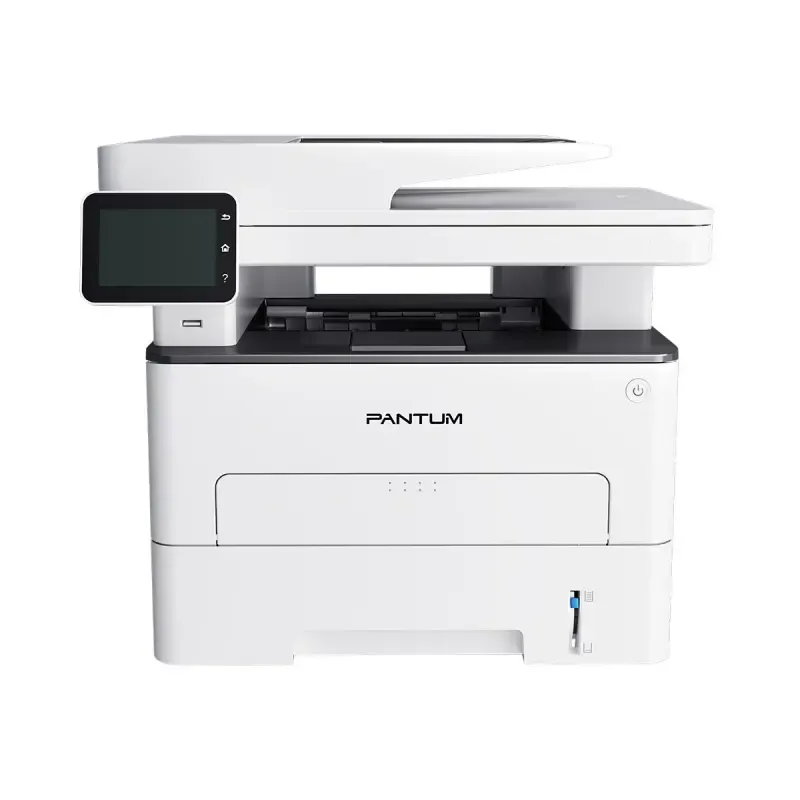

Manual of product M7310DW

Editorial note
The Pantum M7310DW is a laser printer that stands out for its fast printing speed of 33 pages per minute, ideal for a dynamic work environment. Its print quality is also remarkable, with a maximum resolution of 1200 x 600 DPI, allowing for vibrant documents and images. Additionally, the manual duplex printing feature contributes to a more eco-friendly use of paper, while offering versatile connectivity through Wi-Fi and Ethernet options. The high-resolution color scanning at 1200 x 1200 DPI is an added advantage, ensuring faithful reproductions of documents. However, some drawbacks are worth noting. The lack of fax functionality may limit its usefulness for those who need to send or receive documents by fax. Furthermore, the absence of duplex scanning may slow down the process for documents with multiple pages. The color printing speed is generally lower than that of black prints, which could affect efficiency in environments where color printing is frequent. The recommended service cycle, which ranges from 750 to 3500 pages per month, may not be suitable for users with heavy printing needs. Finally, its weight of 10.54 kg can make moving and setting it up more difficult, and the manual duplex printing mode requires user intervention, which may be seen as a constraint. Overall, the Pantum M7310DW offers good value for money for users with moderate printing needs. Its modern and functional design, combined with an intuitive user experience, makes it suitable for professional use. However, for those with more specific needs, particularly regarding faxing or duplex document scanning, it may be necessary to explore other options.Score details
User experience
The user experience is generally positive due to an intuitive interface and practical features. However, the lack of a fax machine and missing duplex scanning may limit usage for some users.
Performance
The printing speed is satisfactory at 33 pages per minute, but the color performance is slightly lower, which may affect efficiency in high-volume color printing environments.
Design
The design is modern and functional, with a weight that, while it may pose difficulties in moving, ensures a robust construction.
Value for money
The product offers good value for money for users with moderate printing needs, but the recommended service cycle may not be suitable for heavy users.
Features
Features such as manual duplex printing and high-resolution color scanning are appreciated, but the absence of certain automatic options can be a drawback.
Advantages
Fast printing: 33 pages per minute
Laser print quality up to 1200 x 600 DPI
Manual duplex printing for less paper
Built-in Wi-Fi and Ethernet connectivity
Color scanning at 1200 x 1200 DPI
Disadvantages
No fax function
No duplex scanning
Slow color printing speed
Low monthly duty cycle
Heavy weight, difficult to move
Manual duplex printing required
Technical Specifications M7310DW
General Information
-
ModelM7310DW
-
Brand
-
Category
-
Type
-
SKU1905545
-
MPN1905545
Print speed
-
Printing technologyLaser
-
PrintingMonochrome printing
-
Double-sided printingYes
-
Duplex printing modeAuto
-
Maximum resolution1200 x 600 DPI
-
Print speed (black, normal quality, A4/US Letter)33 ppm
Network
-
Contactless paymentYes
-
Contactless paymentYes
-
Wiring technology10/100Base-T(X)
-
LAN Ethernet: data transfer rate10, 100 Mbit/s
-
Wifi standards802.11b, 802.11g, Wi-Fi 4 (802.11n)
-
Contactless paymentYes
Features
-
Number of print cartridges-
-
Languages of the page descriptionPCL 5e
-
Service cycle (Maximum)PCL 6
-
Service cycle (recommended)PDF
-
Double-sided functions60000 pages per month
-
Printing colors750 - 3500 pages per month
-
Print, Scan
-
Black
Copier
-
CopySimple copy
-
Duplex copyNo
-
Max. resolution of copies600 x 600 DPI
-
Release time of the first print (black, normal)10 s
-
Maximum copy sizeA4
-
Maximum number of copies99 copies
-
Resizing copy25 - 400 %
-
Copy Function N in 1Yes
-
Copy Function N in 1Yes
-
Copy speed (normal quality, black, A4)33 cpm
Digitization
-
DigitizationColor scanning
-
Double-sided scanningYes
-
Duplex scanning modeAuto
-
Optical scanning resolution1200 x 1200 DPI
-
Optical Analysis Resolution (ADF)600 x 600 DPI
-
Maximum scan area216 x 356 mm
-
Type of scannerFlatbed and ADF scanner
-
Scan toE-mail, FTP, PC
Fax
-
FaxNo
Input and output capacity
-
Total number of power supply units-
-
Total power capacity250 sheets
-
Total output capacity150 sheets
-
Multifunctional trayYes
-
Input capacity of multi-purpose trays1 sheet
Paper management
-
Maximum ISO A series paper sizeA4
-
Type of paper tray supportCard stock
-
ISO, Format Series A (A0...A9)Labels
-
JIS series B format (B0...B9)Plain paper
-
JIS series B format (B0...B9)Thick paper
-
Weight of the multifunctional tray supportThin paper
-
Weight of paper tray supportTransparencies
-
Non-ISO print support sizesA4
-
Envelope sizesA5
-
A6
-
B5
-
B5
-
60 - 200 g/m²
-
60 - 105 g/m²
-
16K
-
Executive (184 x 267mm)
-
Folio (media size)
-
Legal (media size)
-
Letter (media size)
-
Oficio (media size)
-
Statement (140 x 216mm)
-
DL
Weight and dimensions
-
Width415 mm
-
Depth360 mm
-
Height350 mm
-
Weight10540 g
Packaging information
-
Package weight13710 g
Environmental conditions
-
Operating relative humidity (H-H)20 - 80 %
-
Operating temperature10 - 32 °C
Power
-
AC input voltage220 - 240 V
-
AC input frequency50 - 60 Hz
-
Average power consumption in Print mode550 W
-
Energy consumption (loan)50 W
-
Energy consumption (in standby mode)2 W
Design
-
Product colorWhite
-
Market positionProfessional
-
Built-in screenYes
-
Screen size3.5 "
-
Order typeTouchscreen
Representation / realization
-
Sound pressure level (scanning)52 dB
-
Sound pressure level (copy)54 dB
-
Sound pressure level (standby)30 dB
-
Sound pressure level (scanning)52 dB
-
Internal memory512 MB
-
Processor frequency600 MHz
Connectivity
-
Direct printing-
-
Quantity of USB 2.0 Ports1
-
USB portYes
-
Optional connectivityNear Field Communication (NFC)
Minimum system requirements
-
Support for the Windows operating systemWindows 10
-
Support for the Mac operating systemWindows 11
-
Support for the Linux operating systemWindows 11 x64
-
Support for the server operating systemWindows 7
-
Windows 8
-
Windows 8.1
-
Windows Vista
-
Windows XP
-
Mac OS X 10.12 Sierra
-
Mac OS X 10.7 Lion
-
Ubuntu 12.04
-
Ubuntu 14.04
-
Ubuntu 16.04
-
Ubuntu 18.04 LTS
-
Ubuntu 20.04 LTS
-
Windows Server 2003
-
Windows Server 2008
-
Windows Server 2012
Frequently Asked Questions
What is the weight of the Pantum M7310DW printer?
What is the recommended method for removing jammed paper from the printer?
Why is my printer not recognizing the original cartridges?
What are the possible reasons for poor print quality?
How does a laser printer differ from an inkjet printer?
Why does my inkjet printer leave black streaks on prints?
What does the term DPI mean?
How many cartridges can be installed in the Pantum M7310DW?
What is the size of the screen on the Pantum M7310DW?
What is the height of the Pantum M7310DW printer?
What is the width of the Pantum M7310DW printer?
What is the depth of the Pantum M7310DW printer?
Is the manual for the Pantum M7310DW available in French?
Similar products


More product categories from brand Pantum
More product types from brand Pantum

Presentation of product M7310DW specifications from brand Pantum
General Information
The Pantum M7310DW is a laser printer from the Pantum brand, known for its innovation and quality in the printing device sector. This model, the M7310DW, is designed to deliver optimal performance and an enhanced user experience. The EAN code, 6936358027175, uniquely identifies this product in the distribution system.
Print Speed
Equipped with laser printing technology, the Pantum M7310DW ensures exceptional print quality, with a maximum resolution of 1200 x 600 DPI for precise results. The print speed reaches 33 pages per minute in black, making this device ideal for heavy use. Additionally, it offers color printing, allowing for documents and images with vibrant and accurate colors. The manual duplex printing function optimizes paper usage, contributing to a more eco-friendly approach.
Network
The Pantum M7310DW offers several connectivity options, including Wi-Fi and Ethernet, ensuring a fast and reliable connection. It supports Wi-Fi standards 802.11b, 802.11g, and Wi-Fi 4 (802.11n). Furthermore, it allows secure transactions through the contactless payment feature.
Features
This model is designed to meet the varied needs of users, with a maximum service cycle of 60,000 pages per month, although the recommended cycle is 750 to 3,500 pages, which may not suit users with very high printing needs. The printer uses a single cartridge and prints in black, ensuring optimal print quality.
Copier
The Pantum M7310DW includes a color copy function, allowing for the production of documents true to the original colors. However, it does not have an automatic duplex copy function. With a maximum copy resolution of 600 x 600 DPI and a first copy output time of 10 seconds, this device effectively meets daily needs. The copy speed reaches 33 copies per minute in black.
Scanning
This printer also allows color scanning with an optical resolution of 1200 x 1200 DPI, ensuring high-quality reproductions. However, duplex scanning is not available. The duplex scanning mode is automatic, and the maximum scan area is 216 x 356 mm.
Fax
The product does not include a fax function, focusing on printing, copying, and scanning features.
Input and Output Capacity
The Pantum M7310DW has a paper feed capacity of 250 sheets and can handle up to 150 sheets for output. It is also equipped with a multifunction tray for varied use.
Paper Management
Compatible with standard paper sizes such as A4, A5, and B5, it supports various types of media, including labels and thick paper. The weight of the media ranges from 60 to 200 g/m², offering flexibility in use.
Weight and Dimensions
With dimensions of 415 mm wide, 360 mm deep, and 350 mm high, the Pantum M7310DW weighs 10.54 kg, which may complicate its movement in tight spaces.
Environmental Conditions
Designed to operate in varied conditions, it functions effectively in a relative humidity of 20 to 80 % and at temperatures ranging from 10 to 32 °C.
Power
The Pantum M7310DW operates at an input voltage of 220 to 240 V and consumes 550 W in print mode. In standby mode, power consumption is reduced to 50 W and to 2 W in ready mode, ensuring energy efficiency.
Design
Featuring a modern white finish, this printer is intended for professional use. It has a 3.5-inch touchscreen, facilitating interaction and use.
Connectivity
The Pantum M7310DW includes a USB 2.0 port for quick connection. Although it does not offer direct printing, NFC connectivity expands usage possibilities.
Minimum System Requirements
Compatible with a variety of operating systems, the Pantum M7310DW supports Windows (including Windows 10 and 11), Mac OS X, and several Linux distributions, providing flexibility in use across different computing environments.


