

Manuals of product LaserMFD SFF6170DW

Editorial note
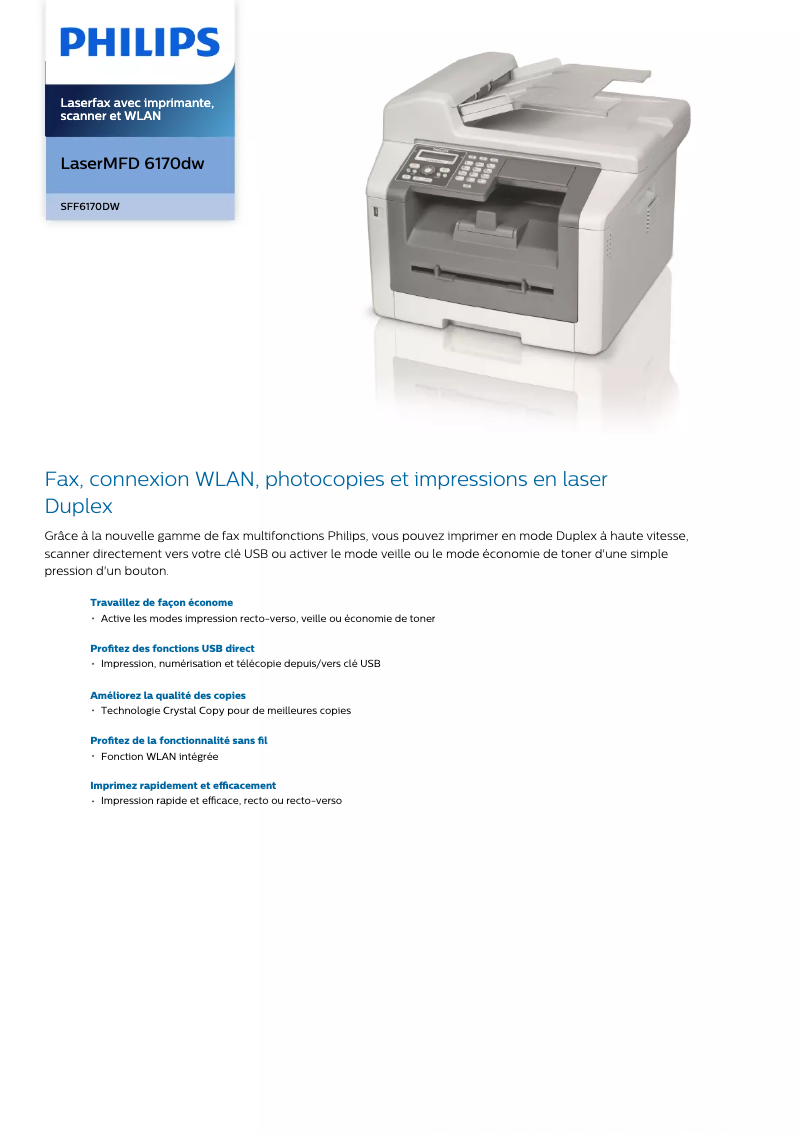
The Philips LaserMFD SFF6170DW is a multifunction printer that stands out for its printing speed, reaching 24 pages per minute, making it an ideal choice for daily professional use. Its laser printing ensures a quality of 600 x 1200 DPI, allowing for vibrant and accurate documents and images. Additionally, the duplex printing feature optimizes resource use, contributing to a reduction in paper volume. Color scanning with a maximum resolution of 4800 x 4800 DPI ensures detailed and faithful reproductions, while Wi-Fi connectivity makes it easy to print from various mobile devices, adding a dimension of flexibility to its use. With a low power consumption of 4.3 W in standby mode, this device is also environmentally friendly. However, some drawbacks are worth noting. The lack of Ethernet connectivity may limit integration into professional networks, where a wired connection is often preferred. Additionally, its weight of 12.7 kg may pose challenges when moving it. The total paper capacity not being specified, users with high printing needs may encounter inconveniences related to frequent tray refills. Finally, the absence of a built-in memory card reader limits flexibility for printing directly from cards. In terms of performance, reviews are generally positive. The user experience is enhanced by an intuitive interface and well-thought-out features. However, some users may wish for even higher printing speeds for large volumes. The modern and sleek design of the printer is an asset, although it is offset by its weight. The value for money is fair, but elements such as the lack of Ethernet connectivity and unspecified paper capacity raise questions for some users. Overall, the Philips LaserMFD SFF6170DW is a good choice for professionals looking for a versatile and high-performing printer, provided they take its limitations into account.Score details
User experience
The user experience is overall positive thanks to an intuitive interface and well-thought-out features, such as double-sided printing and color scanning.
Performance
The printing performance is solid with a speed of 24 pages per minute, well-suited for professional use, although some users may wish for a higher speed for large volumes.
Battery life
The power consumption in standby mode is very low (4.3 W), contributing to energy savings, but the printer is not battery-powered.
Design
The design is modern and sleek, although its weight of 12.7 kg may make moving the printer difficult.
Value for money
The value for money is fair, but the lack of Ethernet connectivity and unspecified power capacity may pose issues for some users.
Features
Features such as color printing and high-resolution scanning are excellent, but the absence of a built-in memory card reader limits flexibility.
Advantages
Fast printing: 24 pages per minute
Laser resolution: 600 x 1200 DPI
Double-sided printing to save paper
Color scanning up to 4800 x 4800 DPI
Wi-Fi connection for mobile printing
Energy-saving sleep mode: 4.3 W
Disadvantages
No Ethernet/LAN connectivity
Weight of 12.7 kg difficult to move
Unspecified power capacity
No memory card reader
Insufficient printing speed for large volumes
Technical Specifications LaserMFD SFF6170DW
General Information
-
ModelLASERMFD SFF6170DW
-
Brand
-
Category
-
Type
-
SKU155428
-
MPN155428
Print speed
-
Printing technologyLaser
-
Maximum resolution600 x 1200 DPI
-
PrintingMonochrome printing
-
Double-sided printingYes
-
Print speed (black, normal quality, A4/US Letter)24 ppm
-
Duplex printing speed (ISO / IEC 24734) monochrome16 ipm
-
Double-sided printingYes
Digitization
-
Gray levels256
-
Optical scanning resolution600 x 600 DPI
-
DigitizationColor scanning
-
Maximum scanning resolution4800 x 4800 DPI
-
Output color display depth24 bit
-
Scan driversTWAIN, WIA
Network
-
WifiYes
-
Ethernet/LANNo
-
Mobile printing technologiesNot supported
Power
-
Energy consumption (standby mode)4.3 W
-
Electricity consumption (average operation)528 W
Features
-
Digital sender-
-
Service cycle (Maximum)10000 pages per month
-
Languages of the page descriptionGDI
-
Printing colorsBlack
Fax
-
Fax memory200 pages
-
FaxSimple fax
-
Fax transmission speed2.5 sec/page
-
Modem speed33.6 Kbit/s
-
Error correction modeYes
Copier
-
Release time of the first print (black, normal)12 s
-
CopySimple copy
-
Max. resolution of copies600 x 600 DPI
-
Copy speed (normal quality, black, A4)19 cpm
-
Free PC copyYes
Input and output capacity
-
Total power capacity- sheets
-
Total output capacity100 sheets
Paper management
-
Maximum ISO A series paper sizeA4
-
Type of paper tray supportOrdinary paper
-
ISO, Format Series A (A0...A9)A4, A5
-
ISO, Formats Series-B (B0...B9)B5, B6
Design
-
Screen-
-
Product colorWhite
-
Market positionDomestic and professional
Connectivity
-
USB portYes
-
Standard interfacesUSB
-
USB portYes
Representation / realization
-
Internal memory128 MB
-
Built-in memory card readerNo
Minimum system requirements
-
Support for the Linux operating systemYes
-
Support for the Linux operating systemYes
-
Support for the Linux operating systemYes
-
Support for the server operating systemWindows Server 2003, Windows Server 2008, Windows Server 2008 R2
Packaging contents
-
Drivers includedYes
Weight and dimensions
-
Width430 mm
-
Depth393 mm
-
Height346 mm
-
Weight12700 g
Packaging information
-
Package width524 mm
-
Package depth492 mm
-
Package height452 mm
-
Package weight15400 g
Environmental conditions
-
Operating relative humidity (H-H)20 - 80 %
-
Operating temperature10 - 32 °C
Frequently Asked Questions
What is the weight of the Philips LaserMFD SFF6170DW?
What is the recommended method for removing paper jammed in the printer?
Why is my printer not recognizing the original cartridges?
What could be the reasons for poor print quality?
What is the difference between a laser printer and an inkjet printer?
Why is my inkjet printer producing black streaks?
What does the acronym DPI mean?
What is the height of the Philips LaserMFD SFF6170DW?
What is the width of the Philips LaserMFD SFF6170DW?
What is the depth of the Philips LaserMFD SFF6170DW?
Is the manual for the Philips LaserMFD SFF6170DW available in French?
Similar products


More product categories from brand Philips
Audio Philips
Home appliances Philips
Personal care Philips
Household appliances Philips
Interior Philips
Phones Philips
Other Philips
Garden and outdoor Philips
Software Philips
More product types from brand Philips


Presentation of product LaserMFD SFF6170DW specifications from brand Philips
General Information
The model Philips LaserMFD SFF6170DW is manufactured by the renowned brand Philips, known for its commitment to quality and innovation in the home appliance sector. This model, identified by the reference SFF6170DW/CHB, is designed to provide reliable performance and a smooth user experience. The EAN code of the product is 3425160298277, allowing for precise identification in the distribution network.
Print Speed
Equipped with laser printing technology, the Philips LaserMFD SFF6170DW ensures optimal print quality with a maximum resolution of 600 x 1200 DPI. It allows for color document printing, delivering vibrant and detailed results. With a print speed of 24 pages per minute for black prints, this model is particularly suitable for daily use in a professional environment. Additionally, its duplex printing feature optimizes paper usage, thereby reducing waste.
Scanning
This model also offers advanced scanning capabilities, with an optical resolution of 600 x 600 DPI and a maximum scanning resolution of 4800 x 4800 DPI. It supports color scanning, ensuring faithful and detailed reproductions of documents and images. The output color depth is 24 bits, ensuring rich color reproduction. The included scanning driver, compatible with TWAIN and WIA, facilitates integration into various scanning systems.
Network
The Philips LaserMFD SFF6170DW is equipped with Wi-Fi functionality for fast wireless connection, allowing easy printing from mobile devices. However, it does not have Ethernet/LAN connectivity, which may be a drawback for some users who prefer a wired connection.
Power
In terms of energy consumption, the device shows a standby consumption of 4.3 W, contributing to energy savings. In normal operation, the power consumption is 528 W, ensuring optimal performance without sacrificing energy efficiency.
Features
The maximum duty cycle of the printer is 10,000 pages per month, allowing for intensive use suited to the needs of professional users. This model supports page descriptions in GDI and offers high-quality black color printing. However, it does not include a digital sending function, which may limit certain operations.
Fax
The Philips LaserMFD SFF6170DW is equipped with a fax memory of 200 pages, facilitating the management of document sending and receiving. It allows for simple faxing with a transmission speed of 2.5 seconds per page and a modem operating at 33.6 Kbit/s. An error correction mode is also available, ensuring reliable transmission.
Copier
This model offers a first print output time of 12 seconds, facilitating quick and efficient printing. The copier also allows for color copies, with a maximum resolution of 600 x 600 DPI. Its copy speed is 19 copies per minute for black prints, and it supports the PC free copy feature, allowing direct printing from a computer.
Input and Output Capacity
The printer's output capacity is 100 sheets, ensuring optimal performance for regular printing tasks. However, the total feed capacity is not specified, which could pose a problem for users with high printing needs.
Paper Management
The Philips LaserMFD SFF6170DW supports standard paper sizes such as A4 and A5, and is compatible with various types of media, primarily plain paper. This ensures flexibility for different printing needs.
Design
With a white color, this model features a modern and sleek design, suitable for both home and professional use. Its compact format makes it easy to integrate into various work environments.
Connectivity
The direct printing feature is available, allowing efficient printing from various devices. The printer is equipped with standard interfaces and a USB port for easy connection.
Representation / Performance
The internal memory of 128 MB ensures smooth data and application management. However, it is worth noting that the model does not have a built-in memory card reader, thus limiting some storage options.
Minimum System Requirements
The Philips LaserMFD SFF6170DW is compatible with Windows, Mac, and Linux operating systems, ensuring flexibility of use. It also supports modern servers such as Windows Server 2003, Windows Server 2008, and Windows Server 2008 R2.
Package Contents
Drivers are included in the packaging, facilitating a quick and hassle-free installation.
Weight and Dimensions
With dimensions of 430 mm in width, 393 mm in depth, and 346 mm in height, the Philips LaserMFD SFF6170DW easily fits into various spaces. Its weight of 12.7 kg may, however, make moving the device more difficult.
Packaging Information
The package measures 524 mm in width, 492 mm in depth, and 452 mm in height, weighing a total of 15,400 g, ensuring adequate protection during transport.
Environmental Conditions
The optimal operation of the Philips LaserMFD SFF6170DW is ensured in a relative humidity of 20 to 80 % and an operating temperature ranging from 10 to 32 °C, making it suitable for various work environments.


