

Manual of product L730
Editorial note
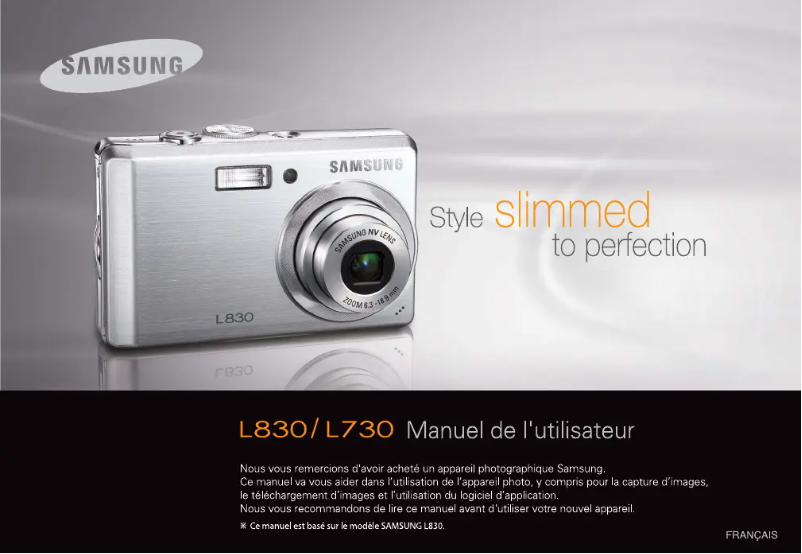
The Samsung L730 is a compact camera that stands out for its exceptional image quality, thanks to its 7.2 MP CCD sensor. It offers a 3x optical zoom and a 5x digital zoom, allowing for precise detail capture even from a distance. The various autofocus modes, such as Multi Point, Single, and Tracking, ensure quick and accurate focusing, which is ideal for use in dynamic environments. Additionally, the ability to record videos at 30 frames per second enhances the user experience. However, there are some drawbacks to note. The 7.2 MP resolution may seem limited compared to current standards, which could compromise the quality of large format prints. Furthermore, the lack of a digital SLR limits customization options for advanced photographers. With only 10 MB of internal memory, it is necessary to use a memory card to store more photos. The maximum shutter speed of 1/1250 s may not be sufficient to capture fast-moving subjects, and the flash recharge time of 4 seconds may be too long for spontaneous moments. In terms of design, the Samsung L730 presents itself in a modern and sleek manner with its silver finish, allowing it to easily blend into different environments. Connectivity is also a strong point, with a USB 2.0 interface and PictBridge compatibility for direct printing. In summary, the Samsung L730 offers a good user experience and acceptable performance, but its limitations in terms of resolution and memory may be factors to consider for users looking for a more advanced camera.Score details
User experience
The user experience is positive thanks to intuitive features, such as the USB 2.0 interface and PictBridge compatibility, making it easy to transfer and print photos.
Performance
The performance is generally good, but the 7.2 MP resolution may seem insufficient for large format prints, and the maximum shutter speed of 1/1250 s can pose problems for capturing fast-moving subjects.
Battery life
The battery life is reasonable, but the 4-second flash recharge time could be too long for quick shots.
Design
The design is modern and sleek, with a silver color that easily fits into various environments.
Features
Features like the 3x optical zoom and various autofocus modes offer good flexibility for photography, although the lack of a digital SLR limits some creative options.
Value for money
The value for money is fair, but the limited 10 MB internal memory requires the purchase of a memory card for optimal use, which can be a drawback for some users.
Advantages
7.2 MP CCD sensor for sharp images
3x optical zoom, 5x digital zoom
Various focus modes
30 fps video for smoothness
USB 2.0 transfer and PictBridge
Modern and elegant silver design
Disadvantages
Limited 7.2 MP resolution
No digital SLR for customization
Only 10 MB internal memory
Insufficient shutter speed of 1/1250 s
Flash recharge too slow (4 seconds)
2.5-inch screen too small
Technical Specifications L730
General Information
-
ModelL730
-
Brand
-
Category
-
Type
-
SKU1053867
-
MPN1053867
Image quality
-
Megapixel7.2 MP
-
Sensor typeCCD (charge-coupled device)
-
Image sensor size1/2.5 "
Objective system
-
Digital zoom5 x
-
Optical zoom3 x
-
Focal length6.3 - 18.9 mm
Other features
-
Digital SLRNo
-
Equivalent focal length in 35 mm38 - 114 mm
-
Camera shutter speed1 - 1/1250 s
-
Printing the dateYes
-
InterfaceUSB
-
Printing the dateYes
Tuning
-
Normal focus range (tele)0.8 - ∞ m
-
Macro focus area (Tele)0.5 - 0.8 m
-
Focusing area in macro (Wide angle)0.1 - 0.8 m
-
Auto Focus Zone (Tele)0.5 - ∞ m
-
Auto Focus Area (Wide Angle)0.1 - ∞ m
-
Auto Focusing (AF) Modescenter weighted auto focus, continuous auto focus, flexible spot auto focus, multi point auto focus
-
TuningAuto
-
Normal focus range (tele)0.8 - ∞ m
-
Normal focus range (tele)0.8 - ∞ m
Flash
-
Flash range (wide)0.2 - 4.6 m
-
Flash range (tele)0.5 - 2.6 m
-
Flash recharge time4 s
-
Flash modesauto, fill-in, Flash off, Red-eye reduction, Slow synchronization
Memory
-
Internal memory10 MB
-
Maximum memory card size4 GB
-
Compatible memory cardsmmc, sd
Video
-
Motion JPEG frame rate30 ips
Audio
-
Built-in microphoneYes
-
Built-in microphoneYes
Screen
-
ScreenLCD
-
Screen size2.5
Connectivity
-
PictBridgeYes
-
USB Version2.0
Design
-
Product colorMoney
Camera
-
CalendarYes
-
CalendarYes
-
CalendarYes
-
CalendarYes
-
Photographic effectsblack&white, Negative film, Sepia, Vivid
-
Scene modesBacklight, beach, Children, Close-up (macro), Documents, dusk, Fireworks, Night, Portrait, Sunset, Landscape (scenery)
-
White balanceauto, Cloudy, custom modes, daylight, Fluorescent, Tungsten
-
Image editingcrop, resizing, rotating
-
Camera playbackmovie, single image, slide show, thumbnails
Battery
-
Battery typeSLB-0937
-
Battery capacity900 mAh
Weight and dimensions
-
Weight132.6 g
-
Width95 mm
-
Height59 mm
-
Depth21 mm
Environmental conditions
-
Operating temperature0 - 40 °C
-
Relative humidity rate (storage)5 - 85 %
Exposure to light
-
Type of exposureCar
-
Light measurementCentre-weighted, Spot
Shutter
-
Camera shutter typeelectronic
-
mechanical
Frequently Asked Questions
What is the weight of the Samsung L730?
What is the screen size of the Samsung L730?
What is the height of the Samsung L730?
What is the width of the Samsung L730?
What is the depth of the Samsung L730?
How to change the ISO settings on the Samsung L730 camera?
How to activate the timer on my Samsung L730 camera?
What to do if the battery of my Samsung L730 camera drains quickly?
How to change the white balance settings on my Samsung L730 camera?
How to change the image resolution and file format on my Samsung L730 camera?
How many megapixels does the Samsung L730 have?
What is the digital zoom capability of the Samsung L730?
What is the optical zoom capability of the Samsung L730?
Does the Samsung L730 have digital SLR features?
What is the flash recharge time of the Samsung L730 camera?
Is the manual for the Samsung L730 available in French?
Similar products




More product categories from brand Samsung
Television and multimedia Samsung
Home appliances Samsung
Household appliances Samsung
Phones Samsung
Audio Samsung
Other Samsung
Interior Samsung
Tools Samsung
Software Samsung
More product types from brand Samsung


Presentation of product L730 specifications from brand Samsung
General Information
The Samsung L730 is a compact camera from the renowned brand Samsung, famous for its innovation and quality in the electronics sector. This model, also identified by the reference L730 | EC-730ZRDA/DE, is designed to deliver optimal performance and a pleasant user experience. Its EAN code, 8801089428516, 8801089428554, allows for easy identification in the distribution network.
Image Quality
Equipped with a 7.2 MP CCD sensor, the Samsung L730 ensures remarkable image quality, allowing for the capture of every detail with great precision. Its sensor size of 1/2.5" positively influences the definition of photos and light management, thus guaranteeing satisfactory results in various lighting conditions.
Lens System
The Samsung L730 features a 3x optical zoom and a 5x digital zoom, providing appreciated flexibility for photographing distant subjects while preserving image quality. Its focal length of 6.3 to 18.9 mm determines the field of view and the distance at which subjects can be captured, thus enriching your creative possibilities.
Other Features
Although the Samsung L730 is not a digital SLR, it allows for high-quality photos. Its lens has a 35 mm equivalent focal length of 38 to 114 mm, offering varied perspectives suitable for different types of scenes. With a shutter speed ranging from 1 to 1/1250 s, the device can capture sharp images, even in low-light conditions. It also offers video features, allowing for the creation of engaging content at 30 fps.
Focusing
The normal focus range of the Samsung L730 extends from 0.8 m to infinity, providing optimal precision. In macro mode, it can focus at very close distances, with ranges from 0.1 to 0.8 m, thus allowing for the capture of fine details. The various autofocus modes, such as Multi Point, Single, and Tracking, ensure high responsiveness and accuracy in various situations.
Flash
The Samsung L730 is equipped with a flash with a range of 0.2 to 4.6 m in wide mode, allowing adequate illumination up to 7.5 meters. Its recharge time of 4 seconds is relatively quick, although it may be a drawback for fast shooting. The flash modes include Auto, Fill-in, red-eye reduction, and slow sync, offering various options for optimal results.
Memory
With an internal memory of 10 MB, the Samsung L730 requires the use of a memory card to store more photos, with a maximum supported size of 4 GB. It is compatible with mmc and sd cards, ensuring optimal performance for storage.
Video
This model allows video capture at a rate of 30 fps in motion JPEG format, ensuring smooth playback of videos.
Audio
The Samsung L730 integrates a microphone for clear audio capture, ideal for voice recordings and calls, thus enriching the user experience.
Screen
Its 2.5" LCD screen offers satisfactory image quality, although its size may limit detailed viewing when composing photos.
Connectivity
The Samsung L730 supports PictBridge, allowing direct printing of photos on a compatible printer without going through a computer. It is also equipped with a USB 2.0 port for quick connection with various devices.
Design
With its silver finish, the Samsung L730 features a modern and elegant design that easily harmonizes with different styles.
Camera
The Samsung L730 offers customizable settings for contrast and saturation of images, allowing adjustments to brightness and color intensity. It also integrates various photographic effects and scene modes suitable for different situations, such as Portrait, Sports, and Night. The white balance has several options to ensure color fidelity in various lighting conditions.
Battery
The Samsung L730 operates with a SLB-0937 battery with a capacity of 900 mAh, ensuring prolonged use without interruption.
Weight and Dimensions
Environmental Conditions
Designed to operate within a temperature range of 0 to 40 °C, the Samsung L730 is suitable for various environments. Its relative humidity storage rate is between 5 and 85%, ensuring optimal conditions for its preservation.
Light Exposure
The automatic exposure mode allows for effective control of depth of field and shutter speed, while the center-weighted and spot light metering ensures precise exposure results.
Shutter
The electronic and mechanical shutter type of the Samsung L730 allows for quick and precise image capture, ideal for moving scenes.


