
Thumbnail of product DW60CG550SSR from brand Samsung
Logo of brand Samsung

Dishwasher Samsung DW60CG550SSR

The Samsung DW60CG550SSR is a modern dishwasher designed to meet the needs of today's households. With the reputation of the Samsung brand, known for its quality and innovation in the field of home appliances, this model guarantees optimal performance and an enhanced user experience.

This dishwasher is equipped with advanced features that make cleaning your dishes easier while being energy-efficient. It offers several wash programs suitable for different types of dishes and levels of soiling, making it a versatile appliance for all your washing needs.

The Samsung DW60CG550SSR is also designed for quiet operation, allowing for discreet use even at night. Its generous capacity allows for cleaning a large amount of dishes at once, which is ideal for families or gatherings.

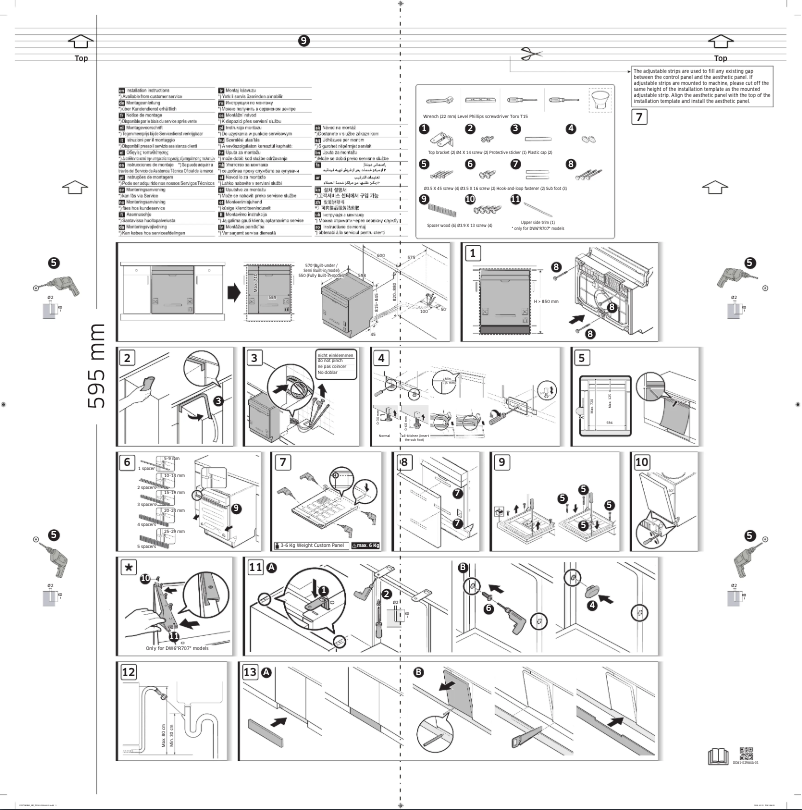
For more information, the product comes with two useful documents: a user manual and an installation guide, thus facilitating the setup and daily use of the appliance.

In summary, the Samsung DW60CG550SSR is a reliable and efficient dishwasher, suited to the modern demands of dish cleaning.

Manuals of product DW60CG550SSR
8 10

Editorial note

The Samsung DW60CG550SSR dishwasher stands out for the reliability of the brand, known for its quality and innovation in the field of household appliances. This model offers optimal washing performance, ensuring impeccable cleanliness of dishes, while being designed to be energy-efficient, which helps reduce electricity bills and preserve the environment. However, it is important to note some drawbacks. The price of the DW60CG550SSR may be relatively high compared to other similar models, which may not suit all budgets. Additionally, the noise level during operation may be higher than advertised, which could be bothersome in a quiet environment. The loading capacity may also prove insufficient for large families, requiring multiple cycles to wash all the dishes, while the duration of the washing cycles may be longer than expected. Regarding user experience, although the model facilitates loading and operation, some users may regret the absence of advanced features such as Wi-Fi connectivity or customizable washing options. Nevertheless, the accompanying documents, including the user manual and installation guide, make installation and use easy from day one. Overall, the Samsung DW60CG550SSR is a high-performing and energy-efficient dishwasher, but it is essential to consider the potential drawbacks before making a choice, particularly regarding budget and capacity needs.

Score details

User experience

The user experience is enhanced by features that simplify loading and operation, although some users may find the lack of advanced features disappointing.

Performance

The washing performance is efficient, ensuring impeccable cleanliness of the dishes, but the cycle duration may be longer than expected.

Value for money

The price is relatively high compared to other similar models, which may not suit all budgets.

noise_level

The noise level during operation can be higher than advertised, which may be bothersome in a quiet environment.

capacity

The loading capacity may be insufficient for large families, requiring multiple cycles to wash all the dishes.

energy_efficiency

The model is designed to be energy-efficient, helping to reduce electricity bills while preserving the environment.

Documentation

The accompanying documents, including the user manual and installation guide, make installation and use easy from day one.


Advantages

Brand reliability of Samsung

Efficient washing performance

Simple and intuitive use

Manual and installation guide included

Significant energy savings

Disadvantages

Relatively high price for some budgets.

Noise level higher than expected.

Insufficient capacity for large families.

Washing cycles too long.

Lack of advanced features.

Technical Specifications DW60CG550SSR

General Information

Frequently Asked Questions

What should I do if my dishwasher emits an unpleasant odor?
To remedy unpleasant odors from your dishwasher, follow these steps: - Clean the filters - Clean the spray arms - Clean the door seals - Run a high-temperature wash cycle - Run the dishwasher empty with a specific dishwasher cleaner. Q: Is it necessary to rinse dishes before placing them in the dishwasher? A: It is not recommended to rinse dirty dishes before loading them into the dishwasher. To prolong the lifespan of the appliance, it is better to load it without prior rinsing, as greasy residues on dirty dishes help lubricate the dishwasher pump. Q: What is the recommended amount of detergent to use? A: The recommended dose is about 25 grams of dishwasher detergent. Please follow the instructions on the packaging. Q: How do I add softening salt to my dishwasher? A: All dishwashers have a compartment dedicated to softening salt. To open it, turn the compartment knob. You can then pour the softening salt using a funnel. Q: How do I turn on the Samsung DW60CG550SSR dishwasher? A: To turn on the Samsung DW60CG550SSR dishwasher, follow these steps: 1. Open the door and load the dishes, removing food scraps. 2. Put detergent in the dispenser. For best results, you can also add a rinse aid. 3. Press the POWER button. 4. Select a wash cycle using the corresponding buttons, such as 'Upper basket only', 'Lower basket only', 'Sanitizer', 'Multi tab', or 'Delay start'. Some options may not be available depending on the selected cycle. 5. If you choose 'Lower basket only', ensure that the dishes are in the lower basket, and the same for the upper basket. 6. Press the START button to begin the cycle, then close the door. The dishwasher will start the cycle after a few seconds of draining. 7. To change the cycle after it has started, hold the START button for 3 seconds to cancel the current cycle, then select a new cycle. 8. The default cycle is ECO. 9. If you need to resume the appliance after opening it, simply close the door. These instructions are specific to the Samsung DW60CG550SSR model. Q: How do I choose a wash cycle on the Samsung DW60CG550SSR dishwasher? A: To select a wash cycle on the Samsung DW60CG550SSR dishwasher, follow these steps: 1. Turn on the appliance by pressing the 'POWER' button. 2. Find the 'Program' button on the control panel and press it. 3. A list of available cycles will appear. 4. Select the desired cycle by pressing the appropriate button. - The 'AUTO' cycle adapts to all levels of soiling. - The 'ECO' cycle optimizes energy and water consumption for normally soiled items. - The 'Intensive' cycle is designed for heavily soiled items. - The 'Quick' cycle is suitable for lightly soiled items and has a shorter duration. - The 'Delicate' cycle is for fragile items that are lightly soiled. - The 'Express 60' cycle is for daily soiled items with a reduced wash time. - The 'Self-cleaning' cycle is used to clean the inside of the dishwasher and should be run when the dishwasher is empty. 5. Once the cycle is chosen, the dishwasher will start automatically. Note that some options, such as 'Sanitize' and 'Multi tab', may not be available depending on the selected cycle. Q: How do I activate the control lock function on the Samsung DW60CG550SSR dishwasher? A: To activate the control lock function on the Samsung DW60CG550SSR dishwasher, follow these steps: 1. Open the door and load the dishes. 2. Press the 'Control Lock' button for 3 seconds; this button is located on the control panel. 3. After these 3 seconds, the control lock will be activated, blocking all buttons except the 'Power' button. 4. With the lock activated, you will not be able to select programs or start operations. 5. To deactivate this function, press the 'Control Lock' button again for 3 seconds. 6. Once deactivated, you will be able to freely choose programs and start operations. 7. It is important to note that the control lock remains active even after restarting the dishwasher. If you wish to cancel it, you must first deactivate it. By following these steps, you can easily manage the control lock function on the Samsung DW60CG550SSR dishwasher. Q: Is the manual for the Samsung DW60CG550SSR available in French? A: Yes, the manual for the Samsung DW60CG550SSR is available in French.
Est-il nécessaire de rincer la vaisselle avant de la placer dans le lave-vaisselle ?
Il n'est pas recommandé de rincer la vaisselle sale avant de la charger dans le lave-vaisselle. Pour prolonger la durée de vie de l'appareil, il est préférable de le charger sans rinçage préalable, car les résidus gras sur la vaisselle sale aident à lubrifier la pompe du lave-vaisselle.
Quelle est la quantité de détergent à utiliser ?
La dose recommandée est d'environ 25 grammes de détergent pour lave-vaisselle. Veuillez suivre les instructions figurant sur l'emballage.
Comment ajouter du sel adoucissant dans mon lave-vaisselle ?
Tous les lave-vaisselles possèdent un compartiment dédié au sel adoucissant. Pour l'ouvrir, tournez le bouton du compartiment. Vous pourrez ensuite verser le sel adoucissant à l'aide d'un entonnoir.
Comment allumer le lave-vaisselle Samsung DW60CG550SSR ?
Pour mettre en marche le lave-vaisselle Samsung DW60CG550SSR, procédez comme suit : 1. Ouvrez la porte et chargez la vaisselle en enlevant les restes de nourriture. 2. Mettez du détergent dans le distributeur. Pour de meilleurs résultats, vous pouvez également ajouter un agent de rinçage. 3. Appuyez sur le bouton POWER. 4. Sélectionnez un cycle de lavage à l'aide des boutons correspondants, tels que 'Panier supérieur uniquement', 'Panier inférieur uniquement', 'Sanitizer', 'Multi tab' ou 'Démarrage différé'. Certaines options peuvent ne pas être disponibles selon le cycle choisi. 5. Si vous choisissez 'Panier inférieur uniquement', assurez-vous que la vaisselle est dans le panier inférieur, et de même pour le panier supérieur. 6. Appuyez sur le bouton START pour démarrer le cycle, puis fermez la porte. Le lave-vaisselle entamera le cycle après quelques secondes de vidange. 7. Pour changer le cycle après son démarrage, maintenez le bouton START enfoncé pendant 3 secondes pour annuler le cycle actuel, puis sélectionnez un nouveau cycle. 8. Le cycle par défaut est ECO. 9. Si vous devez reprendre l'appareil après l'avoir ouvert, il suffit de refermer la porte. Ces instructions sont spécifiques au modèle Samsung DW60CG550SSR.
Comment choisir un cycle de lavage sur le lave-vaisselle Samsung DW60CG550SSR ?
Pour sélectionner un cycle de lavage sur le lave-vaisselle Samsung DW60CG550SSR, suivez ces étapes : 1. Allumez l'appareil en appuyant sur le bouton 'ALIMENTATION'. 2. Trouvez le bouton 'Programme' sur le panneau de contrôle et appuyez dessus. 3. Une liste des cycles disponibles apparaîtra. 4. Sélectionnez le cycle souhaité en appuyant sur le bouton approprié. - Le cycle 'AUTOMATIQUE' s'adapte à tous les niveaux de saleté. - Le cycle 'ÉCO' optimise la consommation d'énergie et d'eau pour les articles normalement sales. - Le cycle 'Intensif' est conçu pour les très sales. - Le cycle 'Rapide' est adapté aux légèrement sales et a une durée plus courte. - Le cycle 'Délicat' est destiné aux articles fragiles légèrement sales. - Le cycle 'Express 60' est pour les articles quotidiennement sales avec un temps de lavage réduit. - Le cycle 'Autonettoyant' est utilisé pour nettoyer l'intérieur du lave-vaisselle et doit être lancé quand le lave-vaisselle est vide. 5. Une fois le cycle choisi, le lave-vaisselle démarrera automatiquement. Notez que certaines options, comme 'Assainir' et 'Multi tab', peuvent ne pas être disponibles selon le cycle sélectionné.
Comment activer la fonction de verrouillage des commandes sur le lave-vaisselle Samsung DW60CG550SSR ?
Pour activer la fonction de verrouillage des commandes sur le lave-vaisselle Samsung DW60CG550SSR, suivez ces étapes : 1. Ouvrez la porte et chargez la vaisselle. 2. Appuyez sur le bouton 'Verrouillage des commandes' pendant 3 secondes, ce bouton se trouve sur le panneau de contrôle. 3. Après ces 3 secondes, le verrouillage des commandes sera activé, bloquant tous les boutons sauf le bouton 'Alimentation'. 4. Avec le verrouillage activé, vous ne pourrez pas sélectionner de programmes ni démarrer des opérations. 5. Pour désactiver cette fonction, appuyez de nouveau sur le bouton 'Verrouillage des commandes' pendant 3 secondes. 6. Une fois désactivé, vous pourrez librement choisir des programmes et démarrer des opérations. 7. Il est important de noter que le verrouillage des commandes reste actif même après le redémarrage du lave-vaisselle. Si vous souhaitez l'annuler, vous devez d'abord le désactiver. En suivant ces étapes, vous pourrez facilement gérer la fonction de verrouillage des commandes sur le lave-vaisselle Samsung DW60CG550SSR.
Le manuel du Samsung DW60CG550SSR est-il disponible en français ?
Oui, le manuel du Samsung DW60CG550SSR est proposé en français.

Similar products


Discover the technical sheet of DW80F600UTS from Samsung and its manuals...
Available manuals:
Discover the technical sheet of FDF3018 from Faure and its manuals...
Available manuals:
Discover the technical sheet of FDF308 from Faure and its manuals...
Available manuals:
Discover the technical sheet of FDF3010 from Faure and its manuals...
Available manuals:
Discover the technical sheet of FDF3020 from Faure and its manuals...
Available manuals:
Discover the technical sheet of DW80F800UWS from Samsung and its manuals...
Available manuals:
Discover the technical sheet of FDF3017 from Faure and its manuals...
Available manuals:
Discover the technical sheet of DW80H9930US from Samsung and its manuals...
Available manuals:
Discover the technical sheet of DW80F600UTB from Samsung and its manuals...
Available manuals:
Discover the technical sheet of DW80F600UTW from Samsung and its manuals...
Available manuals:
Discover the technical sheet of FDF3013 from Faure and its manuals...
Available manuals:
Discover the technical sheet of DW7933LRA from Samsung and its manuals...
Available manuals:

Presentation of product DW60CG550SSR specifications from brand Samsung

General Information

The Samsung DW60CG550SSR is a dishwasher from the renowned brand Samsung, known for its commitment to quality and innovation in the home appliance sector. This model stands out for its exceptional washing performance, providing impeccable cleanliness for your dishes. Designed to optimize the user experience, it facilitates loading and operation, making daily use more enjoyable.

Advantages

Among the many strengths of this dishwasher, we note:

  • Brand reliability: Samsung is synonymous with durability, which ensures increased confidence in the product's longevity.
  • Effective washing performance: The DW60CG550SSR model guarantees impeccable results, even for the toughest stains.
  • Improved user experience: It is designed to make loading and operation simple and intuitive.
  • Accompanying documents: The product comes with a user manual and an installation guide for easy setup.
  • Energy savings: This dishwasher is designed to be energy-efficient, thus contributing to lower electricity bills and environmental protection.

Disadvantages

However, some aspects may be considered disadvantages:

  • Price: The Samsung DW60CG550SSR may have a higher cost than some competing models, which may not suit all budgets.
  • Noise level: Some users report that the noise during operation is higher than advertised, which can be bothersome in a quiet environment.
  • Loading capacity: Its capacity may be insufficient for large families, leading to the need for multiple cycles to wash all the dishes.
  • Cycle duration: Some washing cycles may be longer than expected, which may not suit those looking for a quick solution.
  • Limited features: The absence of certain advanced options, such as Wi-Fi connectivity or customizable washing programs, may restrict the experience for tech-savvy users.