

Manual of product C3595
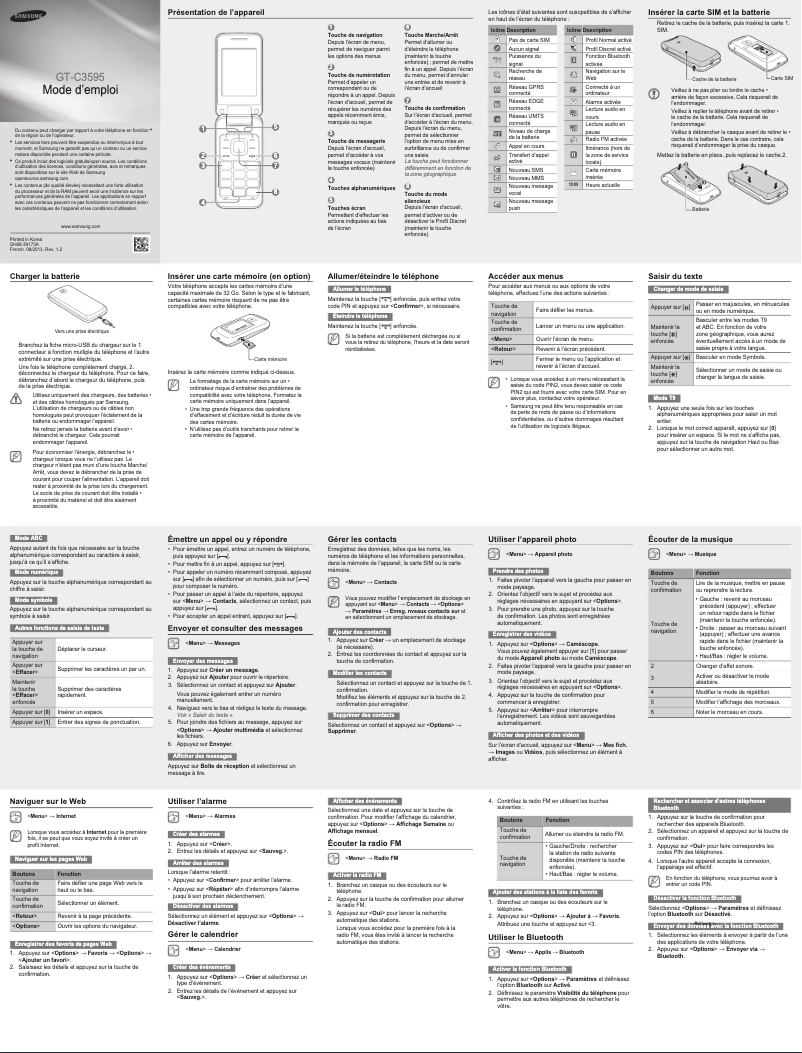
Editorial note
The Samsung C3595 is presented as a lightweight and compact smartphone, weighing only 101.5 g, making it very easy to carry on a daily basis. Its 2.4-inch TFT screen, although not touch-sensitive, offers clear and precise display quality, suitable for basic use. Additionally, it allows for increased storage capacity thanks to a MicroSD card support of up to 32 GB, which is an advantage for users needing more space. However, several drawbacks may limit the appeal of the Samsung C3595. The 2.4-inch screen and the resolution of 320 x 240 pixels may seem outdated, especially for those seeking a modern visual experience. Furthermore, the lack of Wi-Fi connectivity restricts browsing options and makes the device more dependent on mobile data. The quality of the 2 MP rear camera may also disappoint users looking to capture quality images, particularly in low-light conditions. Regarding the user experience, it is considered adequate, although the absence of a touch screen may make usage less intuitive. The performance of the Samsung C3595 is suitable for daily use, but the lack of advanced features such as GPS may limit its attractiveness for users seeking versatility. On the other hand, the 800 mAh battery is a positive point, offering up to 10 hours of talk time, ensuring prolonged use without frequent recharging. In summary, the Samsung C3595 represents a reasonable choice for those looking for a simple and functional smartphone at an affordable price, although its limitations in terms of modern features may not suit all users.Score details
User experience
The user experience is acceptable, but the lack of a touchscreen can make usage less intuitive for some users.
Performance
The performance is suitable for everyday use, but the 2 MP camera and limited screen resolution may disappoint users seeking quality.
Battery life
The 800 mAh battery offers satisfactory autonomy, with up to 10 hours of talk time, which is ideal for regular use.
Design
The compact and lightweight design of the Samsung C3595 is an asset, but the 2.4-inch screen may seem outdated compared to current standards.
Value for money
The value for money is acceptable given the basic features, but the lack of Wi-Fi connectivity and advanced features may limit its appeal.
Features
Although the Samsung C3595 offers essential features like MMS and email, the lack of GPS and other modern options may restrict its use.
Advantages
Lightweight and compact, easy to carry.
Clear 2.4-inch TFT screen.
Expandable storage up to 32 GB.
Quality 2 MP rear camera.
Multimedia messaging and email included.
10 hours of talk time.
Disadvantages
Small screen and outdated resolution
No touchscreen for intuitive use
Poor-performing 2 MP camera
No Wi-Fi for browsing
Insufficient 800 mAh battery
Lack of modern advanced features
Technical Specifications C3595
General Information
-
ModelC3595
-
Brand
-
Category
-
Type
-
SKU183804
-
MPN183804
Screen
-
Screen size2.4 "
-
Screen resolution
-
External screen320 x 240 pixels
-
Type of panelNo
-
Number of colors displayedTFT
-
External screen262144 colors
-
Type of panelNo
-
TFT
Memory
-
Flash Card SupportYes
-
Compatible memory cardsMicroSD (TransFlash)
-
Internal memory2048 MB
-
Maximum memory card size32 GB
Camera
-
Zoom capacityYes
-
Resolution of the rear camera (digital)2 MP
-
Zoom capacityYes
-
Digital zoom2 x
-
Sensor typeCMOS
Network
-
WAP-
-
WifiNo
-
Network data3G, EDGE, GPRS, GSM, HSDPA
-
2G band (1st SIM card)850,900,1800,1900 MHz
-
Supported WCDMA bands900,2100 MHz
-
SIM card capacitySingle SIM
-
GPRSYes
-
GPRSYes
-
Mobile network generation3G
Data transmission
-
BluetoothYes
-
Bluetooth model3.0+HS
-
Bluetooth ProfilesA2DP, AVRCP, BPP, DUN, FTP, GAP, OPP, PBA, PBAP, SAP, SPP
Connectivity
-
USB portYes
-
USB connectorMicro-USB B
-
USB Version2.0
-
Headset connection3.5 mm
Other features
-
Headset output1
Messaging
-
E-mailYes
-
E-mailYes
Video
-
Video call-
-
Video recordingYes
-
Video recordingYes
Audio
-
FM Radio-
-
Ringtone typeMP3
-
Music playerYes
-
Supported audio formatsAAC, AAC+, MP3, WAV, WMA
Power
-
Battery technology-
-
Battery capacity800 mAh
-
Talk time (2G)10 h
-
Talk time (3G)8.3 h
-
Waiting time (3G)300 h
-
Waiting time (3G)300 h
Weight and dimensions
-
Weight101.5 g
-
Width50.9 mm
-
Depth17.33 mm
-
Height100.9 mm
Registration
-
Registration typeWithout plan
Design
-
Type-
-
Product colorMoney
Technical details
-
Alarm FunctionYes
Multimedia
-
Supported video format3GP
-
MPEG4
Packaging contents
-
User manualYes
-
User manualYes
Phone features
-
FormatValve
-
Personal Information Management (PIM)Alarm clock
-
Flight modeCalculator
-
Flight modeCalendar
-
Flight modeNotes
-
Flight modeYes
-
Flight modeYes
-
Yes
-
Yes
-
Yes
GPS Performance
-
Location of positionNo
-
Location of positionNo
Keyboard
-
Navigation buttonYes
Management features
-
Microphone deactivationYes
Call management
-
Call forwardingYes
-
Call forwardingYes
-
Call forwardingYes
-
Call forwardingYes
-
Call forwardingYes
Frequently Asked Questions
How do I reset my Samsung C3595?
What should I do if my SIM card is too small for my phone?
What is the purpose of an IMEI number?
What are the dimensions of my smartphone's screen?
Is there a risk of my smartphone's battery exploding?
What is the weight of the Samsung C3595?
What is the size of the Samsung C3595's screen?
What is the height of the Samsung C3595?
What is the resolution of the Samsung C3595's screen?
What is the width of the Samsung C3595?
What is the depth of the Samsung C3595?
What type of USB connection does the Samsung C3595 have?
Does the Samsung C3595 have a touchscreen?
What is the resolution of the Samsung C3595's rear camera?
Does the Samsung C3595 support external memory cards?
Does the Samsung C3595 have Wi-Fi connectivity?
What is the internal memory capacity of the Samsung C3595?
How do I navigate the menu options on the Samsung C3595?
Why are some status indicators not showing on my Samsung C3595?
What should I do if the SIM card or battery does not fit properly in my Samsung C3595?
Why is my Samsung C3595 not charging when I plug it into the charger?
How do I insert a memory card into my Samsung C3595?
Is the manual for the Samsung C3595 available in French?
Similar products


More product categories from brand Samsung
Television and multimedia Samsung
Home appliances Samsung
Household appliances Samsung
Phones Samsung
Audio Samsung
Other Samsung
Interior Samsung
Tools Samsung
Software Samsung
More product types from brand Samsung


Presentation of product C3595 specifications from brand Samsung
General Information
The Samsung C3595, a product from the renowned brand Samsung, is a smartphone designed to provide a satisfying user experience. This model, identified by the reference C3595 | GT-C3595TSA, highlights reliable performance. The product's EAN code, 4016985511048 and 8806085724228, allows for precise identification in distribution systems.
Screen
Equipped with a 2.4-inch TFT screen, the Samsung C3595 offers a resolution of 320 x 240 pixels, ensuring pleasant display clarity for daily use. Although the screen is not touch-sensitive, it displays up to 262144 colors, providing a satisfying visual experience. It does not have an external screen, but its TFT panel ensures vibrant colors and good image quality.
Memory
The Samsung C3595 includes support for MicroSD (TransFlash) memory cards, allowing storage capacity to be expanded up to 32 GB, which is ideal for users wishing to keep a large volume of data. Its internal memory of 2048 MB allows for smooth application use and adequate storage for essential files.
Camera
This model is equipped with a 2 MP rear camera, allowing for the capture of images and videos of acceptable quality for daily use. Additionally, the 2x digital zoom offers the possibility to take detailed photos from a distance. The CMOS sensor ensures satisfactory image quality for various photography needs.
Network
The Samsung C3595 supports several network technologies including 3G, EDGE, GPRS, and GSM, enabling effective connectivity for communications. However, it does not have Wi-Fi connectivity or WAP support, which limits certain online features. The 2G band for the first SIM card covers frequencies of 850, 900, 1800, and 1900 MHz, providing good coverage for calls and SMS.
Data Transmission
The smartphone is equipped with Bluetooth 3.0+HS technology, facilitating wireless connection with various devices. It supports multiple Bluetooth profiles, ensuring extensive compatibility for data exchanges.
Connectivity
The Samsung C3595 includes a Micro-USB B port for fast and efficient connections, whether for data transfer or charging. It also features a 3.5 mm headphone jack, compatible with a wide range of audio devices.
Messaging
This model supports multimedia messaging service (MMS) and allows for email sending, thus facilitating modern and enriched communication.
Video
The Samsung C3595 allows for video playback and recording, providing the ability to capture moving moments with acceptable quality.
Audio
Although it does not have FM radio functionality, this smartphone offers a music player compatible with various audio formats such as AAC, MP3, WAV, and WMA, providing a varied and enjoyable listening experience.
Battery Life
The 800 mAh battery of the Samsung C3595 allows for up to 10 hours of talk time on 2G and ensures extended battery life with a standby time of 300 hours. This capacity is suitable for daily use without frequent recharging.
Dimensions and Weight
Weighing only 101.5 g, the Samsung C3595 is designed to be lightweight and easy to carry. Its dimensions, with a width of 50.9 mm, a depth of 17.33 mm, and a height of 100.9 mm, allow for a comfortable grip and easy integration into various spaces.
Design
With its silver finish, the Samsung C3595 features a modern and elegant design. Its bar format is practical for daily use.
Additional Features
This model includes practical features such as an alarm function, personal information management (PIM) tools, and the possibility of vibration alerts. However, it is worth noting that it does not have built-in GPS.


