

Manual of product E1270
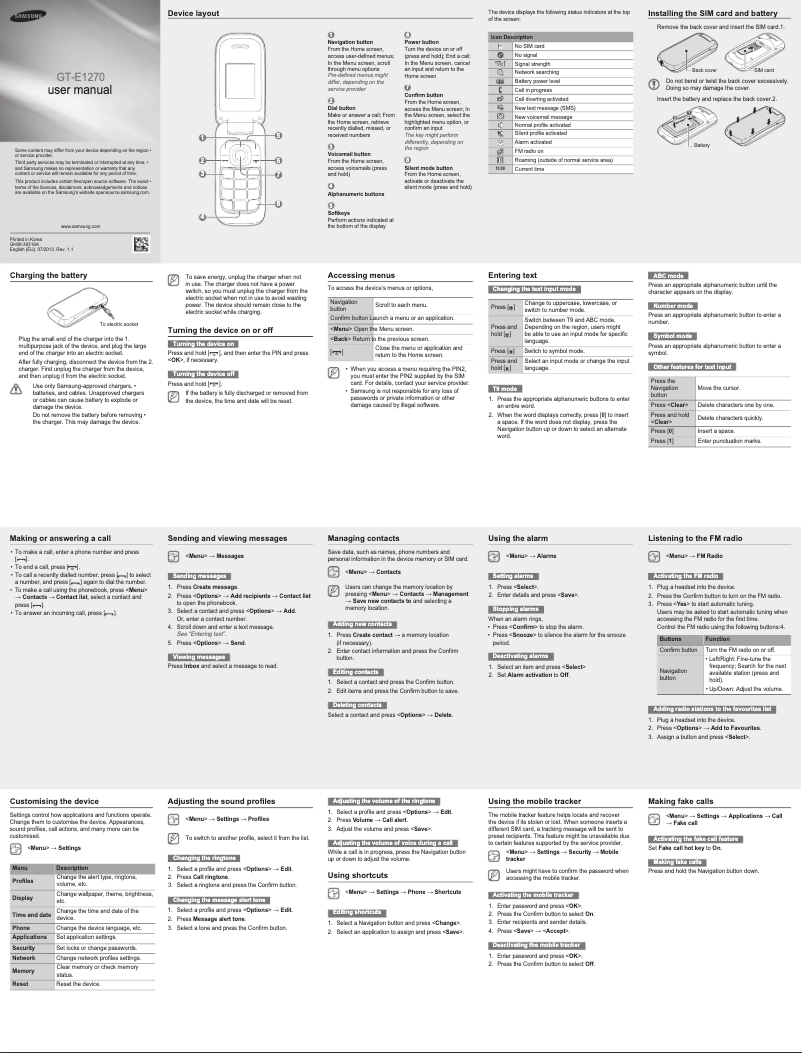
Editorial note
The Samsung E1270 is a lightweight and compact phone, weighing only 82.9 g, making it ideal for everyday use. Its 800 mAh battery offers excellent battery life, with 11 hours of talk time and 610 hours of standby time, allowing users to stay connected without worrying about frequent recharges. Additionally, its alphanumeric keypad makes it easy to type messages and navigate menus, providing an intuitive user experience. However, the Samsung E1270 has several limitations. Its 1.8-inch screen and 160 x 128 pixel resolution restrict the visual experience, making it difficult to view content. The lack of a camera, Wi-Fi, and Bluetooth also limits connectivity options and interaction with other devices, which may disappoint users looking for modern features. Furthermore, the internal memory is very limited, with no possibility of expansion via a memory card, restricting the storage capacity for apps and files. In terms of value for money, the Samsung E1270 may suit users looking for a basic phone to make calls and send messages, but those wanting a versatile device rich in features may be disappointed. Overall, this model stands out for its simplicity and efficiency, but it is clearly aimed at an audience that prioritizes the essentials.Score details
User experience
The user experience is generally simple and intuitive thanks to an alphanumeric keyboard. However, the limited screen and lack of multimedia features may restrict satisfaction.
Performance
The performance is adequate for basic tasks like making calls and sending messages, but the limited internal memory and lack of modern connectivity can be frustrating.
Battery life
The battery life is excellent, with 11 hours of talk time and 610 hours of standby time, allowing for prolonged use without frequent recharging.
Design
The compact and lightweight design (82.9 g) is ideal for daily use and easy to carry, although the small screen size may limit the visual experience.
Value for money
The Samsung E1270 offers good value for a basic phone, but the lack of modern features may disappoint some users looking for a versatile smartphone.
Features
The features of the Samsung E1270 are very limited, with the absence of a camera, Wi-Fi, and Bluetooth, which restricts the versatility of the device.
Usability
Ease of use is a strong point, with a convenient format and personal information management features, but the lack of modern connectivity may hinder user-friendliness.
Advantages
Lightweight and easy to carry
Extended battery life of 11 hours
Convenient alphanumeric keyboard
Essential features only
PIM compatible for efficient organization
Disadvantages
1.8-inch screen, low resolution.
No camera for photos or videos.
No Wi-Fi and Bluetooth.
Limited internal memory, not expandable.
No GPS or multimedia applications.
Technical Specifications E1270
General Information
-
ModelE1270
-
Brand
-
Category
-
Type
-
SKU184862
-
MPN184862
Screen
-
Screen size1.8 "
-
Screen resolution
-
External screen160 x 128 pixels
-
Type of panelNo
-
Number of colors displayedTFT
-
External screen65536 colors
-
Type of panelNo
-
TFT
Memory
-
Flash Card SupportNo
-
Compatible memory cardsNot supported
-
Internal memory- Mo
Camera
-
Front cameraNo
-
Resolution of the rear camera (digital)0 MP
-
Front cameraNo
Network
-
WAP-
-
WifiNo
-
Wifi standardsNot supported
-
Network dataGSM
-
2G band (1st SIM card)900,1800 MHz
-
SIM card capacitySingle SIM
-
Mobile network generation2G
Data transmission
-
BluetoothNo
Connectivity
-
USB portYes
Messaging
-
MMS (Multimedia Messaging Service)-
Video
-
Video callNo
Audio
-
FM Radio-
-
Ringtone typeMP3
-
Music playerYes
Power
-
Battery technology-
-
Battery capacity800 mAh
-
Talk time (2G)11 h
-
Waiting time (2G)610 h
-
Talk time (3G)0 h
Weight and dimensions
-
Weight82.9 g
-
Width46.5 mm
-
Depth17.95 mm
-
Height95 mm
Registration
-
Registration typeWithout plan
Design
-
Type-
-
Product colorWhite
Phone features
-
FormatValve
-
Personal Information Management (PIM)Alarm clock
-
Possibility of conference callCalculator
-
Possibility of conference callEvents reminder
-
Possibility of conference callYes
-
Yes
-
Yes
GPS Performance
-
Location of positionNo
-
Location of positionNo
Keyboard
-
Keyboard layoutAlphanumeric keyboard
-
Navigation buttonYes
Other features
-
KeyboardYes
Management features
-
Microphone deactivationYes
-
Microphone deactivationYes
Packaging contents
-
User GuideYes
-
User GuideYes
Call management
-
On holdYes
-
On holdYes
-
On holdYes
-
On holdYes
Frequently Asked Questions
How do I reset my Samsung E1270?
My SIM card is too small for my Samsung, what should I do?
What is the IMEI number?
What are the dimensions of my smartphone's screen?
Is there a risk of my smartphone's battery exploding?
What is the weight of the Samsung E1270?
What is the screen size of the Samsung E1270?
What is the height of the Samsung E1270?
What is the resolution of the Samsung E1270's screen?
What is the width of the Samsung E1270?
What is the depth of the Samsung E1270?
How do I insert the SIM card into my Samsung E1270?
How do I change the language settings on my Samsung E1270?
What should I do if my Samsung E1270 is not charging?
How do I set an alarm on my Samsung E1270?
How do I transfer photos from my Samsung E1270 to a computer?
Does the Samsung E1270 have a touchscreen?
Does the Samsung E1270 have a rear camera?
Does the Samsung E1270 support Wi-Fi?
Does the Samsung E1270 support external memory cards?
Does the Samsung E1270 allow video calls?
Is the manual for the Samsung E1270 available in French?
Similar products


More product categories from brand Samsung
Television and multimedia Samsung
Home appliances Samsung
Household appliances Samsung
Phones Samsung
Audio Samsung
Other Samsung
Interior Samsung
Tools Samsung
Software Samsung
More product types from brand Samsung


Presentation of product E1270 specifications from brand Samsung
General Information
The Samsung E1270, manufactured by the renowned brand Samsung, is a smartphone recognized for its simplicity and efficiency. This model, identified by the reference E1270 | GT-E1270RWA, is designed to provide reliable performance and a seamless user experience. With a unique EAN code, it easily integrates into distribution systems.
Screen
Equipped with a 1.8-inch screen with a resolution of 160 x 128 pixels, the Samsung E1270 ensures satisfactory visibility for basic applications. The TFT type screen displays 65,536 colors, thus offering appreciable clarity for daily tasks. However, it is not touch-sensitive and does not serve as an external display.
Memory
The Samsung E1270 does not support external memory cards, with limited internal memory that does not allow for storage expansion. This choice may restrict the ability to save numerous applications and files.
Camera
This model does not have a rear camera or a front camera, which limits the possibilities of capturing photos or making video calls, which may be a disadvantage for some users.
Network
The Samsung E1270 operates on a GSM network, ensuring stable connectivity for calls and text messages. However, it does not support Wi-Fi or Bluetooth, which may reduce data sharing options. The supported 2G bands are 900 and 1800 MHz, with a single SIM card capacity.
Data Transmission
This model does not offer Bluetooth connectivity, limiting the possibilities of connecting with other devices.
Connectivity
The Samsung E1270 is equipped with a USB port, allowing for simple and quick connections to various devices for data transfer.
Messaging
Although it does not support MMS, the phone allows for sending traditional text messages.
Video
This model does not support video calls, which limits visual interactions with other users.
Audio
The Samsung E1270 does not have an FM radio, but it offers a built-in music player to enjoy your favorite tracks. Ringtones are in MP3 format, providing a customizable audio experience.
Power
Equipped with a nickel-metal hybrid (NiMH) battery of 800 mAh, the Samsung E1270 ensures reasonable autonomy, with 11 hours of talk time and up to 610 hours on standby. This allows you to stay connected throughout the day without frequent interruptions.
Weight and Dimensions
Weighing 82.9 g, the Samsung E1270 is lightweight and easy to carry. Its dimensions of 46.5 mm in width, 17.95 mm in depth, and 95 mm in height make it a compact device, suitable for daily use.
Subscription
The Samsung E1270 is offered without a plan, providing usage flexibility without commitment.
Design
Displaying an elegant white hue, the Samsung E1270 features an island design, combining functionality and aesthetics.
Phone Features
This bar format model is designed to facilitate input with an alphanumeric keypad. It also includes personal information management (PIM) features, such as alarms and a calendar, for effective organization. The phone supports vibrating alerts and offers conference calling, enhancing communication options.
GPS Performance
The Samsung E1270 does not have GPS, which may be a disadvantage for those seeking navigation functionality.
Keyboard
The alphanumeric keypad is designed for an intuitive typing experience, and the model is equipped with a navigation button to facilitate use.
Management Features
The Samsung E1270 allows for managing contact groups and offers the option to disable the microphone as needed by the user.
Packaging Contents
The product comes with a manual and a user guide, providing useful instructions for optimal use.
Call Management
The Samsung E1270 includes practical features such as call timer, speed dialing, call waiting, and hold, thus facilitating communication management.


