

Manual of product GT-C3590
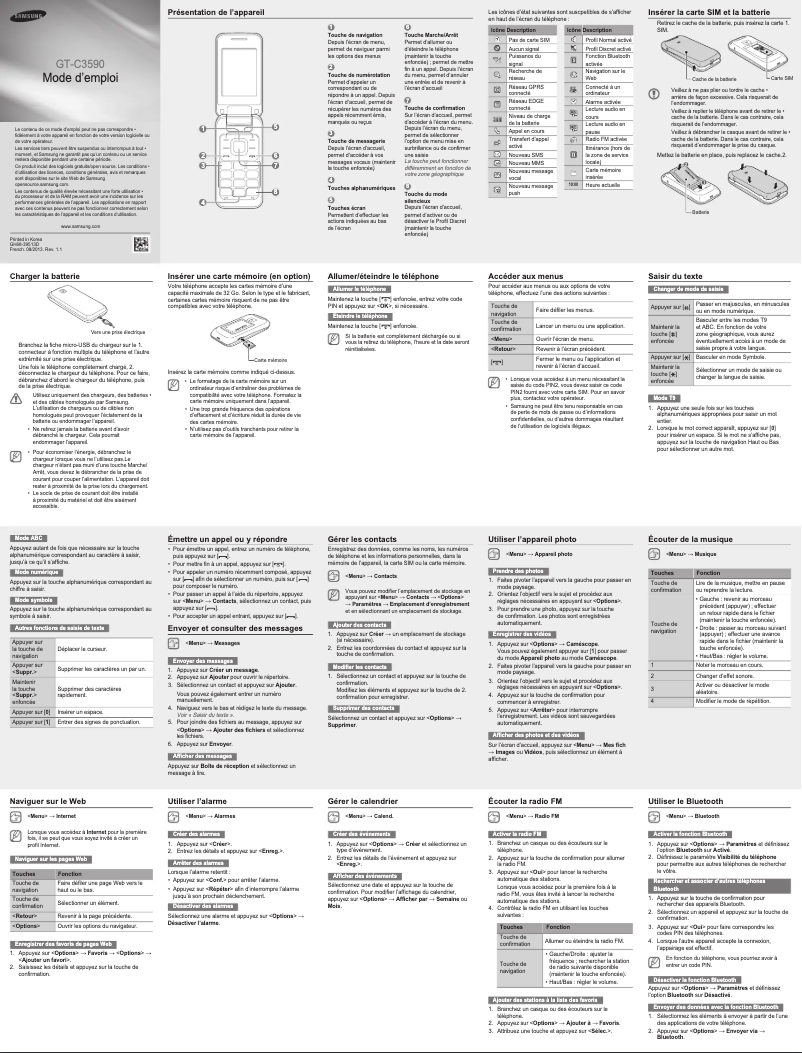
Editorial note
The Samsung GT-C3590 stands out for its ease of use and compact design, making this device accessible even to users who are not familiar with modern smartphones. Weighing only 99.76 g and with optimal dimensions, it is ideal for those looking for a lightweight and easy-to-carry phone. Additionally, its 800 mAh battery offers a commendable battery life, allowing for up to 12 hours of talk time, which is an undeniable asset for daily use. However, this smartphone also has some limitations. The 2.4-inch screen with a resolution of 240 x 320 pixels may seem too small and unsatisfactory for modern multimedia use. The lack of Wi-Fi and Bluetooth connectivity restricts data sharing options, and the quality of the 2 MP camera may disappoint those looking to capture higher quality photos. Furthermore, the absence of built-in GPS limits navigation features, making this model less suitable for users who need location services. In terms of value for money, the Samsung GT-C3590 can be considered an interesting option for a basic smartphone, but its limitations in connectivity and image quality may make it a less attractive choice for some users.Score details
User experience
The Samsung GT-C3590 offers ease of use thanks to its bar-type design, making the device accessible even for users who are not familiar with modern smartphones. However, the 2.4-inch screen may seem too small for multimedia use.
Performance
The performance of the Samsung GT-C3590 is sufficient for daily tasks, but the 2 MP camera quality and the lack of built-in GPS may limit the user experience for those seeking advanced features.
Battery life
The 800 mAh battery capacity and a talk time of 12 hours ensure sufficient autonomy for daily use without interruption, which is a strong point of the product.
Design
Weighing only 99.76 g and with optimal dimensions, the Samsung GT-C3590 is lightweight and easy to carry. Its compact design is ideal for people on the go.
Features
Although the Samsung GT-C3590 offers interesting features like support for memory cards up to 32 GB and advanced messaging options, the lack of Wi-Fi and Bluetooth connectivity limits data sharing options.
Value for money
For a basic smartphone, the Samsung GT-C3590 can be considered to offer good value for money, but the limitations in connectivity and image quality may make it a less attractive choice for some users.
Advantages
Compact and lightweight for easy transport
Simple to use, ideal for everyone
Expandable memory up to 32 GB
Advanced messaging options available
Long-lasting battery, 12 hours of talk time
Disadvantages
2.4-inch screen, insufficient resolution
No Wi-Fi or Bluetooth
2 MP camera, low image quality
No built-in GPS
No video calls available
Technical Specifications GT-C3590
General Information
-
ModelGT-C3590
-
Brand
-
Category
-
Type
-
SKU184734
-
MPN184734
Screen
-
Screen size2.4 "
-
Screen resolution
-
External screen240 x 320 pixels
-
Type of panelNo
-
Number of colors displayedTFT
-
External screen262144 colors
-
Type of panelNo
-
TFT
Memory
-
Flash Card SupportYes
-
Compatible memory cardsMicroSD (TransFlash)
-
Internal memory- MB
-
Maximum memory card size32 GB
Camera
-
Rear cameraYes
-
Resolution of the rear camera (digital)2 MP
-
Sensor typeCMOS
Network
-
WAP-
-
WifiNo
-
Network dataEDGE, GPRS, GSM
-
2G band (1st SIM card)850,900,1800,1900 MHz
-
SIM card capacitySingle SIM
Data transmission
-
BluetoothNo
Connectivity
-
USB portYes
-
USB Version2.0
-
Headset connection3.5 mm
Other features
-
Headset output1
Messaging
-
Instant Messaging (IM)Yes
-
Instant Messaging (IM)Yes
-
Instant Messaging (IM)Yes
Video
-
Video callNo
Audio
-
FM Radio-
-
Ringtone typePolyphonic
-
Voice recordingYes
-
Supported audio formatsAAC, AAC+, AMR, eAAC+, MIDI, MP3
Power
-
Battery technology-
-
Battery capacity800 mAh
-
Talk time (2G)12 h
-
Waiting time (2G)460 h
Weight and dimensions
-
Weight99.76 g
-
Width50.9 mm
-
Depth17.33 mm
-
Height100.9 mm
Registration
-
Registration type-
Design
-
Type-
-
Product colorMoney
Multimedia
-
Supported video format3GP
-
H.263
-
H.264
-
MPEG4
Phone features
-
FormatValve
-
Personal Information Management (PIM)Alarm clock
-
Alert with vibratorCalendar
-
Yes
GPS Performance
-
Location of positionNo
-
Location of positionNo
Packaging contents
-
User GuideYes
-
User GuideYes
Call management
-
Call timerYes
Frequently Asked Questions
How do I reset my Samsung GT-C3590?
What should I do if my SIM card is too small for my Samsung phone?
What is the IMEI number?
What are the dimensions of my smartphone's screen?
Does the battery of my smartphone pose an explosion risk?
What is the weight of the Samsung GT-C3590?
What is the size of the screen on the Samsung GT-C3590?
What is the height of the Samsung GT-C3590?
What is the resolution of the screen on the Samsung GT-C3590?
What is the width of the Samsung GT-C3590?
What is the depth of the Samsung GT-C3590?
How do I insert a SIM card into my Samsung GT-C3590?
How do I turn on or off my Samsung GT-C3590?
How do I set up Wi-Fi on my Samsung GT-C3590?
How do I transfer photos from my Samsung GT-C3590 to a computer?
How do I change the ringtone on my Samsung GT-C3590?
Does the Samsung GT-C3590 have a touchscreen?
Does the Samsung GT-C3590 have an external screen?
Is the Samsung GT-C3590 compatible with flash cards?
What is the maximum memory card capacity supported by the Samsung GT-C3590?
Does the Samsung GT-C3590 have Wi-Fi functionality?
Is the manual for the Samsung GT-C3590 available in French?
Similar products


More product categories from brand Samsung
Television and multimedia Samsung
Home appliances Samsung
Household appliances Samsung
Phones Samsung
Audio Samsung
Other Samsung
Interior Samsung
Tools Samsung
Software Samsung
More product types from brand Samsung


Presentation of product GT-C3590 specifications from brand Samsung
General Information
The Samsung GT-C3590 is a smartphone from the renowned brand Samsung, known for its quality and innovation in the electronics sector. This model, identified by the references GT-C3590 and GT-C3590TSACIT, offers reliable performance and a satisfactory user experience. The unique EAN code, 8806085777606, 8806085777699, 8806085920187, allows for precise product identification in the distribution network.
Screen
The Samsung GT-C3590 is equipped with a 2.4-inch screen, perfect for daily use. Its resolution of 240 x 320 pixels ensures acceptable display quality, although the lack of a touchscreen may seem outdated to some users. The screen type, TFT, provides good visual clarity, displaying up to 262,144 colors, thus offering an adequate visual experience for everyday tasks.
Memory
This model supports a MicroSD memory card (TransFlash) to expand its storage capacity, allowing for an addition of up to 32 GB of memory. Although the internal memory is limited, this expandability is an asset for users needing more space for their data.
Camera
The Samsung GT-C3590 features a rear camera with a resolution of 2 MP, allowing for the capture of images and videos of acceptable quality for daily use. The CMOS sensor used contributes to acceptable performance in varying light conditions.
Network
This smartphone does not have Wi-Fi or Bluetooth connectivity, limiting data sharing options. However, it is compatible with EDGE, GPRS, and GSM networks, enabling effective communication. The supported 2G band for the first SIM card is 850, 900, 1800, 1900 MHz.
Connectivity
The Samsung GT-C3590 is equipped with a USB 2.0 port for quick connection with other devices. Additionally, it features a 3.5 mm headphone jack, offering compatibility with many audio peripherals.
Battery Life
The hybrid NiMH battery of 800 mAh offers a talk time of up to 12 hours and a standby time of 460 hours. This capacity is sufficient for daily use without requiring frequent recharging.
Weight and Dimensions
With a lightweight of 99.76 g and compact dimensions (50.9 mm wide, 17.33 mm deep, and 100.9 mm high), the Samsung GT-C3590 is easy to carry, making it ideal for users on the go.
Design
The phone comes in an elegant Silver hue, and its bar-type format allows for a comfortable and practical grip. Its simple and functional design is suitable for various environments.
Multimedia
The Samsung GT-C3590 supports several video formats, including 3GP, H.263, H.264, and MPEG4, ensuring smooth playback of multimedia content. In terms of sound, it offers polyphonic ringtones and the ability to record voices.
Messaging
Messaging features include MMS and chat, allowing for quick and enriching exchanges. It also supports instant messaging, facilitating real-time communication.
Call Management
The Samsung GT-C3590 includes a call timer function, allowing users to effectively manage their call time.
Package Contents
This model comes with a user manual and a quick start guide, providing precise instructions for optimal handling.


